See why the Amazon reserve account differs
Amazon keeps part of many payouts as a reserve and pays it out in the next settlement. Your books carry that money in a reserve account. The Reserve tab shows what the account holds, what Amazon holds, and why they differ. It reads your settlements and entries. It never changes them.
Before you begin
- Map your Amazon settlements, so Current Reserve Amount and Previous Reserve Amount Balance have an account. See Map Amazon settlements to your accounts.
- You need permission to view accounting.
Open the month
-
In the month-end close, find Amazon reserve balance reconciled and click its arrow. The tab opens on that month, and on the store and currency that are off when there is only one.

You can also go to Apps & Integrations → Amazon → Finance → Reserve and pick a month with the arrows beside its name.
-
Read the three figures. Difference is what the reserve account holds beyond what Amazon holds. The close check allows 1.00.

What Amazon holds is every reserve it hasn't released, plus every failed payout it hasn't repaid, each at its own settlement's exchange rate. A settlement split at month end counts each line in the month it posts. If your first imported settlement opens by releasing a reserve from before it, Amazon doesn't hold that money, so it isn't counted.
Read why they differ
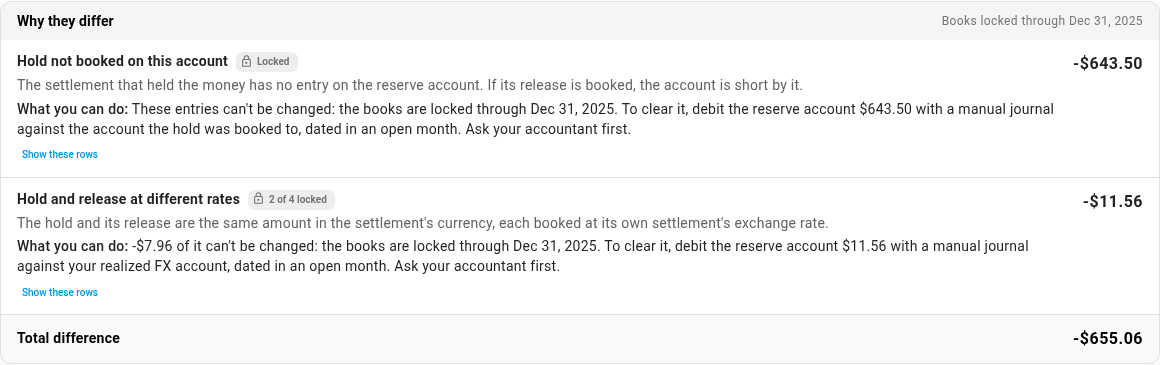
Why they differ lists each cause and what you can do about it. The amounts always add up to the difference.
| Cause | What it means | What you can do |
|---|---|---|
| Never sent, in a locked period | Every entry is in a locked period and never reached your accounting software. | Nothing in SKU.io. Record an override on the close row if you accept it. |
| Release with no hold | Amazon released a reserve that no imported settlement holds. | Import the missing settlement if you can. Otherwise post a manual journal. |
| Hold with no release | A later settlement released another amount, so one between them was never imported. | Import the missing settlement if you can. Otherwise post a manual journal. |
| Hold not booked on this account | The settlement that held the money has no entry on the reserve account. | Open the settlement and check its mapping. In a locked period, post a manual journal in an open month. |
| Release not booked on this account | The settlement that released the money has no entry on the reserve account. | Open the settlement and check its mapping. |
| Hold and release at different rates | Both are booked, each at its own settlement's exchange rate. | Post a manual journal to your realized FX account. |
| Failed payout | What waits on the account for a failed payout doesn't match what Amazon repaid. | Open both settlements and check that they post to this account. |
| Other entries on the account | Manual journals or other lines on the reserve account. | Open each entry and check that it belongs there. |
| Unexplained | Your settlements and entries don't show where it comes from. | Compare the rows with Seller Central. |
A lock beside a cause means its entries are in a locked period and can't be changed. Ask your accountant before you post a journal.
Follow the money row by row
- Click Show these rows under a cause to see only its holds and releases.
- In Every hold and release, choose which rows to show:
- On the account keeps the rows booked on the reserve account, plus the other half of a pair when it isn't booked.
- The month's name shows that month with its opening and closing balance.
- Everything shows all holds and releases up to the month end.
- Read across a row. It shows the amount in the settlement's currency, its exchange rate, the amount in your currency, what was booked, and the account balance after it. With one store and currency selected, it also shows what Amazon holds.
- Click the settlement, the journal entry, or the document in Xero or QuickBooks to open it.
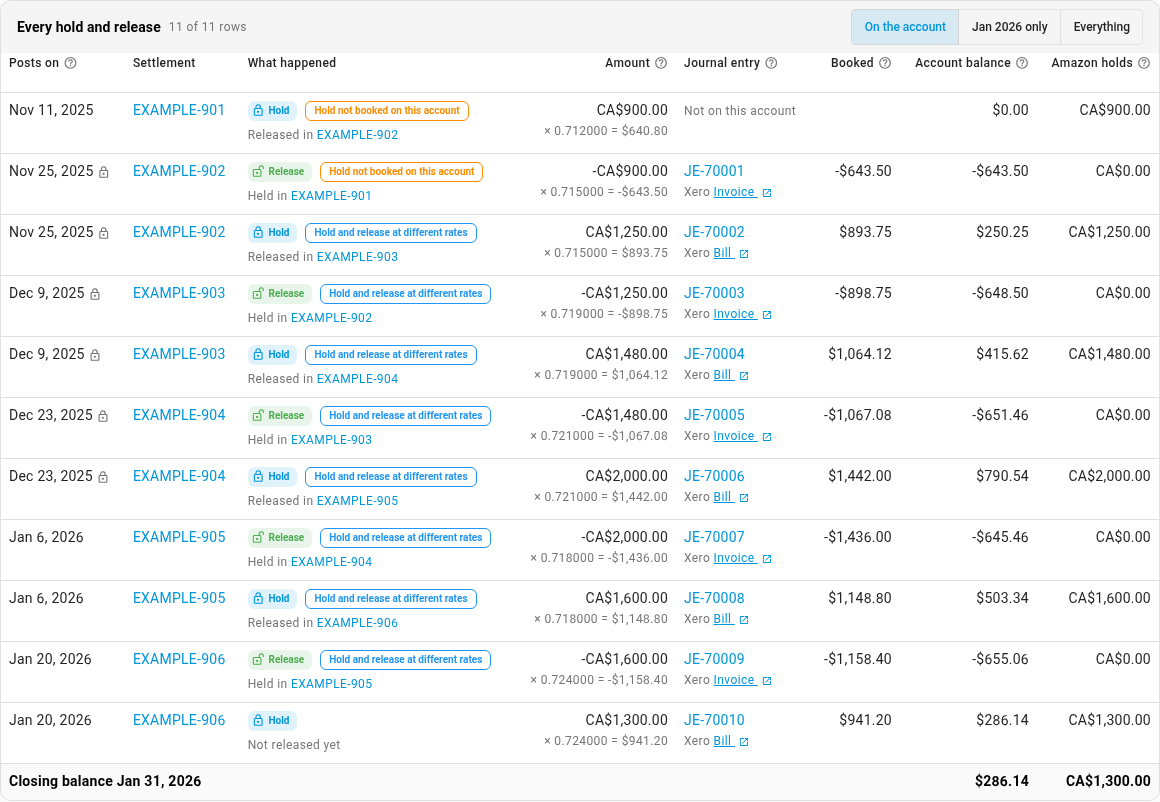
A warning beside Booked means the entry carries another amount than the settlement's rate gives.
Go back to the close
Click Back to the … close at the top of the tab. Re-check the month there after you make a change.