Check whether a settlement's deposit is reconciled in Xero
Every Amazon settlement pays one deposit into your bank. SKU.io posts the settlement's documents to Xero, and Xero matches their payments to that deposit when you reconcile your bank account. The Deposit status shows you, for each settlement, whether Xero has done that, without opening Xero.
Before you begin
- Connect Xero, and map your settlements so they post to it. See Map Amazon settlements to your accounts.
- Turn on the nightly download of Xero's payments. Go to Accounting → Settings → Sync, and under Mirror Downloads from Xero, switch on Payments (download from Xero). It reads On · nightly when it's on. The deposit status reads these payment records, so without them it can't tell whether a deposit is reconciled.
Check the Deposit column
-
Go to Apps & Integrations → Amazon and open the Finance tab.
-
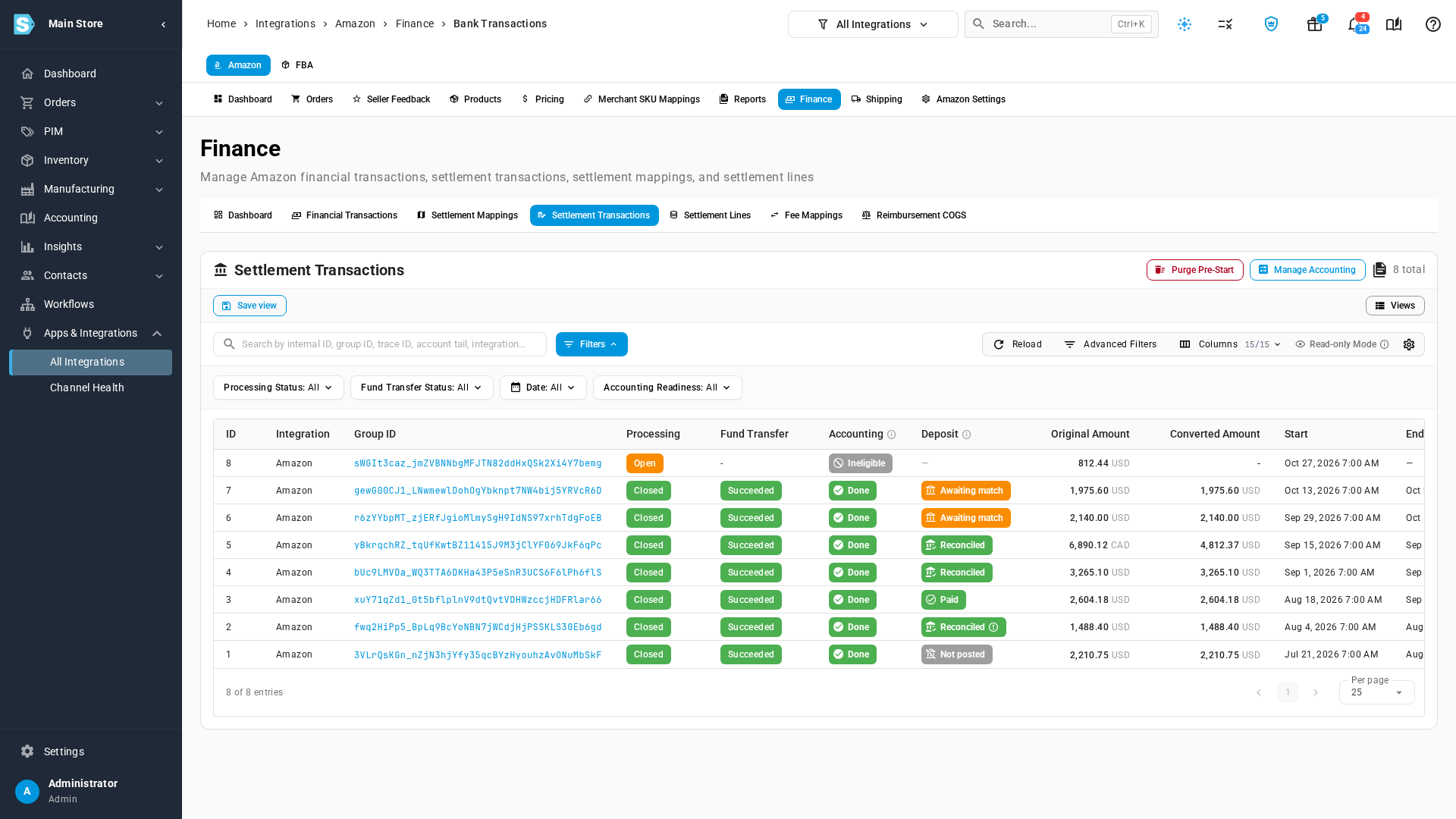
Open Settlement Transactions.
-
Read the Deposit column. Hover the ⓘ next to the column name for a summary, or hover any status for the full sentence about that settlement.
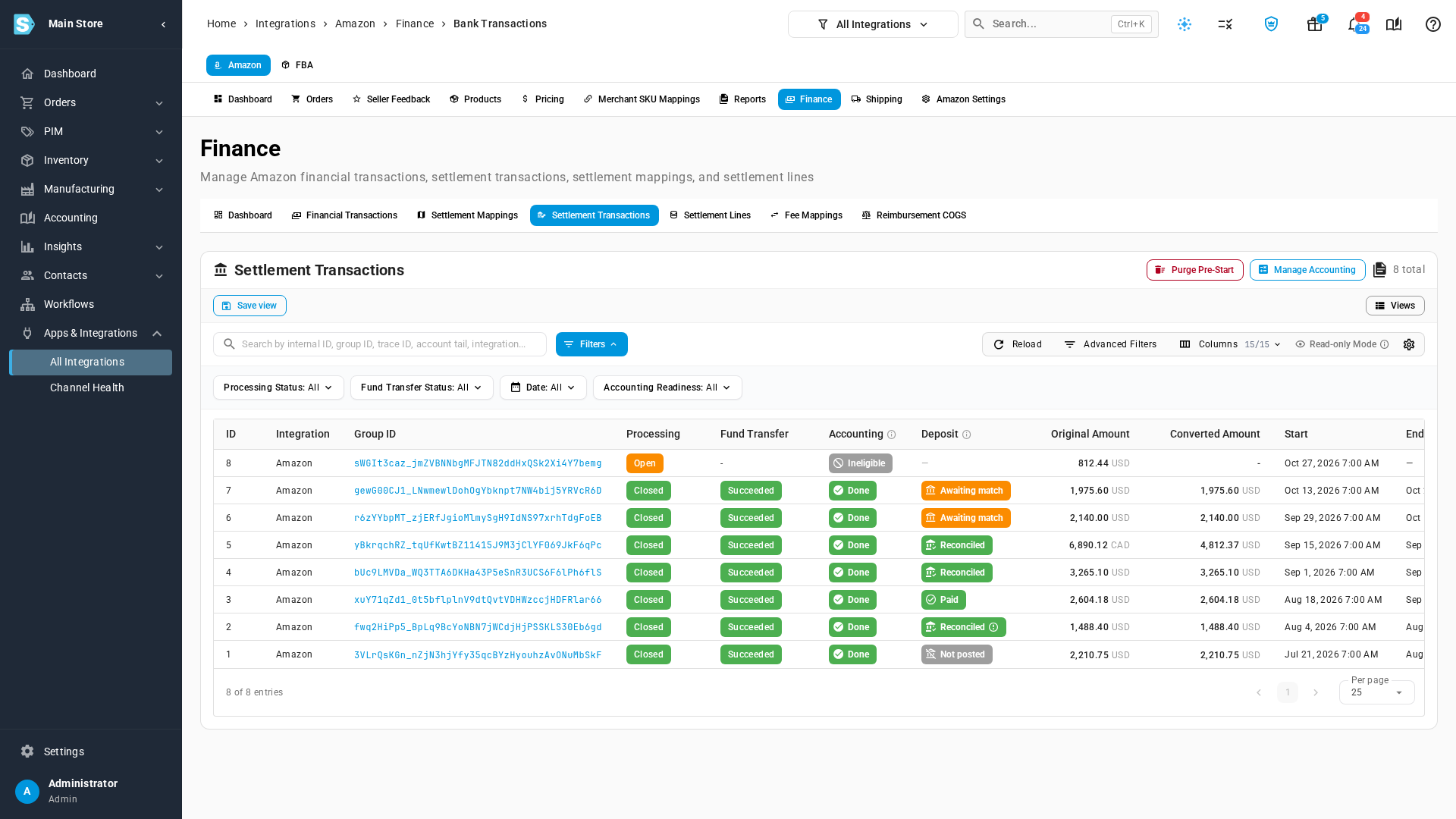
Status What it means Reconciled Every document is paid in Xero, and the payment is matched to your bank statement. Paid Every document is paid, but SKU.io can't confirm the bank match yet. It doesn't have Xero's payment record for this deposit. Awaiting match A document is unpaid, a payment isn't matched to the bank yet, or a document was never sent to Xero. Not posted The settlement's documents haven't been sent to Xero. — Nothing has been posted for this settlement yet, for example while Amazon still has it open. A ⚠ icon on a Reconciled status means Xero matched the deposit, but the payout and its documents differ by more than rounding. Check that the difference is expected.
Read a settlement's Deposit card
-
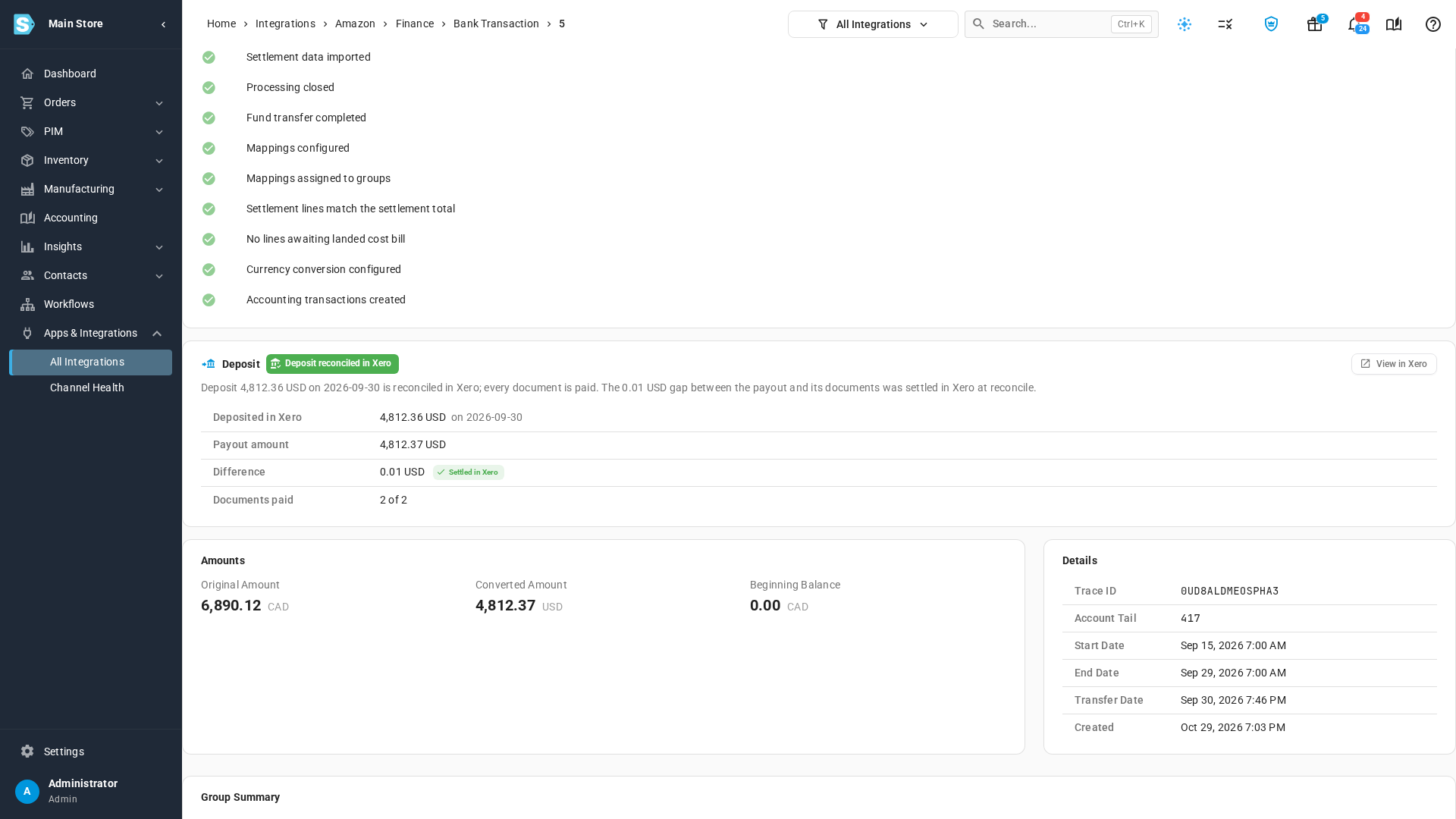
Click a settlement's ID to open it. The Deposit card sits below Accounting Readiness.
-
Read the card:
Field What it shows Deposited in Xero The amount Xero paid against the settlement's documents, and the date. Payout amount What Amazon says it paid, in the documents' currency. Difference Payout amount minus the amount deposited in Xero. Shown only when they differ. Documents paid How many of the settlement's documents Xero shows as paid. Not sent to Xero Documents this deposit pays that were never sent to Xero. Shown only when there are any. A Settled in Xero chip next to the difference means Xero reconciled the deposit and the gap is rounding, at most 0.05. It happens when Amazon pays a settlement in another currency and the converted documents differ from the deposit by a cent. Nothing needs fixing. A Check it is expected chip means Xero reconciled a larger gap.
-
Click View in Xero to open the bank transaction in Xero. When Xero paid the documents in one batch, that's the batch payment matched to your bank line.
When a deposit is awaiting a match
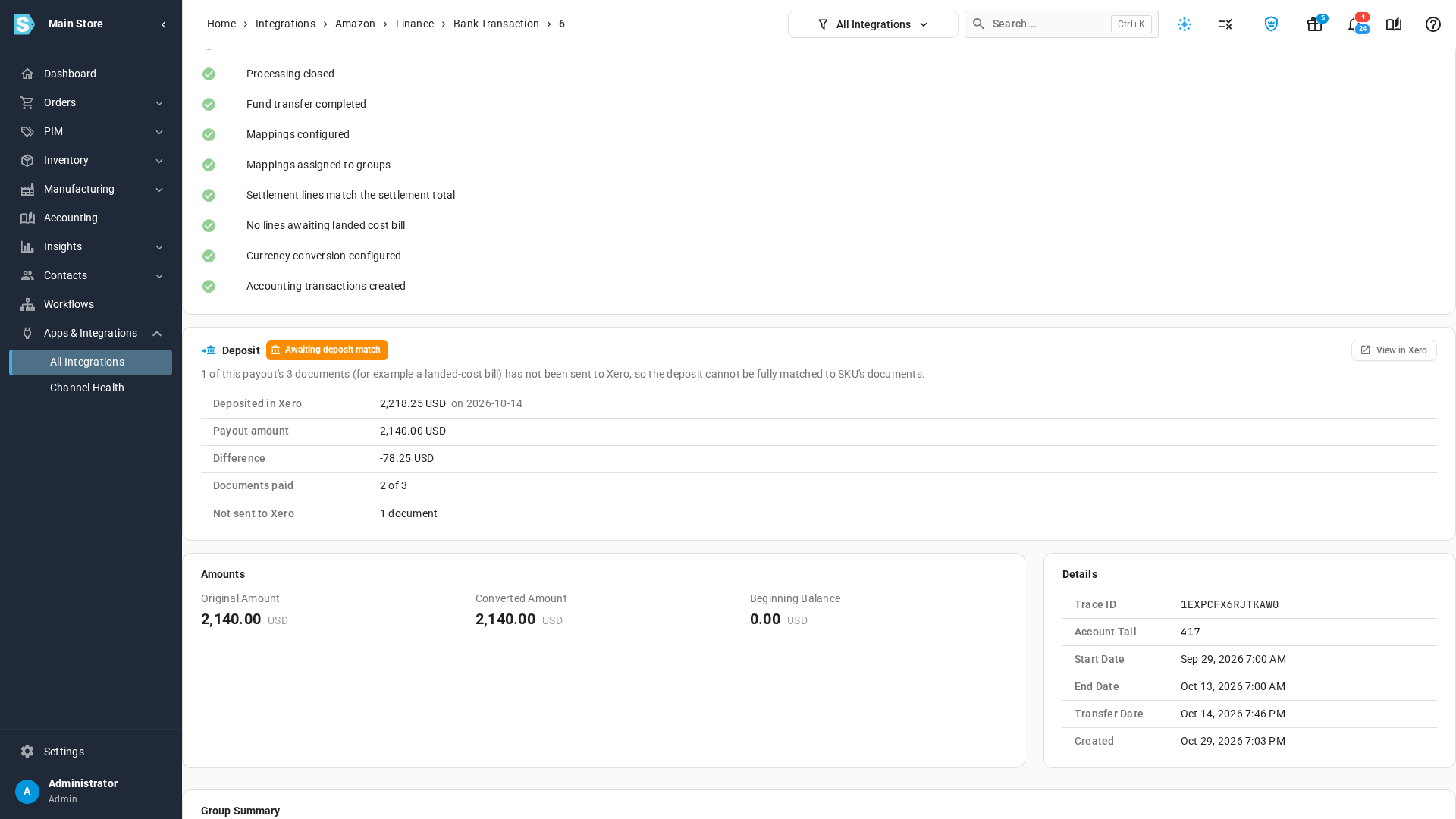
Open the settlement and read the sentence under the status on its Deposit card.
| Cause | What to do |
|---|---|
| A document is unpaid in Xero | Reconcile the deposit in Xero, matching it to the settlement's invoice and bill. |
| A payment isn't matched to the bank yet | Finish the bank reconciliation in Xero. |
| Not sent to Xero lists documents | These are usually landed-cost bills: inbound shipping fees charged to a purchase order or transfer but paid from this settlement. Send them to Xero, then reconcile. |
Landed-cost bills paid from a settlement count toward its deposit. When Xero's deposit already covers the payout, the settlement shows Reconciled, and the card's sentence notes any of those bills that Xero holds but SKU.io's books don't.
Where the status comes from
The status comes from Xero's own records: whether each document is paid, and whether its payment is reconciled to your bank. SKU.io downloads those records from Xero every night, so a deposit you reconcile in Xero today shows as Reconciled after the next nightly download. To bring it in sooner, open Apps & Integrations → Xero → Payments, open the ⋮ menu, and choose Sync from Xero.
eBay and Shopify payouts show the same Deposit card on their payout pages and the same Deposit column in their payout lists.
Next steps
- Map Amazon settlements to your accounts: make every settlement post to Xero.
- Match bank statement lines: match deposits to your bank in SKU.io.
Video transcript
Every settlement pays one deposit into your bank. To check whether each deposit has been matched, open your channel's Finance tab. Then open Settlement Transactions, which lists each settlement and its deposit.
The Deposit column shows what your accounting software says about each deposit. Reconciled means every document is paid, and its payment is matched to your bank statement. Awaiting match is shown while something is still unpaid or unmatched. Paid tells you everything is paid, but the bank match can't be confirmed yet. Not posted means nothing has been sent to your accounting software yet. A dash appears when no documents exist for the settlement yet. A warning icon flags a payout that doesn't match its documents. Hover over any status to read the full explanation.
To see the details, click a settlement's ID. Then scroll down past the accounting readiness checklist to the Deposit card.
This deposit is reconciled in Xero. Deposited in Xero is the amount matched to your bank, and when. Payout amount is what Amazon says it paid. This settlement was paid in another currency, so the two differ by a cent. Because the deposit is reconciled, that gap shows as Settled in Xero. It isn't a problem. Documents paid counts the documents marked as paid. View in Xero opens the matching bank transaction.
To compare, go back to the list with the button at the top of the page. Then open a settlement whose deposit is still awaiting a match. On this one, one of its documents was never sent to Xero. It's a landed cost bill, an inbound shipping fee paid out of this deposit. Not sent to Xero counts those documents. Until they reach Xero, the deposit can't fully match.
This status comes from Xero's own payment records, downloaded every night. So a deposit you reconcile today shows as reconciled after the next nightly download. Payouts from your other channels show the same Deposit card.