Book Amazon deferred transactions in the right month
Amazon holds the money for most orders until seven days after delivery (often called DD+7), and holds business orders longer. The settlement that finally pays it out dates each sale, fee and tax on the day Amazon releases it. So an order shipped on October 28 lands in November's books, with its fees. Turn on Amazon deferred transactions and SKU.io books everything Amazon is still holding at month end back into the month it happened, at no extra cost.
How it works
At the end of each month, SKU.io posts one journal that books everything Amazon is still holding into that month: the sales, shipping, refunds, fees and taxes, each to the account its settlement line maps to. The other side goes to an Amazon Deferred Balances asset account. On the first of the next month the journal reverses. When Amazon pays out, the settlement books the sale as usual, and the reversal cancels it out, so each sale counts once, in the month it happened.
- Nothing changes in your settlements. Their lines, totals and deposits stay exactly as they were, so deposit matching works as before.
- No opening balance. SKU.io only counts orders Amazon held from your start month on, so the account starts at zero. What Amazon still holds from before that month is shown separately, and is never posted.
- It works in every accounting mode. Lines that already reached your books another way are left out, such as revenue booked when the order shipped, or lines mapped to a balance sheet account, like sales tax.
- The open month is a draft. It's rebuilt every night as Amazon sends new transactions, and posts once the month ends.
Before you begin
-
Map your Amazon settlements, so every kind of line has an account. See Map Amazon settlements to your accounts.
-
You need permission to edit integrations, and an Other Current Asset account for the balance, or permission to create one.
-
Your Amazon settlements must be able to post. SKU.io checks your latest settlements when you turn this on, and won't turn it on if:
- ledger generation is off (Accounting → Settings → Generation);
- the account's order-sale lines aren't mapped yet;
- none of your last three settlements can post, usually because some kinds of line have no account.
The card lists what to fix, with a link to the right page. Without this check, a release in a settlement that never posts would stay in your deferred balance for good.
Turn on deferred transactions
-
Go to Apps & Integrations → Amazon, choose Finance, and open the Settlement Mappings tab.
-
Scroll down to the Amazon deferred transactions card. While it's off, it shows how much Amazon is holding right now, which posts in the month Amazon pays it out.

-
Click Set up deferred transactions.
-
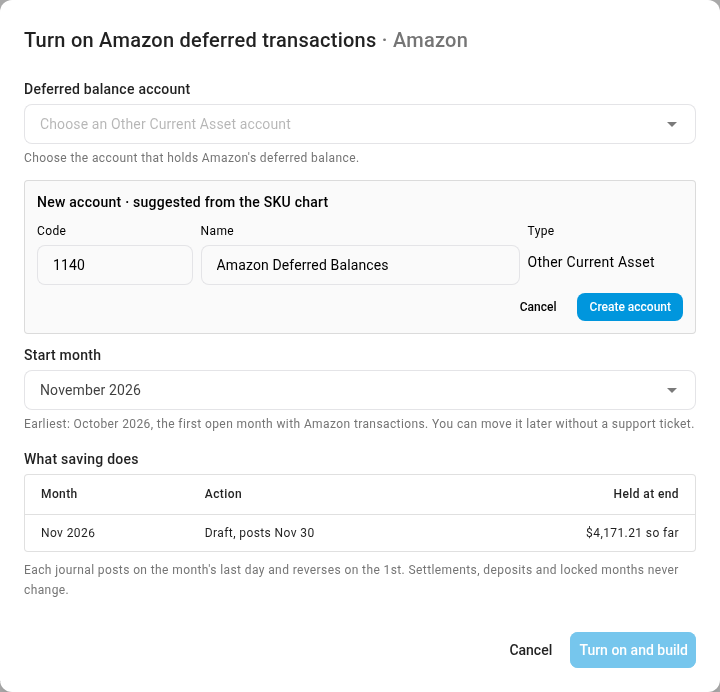
Under Deferred balance account, choose an Other Current Asset account. If you don't have one, click New. SKU.io suggests Amazon Deferred Balances; click Create account, and it's chosen for you.
-
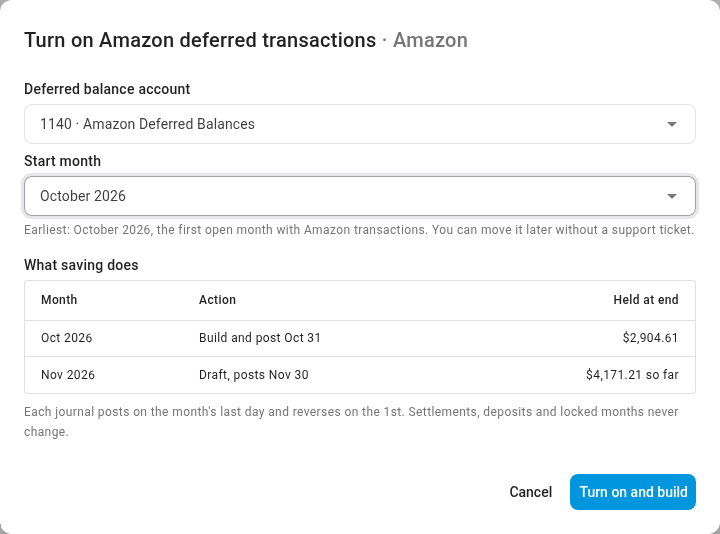
Pick the Start month. It can't be earlier than your first open month, and SKU.io shows the earliest one under the field. You can move it later yourself, in either direction.
-
Read What saving does. A month that has already ended gets a journal on its last day. The current month stays a draft until it ends.
-
Click Turn on and build. SKU.io builds each month in the background, and you can follow it in the jobs tray.
The card now shows the account, the start month, what Amazon holds now, and how much of that is from before your start month.

Review a month on the Deferred tab
-
On the card, click Deferred tab, or open the Deferred tab on Amazon Finance.
-
Read the cards at the top:
Card What it shows Held by Amazon now Everything Amazon is still holding. The line under it is what's held from before your start month, which isn't in your books. Releasing in the next 7 days What Amazon expects to pay out in the next week, by its maturity date. Held past maturity What's at least 3 days past its maturity date and still not paid out: Amazon is late. Amazon routinely pays a day or two after the maturity date, so anything inside those 3 days still counts as releasing. Last month's balance, such as Oct 31 balance What Amazon was holding at the end of last month. 
-
Pick a month in the strip of month tiles. Last month opens first. Its status is one of these:
Status Meaning Posted The month has ended and its journal is posted. It reverses on the 1st. Draft The month is still running. It's rebuilt every night and posts once the month ends. Locked The month is in a locked period. Its journal never changes. Stale source Built while Amazon's transactions weren't fully synced. It posts what's known, and the next build catches up. Held: mapping pending Some settlement lines aren't mapped yet, so nothing is built until they are. Off Before your start month, or while the setting is off. The figures are for reference only. Voided The month left the window, or was removed when you turned the setting off. -
Read Reconciliation. It rolls what Amazon held at the previous month end forward, adds what was deferred this month and is still held, and arrives at what Amazon held at this month end. Left to the settlement is the part SKU.io doesn't accrue, like sales tax mapped to a balance sheet account. What's left is the balance of your deferred balances account, and the chip at the top says whether it ties.
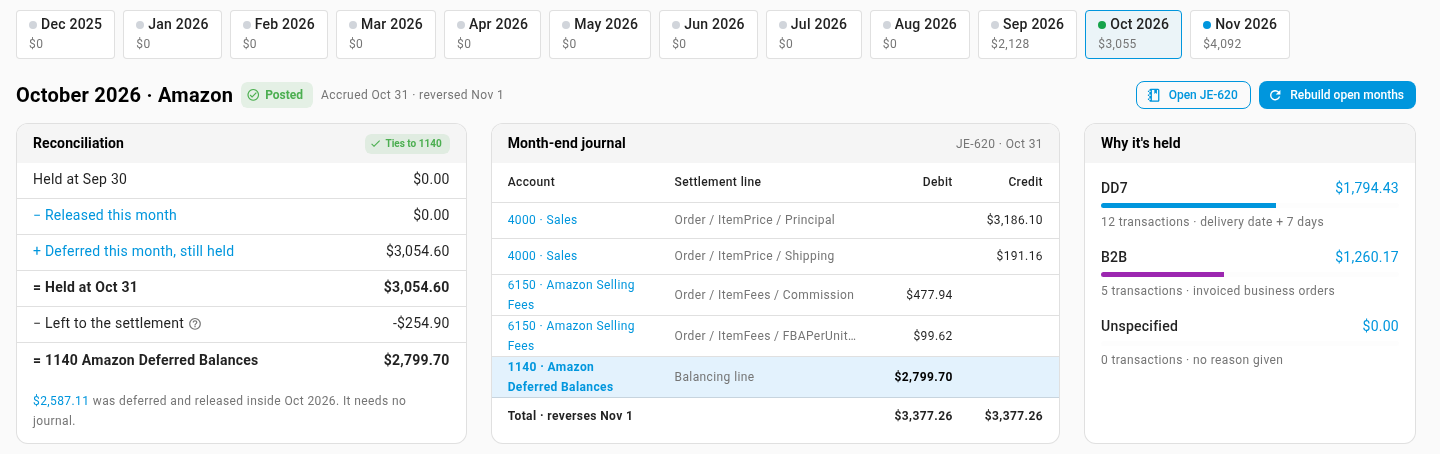
In the current month, a note under the reconciliation adds what Amazon still holds from before your start month.
-
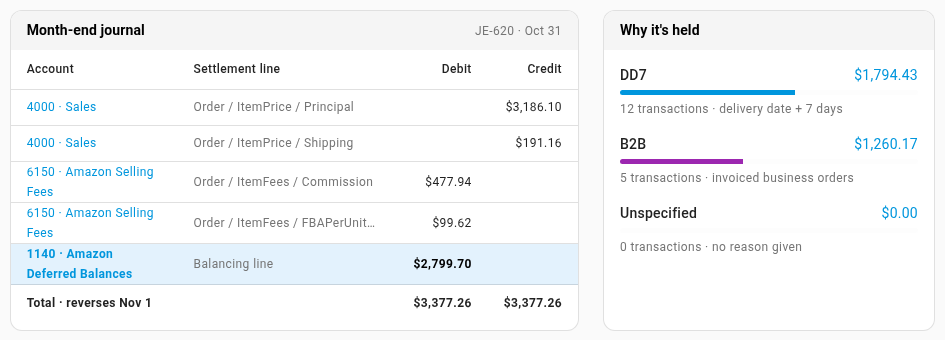
Read the Month-end journal, line by line: held sales and shipping are credited, their fees debited, and the difference goes to Amazon Deferred Balances. Click Open JE-… at the top of the month to see the journal itself.
-
Read Why it's held. It splits the balance by Amazon's reason: DD7 (delivery date plus 7 days), B2B (invoiced business orders), or Unspecified (Amazon gave no reason).
See the transactions behind a figure
-
Below the month, each figure has its own tab: what was held at month end, released this month, deferred and released in the same month, held now, past maturity, and held from before your start month.
-
Click a tab, such as Past maturity. The table lists each Amazon order with its reason, when it was posted, its maturity date, and when it was released and in which settlement.
-
Narrow it with Reason, Marketplace or Release, and click Export CSV to download the list.
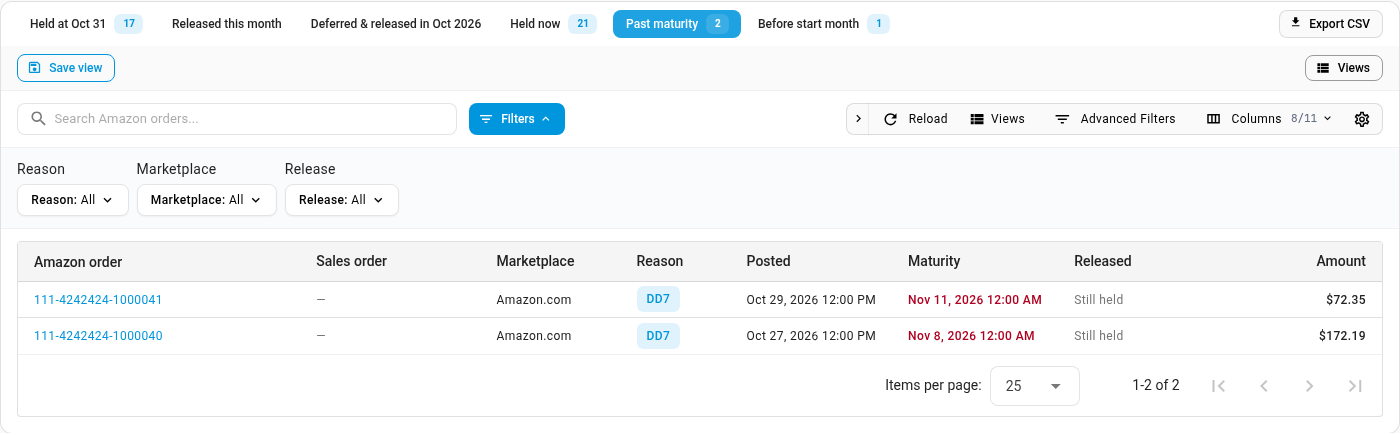
Clicking a figure in the reconciliation or a card at the top opens the same table on that figure.
Held from before your start month
There's no opening balance, so your books only carry orders Amazon held from your start month on. Amazon also still holds some orders from before it. That amount shows in two places:
- Under Held by Amazon now: of which … from before your start month — not in your books.
- In the current month's reconciliation: Amazon also holds … from before October 2026, so this balance plus that amount ties to Seller Central.
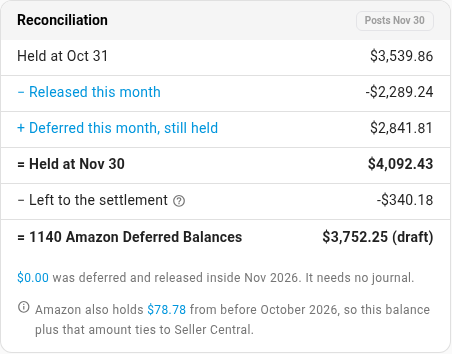
So Held at the month end, plus that amount, is the deferred balance Seller Central shows. Click the amount to open the Before start month tab and see those orders. As Amazon pays them out, their settlements book them as usual and they drop off this figure. There's nothing for you to post.
How SKU.io knows Amazon paid a held order
When Amazon pays out an order it held, it sends a release record for it. SKU.io pairs each held transaction with its release, by the order, the shipment, the type of transaction and the amount. The Released column then shows the day and the settlement that paid it.
Sometimes Amazon's release record is missing, or doesn't say enough to pair it. This is common for business (B2B) liquidations. SKU.io then looks in the settlement report itself: a payout line for the same order and the same amounts is proof that Amazon paid it, and SKU.io dates the release by that settlement. These count as approximate releases. That's normal, and they never fail the close check.
Anything SKU.io can't pair stays held, so it's still in the month-end balance, and once it's 3 days past its maturity date it shows under Held past maturity.
When SKU.io can't match a release
Some held transactions arrive from Amazon with no order id at all. You'll mostly see this on business (B2B) liquidations. With no order id, SKU.io can't safely tie the transaction to a release or a payout: matching on the product and the amount alone would pick up a different liquidation of the same item at the same price. In the table, the order shows as Transaction #…, and the Released column reads Still held · Amazon sent no order id.
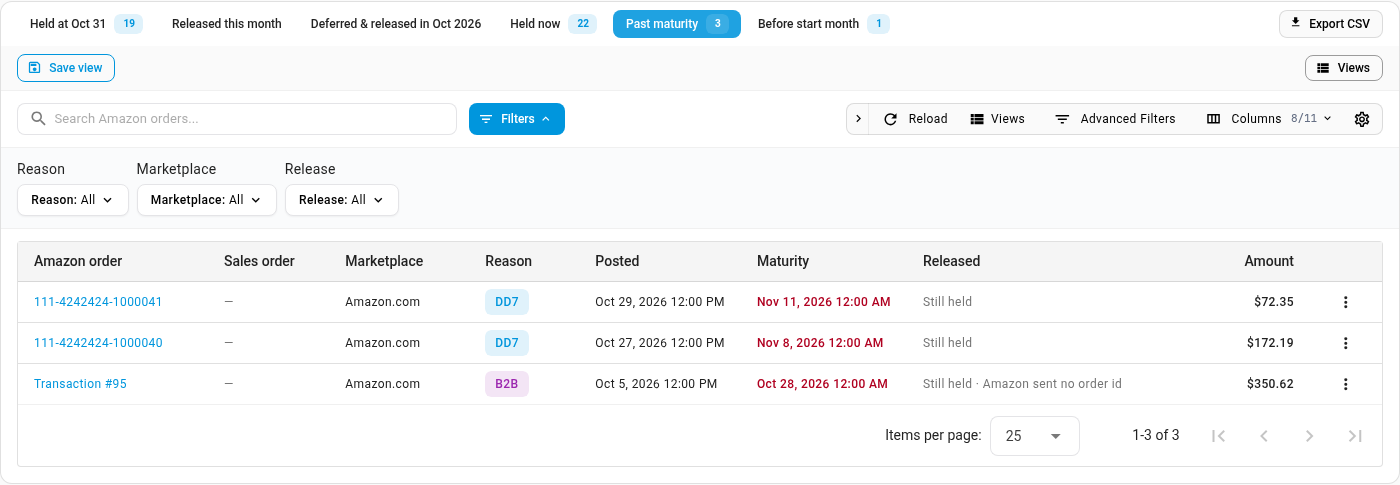
Why it matters. While such a transaction is still held, the month-end journal books its sale. When Amazon does pay it out, the settlement books the sale too. Until SKU.io knows it's been paid, that sale can be counted twice.
What happens next:
-
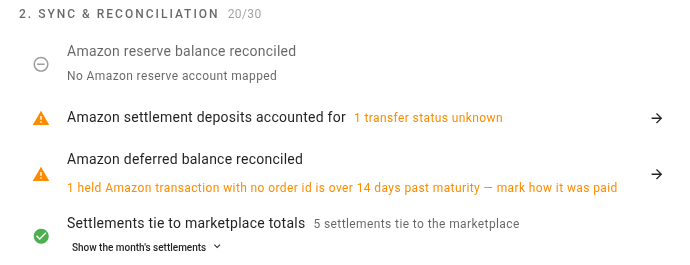
14 days past maturity, the close check warns. Amazon deferred balance reconciled reads, for example, 1 held Amazon transaction with no order id is over 14 days past maturity — mark how it was paid.
-
30 days past maturity, SKU.io releases it automatically. It stops being held on that day, and the Released column reads Released automatically (no order id). The sale reaches your profit and loss through whichever settlement Amazon actually paid it in.
You don't have to wait for either. If you know when Amazon paid it, mark it yourself, as below. Then nothing is counted twice, and the close check stops asking.
Mark how a held transaction was paid
You need permission to edit integrations. You can do this for any held transaction, not only ones with no order id, and what you choose overrides SKU.io's own pairing.
-
On the Deferred tab, click Past maturity. From the close checklist, click the arrow on Amazon deferred balance reconciled, then click Past maturity.
-
Find the transaction, click the menu at the end of its row, and choose Mark released….

-
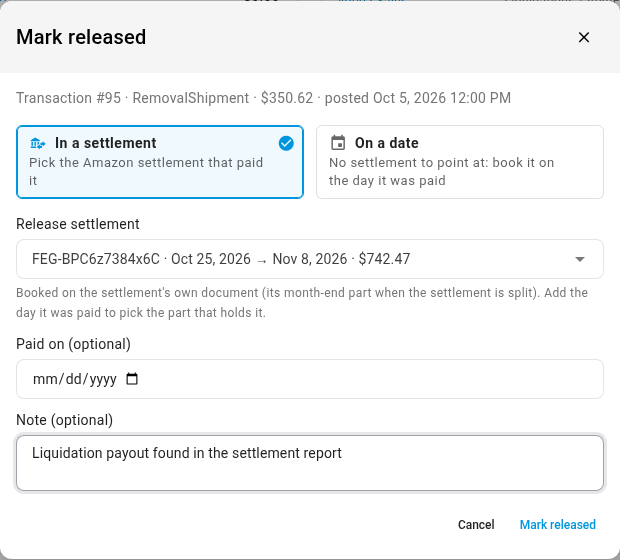
Under How Amazon paid it, choose one:
- In a settlement: pick the settlement that paid it under Release settlement. Each one shows its dates and its total. It's booked on that settlement's date, or on its month-end part if the settlement is split; add Paid on (optional) to pick the part that holds that day.
- On a date: when there's no settlement to point at, enter the day it was paid in Paid on.
-
Add a Note (optional), such as where you found the payout.
-
Click Mark released. SKU.io rebuilds the open months, and you can follow it in the jobs tray.
The row now shows a Marked released chip. Hover over it to see the settlement, the note, and who marked it and when.

From the same row menu you can also:
- Confirm still held: Amazon really is still holding it. It stays held, it shows Confirmed still held, it's never released automatically, and the close check stops asking about it.
- Clear resolution: undo what you chose. The transaction goes back to SKU.io's own pairing, and the open months are rebuilt.
Check the balance at month end
The close checklist checks the account for you.
-
Go to Accounting, and open Close.
-
Click the month you're closing.
-
Find Amazon deferred balance reconciled under Sync & reconciliation. It passes when your deferred balances account holds what Amazon was still holding at month end, within 1.00. Click the arrow to open that month on the Deferred tab. When the check is warning about held transactions with no order id, the arrow opens the Past maturity list instead.
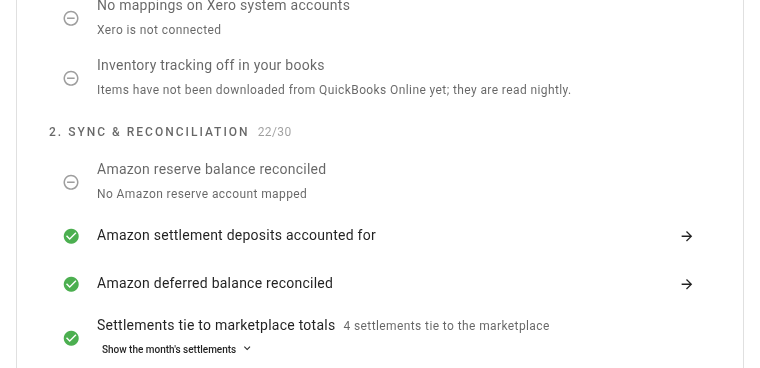
The check also warns when a held transaction with no order id is over 14 days past maturity and you haven't marked how it was paid. See When SKU.io can't match a release. Approximate releases, paired from a settlement's payout line, never fail it.
It fails while the feature is on and none of your latest settlements can post. Fix the settlement mappings, and the check clears at the next build.
If you haven't turned the feature on and run plain Per Settlement accounting, the same row warns you when Amazon held at least $500 at month end, for example: $1,240.00 of Amazon sales, fees and taxes from October will post in November. Turn on Amazon deferred transactions.
Change the start month or turn it off
- Change the start month: click Edit on the card, pick a new month, and click Save and rebuild. Months that leave the window have their journals voided, and months that join it are built. Locked months never change.
- Rebuild: Rebuild open months rebuilds every open month now, instead of waiting for the nightly build.
- Turn it off: click Turn off. Nothing new posts from this month on, and held orders go back to booking in the month Amazon pays them out. Months already posted stay as they are, unless you tick Remove posted adjustments for open months. The table in the dialog says what happens to each month before you confirm. Locked months are always kept.
Good to know
-
Amazon's maturity date is only an estimate. SKU.io uses it for the Releasing in the next 7 days and Held past maturity figures, never for what it posts. What it posts follows when the settlement that pays the order actually reaches your books.
-
Reference figures are approximate. For months before your start month, or while the setting is off, the figures are worked out from the day Amazon released each order, not from the settlement that booked it. Nothing posts for them.
-
Other currencies. Each currency gets its own row. A held order is valued at your exchange rate for the day Amazon deferred it, so holding it across two month ends doesn't move your profit and loss.
-
Late transactions. If Amazon sends a held order after a month is locked, it shows up in the next open month's balance instead. The next month-end balance always reflects everything still held.
-
Splitting settlements. Split settlements at month end splits a settlement by the day Amazon posted each line. For a held order that day is the release day, so the split alone doesn't move it back. Use both together.
-
A transaction shows Transaction # instead of an Amazon order. Amazon sent it with no order id. See When SKU.io can't match a release.
-
Something is past its maturity date but it's only a day or two. It isn't counted as past maturity until 3 days have passed, because Amazon is often a little late.
-
Held by Amazon now doesn't match Seller Central. Add the amount held from before your start month. See Held from before your start month.
Next steps
- Map Amazon settlements to your accounts: decide which account each held line books to.
- Split settlements at month end: post each month's share of a settlement in that month.
- The close checks: what every check on the close checklist measures.
Video transcript
Amazon holds the money for most orders until seven days after delivery. The settlement that pays it out dates each sale on its release day. So an order shipped late in a month is booked in the following month. Its fees and taxes move with the sale. Deferred transactions books them back in the month they happened. To turn it on, open Finance on your Amazon integration. Then open the Settlement Mappings tab, in the row of tabs above. Scroll down to the card called Amazon deferred transactions. While it's off, it shows how much Amazon is holding right now. Those sales post in the month Amazon pays them out. To change that, click Set up deferred transactions. First, choose the account that will hold the deferred balance. It must be an Other Current Asset account. If there's no such account yet, click New to add one now. SKU.io suggests Amazon Deferred Balances. Click Create account, and the field fills in with the new account. Next, pick a start month from the list below the account. It can't be earlier than your first open month, here last month. There's no opening balance to enter. Your books only get orders held from the start month onward. What saving does lists each month. A month that has ended posts a journal on its last day. The current month stays a draft until it ends. When it looks right, click Turn on and build, and the setup closes. SKU.io builds each month in the background. The card now shows the account, the start month, and what Amazon holds now. Anything held from before your start month is shown separately. SKU.io never posted those orders. To change the start month later, click Edit on the card. Turn off stops new months, and keeps posted months unless you remove those journals. Now open the Deferred tab, from the link at the end of the card. The top row answers what Amazon is holding, and when it releases. Held by Amazon now is everything still held. Releasing in the next seven days uses Amazon's maturity date. Held past maturity means Amazon is late paying out. The last card shows last month's closing balance. Below, each month has a tile, and last month opens first. Its status is Posted, because the month has ended. The reconciliation rolls what Amazon held forward, from the previous month end to this month end. Lines on balance sheet accounts, like sales tax, are left to the settlement. What's left ties to your deferred balances account. The journal next to it shows every line. Held sales and shipping are credited, and their fees are debited. The difference goes to the Amazon Deferred Balances account, as one line. It posts on the last day of the month, and reverses on the first. When Amazon pays out, the reversal and the settlement cancel, so each sale counts once. Why it's held splits the balance by Amazon's reason. Under the cards, each figure has its own tab, with the orders behind that figure. Click Past maturity to see the orders that are past their maturity date. Filter by reason or marketplace, or download the list with Export CSV. At month end, the close checklist also checks this balance. Open Accounting from the main menu, then choose Close in its sections list. A tile for each month of the year appears. Click the tile for the month you're closing, and its checklist opens on the right. Scroll down to Sync and reconciliation, and find Amazon deferred balance reconciled. It checks the account against what Amazon held, and passes when the two match. Your Amazon sales, fees and taxes now land in the month they happened.