
The Kit Order That Came In With Nothing to Ship
Last November I was on an onboarding call with a brand that sells a monthly box on Shopify. Each month’s box is a kit in SKU.io, the products packed inside it, and a few of their kits sat inside other kits. Most of the call was kits. We went through the Shopify products that still showed as unmapped, and I explained that until those were set up, their stock would read high, because an order for a kit nobody had defined can’t take its parts out of stock. I made them a saved view, open orders that aren’t backordered, to catch the orders that couldn’t do what they were supposed to.
The first order in it had imported with no items at all. I said it sounded like a bundle or a kit that wasn’t configured, since a kit with no components splits into nothing. It wasn’t. The product behind the line was set up fine, and I said so: “Well I was expecting that to create the item it just would have been out of stock. So that’s not expected.”
I opened the Shopify line item and found require shipping set to false. Shopify writes that flag when a product isn’t marked as a physical product. Our import treats a line like that as money, not goods, which is how gift cards, tips and shipping protection stay out of the pick queue. The price had come in as a revenue line. I’d spent most of the call looking for kit problems, and this didn’t look like one. I said “Maybe it was fine then,” and we moved on.
In September the same brand opened a support ticket. Their subscription app creates each month’s order in Shopify, and from there it comes to SKU.io and then ShipStation. The September box showed correctly in Shopify, and in SKU.io the line was gone. The person who wrote it had drawn the chain out with arrows and asked us to find where the line dropped. “Please help me unravel this web!”
By then their team had already found seven of the bad orders and typed the box’s parts onto each one by hand, at a price of zero, so they’d at least ship. Three orders were still empty.
I followed one of the empty ones end to end. It had come into SKU.io with the full price booked as revenue and no product lines, so there was nothing to allocate or pick, and we hadn’t sent it to ShipStation at all. The copy they could see there had a plain order number. Ours carry a suffix, like .1, so that one had come straight from Shopify’s own ShipStation connection. Shopify’s API said requiresShipping: false, on the September product and on every line built from it. Someone had left “This is a physical product” unticked. The mapping in SKU.io was right, from the Shopify product to the kit and its components, and it was never used.
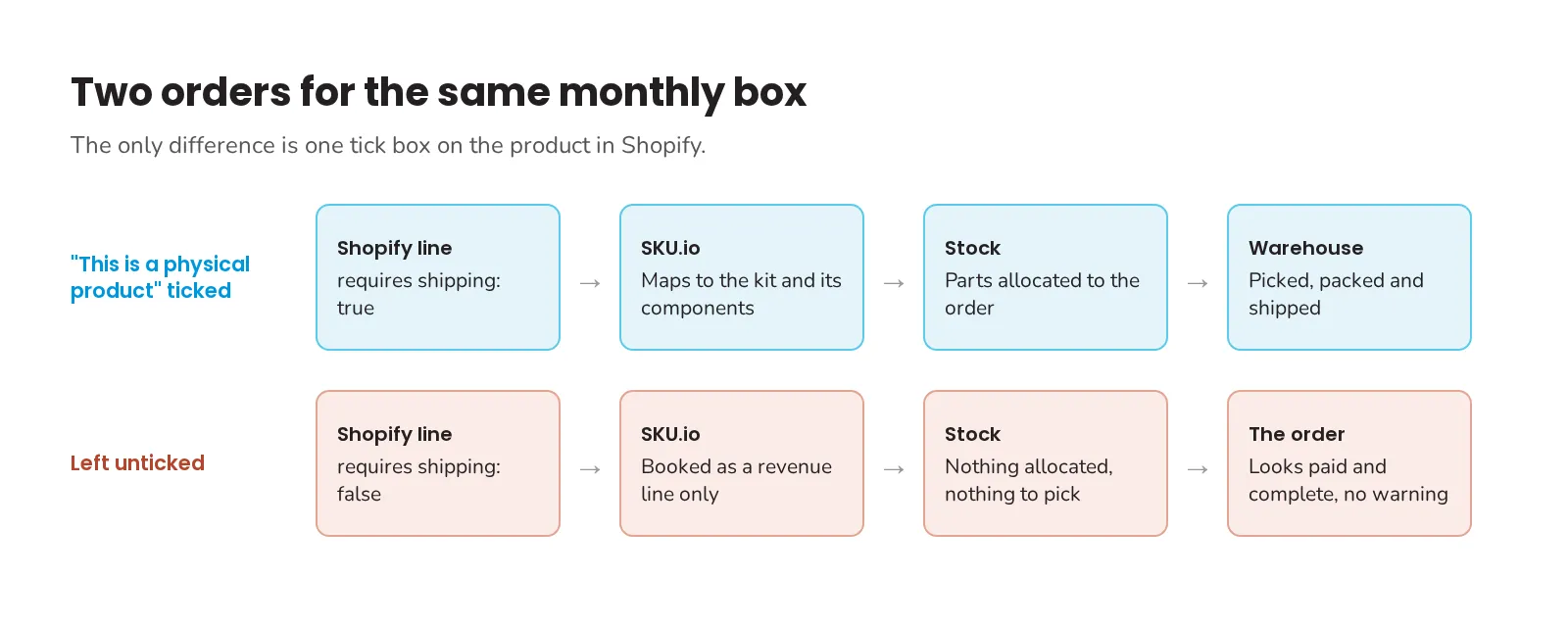
A re-sync wouldn’t help. Shopify stamps the flag on each line when the order is placed, and their own history showed it: one of the products from the November call had the flag off on every order from early November to mid-February, and those orders still said false after being pulled again in March. Orders placed after someone fixed that product were fine. I’d had that flag on screen in November and talked myself out of it. So the three empty September orders got filled in by hand like the other seven, and the fix was a tick box in Shopify. October’s box was already set up right. I sent that back the same day and apologized for the afternoon it had cost them.
An order with a line we can’t match to a product shows the line in amber, and the order can’t be fulfilled or closed until someone links it. A line Shopify calls non-physical gets none of that. In the reply I wrote: “When SKU skips a line for this reason it currently does so silently, with no warning anywhere on the order.” My first thought was to flag every order that comes in with a price and no product lines, but that’s every gift card order too. The rule I want is narrower. If Shopify says a line isn’t physical and its product is mapped to a kit or a stocked product on our side, one of the two is wrong, and the order should say so. That check still isn’t built as I write this.
For now the check is in Shopify. Anything you ship, kit or not, needs “This is a physical product” ticked, and a new monthly or seasonal product is the one most likely to go out without it. Open the first order after a new product goes live and look for its product lines.
Whether that box should be a kit at all, or a bundle we split into its parts on the order, is a separate question, and I wrote about it in where a bundle turns into its parts. The docs list what an unmapped line blocks and how kits and bundles differ. If you have orders that came in paid with nothing on them, book a demo and bring a couple.