Hold stock for Amazon Pending orders
Amazon sends some merchant-fulfilled orders as Pending until the buyer's payment clears. SKU.io can't create their sales orders yet, because Amazon hides the shipping address until then, so nothing is allocated to them and their units still count as available. If another channel sells those units first, you can end up with two orders for one item. Turning on Hold stock for Pending orders holds the units for each Pending order the moment it arrives, and releases them as soon as Amazon confirms or cancels the order.
Before you begin
- The Amazon connection is set up and imports orders. See Ship Amazon merchant-fulfilled orders.
- The Amazon listings are linked to your products. A Pending order for a listing that isn't linked holds nothing until you link it.
- You have permission to change the connection's settings.
Turn on Pending-order holds
-
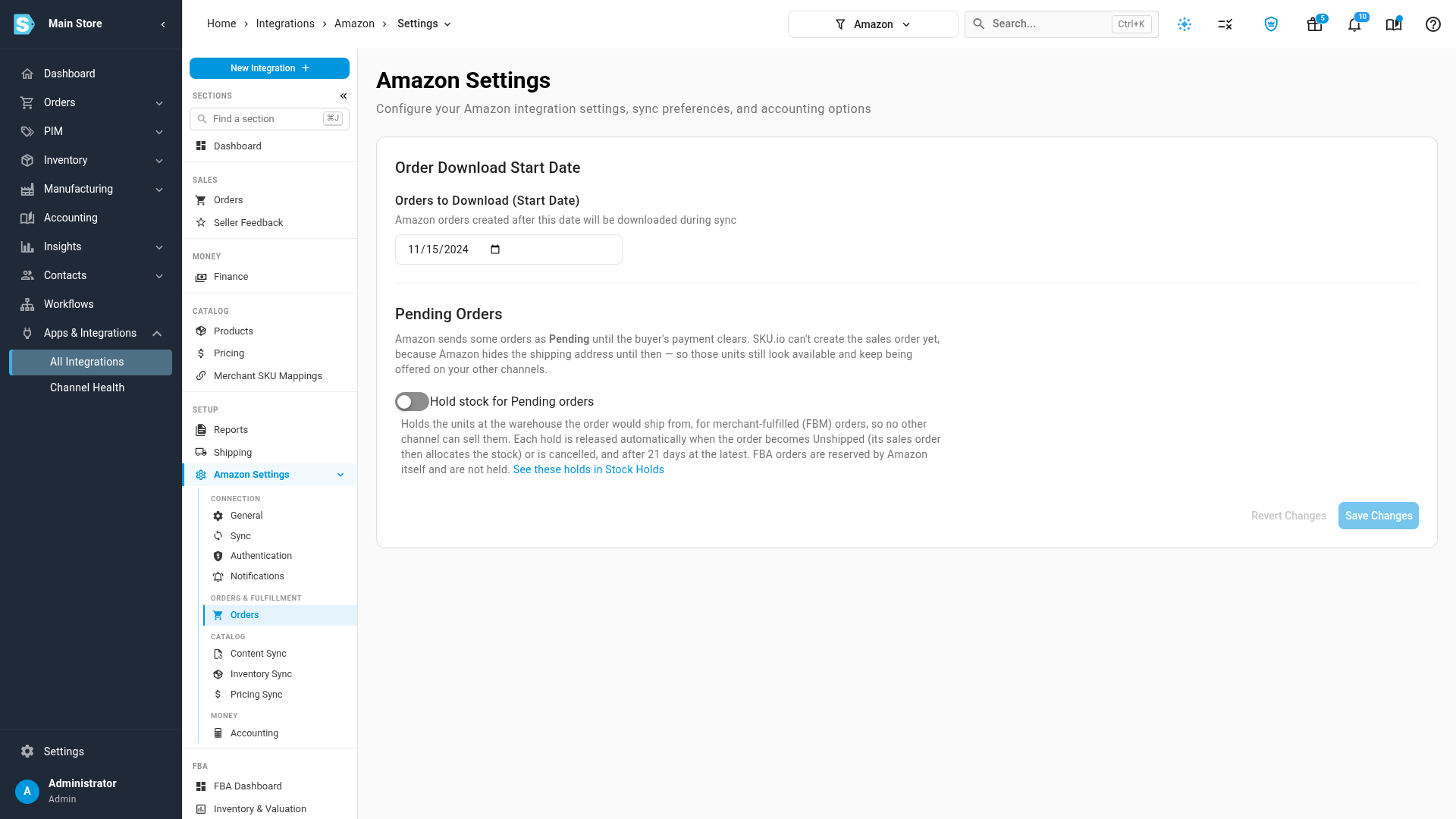
Go to Apps & Integrations, open your Amazon connection, then open Amazon Settings and the Orders tab.
-
Under Pending Orders, turn on Hold stock for Pending orders.
-
Click Save Changes.
SKU.io holds the units for the orders that are Pending right now, and for every new Pending order from then on. The switch belongs to this connection only: if you have more than one Amazon connection, turn it on for each one you want.
See the holds
Go to Inventory → Stock Holds. Each Pending order line has its own hold:
- Reason is Marketplace Pending Order.
- Source names the Amazon order and links to it.
- Warehouse is the warehouse the order would ship from, the same one its sales order will use.
- Expires is 21 days after the order was placed.
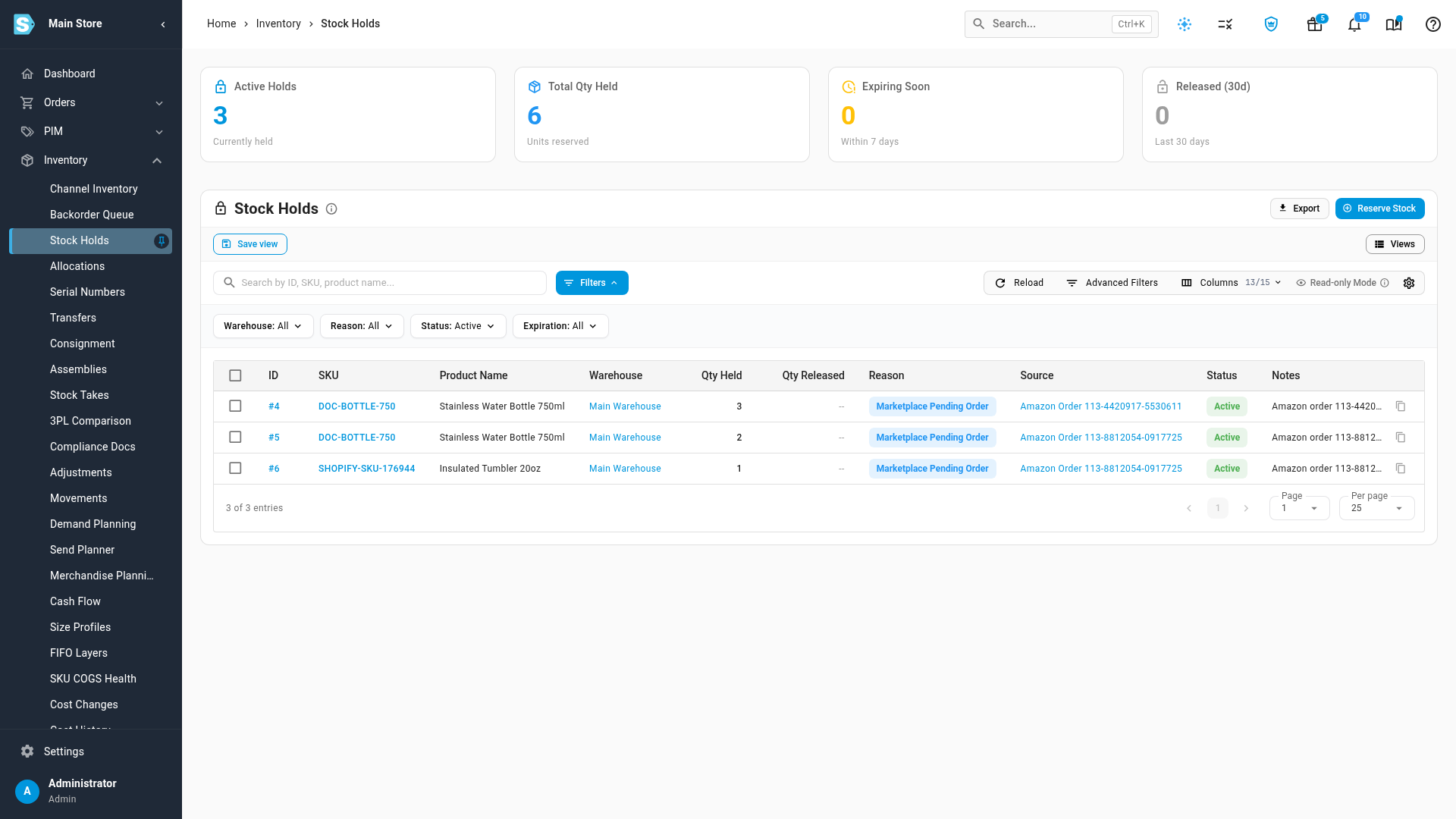
The held units leave Available, so every channel is sent the lower quantity on its next sync. For how that number is worked out, see How channel stock is calculated.
How the holds are released
You don't release these holds yourself. SKU.io checks them every time it downloads Amazon orders:
| When | What happens |
|---|---|
| The order becomes Unshipped | The hold is released. SKU.io creates the sales order, which allocates the stock as usual. |
| The order is Canceled | The hold is released and the stock is free again. |
| The listing is linked to a different product | The hold on the old product is released, and the new product is held instead. |
| 21 days pass and Amazon never updated the order | The hold expires and is released. |
| You turn Hold stock for Pending orders off | Every hold this connection placed is released. |
Each released hold keeps a Release Reason saying why, for example Auto-released: Amazon order 112-4459813-2207451 is now Unshipped. Show the column from the column picker on Stock Holds.
What the switch leaves alone
- FBA orders. Amazon reserves stock in its own warehouses for Pending FBA orders, so SKU.io doesn't hold anything for them.
- Pre-orders. Orders Amazon shows as Pending Availability aren't held; the item isn't released yet.
- Orders older than 21 days when you turn the switch on.
When stock runs short
A hold never takes more than is free at that warehouse. If an order is for 3 units and only 1 is free, SKU.io holds 1, and the hold's notes say Held 1 of 3. If nothing is free, no hold is placed.
Releasing or deleting a hold yourself
You can release or delete one of these holds from Stock Holds like any other. Once you have, SKU.io doesn't hold stock for that order line again. You can't edit these holds: the Edit action is greyed out, and its tooltip says why. See Place & manage stock holds.
Release stale allocations
An allocation can also keep stock after its job is done: it stays active on a sales order line that is already fully cancelled, returned or fulfilled. On Inventory → Allocations, click the Stale card to list them, then click Release all (or tick rows and click Release selected) and confirm. See Release stale allocations.
Next steps
Video transcript
Amazon sends some orders as Pending until the buyer's payment clears. SKU.io can't create the sales order yet, because the shipping address is still hidden. So those units still look available on your other channels. In Amazon Settings, the Orders tab has a Pending Orders section. Turn on Hold stock for Pending orders. Then click Save Changes to keep the setting for this connection. From now on, each Pending line holds its units at its shipping warehouse. To see them, open Inventory in the menu on the left, then click Stock Holds in that list. This page shows every stock hold in your account. These carry the reason Marketplace Pending Order. The Source column links each one to its Amazon order. Once Amazon confirms or cancels an order, its stock comes off hold. The new sales order then allocates the stock as usual. If Amazon never updates it, the hold expires after three weeks. Stock can also get stuck on lines that are already cancelled or fulfilled. Go to Inventory, then Allocations, and click the Stale tile. The banner explains why these allocations are listed. To free them all, click Release all, then click Release in the dialog to confirm. Each allocation is checked again before it is cancelled. The stock is free again for your other orders.