Amazon settings reference
Each Amazon connection has its own settings page: go to Apps & Integrations, open your Amazon channel, and click Amazon Settings in the tabs at the top. If you have more than one Amazon connection, pick the one to change in the integration selector at the top of the page; the page says No Integration Selected until you do. The settings are spread over nine tabs, described below in the order they appear. FBA has its own settings page, under FBA → FBA Settings: see Turn on FBA inventory tracking.
Tabs with a form keep your edits until you click Save Changes at the bottom of the card; Revert Changes throws them away. You need permission to change integrations to save, and to sync integrations to reauthorize.
General
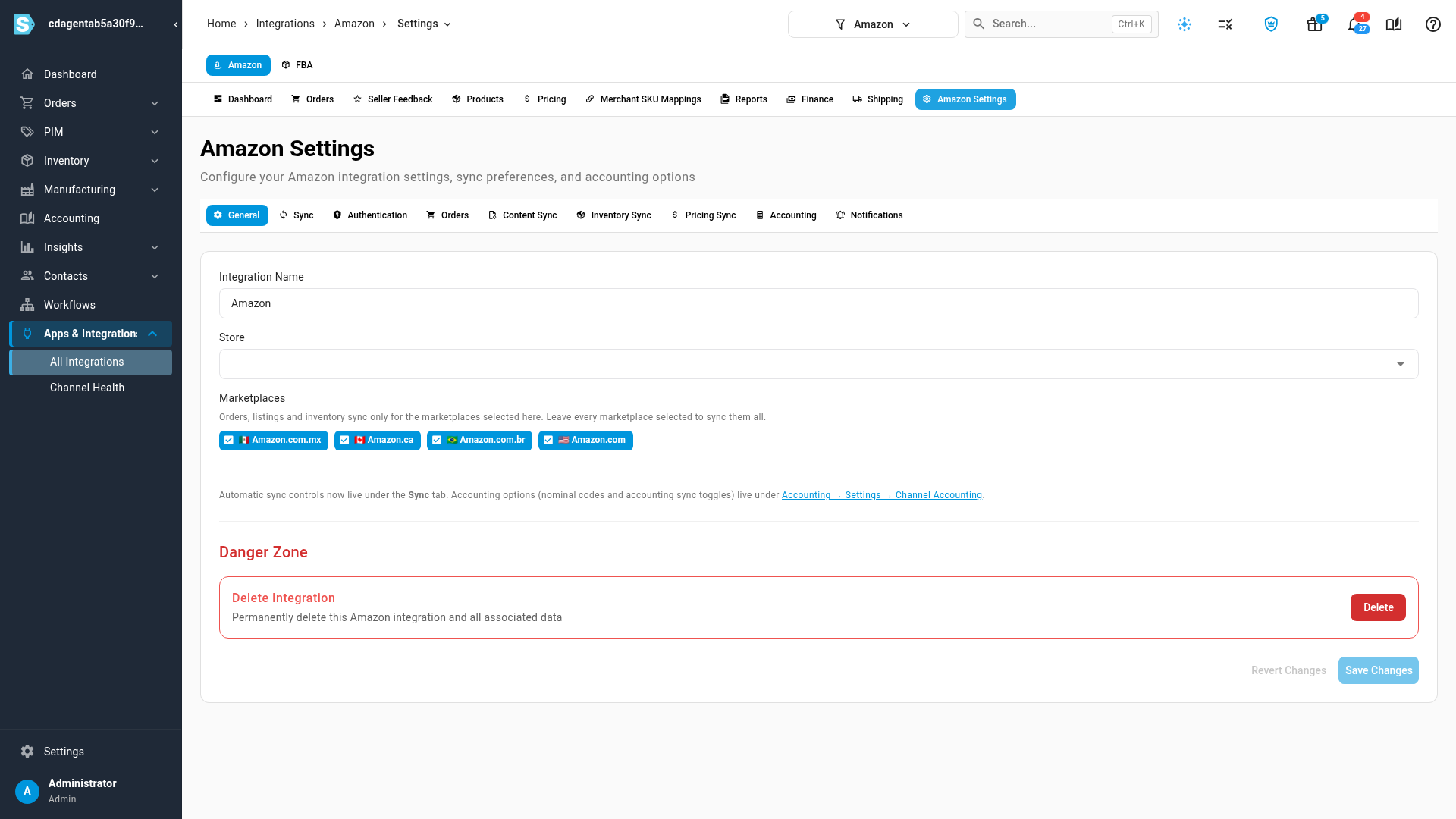
| Control | What it does |
|---|---|
| Integration Name | The name this connection goes by everywhere in SKU.io, such as the integration selector and order lists. |
| Store | The SKU.io store that orders from this connection belong to. See Connect more than one store or account. |
| Marketplaces | The Amazon marketplaces this connection syncs. Orders, listings and inventory sync only for the ticked ones; leave them all ticked to sync every marketplace. A marketplace appears here once Amazon has authorized it. See Connect Amazon and choose your marketplaces. |
| Delete Integration | In the Danger Zone: permanently deletes the connection and everything SKU.io imported through it. |
Sync
The switches that turn each part of the connection on or off. Amazon syncs on a schedule, so a change takes effect on the next scheduled run.
| Control | What it does |
|---|---|
| Sync Schedule | Active runs the scheduled sync; Paused stops all of it. A manual Sync Now still works while paused. |
| Import orders from Amazon | Downloads Amazon orders. |
| Create SKU sales orders from Amazon | Turns downloaded Amazon orders into sales orders. |
| Import products from Amazon | Downloads your Amazon listings. |
| Submit tracking to Amazon | Sends tracking for the merchant-fulfilled orders you ship. See Ship Amazon merchant-fulfilled orders. |
| Push inventory to Amazon | Sends available stock to your merchant-fulfilled listings, by the rules on Inventory Sync. |
| Push prices to Amazon | Sends prices, by the rules on Pricing Sync. |
For how these switches behave on every channel, see Manage a connected app.
Authentication
| Control | What it does |
|---|---|
| Connected / Not Connected | Whether SKU.io holds a working authorization from Amazon, with the Seller ID it belongs to. |
| Reauthorize | Sends you to Amazon Seller Central to grant access again. Use it when Amazon's authorization has expired or been revoked, or when you add a marketplace. |
Orders
| Control | What it does |
|---|---|
| Orders to Download (Start Date) | Amazon orders created after this date are downloaded. Orders from before it are never imported. |
When Import orders from Amazon is off, the tab says Order imports are turned off, with a Manage in Sync settings link.
Content Sync
Whether SKU.io watches your Amazon listings for content changes, and what it does with them. Content sync only reads from Amazon; it never writes content back to it.
| Control | What it does |
|---|---|
| Watch this channel for content changes | Turns content sync on. Listings are recorded as they are when you turn it on, and only later changes are flagged. |
| Reconcile frequency | How often listings are re-checked against Amazon: Every 6 hours, Daily, Weekly or Manual only. |
| Fill empty catalog fields from channel automatically | When a product field is empty and Amazon has a value, take Amazon's value without review. |
| Field ownership | For each field group (Identity, Descriptive, Media, Physical): keep the Catalog value and log the difference, take the Channel value, or Ask on conflict when both sides changed. Auto-apply applies a group's changes without review; Field overrides sets a different rule for one field. |
| Governance gate | Block publishing when required content is missing holds products back from Amazon until the fields under Required before publishing are filled. |
See Review and apply channel content changes.
Inventory Sync
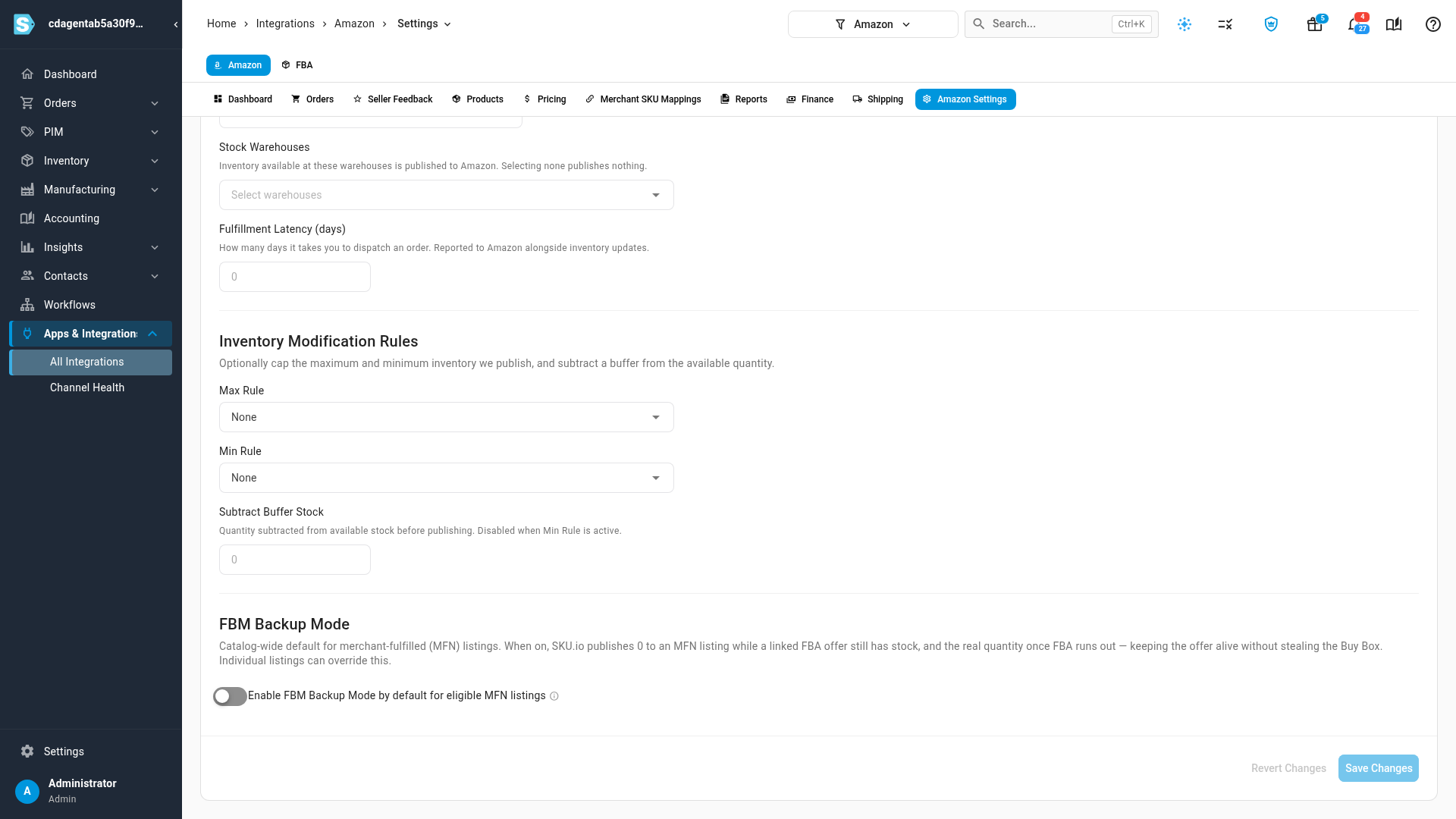
| Control | What it does |
|---|---|
| Master of Stock | Who owns the quantity on your listings. sku.io works it out and sends it; Neither sends nothing. Amazon (contact support) can't be chosen here. |
| Stock Warehouses | With sku.io as master, the warehouses whose stock is published to Amazon. Choosing none publishes nothing. |
| Fulfillment Latency (days) | How many days you take to dispatch an order. It's sent to Amazon with each inventory update. |
| Max Rule, Min Rule, Subtract Buffer Stock | Cap, floor and buffer the quantity sent. Subtract Buffer Stock is unavailable while a Min Rule is set. See Set the stock each channel sees. |
| FBM Backup Mode | The default for merchant-fulfilled listings that have an FBA twin: send 0 while FBA has stock, and the real quantity once FBA runs low, by FBA stock threshold and FBA scope. See Keep MFN offers live as an FBA backup. |
Pricing Sync
| Control | What it does |
|---|---|
| Master of Price | Who owns the price. SKU.io sends its price; Amazon copies Amazon's price into the Pricing Tier below, overwriting it regularly; Neither leaves both alone. |
| Pricing Tier | The SKU.io pricing tier this connection's prices are kept in. |
| Push prices to Amazon | How SKU.io sends prices when it's master: How often, the Channel policy, and the levels it checks for each listing. See Sync prices with sales channels and Price Amazon MFN listings differently. |
Accounting
Accounting settings for every sales channel now live in one place. The tab's Go to Channel Accounting button opens Accounting → Settings → Channel Accounting, where you set the accounts Amazon orders post to. See Use different accounts per sales channel. Settlements have their own mapping, see Map Amazon settlements to your accounts.
Notifications
Amazon can tell SKU.io about some changes the moment they happen, instead of waiting for the next scheduled sync. Notification Health shows those real-time notifications for the connection.
| Control | What it does |
|---|---|
| Subscriptions, Healthy, Degraded, Failed | How many notification types Amazon is sending, and their state. |
| Resync | Registers any notifications that are missing with Amazon, and removes ones SKU.io no longer uses. Safe to run again. |
| Tear Down | Stops every real-time notification for the connection, after you confirm. Scheduled sync carries on. |
| Recent Notification Events | The latest notifications Amazon sent, with when they arrived and whether they were processed. |
If the tab says No active subscriptions, real-time notifications aren't on for your account yet; SKU.io keeps syncing on its regular schedule.
Video transcript
Each connection has its own settings, under Amazon Settings at the top of the channel's pages. General holds the Integration Name, the Store its orders belong to, and the Marketplaces it syncs. The Danger Zone deletes the connection. Sync pauses the whole schedule, or switches each part on and off. Orders and products come in from Amazon. Tracking, inventory and prices go out. Authentication shows whether Amazon's authorization is working, and Reauthorize Connection renews that authorization. Orders sets the date that order downloads start from, under Order Download Start Date. Content Sync watches your listings for edits made on Amazon, and decides what happens to your catalog. Inventory Sync picks the warehouses that feed the channel, with caps, floors and buffers on the quantity. Further down is FBM Backup Mode, for listings that back up an FBA offer. Pricing Sync decides who owns the price, and how price changes are sent to the channel. Accounting points you to Channel Accounting, where every channel's accounts live. Notifications shows the real-time updates Amazon sends SKU.io.