
Lot Tracking With a 3PL: Who Picks the Lot?
On August 12 I gave a demo to a brand that makes a food product through a co-packer, sells on Shopify, and was about to hand its pick and pack to a small 3PL. Lot tracking was the reason for the call. The buyer had two questions. If a batch of one ingredient gets recalled, which finished batches did it go into, and which customers got those? And going the other way: if a group of customers get sick and they all had the same finished batch, who else got that batch, and what went into it?
I said we had both. We do. Then I set it up on a blank site, live, and showed him how to break it.
I made the ingredient, received a purchase order of it, built a bill of materials, and started a manufacturing order. The order said there was enough of the ingredient and that was all it said. No lot to choose, no warning. He caught it right away. “Most inventory systems, when you create an order, it’s just going to say, yeah, we have all the components, we’re good.” He wanted to say this run used the end of the old batch and most of a new one, and the screen gave him nowhere to say it.
The reason was me. I hadn’t turned on lot tracking for the ingredient, so the receipt never asked for a batch number, and there were no lots to pick from. “I told you I would make a mistake,” I said, which is true, I had warned him at the start that I’m not a manufacturer. I switched to another site, turned it on, received a batch with an expiry date, and the manufacturing order showed the lots and which one first-expiry-first-out would take, with a way to override it. Then I ran a sale, traced forward from the batch to the customer, exported the affected customers to a CSV, and showed the recall email you can send from inside SKU.io. He said that was exactly what he’d been asking for.
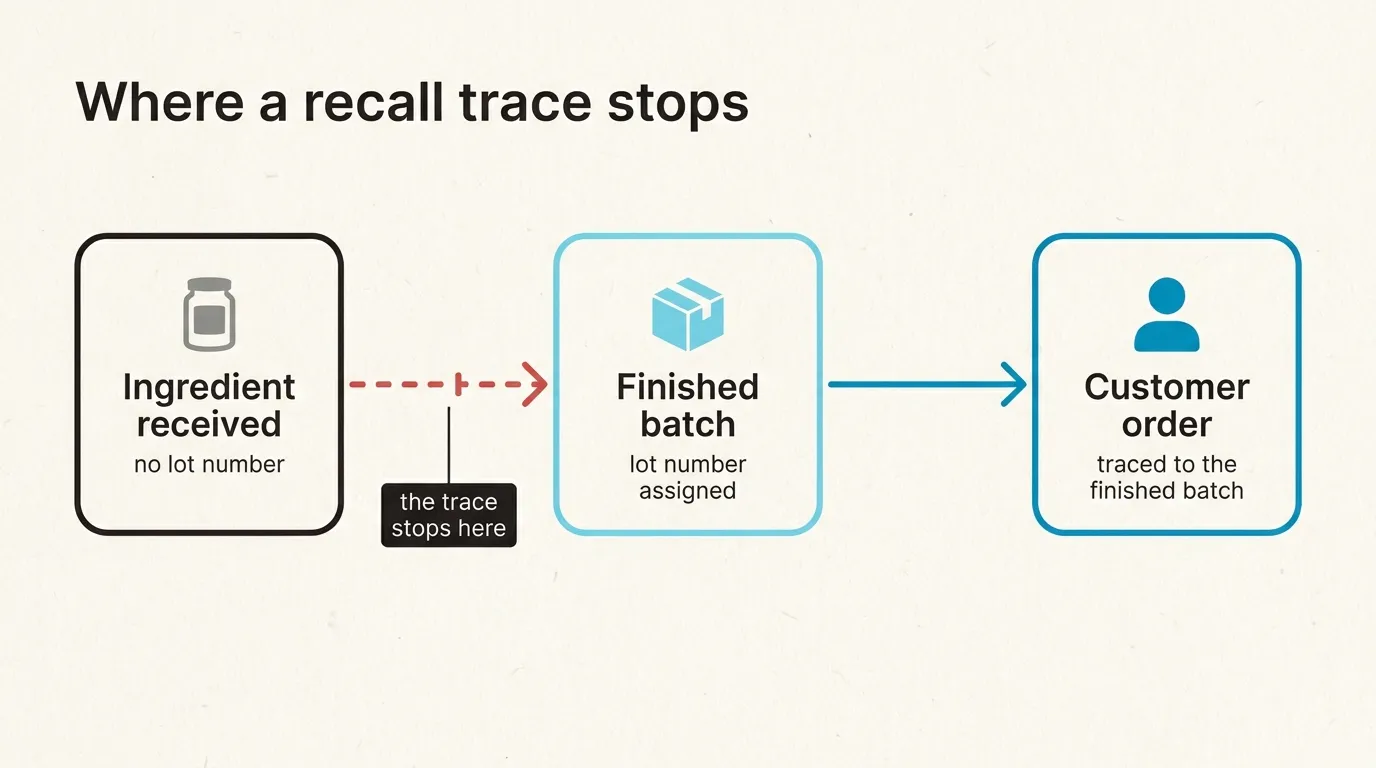
The part I didn’t see during the call is what would have happened if he hadn’t caught it. The finished product was lot-tracked. A finished batch gets a lot number when you record production, whether or not the ingredients have lots. So the batch numbers would all look fine, every sale would trace back to a finished batch, and the trail would end there. You would find out the morning a supplier called about an ingredient recall.
The next day we added warnings for it. A finished good that is lot-tracked and uses an ingredient that isn’t now gets named, by SKU, when you activate the bill of materials, when you confirm the manufacturing order, and when you record production. They warn and don’t block, because plenty of people track lots on what they sell and not on the packaging. In September we also moved the lot tracking switch into the dialog where you create a product. Before that it lived on the product’s tracking tab, which most people open after their first stock has arrived, and stock received before you turn it on has no lots.
The second half of the call was harder, and I’m less sure I answered it.
He said, “We have people that do pick and pack.” His 3PL. Shopify doesn’t decide which lot ships, and he knew that. SKU.io assigns a lot to every fulfillment, first-expiry-first-out unless you override it. In a warehouse you run yourself, that is the pick. At a 3PL it’s only what our record assumes, because the person with the scanner picks from whatever is in front of them. I told him the 3PL either has to take the lot from us, which needs a warehouse system that accepts one on the order, or pick on its own and tell us what it picked. I said it comes down to who determines the lot, and that I’d rather it be us, because we’re the record everything else traces from.
He asked how the information gets back. His guess was a daily report from the 3PL listing each order and the batches they picked for it, which he thought was the standard thing to ask for. I said “we don’t want to wait for a daily report.” Until the report arrives, our record says the first-expiring lot shipped, and that’s just a guess. If a recall lands the same week, the customer list you export could be wrong.
How that data travels depends on the 3PL. At the time, one 3PL pulled orders from us and every other one got them pushed. His would have been reached through a middleware service, and I said the details mattered there: the warehouse system has to record lots, and the service in between has to pass them along. I asked him to get me on a call with the warehouse so I could ask exactly that.
There’s one version of this we now handle properly. A 3PL that confirms shipments over EDI sends a 945, the warehouse shipping advice, and it can list the lots on each line. As of November, SKU.io reads those lots and records them against the order, so the trace follows what actually left the building. If the 945 names a lot we can’t match to stock at that warehouse, the shipment still records, on our own first-expiry pick, and the order gets a note with what the 3PL reported and that our record differs. It doesn’t stop the shipment, since the goods are already gone, but someone has to fix it before a recall finds it.
If your 3PL only sends a daily spreadsheet, I don’t have a general answer yet. My advice is to ask a 3PL how they report the lot on each shipment before you sign. Ask whether it comes back per order or per day, and in what format. If they don’t record lots on the way out, they aren’t really doing lot tracking for you, whatever the contract says.
If you want to see where a trace would stop on your own catalog, book a demo and bring one finished product and the ingredients that go into it. You can also read how forward and backward genealogy work in the docs first.