
Your Inventory Sync Says Synced. How Do You Check?
On October 9 a row in my own software said “Synced 15.” Fifteen units, one location, one SKU. Shopify had 0 at that location. The screen I built so that you would never have to wonder about this was telling a customer not to wonder.
A sync status usually records what your system sent, not what the channel holds. The only way to check a sync is to read the quantity back from the channel and compare it with the number you meant it to show, per SKU and per location. I knew that in 2024. I just hadn’t built it where it counted.
In August 2024 I was on a call showing someone how I run my own stock against my 3PL. “I created a custom script that compares every five minutes their inventory with our inventory so that I can have visibility of discrepancies.” There were two more reports beside it, for SKUs the 3PL had that we didn’t and the other way around. I pulled it up and said it was “very out of sync because they haven’t done a reconciliation since they changed their inventory system.” That was the example I chose to show off.
Three months later I was rebuilding the sales channel side, on a morning scrum with the team. Working out what every listing should show, through its warehouses and its rules, took about eight minutes for 100,000 listings, and we couldn’t run that every time we wanted to know what needed a sync. I said, “I was hoping we don’t need a cache, but I think we do.”
So we made a table. Per listing and location it holds our quantity and the channel’s quantity, and the sync picks the rows where the two differ. That is still how it works, and it’s fast. What I didn’t say on that call, because I didn’t see it, is that the channel’s column is only as honest as whatever writes to it. Ours learned Shopify’s number from our own pushes and from webhooks. Nothing went and looked on its own.
It also took us until May 2026 to give anyone a page that asked the question across a catalog. Before Channel Inventory, you checked a listing by opening its product. I’d had a five-minute script for my own 3PL for almost two years by then.
On September 23 I was on a call with an operator about to turn on our push to Shopify. “Our inventory was always off,” they told me, and an app had been moving orders between warehouses to cover for it. They asked whether turning it on would mess anything up, or if it was just going to push inventory. I said, “Inventory level. Exactly. Right.”
Four days later we found the first hole. When a batch came back with nothing confirmed, because every item in it was filtered out or rejected, the code stamped all of those rows as synced at our quantity. A failed push counted as a finished one, so it never retried. We changed it so a pushed row records only what Shopify confirmed, and I considered that closed.
The October 9 row was that same operator’s stock, and it got past the fix. Our push keeps a local list of which locations stock each item, and that list only refreshed on a product sync. They had stocked the location after the last one, so the push skipped it as not stocked there.
The September fix had an exception for skipped rows, and that was the bug. A skipped row has no channel number, and a row with no channel number gets picked again every cycle. To stop that, the fix filled the column in. It filled it with our quantity. So nothing was sent, 15 went into Shopify’s column, and both sides read 15.
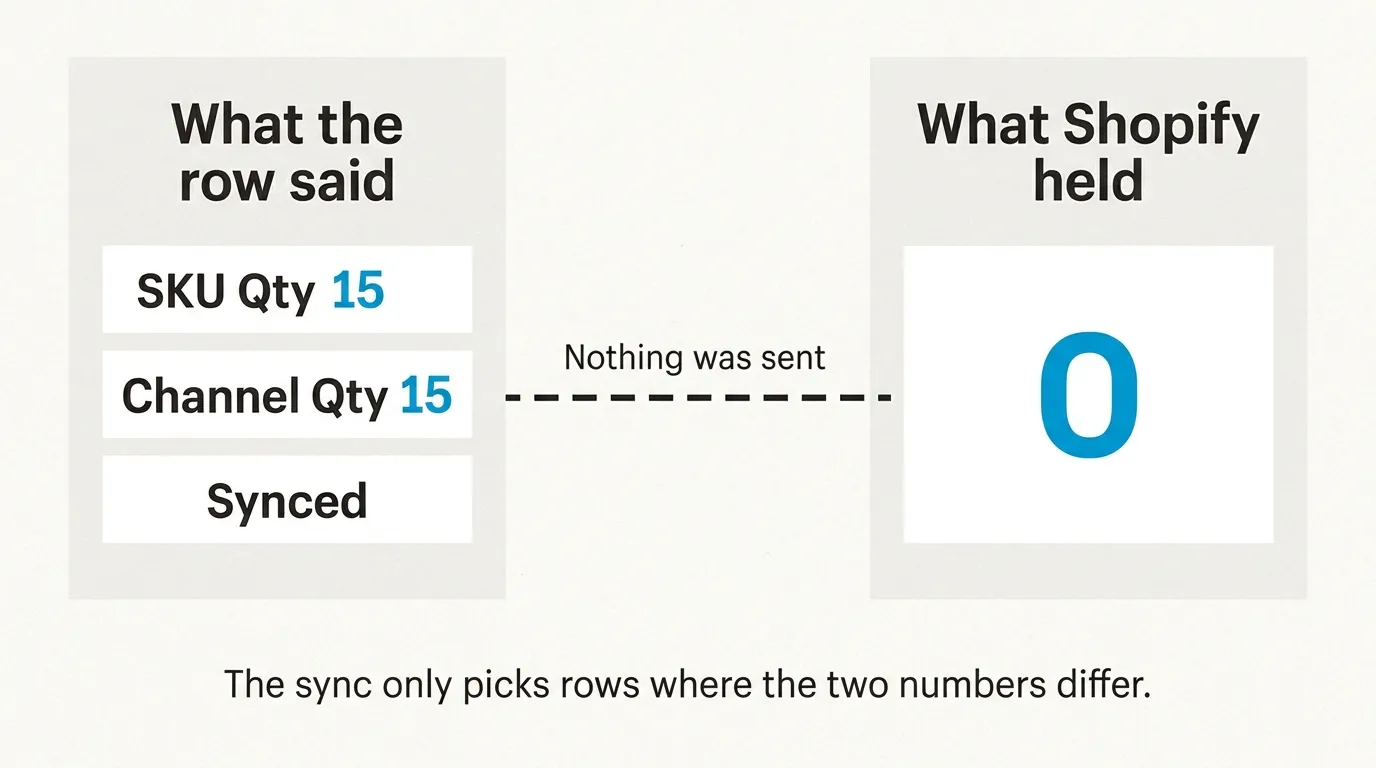
They sell through when out of stock, so it didn’t stop orders there, which was luck.
What I typed that day was “why it wouldn’t correct itself.. wasn’t that the point for a self correcting ecosystem”. It couldn’t. The sync picks rows where the two numbers differ, and we had made them the same. Now the push asks Shopify before it skips a location, and if Shopify says the item really isn’t stocked there the row records 0.
What read-back costs
The other fix that day was a job that reads Shopify’s live quantity every hour and records it as an observation. It never counts as confirming a push, so the two facts stay in separate columns, when we last told Shopify and when Shopify last told us. A difference becomes a variance, and the next push corrects it.
Reading everything every hour isn’t free. On a store with 100,000 listings that would be about 1,000 API calls an hour per connection, on the same rate limit that orders use. So each run reads 1,000 listings in 10 calls. It takes the most suspect first, meaning rows that were never confirmed by a push, aren’t zero, and exactly equal our number, and then the rows nobody has read for longest. A catalog that size takes about four days to walk. The Fetch from Shopify button still does the whole thing when you ask.
The check was wrong within the hour, too. Right after a push, the read came back 0 while Shopify held 15, because the query we used goes through Shopify’s search index, which was running tens of seconds behind. We switched to reading each item by ID.
How to check yours
You can do this on any system this week, and you don’t need ours.
Export the quantities from the channel itself, per location. Don’t use your tool’s column for what the channel has, because that column is the thing in question. A row like mine would match.
Then export what your system means the channel to show. That’s the number after buffers and warehouse rules, not on-hand, or every SKU with a buffer turns up as a false variance. Join the two on SKU. Anything that exists on one side only goes in a separate list, because that’s a mapping problem.
Do it again an hour later and keep only the rows that are off both times. A row that shows up once was usually a sale in flight.
Work the rows where the channel shows more than you have first, since those are your oversells. Then do the ones where it shows less. Nobody reports those.
Then ask your vendor where that column comes from. If the answer is “what we last sent,” it can’t catch this. Etsy on our side still works that way: the channel quantity after a push is the quantity we pushed.
In SKU.io this lives at Inventory, then Channel Inventory: SKU Qty after your rules, Channel Qty as last reported, the variance, and In Sync, Mismatch, Never Synced and Pending Recalc counts across the catalog. The hourly read-back is Shopify only. WooCommerce, BigCommerce, Walmart and eBay have the fetch button, and you have to press it.
If you sell on one channel with a few hundred SKUs, a Monday export and a spreadsheet will do this, and you don’t need us. If you sell on several, book a demo and bring one channel’s export.