Track Shopify Payments reserves
Shopify sometimes holds back part of a payout as a reserve, and releases it in a later payout. The money held is still yours: Shopify owes it to you. With a Shopify Payments reserve account, SKU.io books each hold as money owed to you on your balance sheet, and each release as that money coming back, instead of booking them as an expense and a sale.
Setting a reserve account is optional. Without one, reserves keep posting to the store's fallback accounts, as they always have.
Before you begin
- The store posts its payouts with Per payout accounting. See Account for Shopify and eBay payouts.
- You need permission to edit integrations. To create the account in one click, you also need the Nominal Codes → Create permission.
See what Shopify held back
-
Go to Apps & Integrations, open Shopify, choose the store, and open the Finance tab.
-
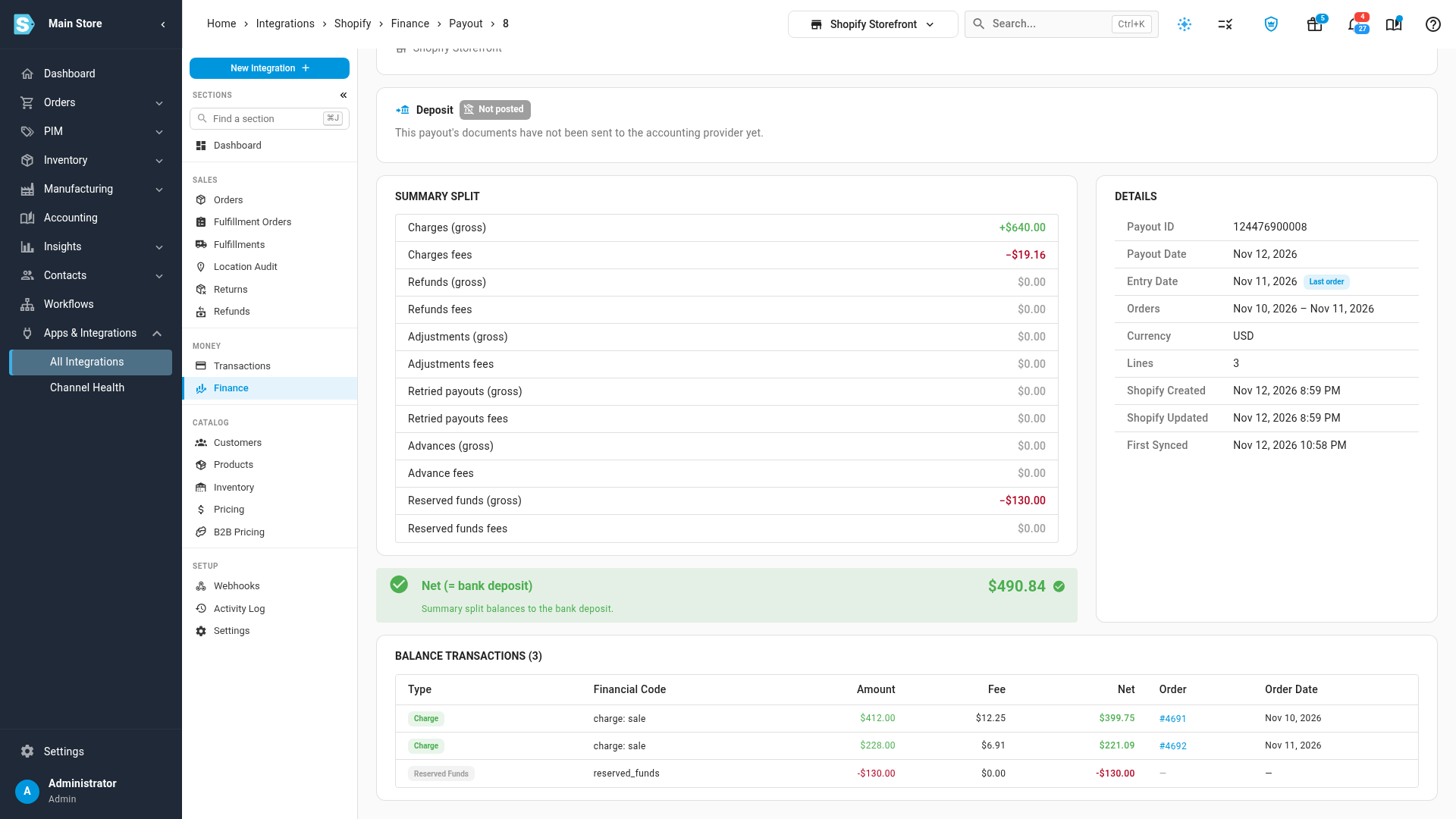
Open a payout. In its summary, Reserved funds (gross) shows what Shopify held back, and Net (= bank deposit) is what reached your bank after it. Under Balance Transactions, the hold is its own negative line.
Set up the reserve account
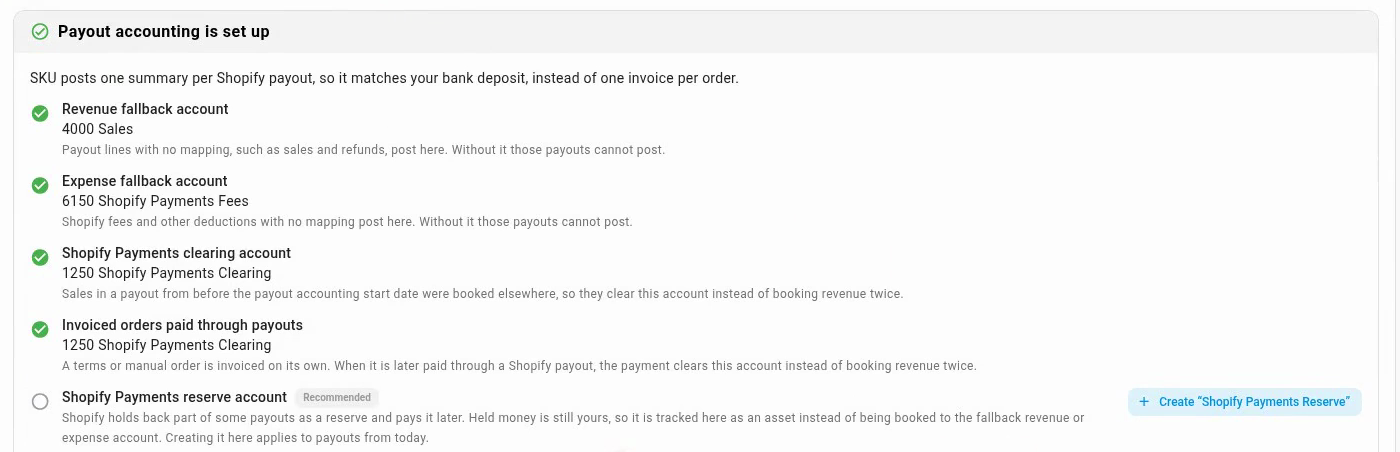
The setup card on Payout Mappings offers Shopify Payments reserve account once Shopify has held funds back from one of the store's payouts. It's marked Recommended and never holds a payout up, so it stays on the card even when the card reads Payout accounting is set up.
-
Open the store's Finance tab, then Payout Mappings.
-
On the setup card, click Create "Shopify Payments Reserve". SKU.io creates a current-asset account and selects it for the store. With QuickBooks Online or Xero connected, it's created there too.
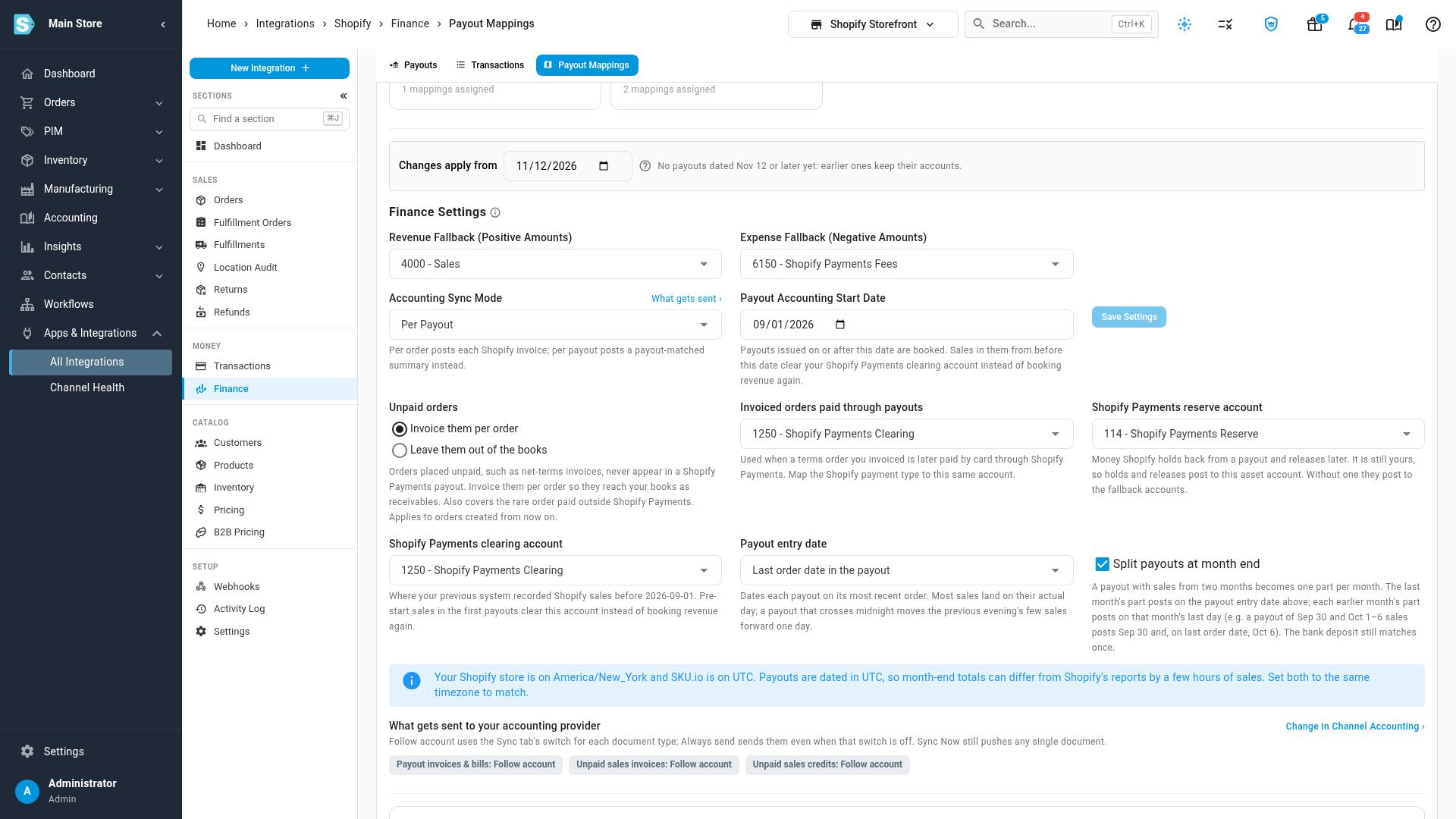
The account applies to payouts dated from today. Changes apply from, under the card, says which payouts that covers; earlier payouts keep the accounts they posted to.
-
To use an account you already have, pick it under Finance Settings → Shopify Payments reserve account further down the page, and click Save Settings. The list shows balance-sheet accounts only, and leaves out Accounts Receivable and Accounts Payable.
Create is unavailable, and hovering over it says why, when an account with that name already exists (select it in Finance Settings instead) or your role can't create accounts.
How reserves post
| On the payout | With a reserve account | Without one |
|---|---|---|
| Shopify holds funds back | A bill, Shopify Payments reserve, that adds the amount to the reserve account | The store's Expense Fallback account |
| Shopify releases funds | An invoice, Shopify Payments reserve, that takes the amount out of the reserve account | The store's Revenue Fallback account |
Either way, the payout's documents still add up to the bank deposit. A reserve line you've mapped yourself under Type Mappings keeps that mapping.
Check the reserve at month end
The month-end close checklist includes Shopify Payments reserve reconciled (a warning). It passes when your reserve account holds exactly what the posted payouts say Shopify still holds. It flags:
- reserves posted to the fallback accounts because no reserve account is set;
- a reserve account whose balance differs from what Shopify still holds;
- a reserve line mapped to a profit-and-loss account under Type Mappings;
- paid payouts with a reserve that haven't posted yet.
Its link opens Payout Mappings. See Close checks reference.
Next steps
Video transcript
Shopify sometimes holds back part of a payout as a reserve, and releases it later. Open a payout from this list to see the amount it kept back until later. Its summary shows the reserved funds, and the net is what reached your bank. Further down, the hold is its own negative line, and that money is still yours. Then go back to the payouts list, and open the Payout Mappings tab at the top of the page. Once Shopify has held funds back, its setup card offers a Shopify Payments reserve account. It is recommended, but never required. One click creates a current asset account and selects it, for payouts dated from today. In Finance Settings, the reserve account lists only balance sheet accounts. Each hold adds to that account, and each release takes the money back out of the account. The payout still adds up to the bank deposit.