
Sent Out, Not Sold: Stock With an Installer or a Co-Packer
In September 2025 someone asked the QuickBooks community how to put inventory against a job without an invoice. The moderator said Desktop has no built-in way and suggested a sales receipt with every item at $0.00. The asker came back the next day wanting to know how to credit the units they didn’t use.
I know that answer. I’d given it to the operations lead at a food brand, and in February 2024 it got read back to me on a recorded call. It took me most of an hour to get off it.
They took a frozen ingredient to a co-packer, the co-packer added its part and its labor, and billed them only for what it put in. How should the ingredient leave their system? “I think you suggested a zero sum sale, a $0 sale in Shopify.”
I had. A few minutes later I said it again: “Which I said, sales order zero sum.” A $0 sale says the stock is gone. That’s fine for free product to an influencer. Theirs was sitting in somebody else’s kitchen, it was still theirs, and most of it was coming back as finished meals.
The ops lead told me early how much this mattered. “The way it is now, it’s so chaotic that any small improvement would be a step in the right direction. And I don’t think we need to pour a ton of resources into solving this.” I heard that and pitched a custom “value added purchase order workflow” anyway.
Then I started building on screen. A warehouse for the co-packer, a transfer, a purchase order for their part, an assembly. The recipe took 0.25 of a pack and the number moved from batch to batch, because the kitchen wasn’t always happy with the meat. “They’re chefs and they think they know everything.” The system wouldn’t take the fraction. The assembly threw “not enough stock.” While I was saying “okay, why is it not enough stock?” I got, “I’m just going to run upstairs real quick.” I kept debugging to nobody.
Back on the call, the ask was the simplest way, “because this is just a very small part of what we do.” And then, “there’s only two SKUs that fit this bill.” I started explaining holding warehouses for each supplier anyway.
“It just seems like a lot of unnecessary fake stuff to these virtual warehouses and putting a lot of time suck into one SKU.”
“There’s no way around a virtual warehouse,” I said.
Did it have to be called that? “No, that’s just what I call it.”
We ended up with the warehouse anyway. What changed was everything around it, and that came from a plain description of the job: “kind of like a pile of old stuff in the freezer. And then we technically pick it up and we bring it to them.” So we quit trying to make the system do fractions. Adjust the packs down and a bulk SKU in ounces up, transfer the bulk to a warehouse with the co-packer’s name on it, assemble there, bring the finished goods back, adjust off what’s left over. In the test that was 8 ounces. I was still walking it when I got, “I have a hard stop at two.” Then, “I think that way works much better. Because that’s basically how we work with our hands anyways.”
This July a consultant working through pop-up events for a client called the event stock a virtual warehouse, “because it’s not another physical location.” I said we don’t distinguish, it’s just a warehouse. So that word has stopped being mine. Then came the question I should have been asking in 2024. Could they reconcile afterward and say, “you took out 20, 10 came back and you sold nine, we’re missing one.”
I said of course, and then that I’d have to look at the details in writing. What I didn’t ask is whether anyone counts while the 20 are out.
I don’t run install crews, so I’ll say what I know. That sum is the same sum as a job. Product goes out, you won’t bill until it’s done, and some comes back. A reservation covers most of that. Allocated stock stays in On Hand and comes out of Available, so nobody else sells it, and if the job closes the same day I’d leave it there.
The catch is the count. Say 50 on hand, those 20 reserved and gone, and someone counts 30. SKU.io checks a count against reserved stock, but 30 free units absorb this one, so it goes through. Then the order ships 9. The system says 21 and the shelf ends up with 40. I worked that out from how the count behaves. I haven’t seen it on a live account.
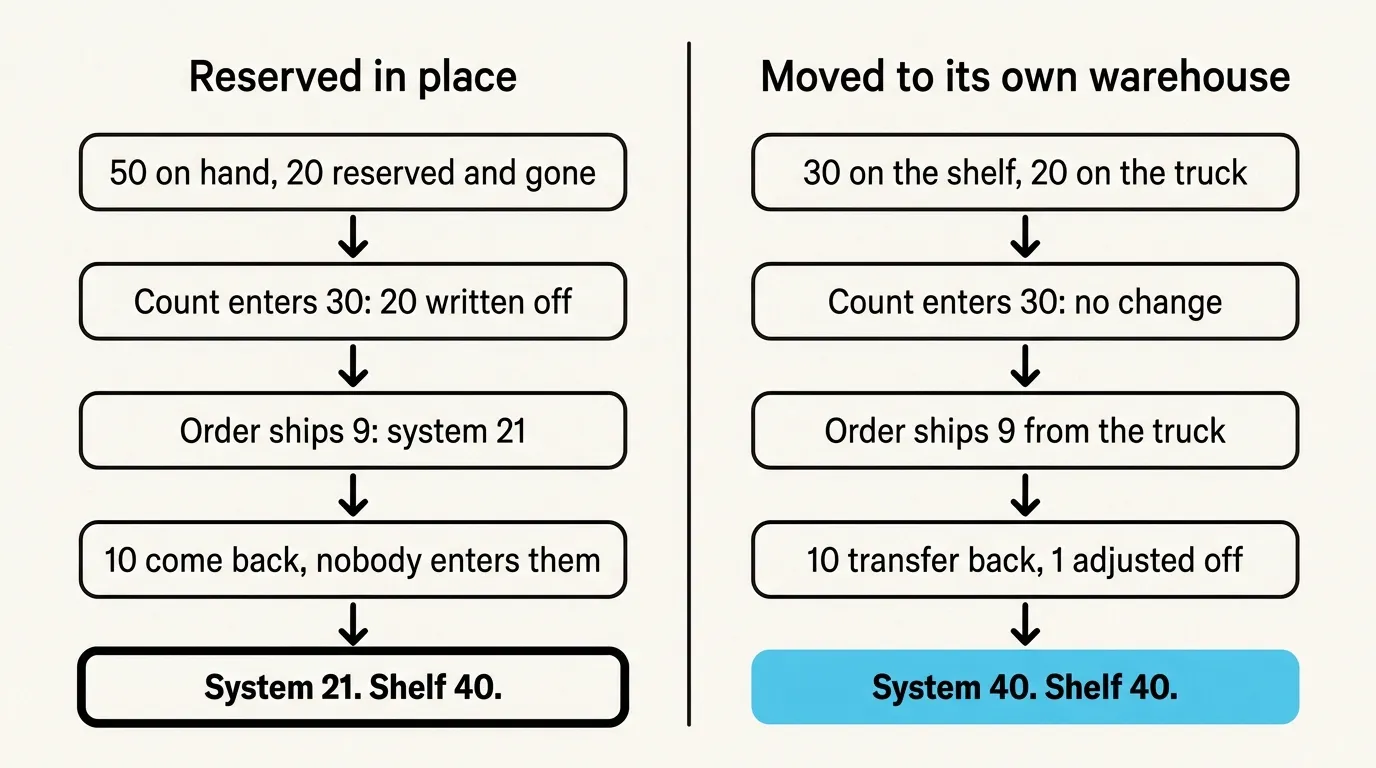
If the stock stays out across a count, it gets its own warehouse, one per truck, and the order goes on Per shipment invoicing, because the default invoices at approval. You transfer the 20 out, move the order’s line over, ship the 9 from there when the job closes, transfer 10 back and adjust off the 1. That’s a transfer each way on every job and there’s no one button for it. I wouldn’t do it for two SKUs. Under about $1M on one channel I wouldn’t do it at all, and Zoho Inventory or inFlow will hold you for a while.
SKU.io has no job record, so the sales order is the job, and out 20, back 10, sold 9 isn’t a report. You read it off the order, the transfers and the adjustment. A transfer can’t take units that are already allocated, so if the shelf has no spare you release the line first, and for that minute nothing is protecting them.
If you want to walk through it with your own jobs, book a demo.