Fix Amazon listings outside their min/max
Video chapters
0:00 Open the Amazon min/max tab · 0:17 Read the cards · 0:41 Problems grouped by cause · 1:00 Who set each limit · 1:21 Compare SKU.io and Amazon · 1:38 Preview a fix · 1:59 A held listing · 2:17 Held prices in the push history
A limit someone sets in Seller Central can leave a listing priced outside its own range, and Amazon then deactivates it. SKU.io reads every offer's minimum, maximum, and price back from Amazon each night, after each price push, and within minutes of Amazon reporting a pricing problem. The Amazon min/max tab lists every listing that's outside its limits, deactivated, or held by SKU.io, says who set each limit, and fixes them in bulk without changing your prices.
Before you begin
- Your Amazon channel needs its Amazon min/max settings. See Set Amazon min/max allowed prices.
- You need permission to edit integrations to run a fix or save an override. Without it, the tab is read-only.
Open the Amazon min/max tab
- Go to Apps & Integrations, open your Amazon channel, and choose Pricing.
- Open the Amazon min/max tab. Its badge counts the listings that need attention.
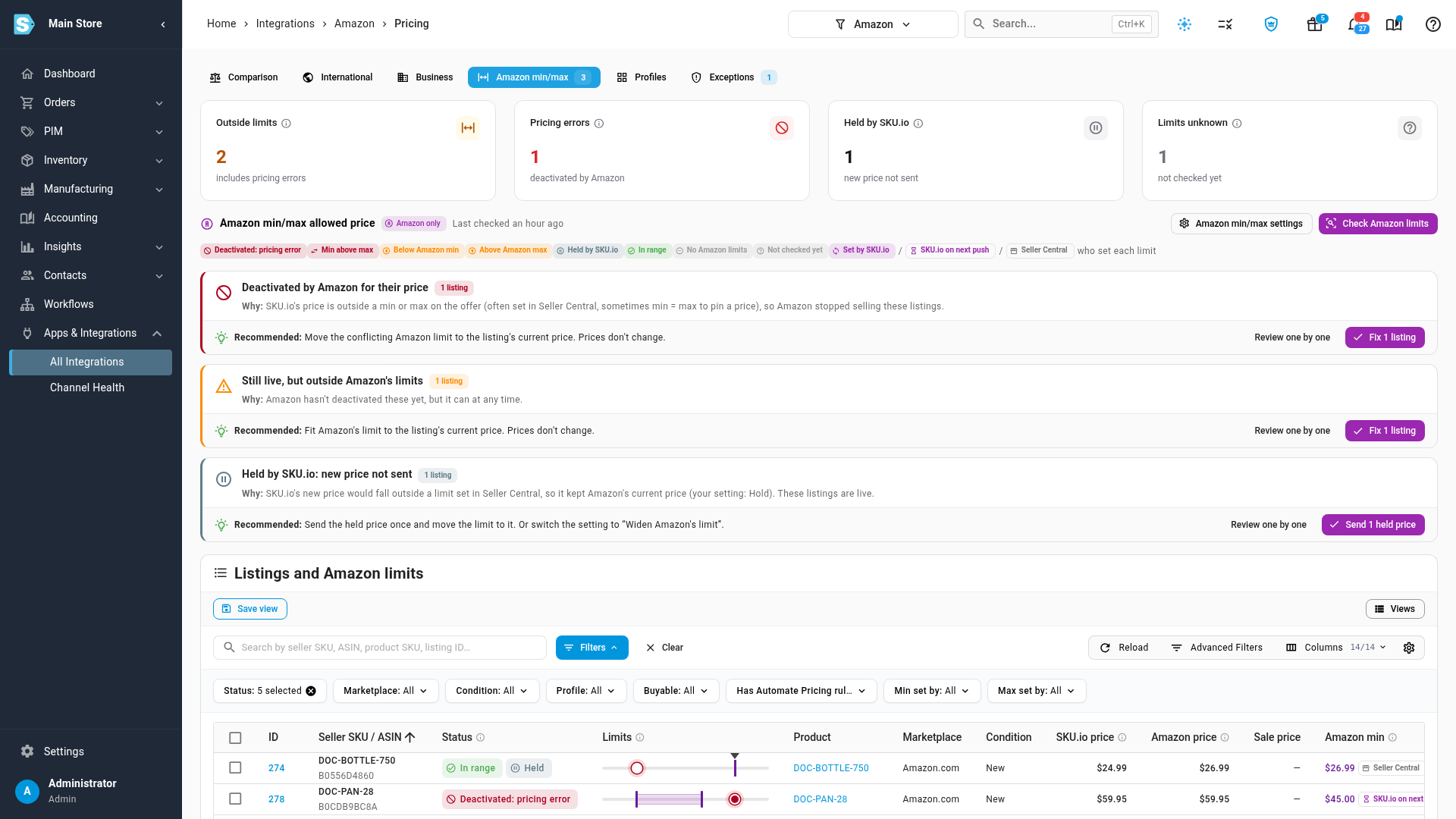
The four cards at the top give the answer first:
| Card | Counts |
|---|---|
| Outside limits | Listings priced outside Amazon's minimum or maximum, including the deactivated ones |
| Pricing errors | Listings Amazon has deactivated for their price |
| Held by SKU.io | Listings whose new price SKU.io didn't send, because it fell outside a limit set in Seller Central |
| Limits unknown | Listings SKU.io hasn't read from Amazon yet |
Below them, Last checked says when SKU.io last read Amazon. Check Amazon limits reads them again now, as a background job you can follow in the job tray. Amazon min/max settings opens the settings card.
Read the problem groups
The legend under the cards explains every status chip, and that the Set by SKU.io, SKU.io on next push and Seller Central chips say who set each limit. Under it, the tab groups the problems by cause. Each group says why it happened and recommends one fix:
| Group | Why | Recommended fix |
|---|---|---|
| Deactivated by Amazon for their price | The price is outside a minimum or maximum on the offer, often set in Seller Central, sometimes with min = max to pin a price. Amazon stopped selling these listings. | Move the conflicting limit to the listing's current price. |
| Still live, but outside Amazon's limits | Amazon hasn't deactivated these yet, but it can at any time. | Fit Amazon's limit to the listing's current price. |
| Held by SKU.io: new price not sent | SKU.io's new price would fall outside a limit set in Seller Central, so it kept Amazon's current price. These listings are live. | Send the held price once and move the limit to it, or switch your setting to Widen Amazon's limit. |
| Amazon's minimum is above its maximum | No price can be valid. Usually two people or tools edited the limits. | Review each one: remove one limit, or save an override with the range you want. |
Click the group's button, for example Fix 1 listing, to run its recommended fix on every listing in the group, or Review one by one to filter the table to them.
Read the table
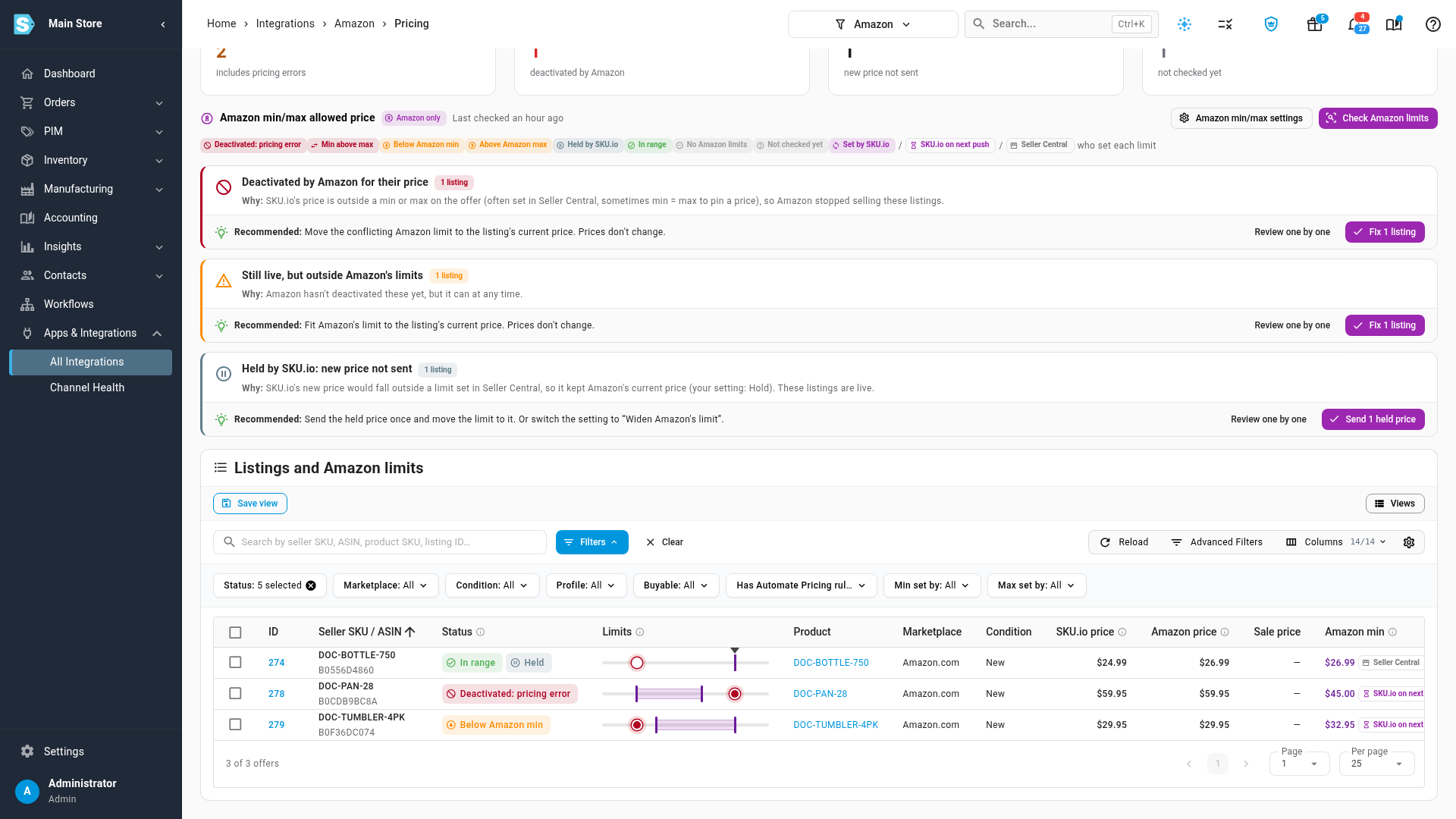
Listings and Amazon limits has one row per offer, filtered by default to listings that need attention. Change the Status filter to All statuses to see every offer.
- SKU.io price is the price SKU.io sends (or wanted to send). Amazon price is the live price on Amazon.
- Amazon min and Amazon max carry a chip saying who set the limit:
- Seller Central: set outside SKU.io. SKU.io only reads it.
- Set by SKU.io: SKU.io published it, and Amazon holds that value.
- SKU.io on next push: your settings now manage this limit, but Amazon still holds the old value until the next price push replaces it.
- Limits, next to Status, draws the price on Amazon's range: the purple band is the allowed range, and a red dot is a price outside it.
- Last held push shows the price SKU.io held back, and when.
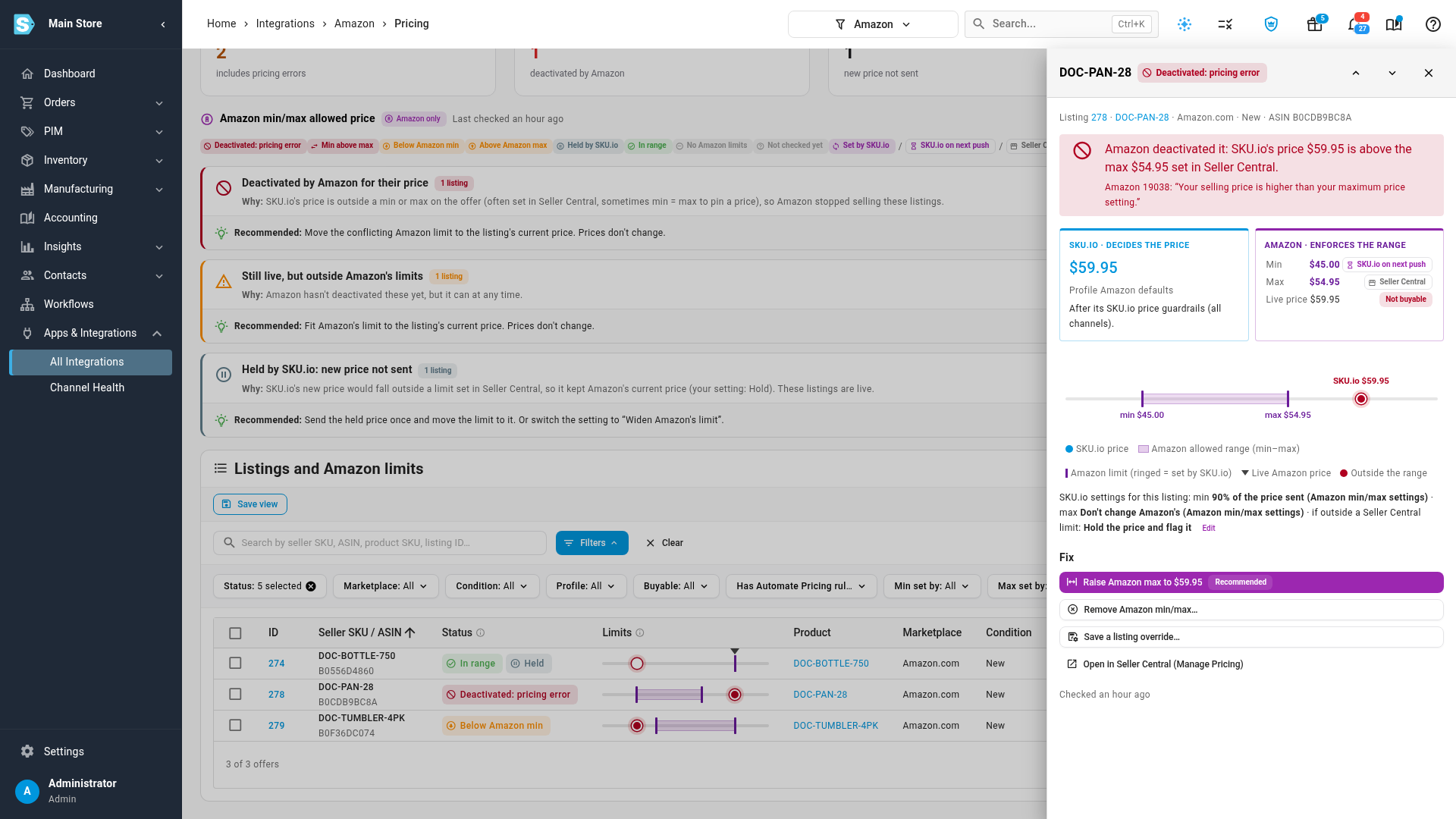
Click a row to open its comparison drawer. The left half, SKU.io · decides the price, shows the price and the profile and guardrails it came from. The right half, Amazon · enforces the range, shows Amazon's minimum, maximum and live price, with who set each one. Under them, a sentence explains the problem in plain words, with Amazon's own message and code when it deactivated the listing, and a line lists the settings that apply to this listing and where each comes from.
Fix listings
Each fix sends a dedicated update to Amazon for the selected listings and shows you exactly what will be sent first. None of them changes your SKU.io price guardrails.
-
Tick the listings in the table, or click a group's fix button. From a drawer, use its Fix menu for that one listing.
-
Open Fix and choose an action:
Action What it does Raise max / lower min to the current price Sends only the limit that conflicts, set to the price Amazon has for the listing now. The price itself doesn't change. Apply SKU.io's Amazon min/max settings Publishes the minimum and maximum your settings work out for each listing. Offered only when at least one limit is managed by SKU.io. Remove Amazon min/max Deletes the limits you choose on Amazon. Not available for the minimum on a listing that uses Automate Pricing. Send the held price Sends the price SKU.io held, once, and moves the conflicting limit to it. Save as override… Saves a listing exception, so the fix sticks on future pushes. -
Read the preview. It lists every listing with Price re-sent, the new Amazon min and Amazon max (an arrow shows a change, left means unchanged), and a Note when something is skipped. An action that can't run on a listing is disabled, with the reason in a tooltip.
-
Click the confirm button, for example Fix 1 listing. The fix runs as a background job in the job tray. When Amazon has processed it, SKU.io reads the listings back, and a fixed listing moves to In range. Amazon reactivates a deactivated listing once its price is back inside its limits.
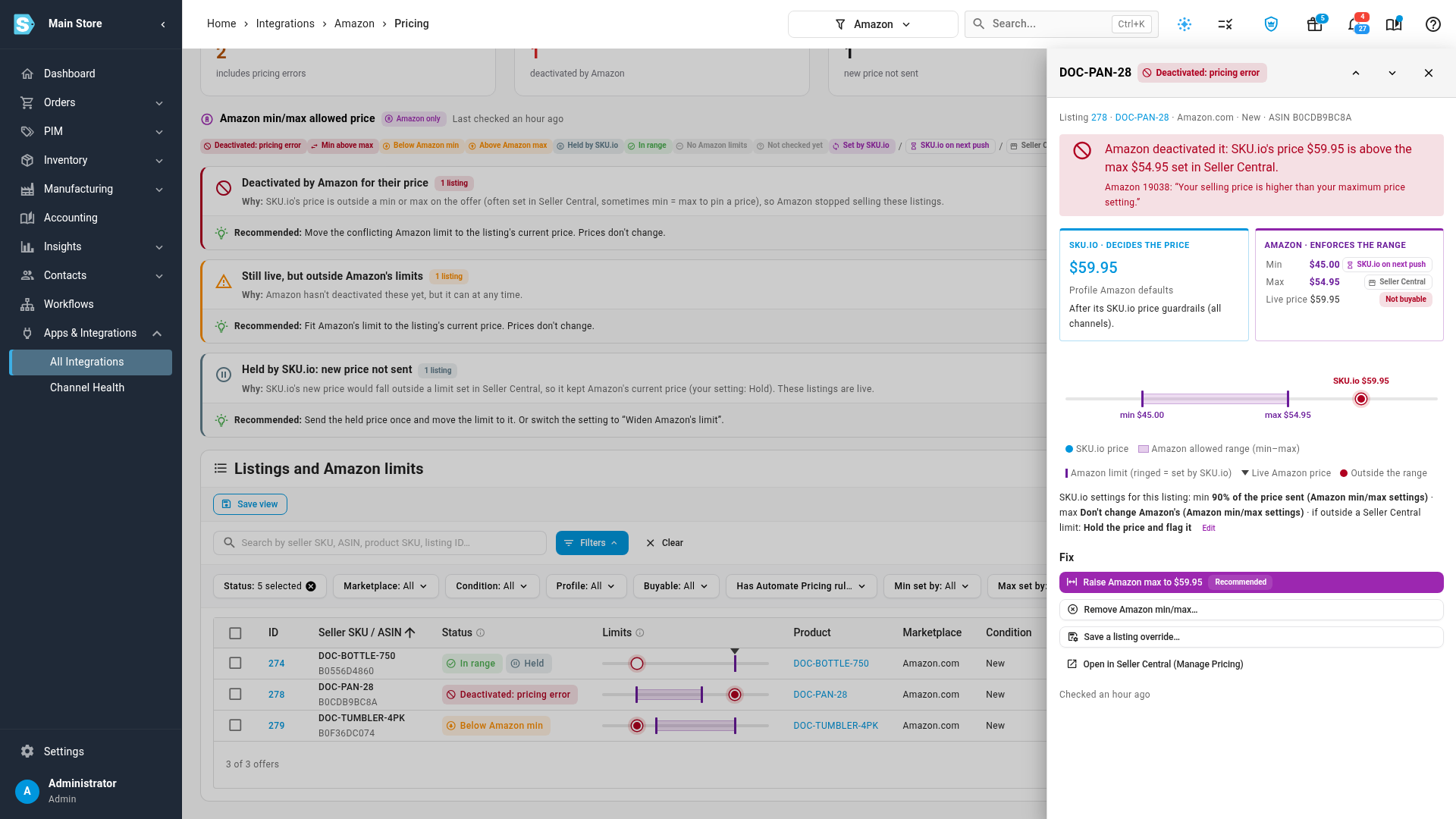
To fix a limit by hand instead, choose Open in Seller Central (Manage Pricing) from the drawer.
Check a single listing
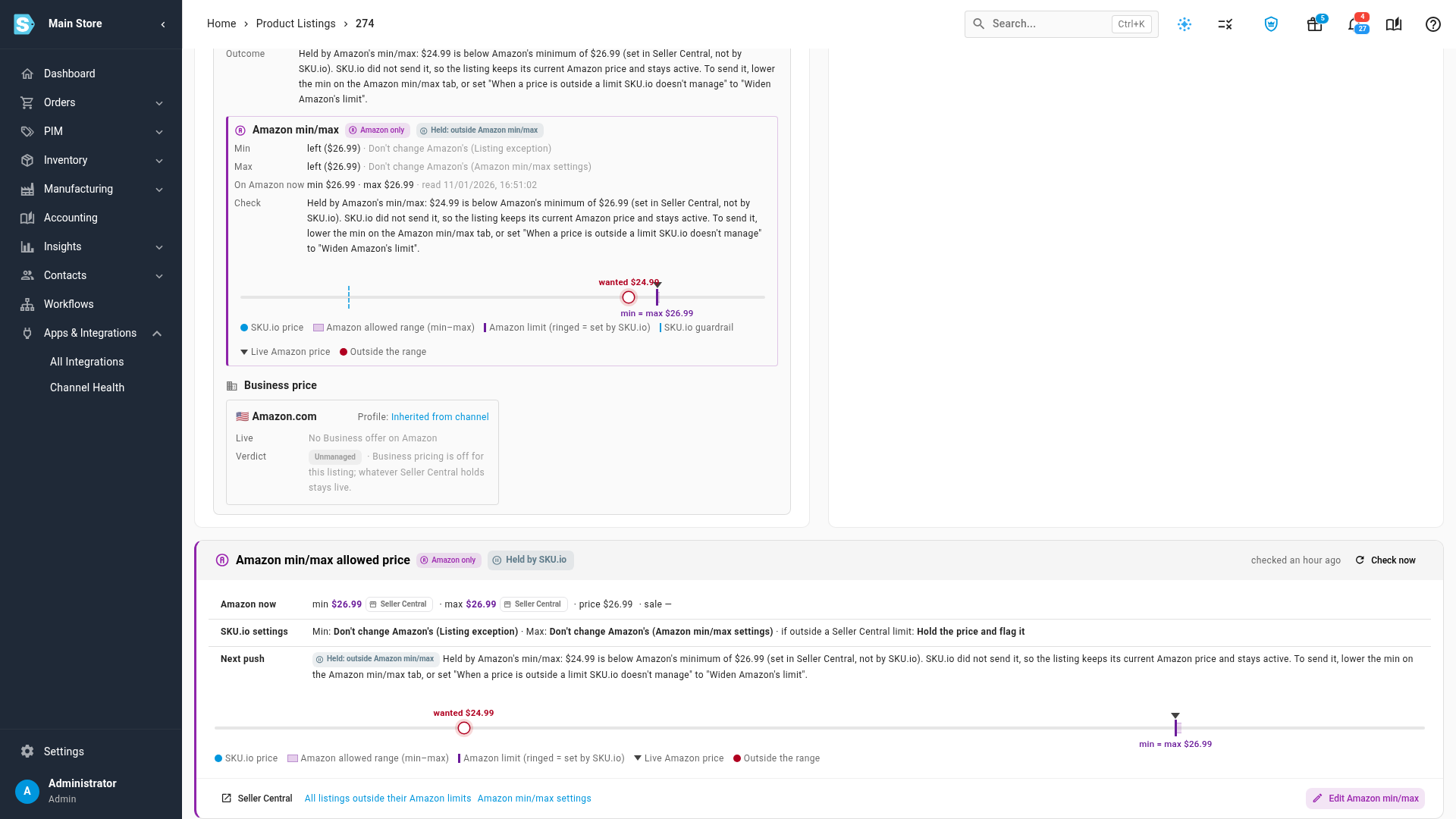
Every Amazon listing's page has an Amazon min/max allowed price card, tagged Amazon only:
- Amazon now: the minimum, maximum, price and sale price on Amazon, with who set each limit.
- SKU.io settings: the setting for each limit and where it comes from, for example Listing exception or Amazon min/max settings, and what happens on a conflict.
- Next push: what the next price push will do, and why, for example "Held by Amazon's min/max: $24.99 is below Amazon's minimum of $26.99 (set in Seller Central, not by SKU.io)."
Check now reads that listing from Amazon again, and Edit Amazon min/max opens its exception. The What the next push does panel on the same page tells the same story.
Find held prices in the push history
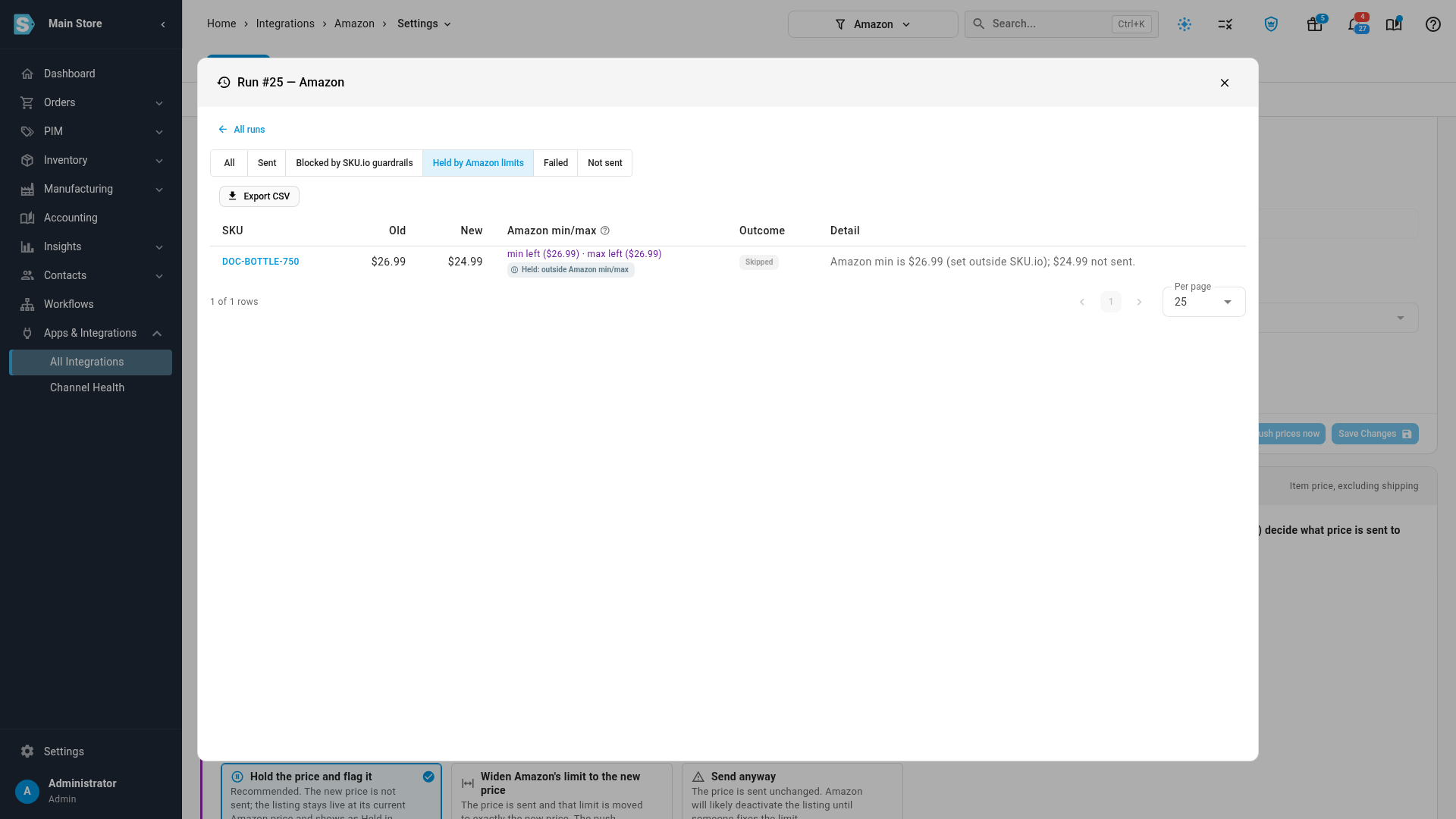
On the Pricing Sync tab, click View history, then Details on a run. Filter by Held by Amazon limits to see only the prices SKU.io held. A held line's outcome is Held: outside Amazon min/max, and its detail names the limit and both prices. The Amazon min/max column shows what each push did with Amazon's limits, for example "min $40.45 · max left ($59.95)".
Next steps
- Set Amazon min/max allowed prices
- Amazon min/max and SKU.io price guardrails
- Sync prices with your sales channels
Video transcript
When someone changes a limit in Seller Central, a listing can end up priced outside its own range. The min max tab, on the channel's Pricing page, lists every one of them in one place. Its badge counts the listings that need attention. The cards give the answer first. Outside limits counts listings priced outside Amazon's minimum or maximum. Pricing errors are the ones Amazon has already deactivated. Held by SKU.io counts new prices SKU.io didn't send, because they fell outside a Seller Central limit. Last checked says when SKU.io last read Amazon. Check Amazon limits reads them again. Below, the problems are grouped by cause. Each group says why, and recommends one fix. Deactivated listings usually need Amazon's limit moved to the listing's current price. Held listings can send the held price once, and move the limit to it. Review one by one filters the table to just that group. In the table, every Amazon min and max carries a chip saying who set it. Seller Central means it was set outside SKU.io. SKU.io on next push means your settings now manage it, and the next push replaces Amazon's value. Beside each status, a small bar draws the price on Amazon's range. A red dot is outside it. Click any row to open its comparison, side by side. The left half is the price SKU.io decided, after its guardrails. The right half is the range Amazon enforces. Here the price is above a maximum set in Seller Central, and Amazon's own message says so. The Fix list underneath has one recommended choice. Raise max or lower min to the current price. The preview lists every listing, with its price sent again, unchanged, and the new Amazon limit. When you confirm, SKU.io sends only that change to Amazon, reads the listing back, and Amazon reactivates it. A held listing tells the same story on its own page, so open it from the table. Its Amazon min max card shows Amazon's limits right now, the SKU.io settings that apply, and what the next price push will do. Here the next push holds the price, because it's below a minimum set in Seller Central. To find every held price, open the push history with View history, and then open a run's details. Held by Amazon limits filters the run to the prices SKU.io kept back, with the limit and both prices.