Amazon min/max and SKU.io price guardrails
SKU.io has two sets of price limits for Amazon, and they do different jobs. SKU.io price guardrails decide what price SKU.io sends to every channel. Amazon min/max allowed prices are Amazon's own limits on each offer: Amazon deactivates a listing whose price falls outside them. Keeping the two apart means a rule like "never sell below MAP on any channel" can't change your Amazon offers by accident, and a range you set for Amazon can't change what other channels are sent.
The two side by side
| SKU.io price guardrails | Amazon min/max allowed price | |
|---|---|---|
| Applies to | Every sales channel SKU.io sends prices to | Amazon only |
| What it decides | The price SKU.io sends: a floor, a ceiling and a maximum change | The range Amazon allows on each offer: a minimum and a maximum |
| Who reads it | SKU.io, before anything leaves | Amazon. Outside the range, Amazon deactivates the listing. Automate Pricing only moves between the two. |
| Where you set it | Pricing Sync → Push prices to Amazon → SKU.io price guardrails (and the same section on any other channel) | Pricing Sync → Amazon min/max allowed price, or in Seller Central |
| Color and tag in the app | Blue, tagged All channels | Purple, tagged Amazon only |
| When a price breaks it | SKU.io moves the price to the limit or blocks the listing, depending on your setting | Amazon stops selling the listing until the price is back inside the range |
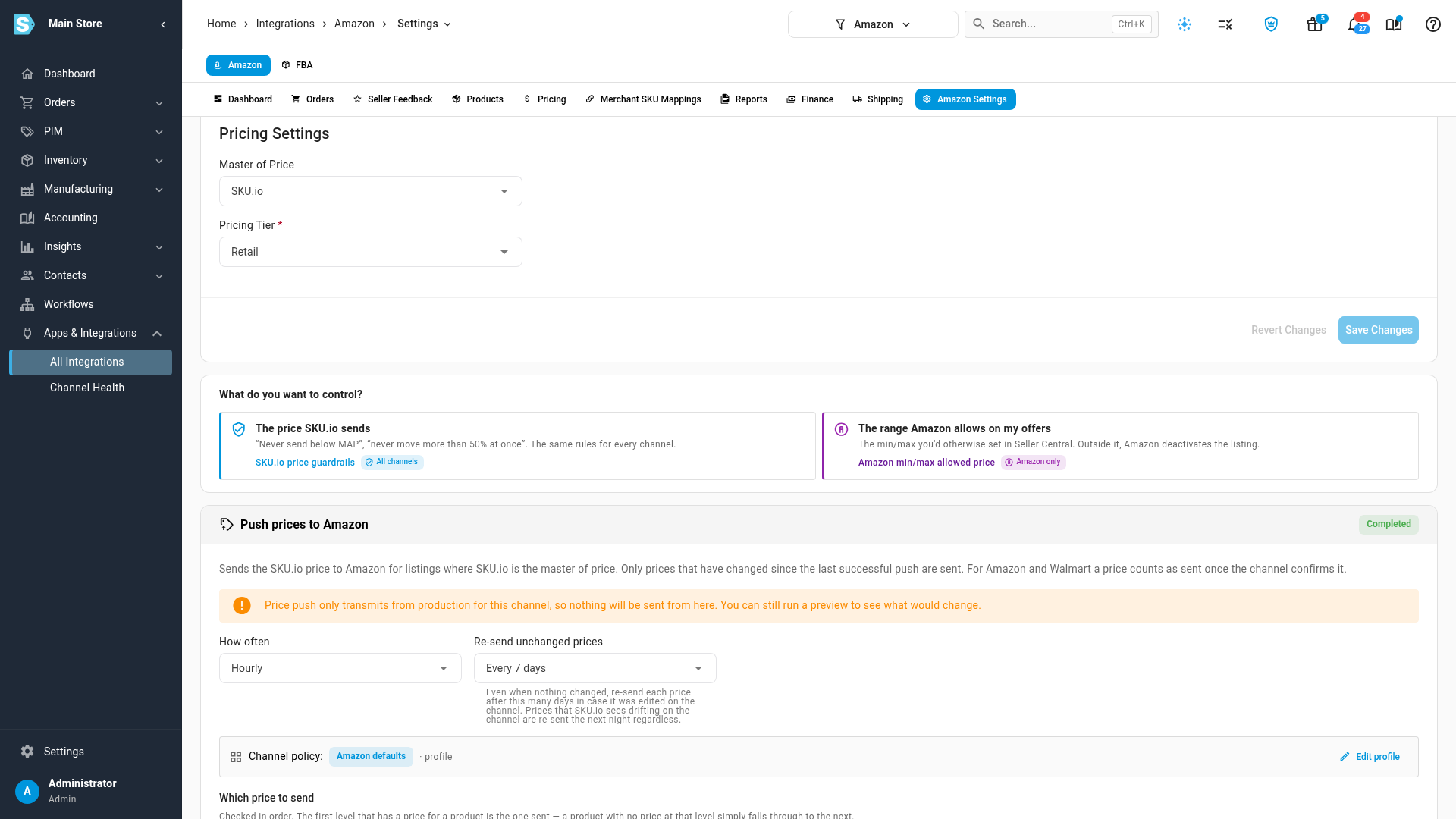
What you set where:
- To stop a bad price reaching any marketplace (below MAP, below a margin, or a sudden 50% drop), use the guardrails. See Sync prices with your sales channels.
- To control the minimum and maximum on your Amazon offers, the ones you could otherwise type into Seller Central, use Amazon min/max. See Set Amazon min/max allowed prices.
How a price goes out to Amazon
For each Amazon listing, a push runs these checks in order:
- The guardrails decide the price. SKU.io picks the price from your pricing levels, then the floor, ceiling and maximum change check it. A price the guardrails refuse never reaches Amazon, so nothing below happens for it.
- SKU.io works out the Amazon min and max it manages. If you've told SKU.io to manage a side, for example "minimum = 90% of the price sent", it works that value out from the final price. SKU.io never publishes a range that would exclude its own price. A managed minimum above the price is lowered to the price, and a managed maximum below it is raised to it.
- SKU.io checks the price against the limits it doesn't manage. For a side you left to Seller Central, SKU.io compares the price with the value it last read from Amazon. If the price is outside, your conflict setting decides: hold the price, widen Amazon's limit to the price, or send it anyway.
- SKU.io sends the price and the managed limits together. A side set to Don't change Amazon's is never sent, so Amazon keeps whatever Seller Central has.
The guardrails are never adjusted to fit Amazon. They decide the price, and the Amazon limits are fitted around it.
Why SKU.io reads Amazon's limits back
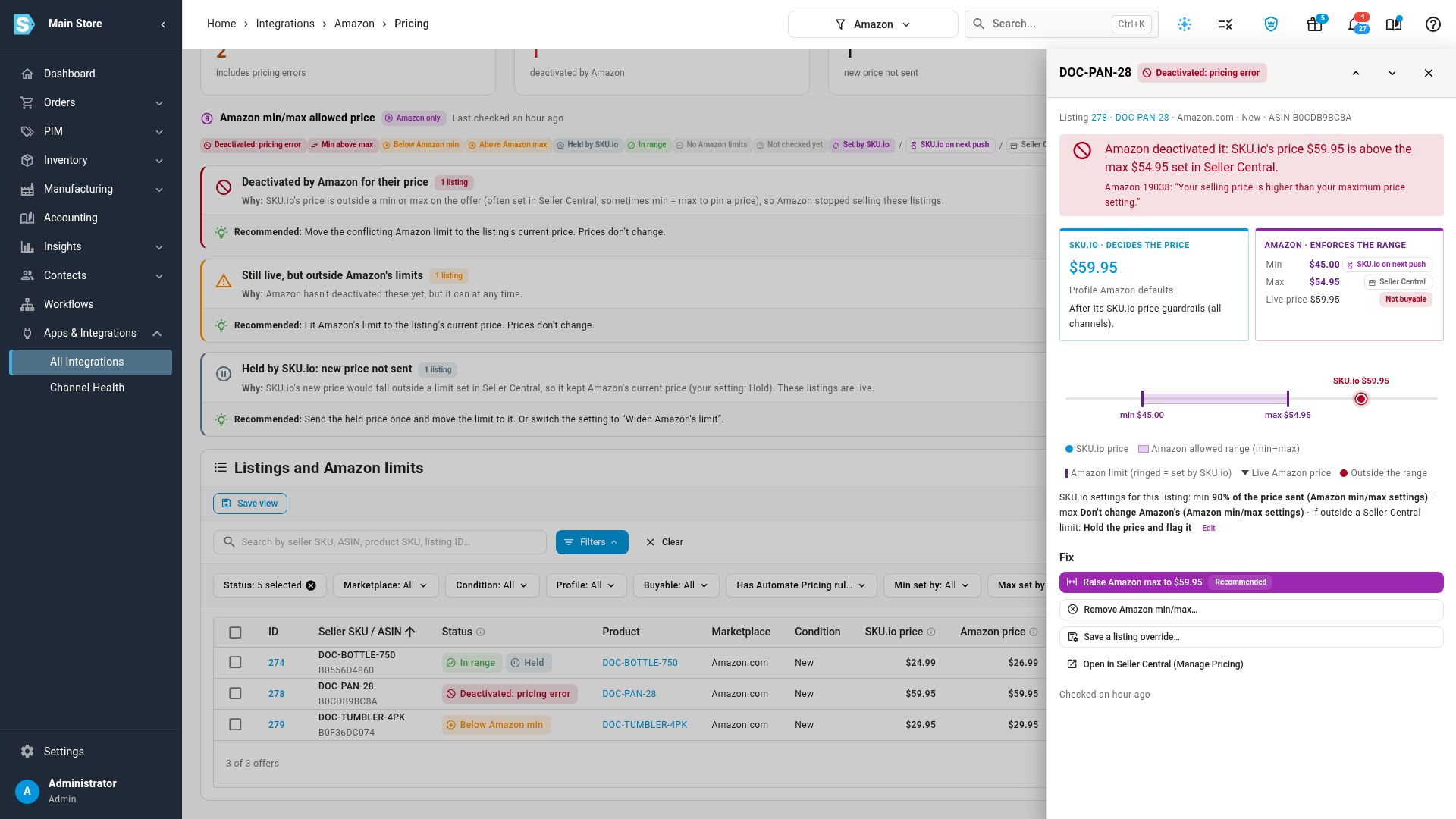
Someone can change a minimum or maximum in Seller Central at any time, and the price that was fine yesterday is then outside the range. SKU.io reads each offer's minimum, maximum, price and sale price back from Amazon every night, after each price push, and within minutes of Amazon reporting a pricing problem on a listing. The Amazon min/max tab on the Amazon Pricing page lists every listing that's outside its limits or deactivated, and fixes them in bulk. See Fix Amazon listings outside their min/max.
Common setups
| You want… | Guardrails | Amazon min/max |
|---|---|---|
| MAP on every channel, and Amazon's range left to Seller Central | Floor: your MAP pricing level | Both sides Don't change Amazon's, conflict Hold |
| Amazon Automate Pricing to move within 90%–125% of your price | Whatever you use on other channels | Min 90% of the price sent, max 125% of the price sent, plus your Automate Pricing rule |
| The guardrail floor and ceiling published to Amazon as its min and max | Floor and ceiling as you like | Min Use the SKU.io guardrail floor, max Use the SKU.io guardrail ceiling |
| No minimum or maximum on Amazon at all | Whatever you use on other channels | Both sides Remove from Amazon |
If your channel used guardrails to set Amazon's minimum and maximum before these settings existed, SKU.io moved that behaviour into the Amazon min/max card as Use the SKU.io guardrail floor and Use the SKU.io guardrail ceiling, with Send anyway. Nothing your channel sends changed.
Next steps
- Set Amazon min/max allowed prices
- Fix Amazon listings outside their min/max
- Sync prices with your sales channels
Video transcript
SKU.io has two sets of price limits for Amazon, and they do different jobs. Open the channel's settings first. Then choose the Pricing Sync tab, near the middle of the row. The first question on the page is what you want to control. On the left, in blue, is the price SKU.io sends. These are your price guardrails, and they apply to every sales channel. A floor such as your minimum advertised price, a ceiling, and a maximum change between pushes. They decide what price leaves SKU.io, and they never change Amazon's limits. On the right, in purple, is the range Amazon allows on your offers. It's the minimum and maximum you could otherwise set in Seller Central, and it's Amazon only. Amazon deactivates a listing priced outside it, and Automate Pricing only moves between the two. To see both on one listing, open the Pricing page and its min max tab. Then click any row in the table to open its comparison. The left half shows the price SKU.io decided, after its guardrails. The right half shows the range Amazon enforces, and who set each limit. Here the price is above a maximum set in Seller Central, so Amazon deactivated the listing. So, to keep a bad price off every channel, use the guardrails. To control the range on the offers themselves, use the min max settings.