Buy shipping labels with Shiptheory
A connected Shiptheory account can buy the labels in a label batch, on the UK carriers in your Shiptheory account (Royal Mail, DPD, Evri, Parcelforce and the rest). Shiptheory works a little differently from the other label accounts: it gives no price until a label is booked, it can't void a label for another app, and it has no SCAN forms. This guide covers what that changes.
Before you begin
- Shiptheory is connected and its delivery services are synced. See Connect Shiptheory. If Service lists no services, open the connection's Shipping Methods tab and click Sync from Shiptheory.
- The orders ship from one of your own warehouses, as for every label batch. You don't need to route the warehouse to Shiptheory on its Warehouses tab: that routing sends whole fulfillment orders to Shiptheory, while a batch only buys the labels.
- Your role has the Fulfillment Orders Ship permission (
fulfillment_orders.ship).
Until a label account is connected, Label Batches shows a card for each provider. Shiptheory's card says No SCAN forms · Fixed service only.
How Shiptheory labels differ
| Other label accounts | Shiptheory | |
|---|---|---|
| Service rule | Cheapest or Fixed service | Fixed service only. Shiptheory quotes no price before booking, so Cheapest has nothing to compare and leaves it out. |
| Rate before you buy | A price | Priced after purchase |
| Label cost | The quoted price | What Shiptheory reports once the label is booked, or Not reported |
| Voiding a label | Void label voids it and reopens the order | Not supported. Cancel the label in Shiptheory or with the carrier. |
| SCAN forms | EasyPost and Shippo only | None |
| Label format | PDF 4×6 or ZPL | PDF only |
Set Shiptheory as your default
So every new batch starts on Shiptheory:
- Go to Settings → Fulfillment → Shipping Labels.
- Under Label accounts & service rule, choose Fixed service.
- In Label account, choose your Shiptheory account. In Service, choose the delivery service to book every order with, for example Royal Mail · Tracked 48. The note under it says Shiptheory doesn't quote prices.
- Click Save Changes.
Under Cheapest rate, your Shiptheory account is listed as No prices before booking — use Fixed service.
Buy a batch of labels
-
Go to Orders → Fulfillments, and click the Label Batches tab.
-
Click New batch, choose the Warehouse the orders ship from, and click Create batch & get rates.
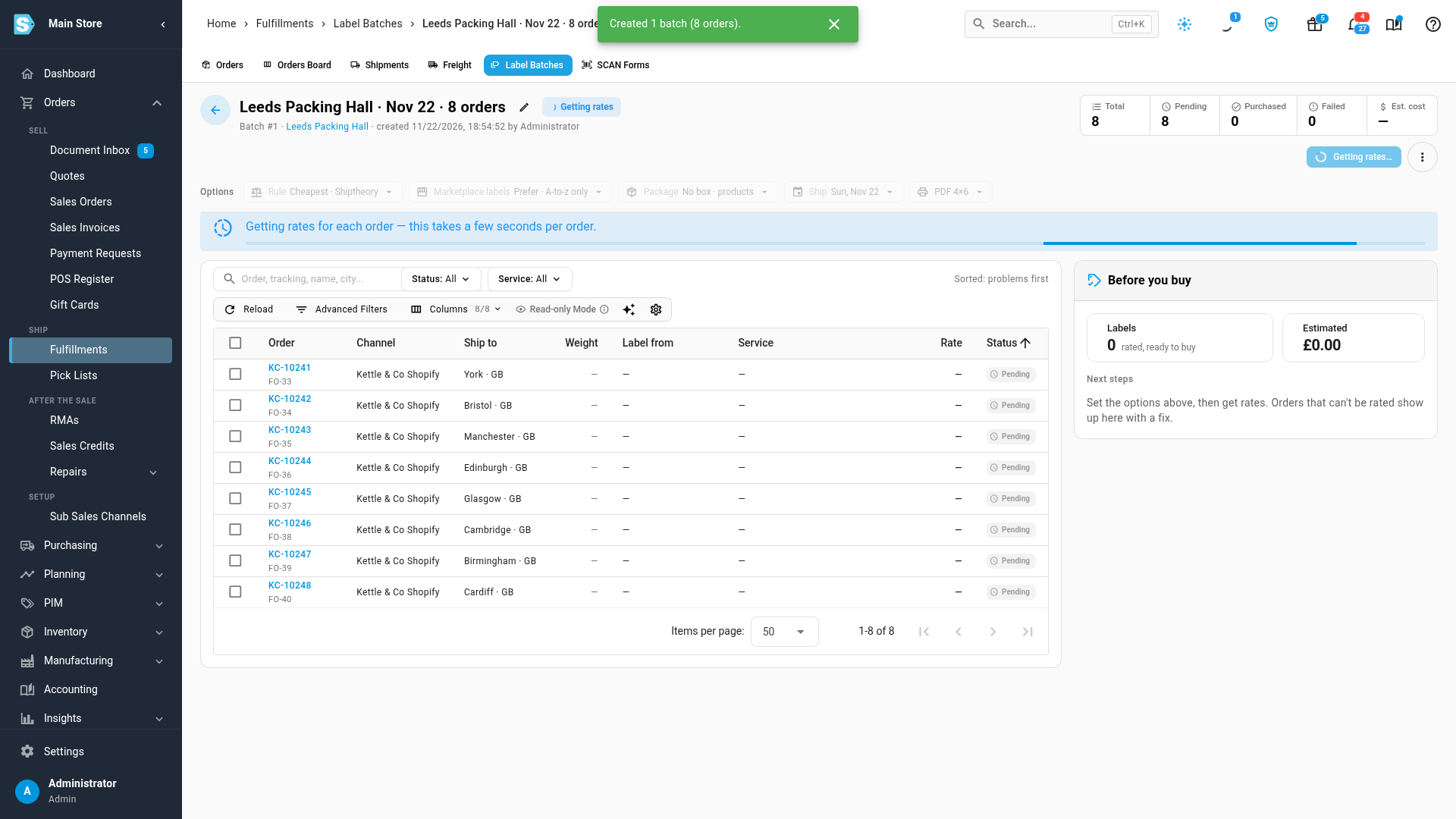
-
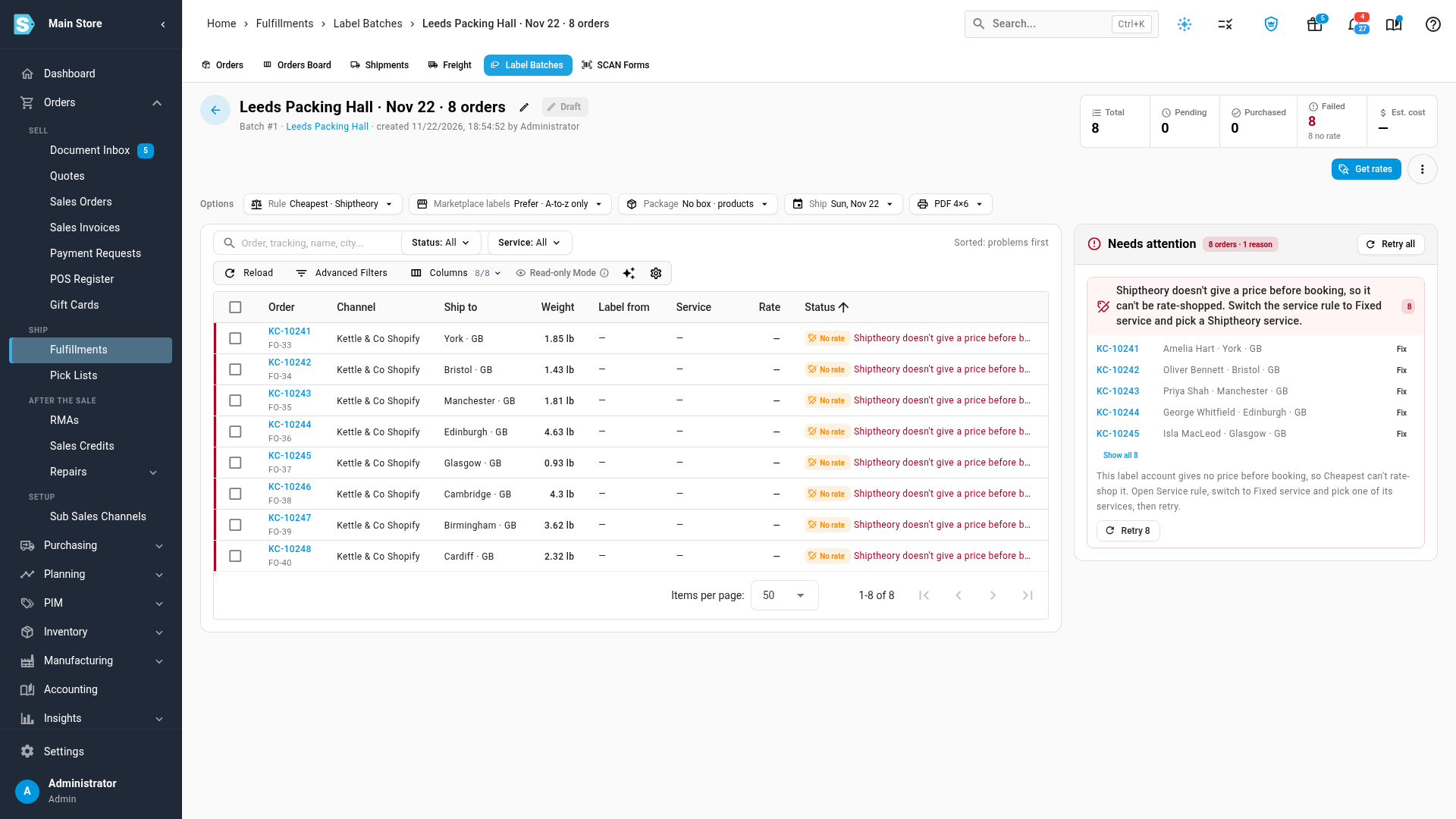
If the batch is on the Cheapest rule, its orders land under Needs attention, with the reason "Shiptheory doesn't give a price before booking, so it can't be rate-shopped". Switch the batch to Fixed service:
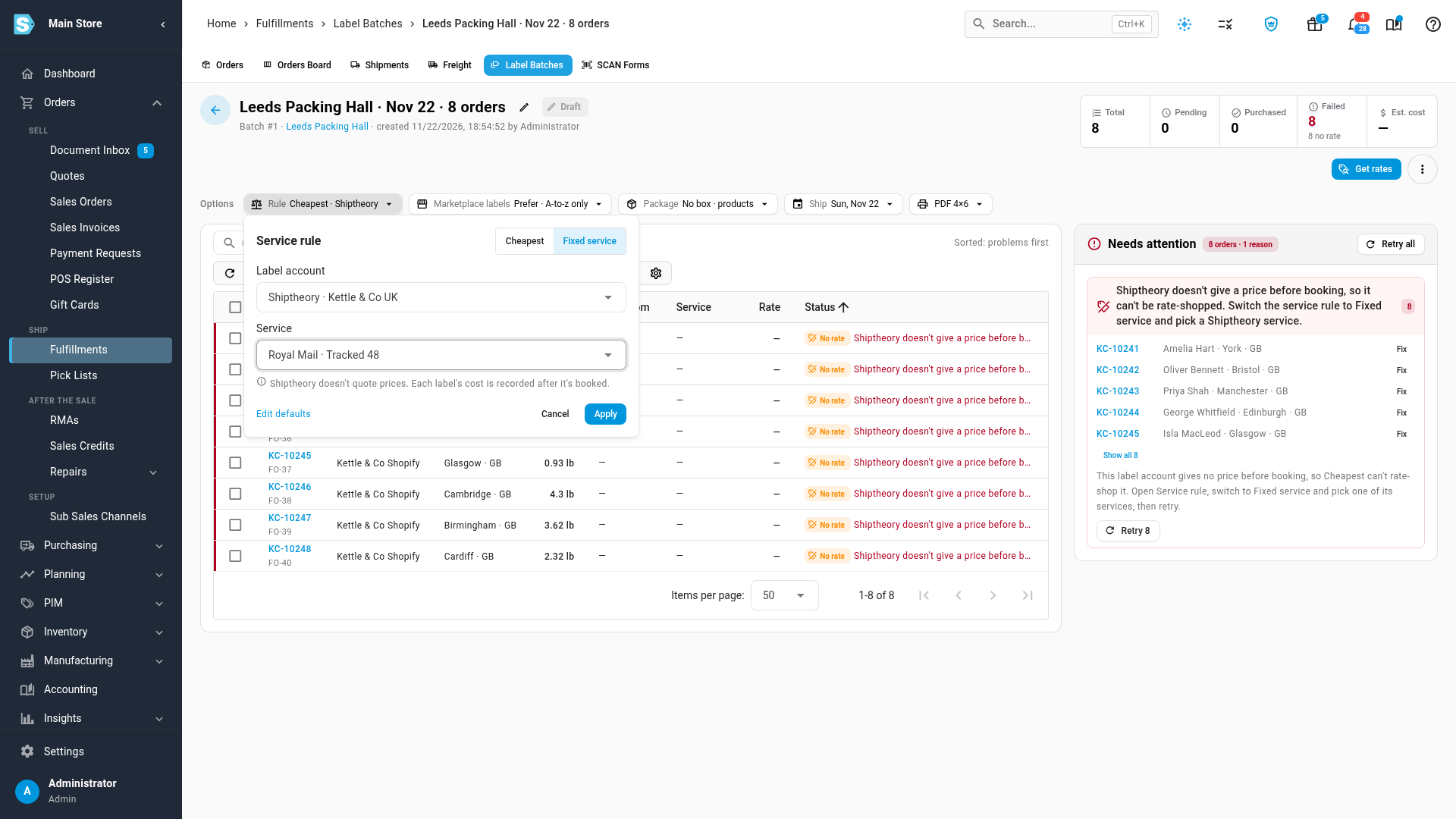
- Click the Rule option above the orders, and choose Fixed service.
- Choose your Shiptheory account in Label account and a delivery service in Service.
- Click Apply, then click Get rates.
-
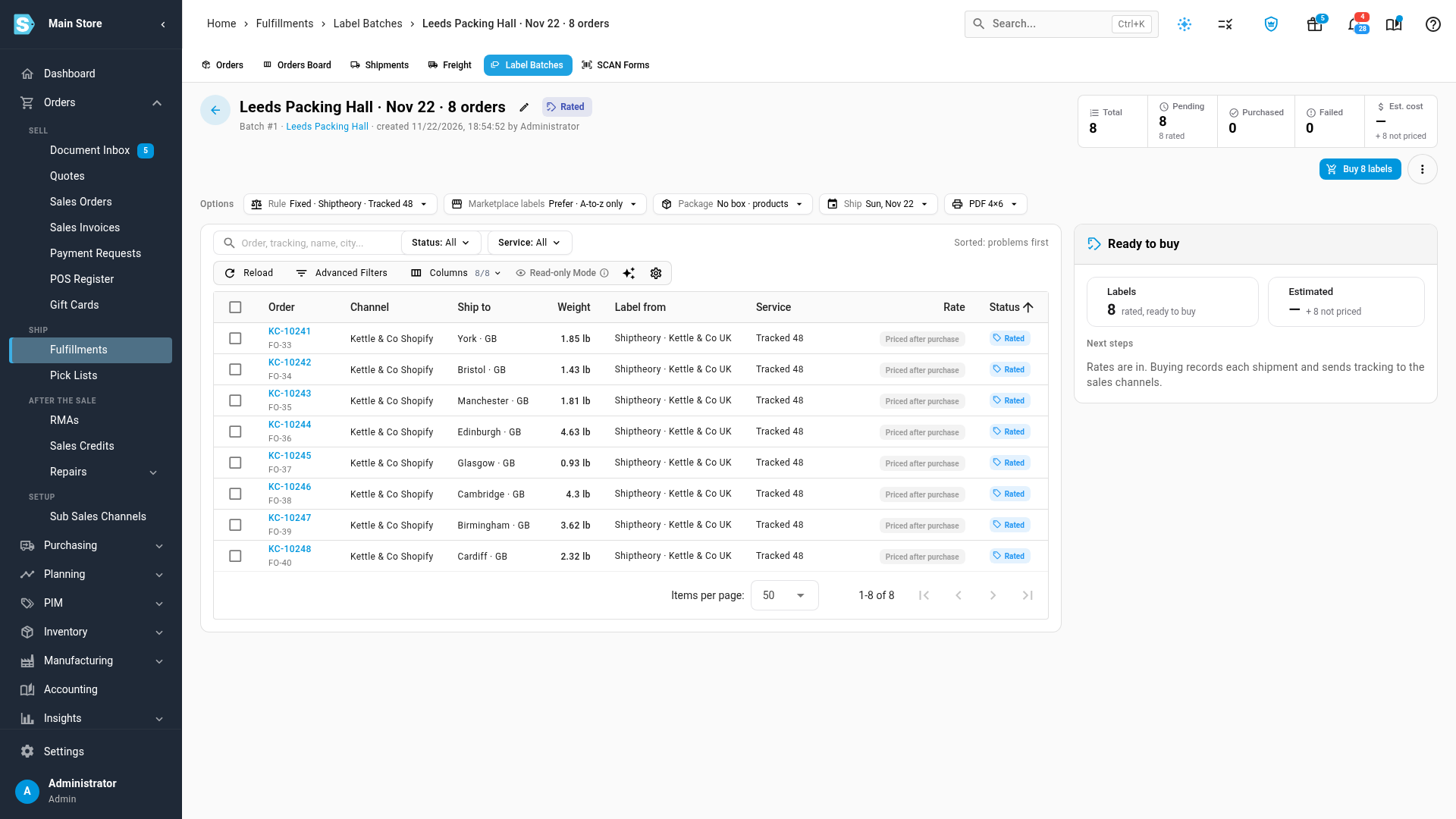
Check the rates. Each order shows Priced after purchase instead of a price, and the estimated cost leaves those labels out.
-
Click Buy labels. The confirmation says the labels have no price before booking and that their cost is recorded once bought. Click Buy labels in the confirmation.
-
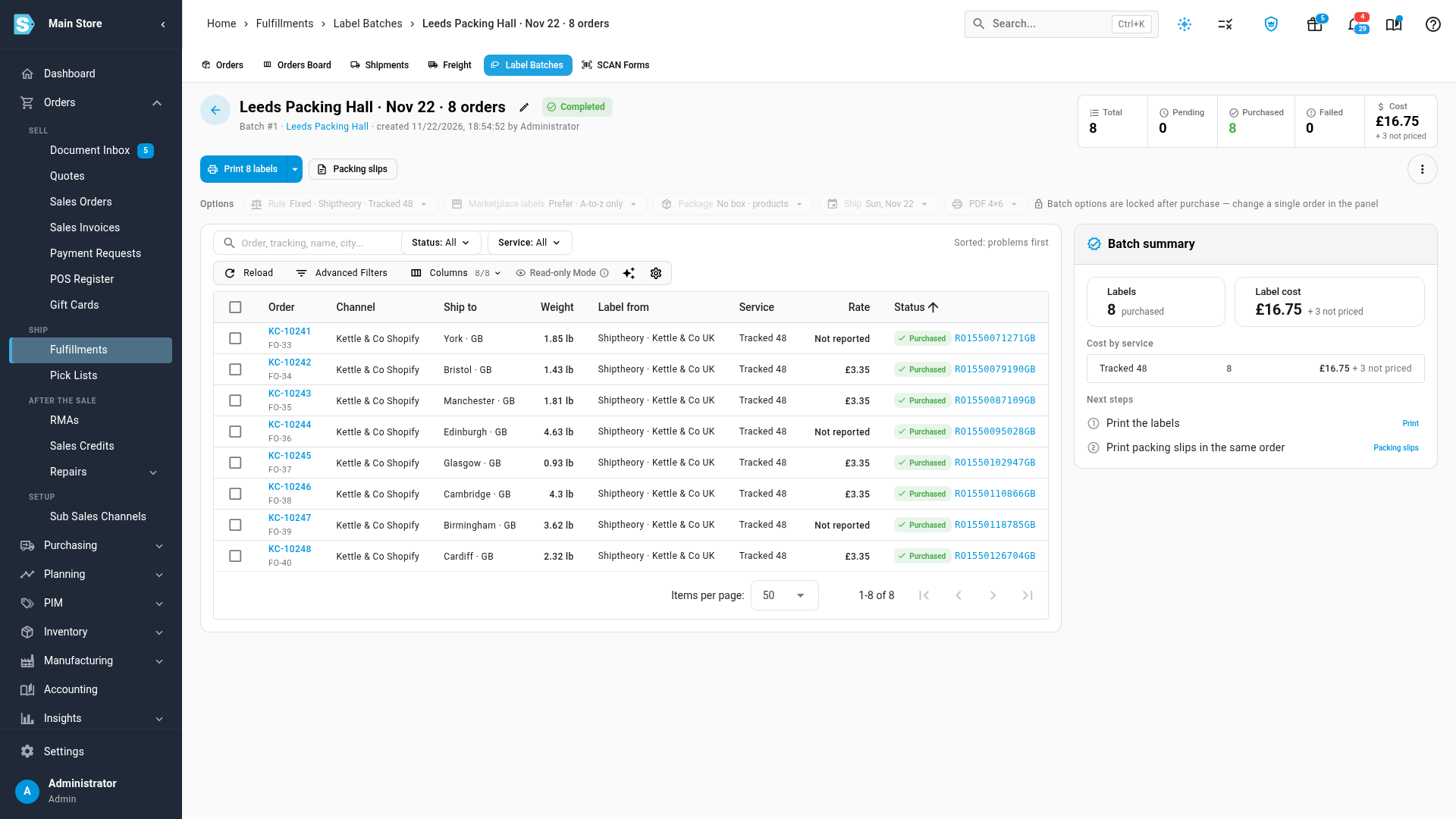
Wait for the batch to show Completed. Each order has its tracking number, and Rate shows the cost Shiptheory reported for its label. Batch summary adds them up, with any label Shiptheory didn't price shown as not priced.
-
Click Print labels, and print them as usual.
Buying a Shiptheory label records the shipment, moves the inventory out of the warehouse, and sends the tracking number to the sales channel the order came from, as it does for any live label account.
Large batches take a little longer
Shiptheory accepts about one request a second, so SKU.io books one Shiptheory label at a time and waits between them. A batch of 100 labels takes a few minutes. Labels on other accounts in the same batch aren't held up.
If Shiptheory stops answering partway through, the labels it already booked stay bought, and SKU.io finishes the rest in the background. A booking is never sent twice: before it books an order again, SKU.io checks whether Shiptheory already has it.
Labels with Not reported
Not reported means Shiptheory booked the label but didn't tell SKU.io what it cost. That happens with carriers that don't return a price to Shiptheory. The label is bought and printable, and the batch total leaves it out. Check the cost in Shiptheory or on the carrier's invoice.
Cancel a Shiptheory label
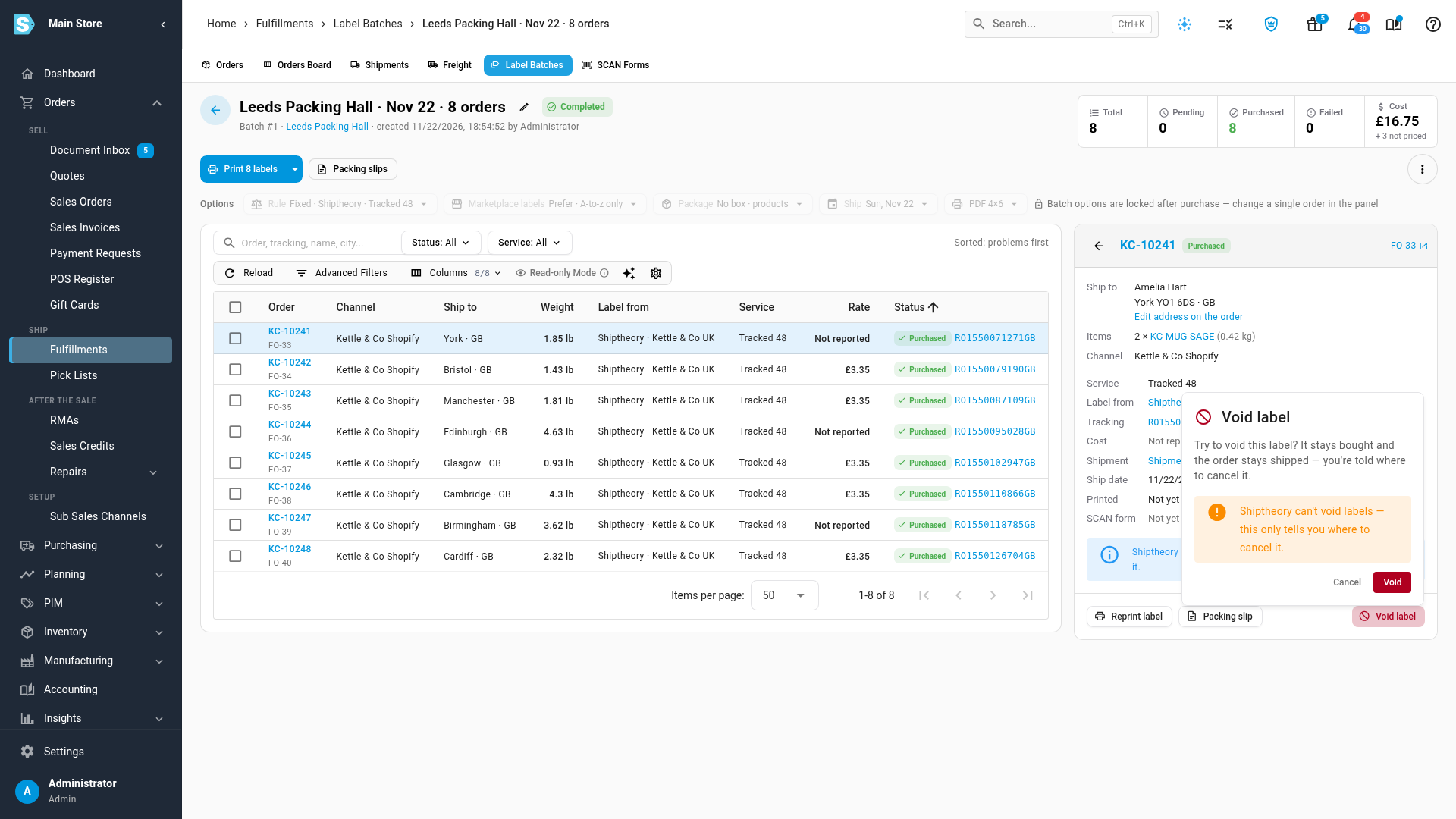
Shiptheory can't void a label for another app. In a batch, Void label on a Shiptheory order says so instead of voiding:
- Click the order in the batch, then click Void label.
- The confirmation says the label stays bought, the order stays shipped, and Shiptheory can't void labels. Click Cancel to close it.
To cancel the label for real, cancel the shipment in Shiptheory, or ask the carrier for a refund. The order stays shipped in SKU.io.
Next steps
Video transcript
Shiptheory can buy your batch labels on the UK carriers in your Shiptheory account. To start, open Orders, then choose Fulfillments in the menu. At the top of the page, click the Label Batches tab, which lists every batch you have made so far. Click New batch to open the form. In Warehouse, type a few letters of the warehouse your orders ship from, and pick it from the list. The green badge shows how many open orders match, so you know what goes into the batch. Keep Get rates right after creating turned on, so rating starts straight away. Then click Create batch and get rates. Shiptheory gives no price until a label is booked, so the Cheapest rule has nothing to compare. These orders land under Needs attention, with the fix spelled out. Shiptheory labels always use the Fixed service rule. Above the orders, click Rule to change how the batch picks a carrier. At the top of the panel, choose Fixed service. In Label account, pick the Shiptheory account you want these labels bought on, from the list. Then, in Service, pick the delivery service for every order in the batch. The note below says Shiptheory doesn't quote prices, and each label's cost is recorded after it's booked. Click Apply to save the rule for this batch. The batch now says its options changed, and its rates are out of date. Click Get rates, and every order is rated again on the Shiptheory service. Every order now has a rate, shown as Priced after purchase. The batch total counts these labels without a price, and fills in the cost once they're booked. When the rates look right, click Buy labels at the top right of the batch. The confirmation says these labels have no price before booking. Click Buy labels again in the confirmation to start buying. Shiptheory accepts about one request a second, so the labels are booked one at a time. Each booking waits for Shiptheory to confirm it, and then its row shows a tracking number. A batch of a few hundred labels takes several minutes. You can leave the page while it runs, and the job tray keeps count. When the last label is booked, the batch shows Completed. When the batch completes, every order has its tracking number. The rate column now shows what Shiptheory charged for each label. If Shiptheory reports no cost for a label, it shows Not reported. Shiptheory can't void labels for other apps. To see what happens, click an order in the batch, and then click Void label in the panel. The confirmation says the label stays bought, and the order stays shipped. To cancel a label, cancel it in Shiptheory, or with the carrier.