Set up sub sales channels
A sub sales channel splits one sales channel into finer buckets. Amazon orders, for example, divide into FBA and MFN, and a Shopify store can separate its point-of-sale orders from its web orders. Every order still belongs to its sales channel, and the sub-channel adds a second label you can filter, report, and post to the books by.
Before you begin
- You need the sales channel permissions to view, create, or update sales channels.
- The sales channel must already exist, either a connected app or one of your own channels.
How sub-channels get created
Some channels create sub-channels for you as their orders import, and fill in the External Identifier so later orders land in the same one:
| Channel | Sub-channels it creates |
|---|---|
| Amazon | FBA and MFN, from how each order is fulfilled |
| Shopify | One per order source, such as the online store or point of sale |
| Faire | One per order source, such as marketplace orders and Faire Direct orders |
| Square | Square POS, Square Online, and Square Invoices |
You can also create your own, for any sales channel, and pick them on orders yourself.
Create a sub sales channel
-
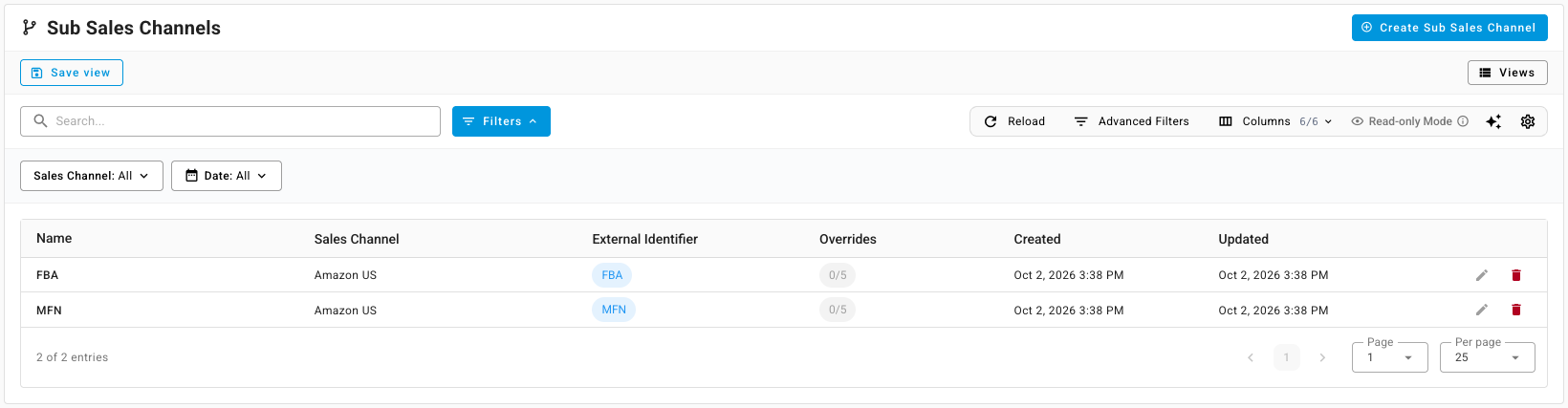
Go to Orders → Sub Sales Channels. The list shows each sub-channel, its sales channel, its external identifier, and how many accounting overrides it has.
-
Click Create Sub Sales Channel.
-
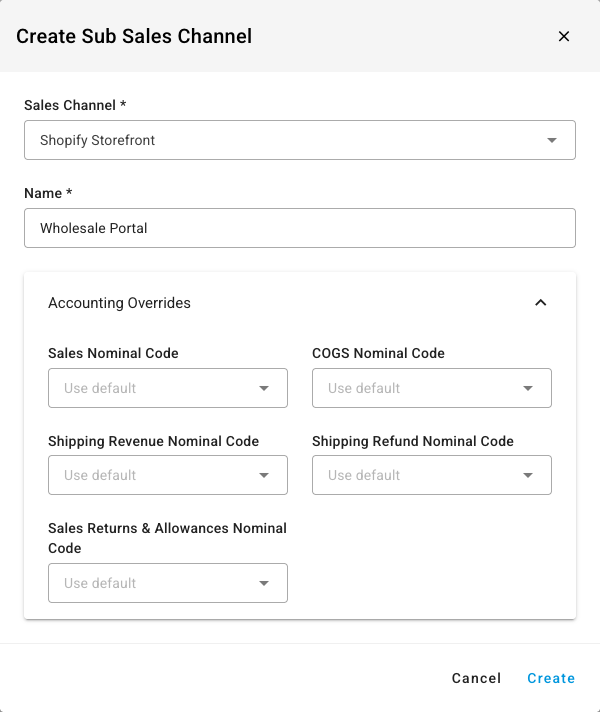
Pick the Sales Channel it belongs to.
-
Type a Name, such as Wholesale Portal.
-
To post this sub-channel's sales to different accounts, open Accounting Overrides and pick any of Sales Nominal Code, COGS Nominal Code, Shipping Revenue Nominal Code, Shipping Refund Nominal Code, and Sales Returns & Allowances Nominal Code. A field left on Use default follows the sales channel's own accounts.
-
Click Create.
To change one later, click its edit icon in the list. A sub-channel a channel created for you shows its External Identifier as read-only.
Put orders in a sub-channel
- Orders from a connected channel get their sub-channel from the channel, as in the table above. On these orders the Sub Channel field is locked.
- Orders you create in SKU.io: open the sales order, edit its details, and pick the Sub Channel. The list offers the sub-channels of the order's own sales channel.
- Imported spreadsheets: fill the Sub Sales Channel column when you import sales orders.

Use sub-channels
- Filter orders. On the Sales Orders list, add the Sub Channel filter or show the Sub Channel column.
- Report. The Financial Summaries and Profitability reports can group by Sub Sales Channel.
- Post to the books. A sub-channel's overrides win over its sales channel's accounts for the orders in it. See Use different accounts for each sales channel.
Next steps
- How channel orders sync — how imported orders pick up a sub-channel.
- Connect more than one store or account — when a separate connection fits better than a sub-channel.