Ship Walmart orders from a 3PL on Ship with Walmart labels
When a 3PL ships your Walmart orders, it normally buys its own postage. With Labels for 3PL orders on, SKU.io buys a Ship with Walmart label for each of those orders instead, at Walmart's rates (and any Walmart shipping credit applies). SKU.io then sends the label to the 3PL with the order, so the 3PL ships on Walmart's label and doesn't buy postage of its own.
Here's what happens to each order:
- SKU.io buys the label first. When a seller-fulfilled Walmart order is routed to a 3PL warehouse, SKU.io holds it and buys the label. The order waits until the label has reached the 3PL, so the 3PL never gets an order without its label.
- The label goes to the 3PL with the order. The 3PL's order arrives with Walmart Label Provided as its shipping method, the label PDF attached (or emailed, depending on the 3PL's settings), and a packing note: "SHIP ON SUPPLIED WALMART LABEL (attached, tracking …). Do not buy postage."
- Tracking goes back to Walmart. When the 3PL ships, SKU.io records the shipment with the Walmart label's tracking number and sends it to Walmart.
- Unused labels are voided for you. If the order is cancelled, or moved to another warehouse before it ships, SKU.io voids its unused label with Walmart.
This setting only affects orders a 3PL ships. For orders you pack in your own warehouse, buy the label from the order. See Buy a Ship With Walmart label. Orders that Walmart Fulfillment Services ships aren't affected either.
Before you begin
- Your Walmart seller account is enrolled in Ship with Walmart. See Connect Walmart.
- Your 3PL's warehouse is a fulfillment center in Walmart Seller Center, and its address there is current. Walmart prints that address as the label's ship-from address. Check it in Seller Center under Settings → Shipping Profile → Seller Fulfillment.
- In SKU.io, the 3PL warehouse sends its orders to the 3PL through a fulfillment integration, such as ShipHero.
- Products have a weight. A single item is labelled from its catalog weight and dimensions, so give your products both.
- Ask your 3PL to ship orders with the shipping method Walmart Label Provided on the label you supply. In ShipHero, the 3PL maps that method to a carrier that buys no postage.
- You need permission to change integrations. Retrying, voiding or skipping a label on a sales order needs permission to edit sales orders.
Turn on Walmart labels for 3PL orders
-
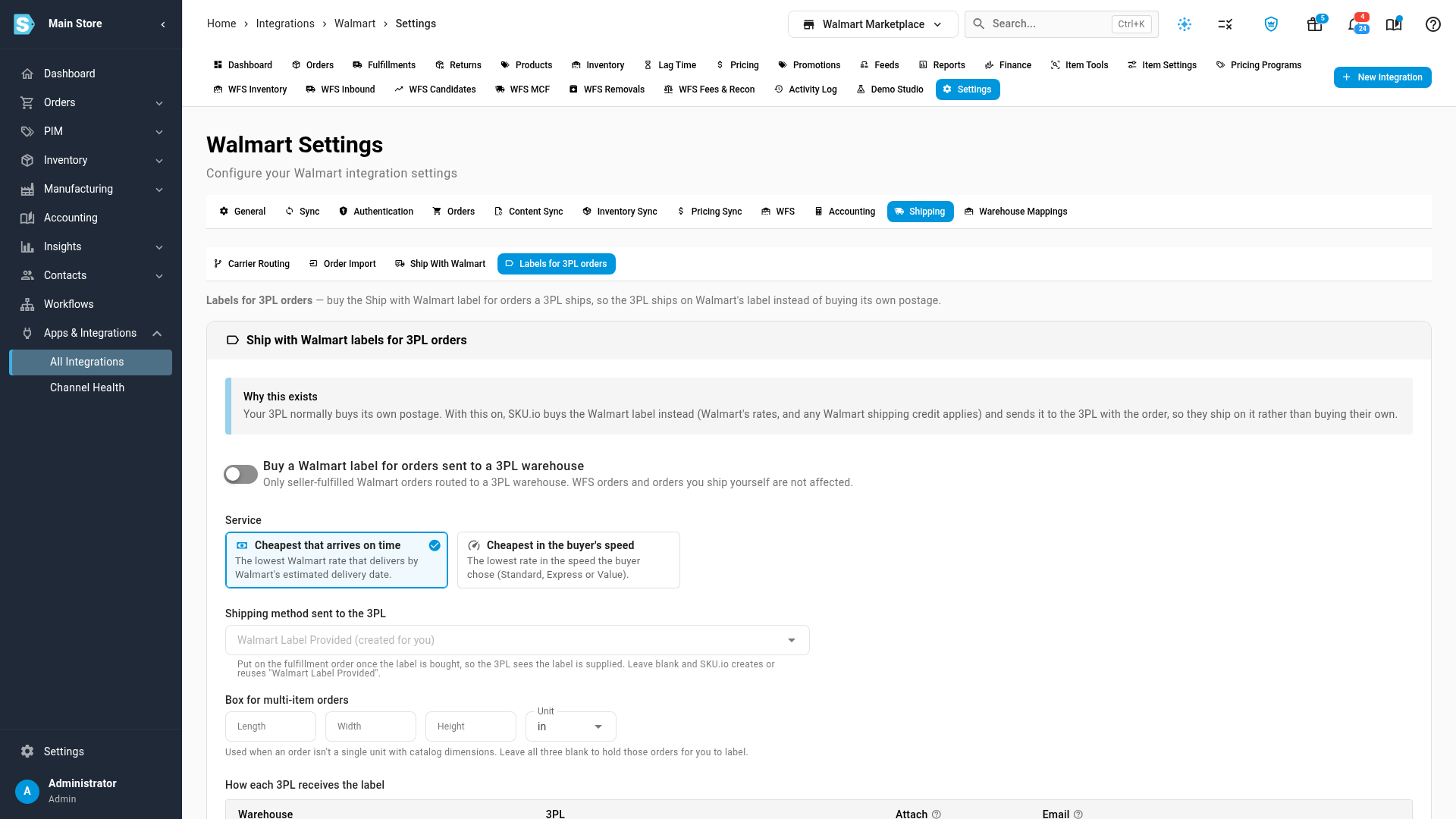
Open your Walmart channel, click Settings, choose the Shipping tab, and then Labels for 3PL orders.
-
Turn on Buy a Walmart label for orders sent to a 3PL warehouse.
-
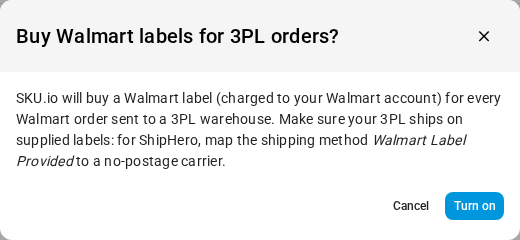
Each label is charged to your Walmart account, so SKU.io asks you to confirm. Click Turn on.
-
Under Service, choose how SKU.io picks the rate. See Settings below.
-
In Shipping method sent to the 3PL, leave the field blank to use Walmart Label Provided, or choose another shipping method your 3PL already knows.
-
Under Box for multi-item orders, enter the Length, Width and Height of the box your 3PL uses, and choose the Unit.
-
Click Save Changes.
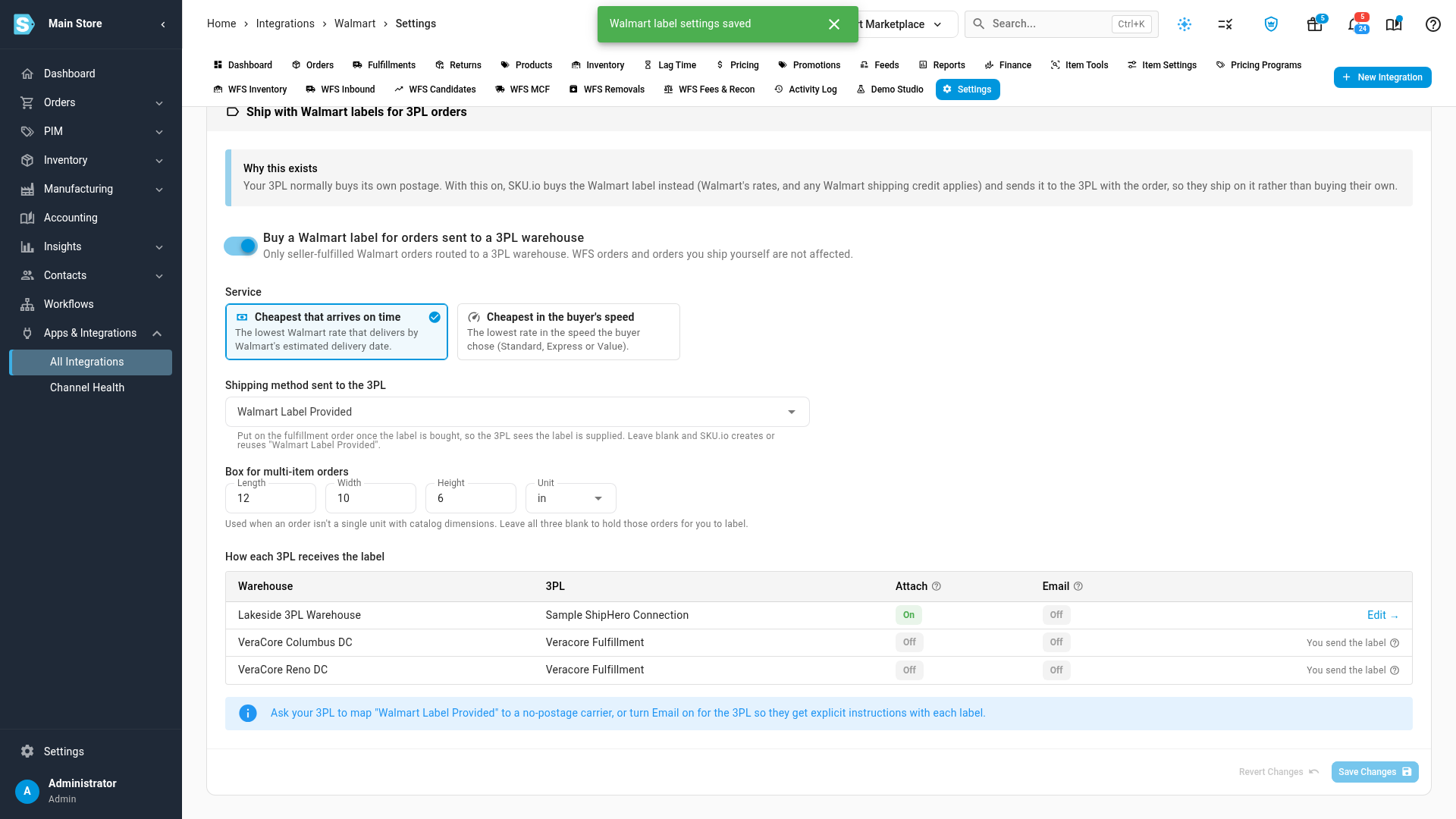
What you'll see: "Walmart label settings saved". From now on, each new Walmart order routed to a 3PL warehouse gets its label before it goes to the 3PL.
Settings
| Setting | What it does |
|---|---|
| Cheapest that arrives on time (default) | Buys the lowest Walmart rate that delivers by Walmart's estimated delivery date. If no rate makes that date, SKU.io buys the cheapest rate and adds a note to the sales order. |
| Cheapest in the buyer's speed | Buys the lowest rate in the speed the buyer chose at checkout: Standard, Express or Value. |
| Shipping method sent to the 3PL | The shipping method the order is sent to the 3PL with, once its label is bought. It tells the 3PL that the label is supplied. Blank means Walmart Label Provided, which SKU.io creates the first time you save. |
| Box for multi-item orders | The box size used for an order of more than one item, or an item with no catalog dimensions. Leave all three blank, and those orders wait for you instead. See When an order waits. |
Choose how each 3PL gets the label
How each 3PL receives the label lists your 3PL warehouses and how a label reaches each one:
| Column | What it shows |
|---|---|
| Warehouse | The 3PL warehouse in SKU.io. |
| 3PL | The integration that sends the warehouse its orders. |
| Attach | On: the label PDF is attached to the order in the 3PL's system, where the packer prints it. |
| On: the label PDF is emailed to the warehouse's email address when it is bought. |
To change how a 3PL gets its labels:
- Click Edit → on the warehouse's row. This opens the 3PL's Shipping Labels settings, on the Sales Channel Shipping Labels card.
- Leave Attach purchased channel labels to the order on, so the label is on the 3PL's order.
- To also email each label to the warehouse, turn on Email label to warehouse when a shipping label is purchased.
- Click Save Changes.
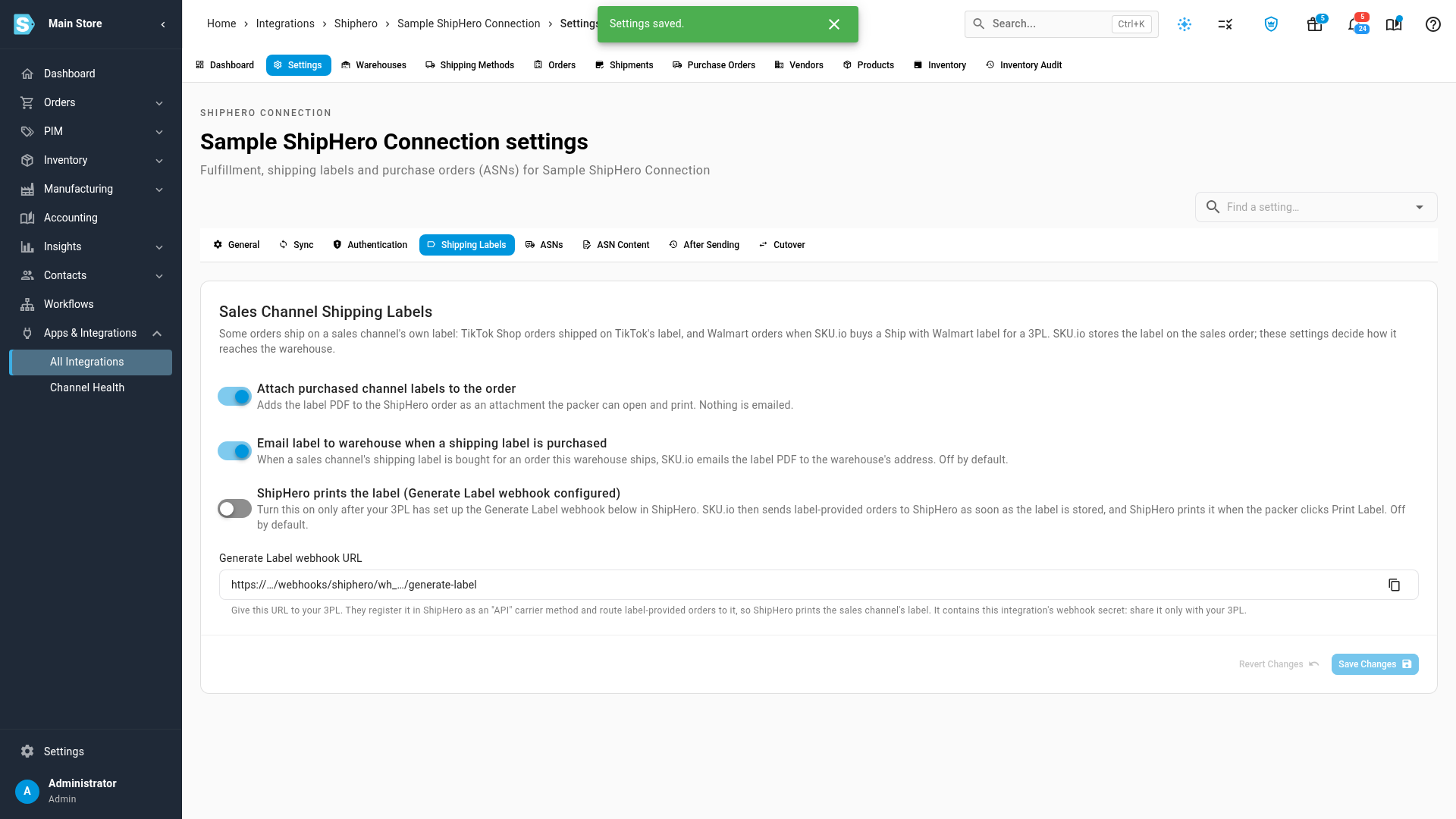
For every switch on that card, including letting ShipHero print the label itself, see Send sales channel labels to ShipHero.
A warehouse whose integration can't receive a label shows You send the label instead of Edit →. Its orders wait with the label stored on the sales order: download the label, send it to the warehouse, then submit the fulfillment order. Your submit counts as the hand-off.
Until your 3PL confirms it has mapped Walmart Label Provided to a carrier that buys no postage, turn on Email as well. The warehouse then gets an explicit email with each label. A 3PL that buys its own postage anyway costs you twice: SKU.io records the 3PL's tracking, voids the unused Walmart label, and adds a note to the sales order saying so.
Follow the label on the sales order
Each Walmart order's label appears on its sales order, in the Sales channel shipping label card. It shows the carrier and service, the tracking number (linked to the carrier's tracking page), the cost and when the label was bought.
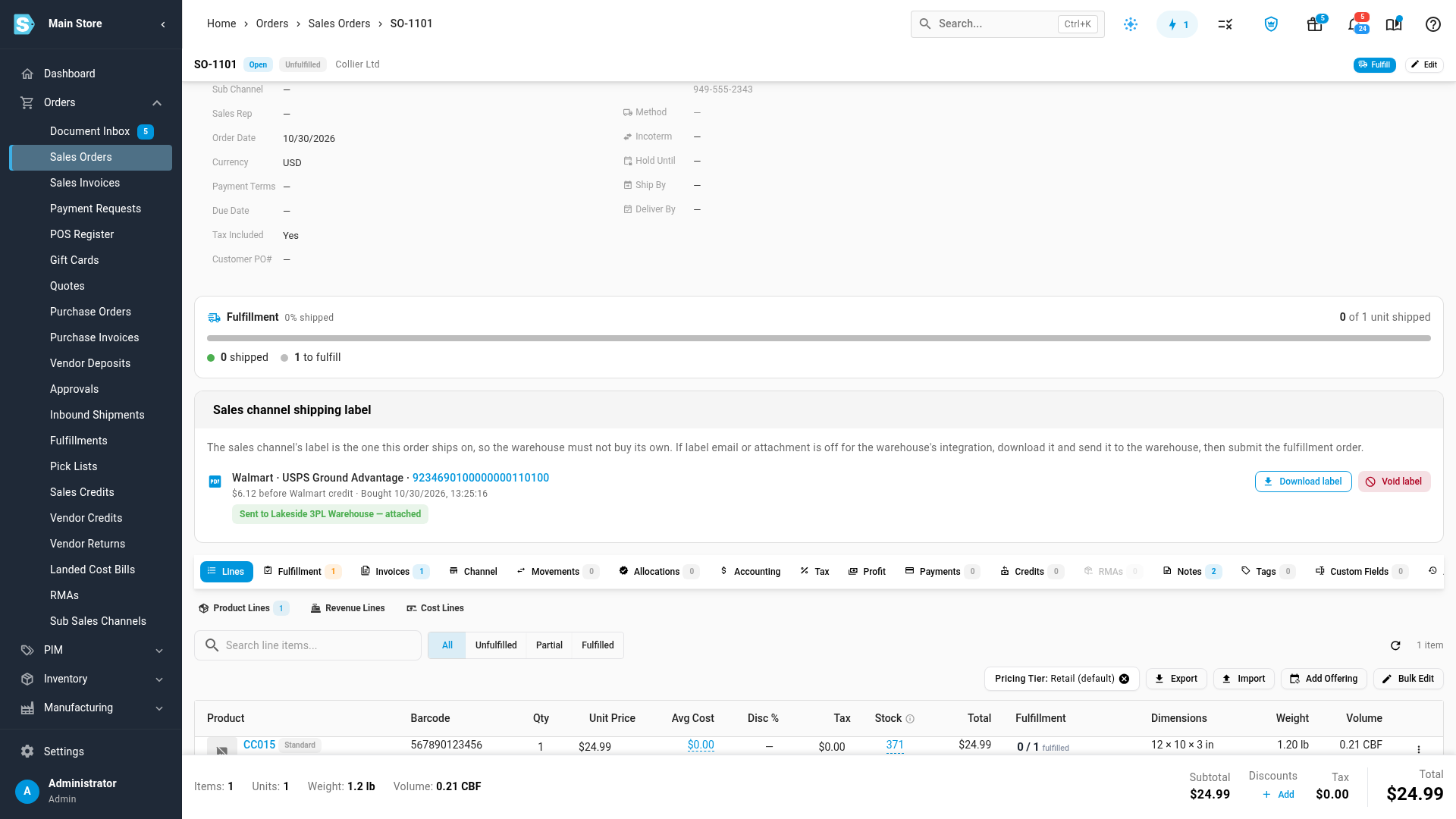
The cost is Walmart's price before Walmart credit: Walmart applies any shipping credit when it bills you.
The card's status says where the label is:
| Status | What it means |
|---|---|
| Buying label | SKU.io is buying the label. The order waits. |
| Waiting: box size needed | The order has more than one item, or an item without dimensions, and no box size is set. See When an order waits. |
| Waiting: send the label to warehouse | The label is bought, but the 3PL's integration doesn't attach or email it. Download it and send it to the warehouse, then submit the fulfillment order. |
| Sent to warehouse — attached / — emailed / — sent by an operator | The label reached the 3PL with the order. |
| Adopted | A label for this order was already bought in Walmart Seller Center. SKU.io used that one instead of buying a second. |
| Shipped | The 3PL shipped on this label, and the tracking went to Walmart. |
| Label purchase failed | Walmart didn't sell the label. The reason shows under the status. See When a purchase fails. |
| Voided date | The label was cancelled with Walmart and can't be used to ship. |
| Skipped | The order went to the 3PL without a Walmart label, and the 3PL buys its own postage. |
The card's buttons:
- Download label opens the label PDF.
- Void label cancels a label you won't use, after you confirm. The warehouse is told not to ship on it. You can't void a label that already shipped.
- Retry tries the purchase again for a waiting or failed label. A label that is already paid for is never bought twice.
- Send without Walmart label sends a waiting or failed order to the 3PL without a label, after you confirm. The 3PL buys its own postage for it.
- Set fallback box opens Labels for 3PL orders, so you can enter a box size.
You don't have to void labels by hand when plans change. If Walmart cancels the order or its lines, or you cancel the fulfillment order or move it to another warehouse, SKU.io voids the unused label for you and adds a note to the sales order.
When an order waits
An order of more than one item needs a box size before Walmart can rate it. Without a Box for multi-item orders, the order waits with the status Waiting: box size needed.
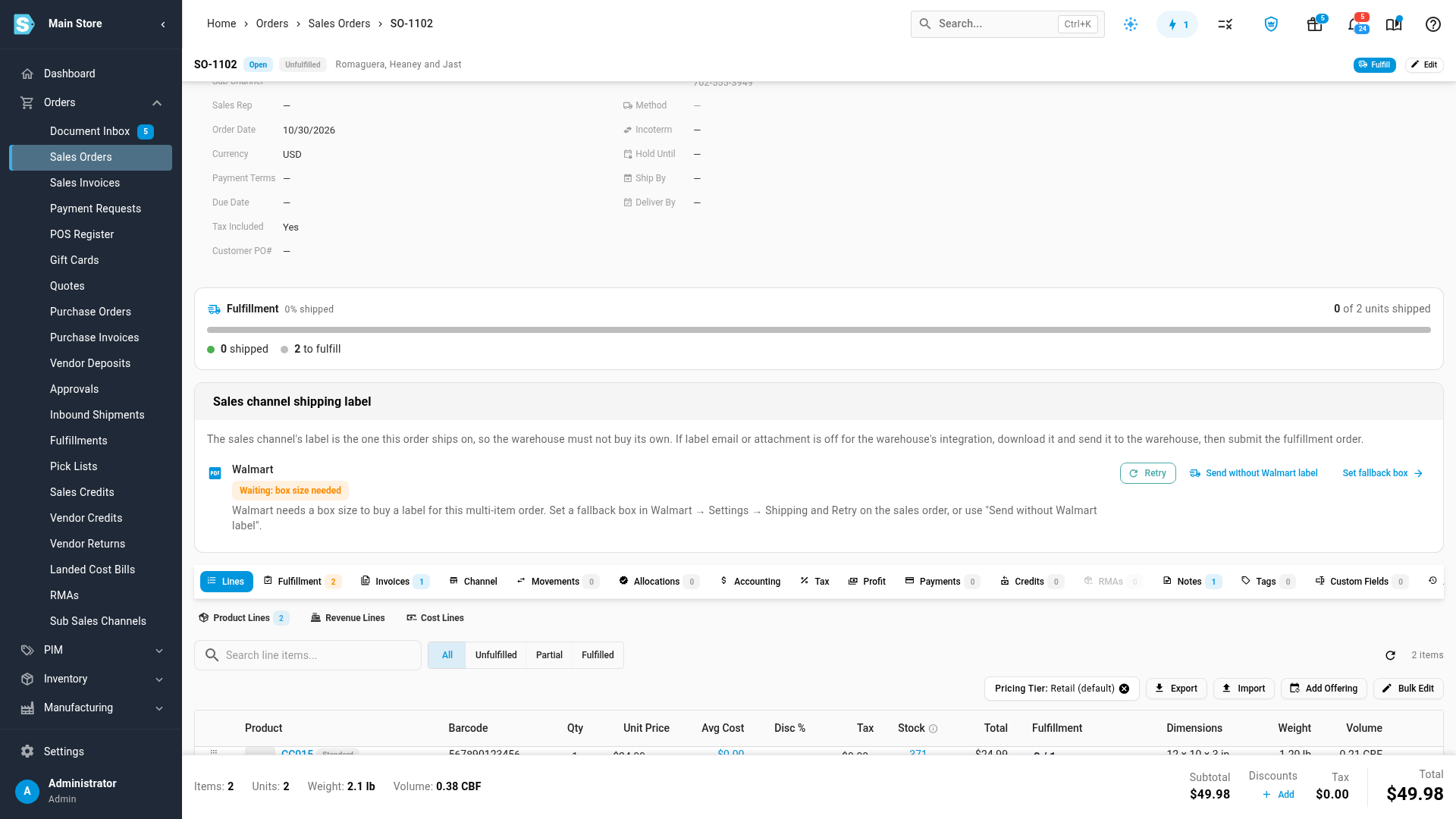
Choose one:
- To buy the label, click Set fallback box, enter the box size, click Save Changes, and then click Retry on the sales order.
- To buy the label yourself, open the Walmart order and use its Ship With Walmart dialog. See Buy a Ship With Walmart label.
- Not every Walmart order needs Walmart's label. To let the 3PL ship it on its own postage, click Send without Walmart label, then Send without label.
A product with no weight holds the order in the same way. Add the weight to the product, then click Retry.
When a purchase fails
If Walmart won't sell the label, the status is Label purchase failed, and Walmart's reason shows under it. The order waits.
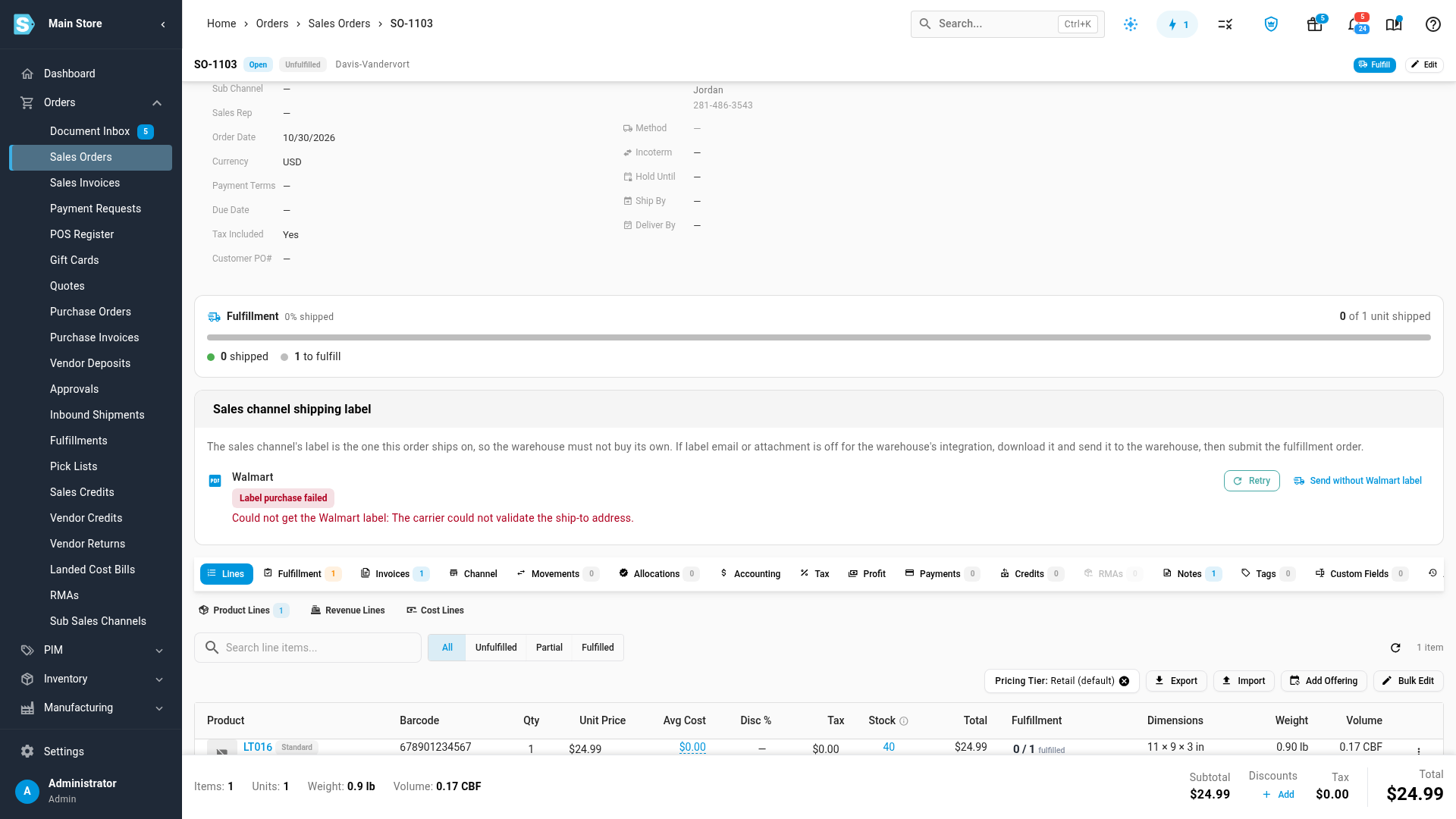
Fix the cause, then click Retry. Common reasons:
| Reason mentions | What to do |
|---|---|
| The order ships from a Walmart ship node that isn't the warehouse | The order's Walmart fulfillment center isn't this 3PL warehouse. Map it under your Walmart channel's Settings → Warehouse Mappings, or use Send without Walmart label. |
| The address | Check the ship-from address of your fulfillment center in Seller Center, under Settings → Shipping Profile → Seller Fulfillment, and the order's shipping address. |
| A signature | The order needs a signature, and Walmart had no rate with one. Use Send without Walmart label, or buy the label in Seller Center. |
Next steps
- Send sales channel labels to ShipHero
- Buy a Ship With Walmart label for orders you ship yourself
- Dispatch to a fulfillment provider
Video transcript
When a 3PL ships your Walmart orders, SKU.io can buy each Ship with Walmart label. The 3PL then ships on Walmart's label, instead of buying its own postage. In your Walmart settings, open the Shipping tab, which holds every shipping setting. Then choose Labels for 3PL orders, the last of the four sub-tabs. Every setting for these labels lives on this one card. Turn on Buy a Walmart label for orders sent to a 3PL warehouse. Each label is charged to your Walmart account, so SKU.io asks you to confirm. Read the note, then click Turn on to confirm. The switch stays on once you save. Under Service, Cheapest that arrives on time picks the lowest rate that meets Walmart's delivery date. Shipping method sent to the 3PL is how the 3PL knows that you supply the label. Leave it blank, and SKU.io uses Walmart Label Provided. Ask your 3PL to map that method to a carrier that buys no postage. For a single item, the product's catalog weight and size set the box. For orders with more items, enter the size of the box your 3PL packs them in: its Length, its Width, and its Height. Without a box size, those orders wait for your review. Then click Save Changes to store the settings. A message confirms that your settings are saved. How each 3PL receives the label lists your 3PL warehouses. Attach and Email show how each warehouse gets the label. To change how a 3PL gets its labels, click Edit on its row. That opens the 3PL's own label settings. Here, Sales Channel Shipping Labels decides how labels reach this 3PL. Attach purchased channel labels to the order adds the label to the 3PL's order. Turn on Email label to warehouse, and the warehouse also gets each label by email. Then click Save Changes to keep your choice. From now on, each Walmart order for a 3PL gets its label first. The order waits until the label reaches the 3PL. The Sales channel shipping label card shows the service, tracking number and cost. The cost is Walmart's price, before any Walmart shipping credit. This label was sent to the warehouse, attached to the 3PL's order. The 3PL's order arrives with a shipping method that says the label is supplied, the label itself, and a packing note. When the 3PL ships, Walmart receives the tracking number. Download label opens a copy, and Void label cancels a label you won't use. If the order is cancelled or moved to another warehouse, the unused label is voided automatically. This order has two items and no box size, so its label is waiting. Set fallback box opens the setting, and Retry buys the label once it's saved. Not every Walmart order needs Walmart's label. Send without Walmart label lets the 3PL buy its own postage for this order. A confirmation appears before the order goes to the 3PL without a label. If Walmart refuses a purchase, the card shows Walmart's reason. Fix the cause, then click Retry. Walmart prints the ship-from address from your fulfillment center, so keep that address current.