Account for Walmart settlements
Walmart pays you every two weeks: one deposit for your sales, net of commission, refunds, return-shipping charges and fees. By default, each Walmart order posts to your books as its own invoice, so those invoices never add up to what reaches your bank. Per Settlement accounting posts each deposit instead: one sales invoice and one fee bill per settlement, adding up to the deposit to the cent. It works like Shopify and eBay payouts, with Walmart's reconciliation report as the source.
Before you begin
- Connect Walmart.
- Set up the accounts you'll post to, such as sales, refunds, marketplace fees and shipping charges, under Accounting → Settings → Nominal Codes.
- Choose the date to start from. Settlements dated before it aren't posted, so pick the first deposit your books haven't already recorded.
Open the Walmart finance pages
-
Go to Apps & Integrations, open Walmart, and choose the store in the integration selector.
-
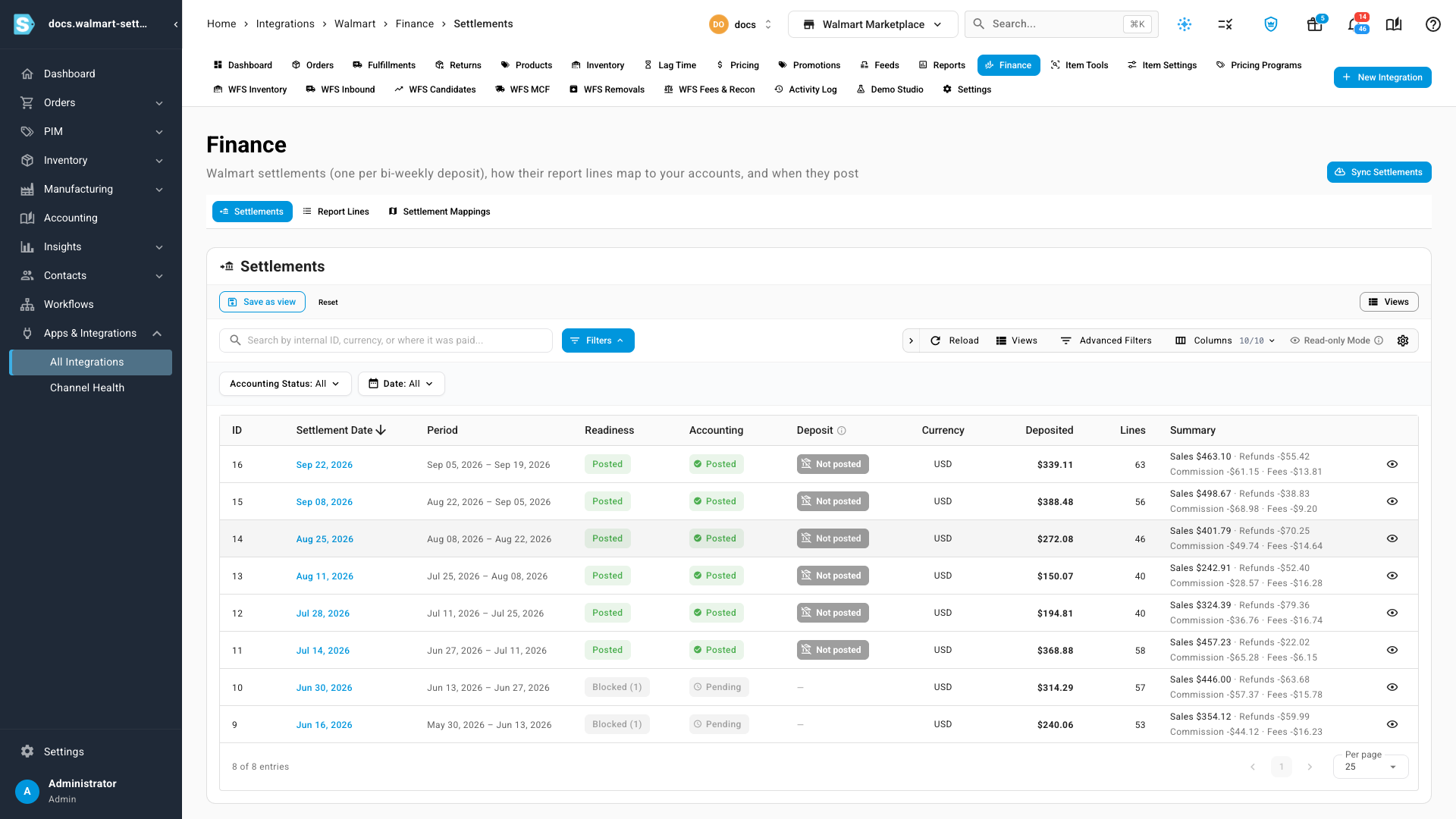
Open the Finance tab. Settlements lists one row per deposit: its date, the period it covers, its readiness, its accounting status, the amount deposited and a summary of sales, refunds, commission and fees.
-
If the list is empty, click Sync Settlements. SKU.io imports every reconciliation report it hasn't imported yet, and you can follow the import in the job tray. After that, new settlements arrive once a day.
Set up the mappings
Open Settlement Mappings.
-
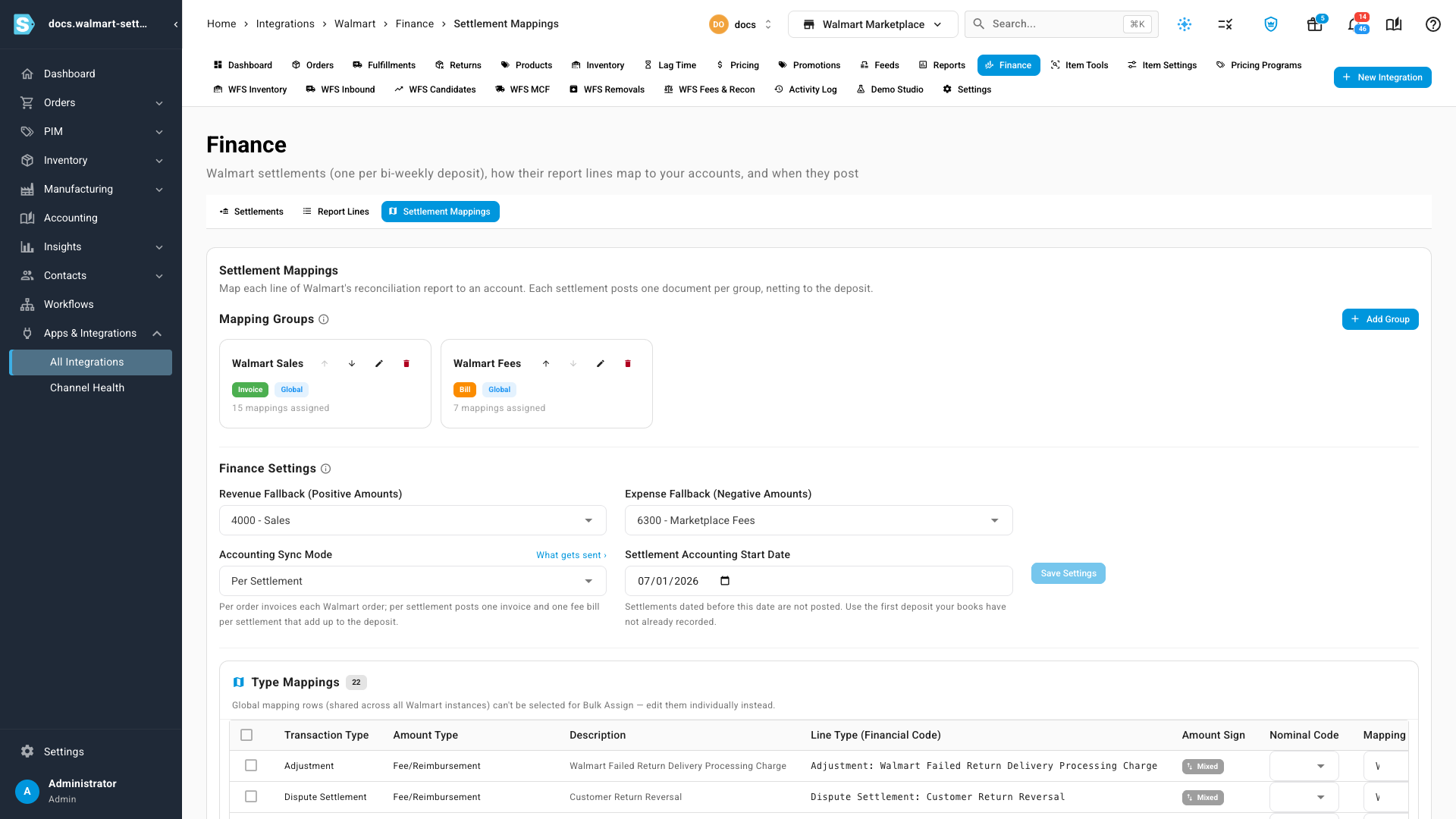
Under Mapping Groups, check the two groups a new store starts with: Walmart Sales, an Invoice, and Walmart Fees, a Bill. Each group becomes one document per settlement. Click Add Group to add another, and choose whether it applies to every Walmart store (Global) or only this one.
-
Under Type Mappings, give each kind of report line a Nominal Code and a Mapping Group. A line type is the report's transaction type with its amount type or description, such as Sale: Product Price, Sale: Commission on Product or Service Fee: Walmart Return Shipping Charge. SKU.io lists the common ones up front, and adds any new kind of line it finds in a report. Click View example lines on a row to see real lines of that type.
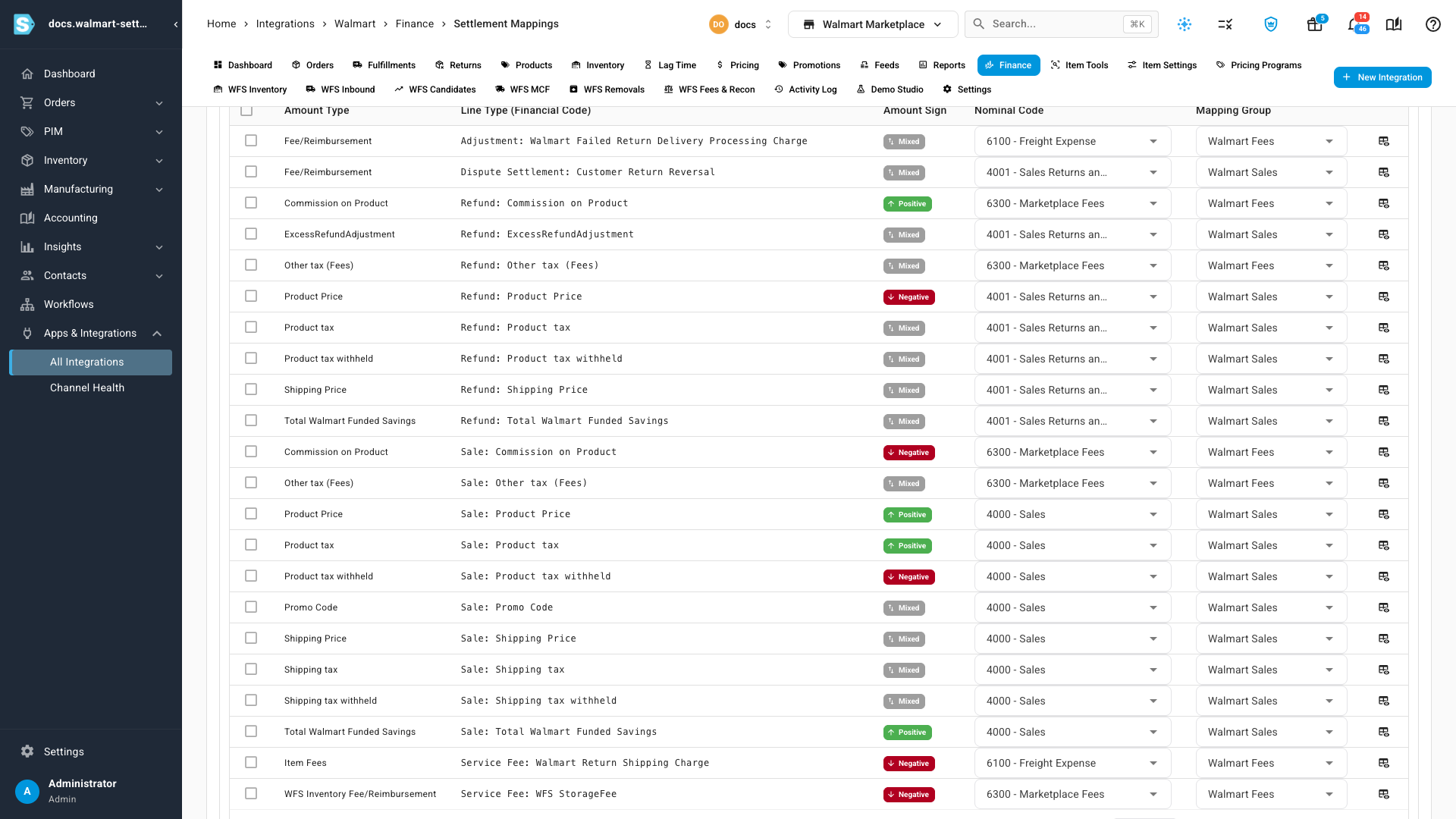
A typical setup:
Line types Account Group Sale: product price, product tax and tax withheld, shipping, promo codes and Walmart-funded savings Sales Walmart Sales Refund: the same kinds of line, plus Dispute Settlement: Customer Return Reversal Sales returns Walmart Sales Commission on Product and Other tax (Fees), on sales and refunds, and Service Fee: WFS StorageFee Marketplace fees Walmart Fees Service Fee: Walmart Return Shipping Charge and Adjustment: Walmart Failed Return Delivery Processing Charge Shipping charges Walmart Fees -
Under Finance Settings, set Revenue Fallback (Positive Amounts) and Expense Fallback (Negative Amounts). A line type you haven't mapped posts to these, so a new kind of line never holds a settlement up. There's no clearing account to set: the invoice and bill post through Accounts Receivable and Accounts Payable like any other.
A deposit a few cents short of your sales less fees is usually Walmart's WFS storage fee, a Service Fee: WFS StorageFee line of a few cents per item stored. Map it with your other marketplace fees.
Switch the store to per-settlement accounting
- In Finance Settings, set Settlement Accounting Start Date.
- Change Accounting Sync Mode from Per Order to Per Settlement.
- Click Save Settings, read the warning, and confirm.
From then on, the store's order invoices and credits stop syncing to your accounting provider, because each settlement already carries that revenue. Orders still post inside SKU.io.
SKU.io doesn't void order invoices that were already sent to your accounting provider. If any of them fall on or after the start date, review them in Accounting and void them in your provider, or set the start date after the last order you synced.
Check each settlement posts
Each settlement's Accounting status shows where it is:
| Status | What it means |
|---|---|
| Pending | The store isn't in Per Settlement mode yet, or the settlement is dated before your start date. |
| Posted | Its invoice and bill are in your ledger. |
| Held | Something blocks it, such as a report whose lines don't add up to the deposit, an unmapped line with no fallback, or a missing exchange rate. It posts on its own once that's fixed. |
Readiness gives the reason: hover a Blocked chip to see what's missing. Open a settlement to see each check, the summary ending in Deposit, the ledger entries it posted and the report lines behind it.
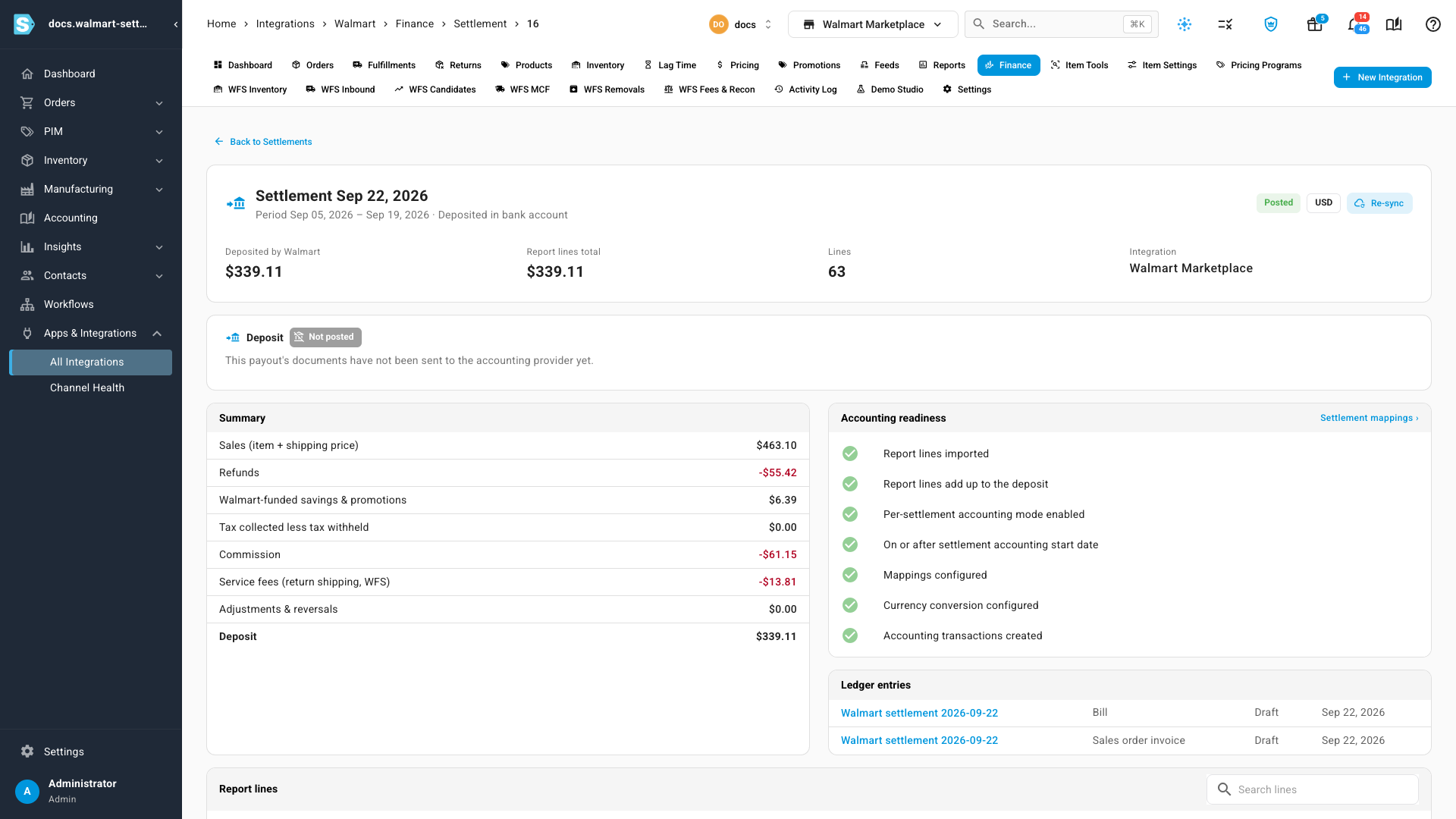
A settlement only posts when its report lines add up to the deposit to the cent. If they don't, click Re-sync on the settlement to read its report from Walmart again.
Match the settlement to your bank
Once your accounting provider has the invoice and bill, the settlement's Deposit column shows whether they're paid and reconciled to the bank. In Statement Match, the settlement's documents are matched one at a time; a Walmart settlement isn't offered as a single match yet. See Match bank statement lines.
Next steps
- Account for Shopify and eBay payouts: the same idea for Shopify Payments and eBay.
- Map Amazon settlements to your accounts: the same idea for Amazon.
- Review WFS fees and reconciliation: the WFS fees behind a settlement.
Video transcript
Walmart pays you every two weeks, and each deposit is one settlement. On your Walmart store's page, choose the Finance tab. This list shows each deposit, the period it covers, and its accounting status. Sync Settlements brings in any report you don't have yet.
Next, open the Settlement Mappings tab, beside Report Lines. Each mapping group becomes one document per deposit. Walmart Sales is an invoice for the money you're paid, and Walmart Fees is a bill for what Walmart keeps.
Under Type Mappings, give each kind of report line an account and a group. Sales go to your sales account, and commission and fees to an expense. Any line you haven't mapped posts to the fallbacks, so a new kind of line never holds a deposit up.
Then set the Settlement Accounting Start Date to the first deposit your books haven't recorded. Set Accounting Sync Mode to Per Settlement, and click Save Settings. From then on, each settlement posts one invoice and one fee bill that add up to the deposit.
Back on Settlements, the Accounting column shows each one's status. Posted means its invoice and bill are in your ledger. Anything dated before your start date stays Pending.
To see what's behind a status, click the settlement's date. Accounting readiness lists every check it has to pass. The summary ends in the deposit, and Ledger entries lists the invoice and the bill it posted.