Reconcile ShipBob invoices
ShipBob groups its charges into invoices, about once a week for each kind of charge. The Invoices tab checks each one: it adds up the charges SKU.io holds for the invoice and compares the total with the amount ShipBob invoiced. When they agree, every dollar on that invoice has landed somewhere in SKU.io, whether on an order, a product, a purchase order, overhead, or the payments that settle it. When they don't, the tab shows the gap and what to do about it.
Before you begin
- Turn on ShipBob billing. Invoices appear after the first bill sync.
- To post invoices to your books, turn on Post ShipBob invoices to accounting and choose a Default expense account on the Financial settings tab.
Read the Invoices tab
- Go to Apps & Integrations, open ShipBob, and choose your connection.
- Click the Invoices tab. From the Bills tab you can also open the more actions button (⋮) and choose Reconcile invoices.
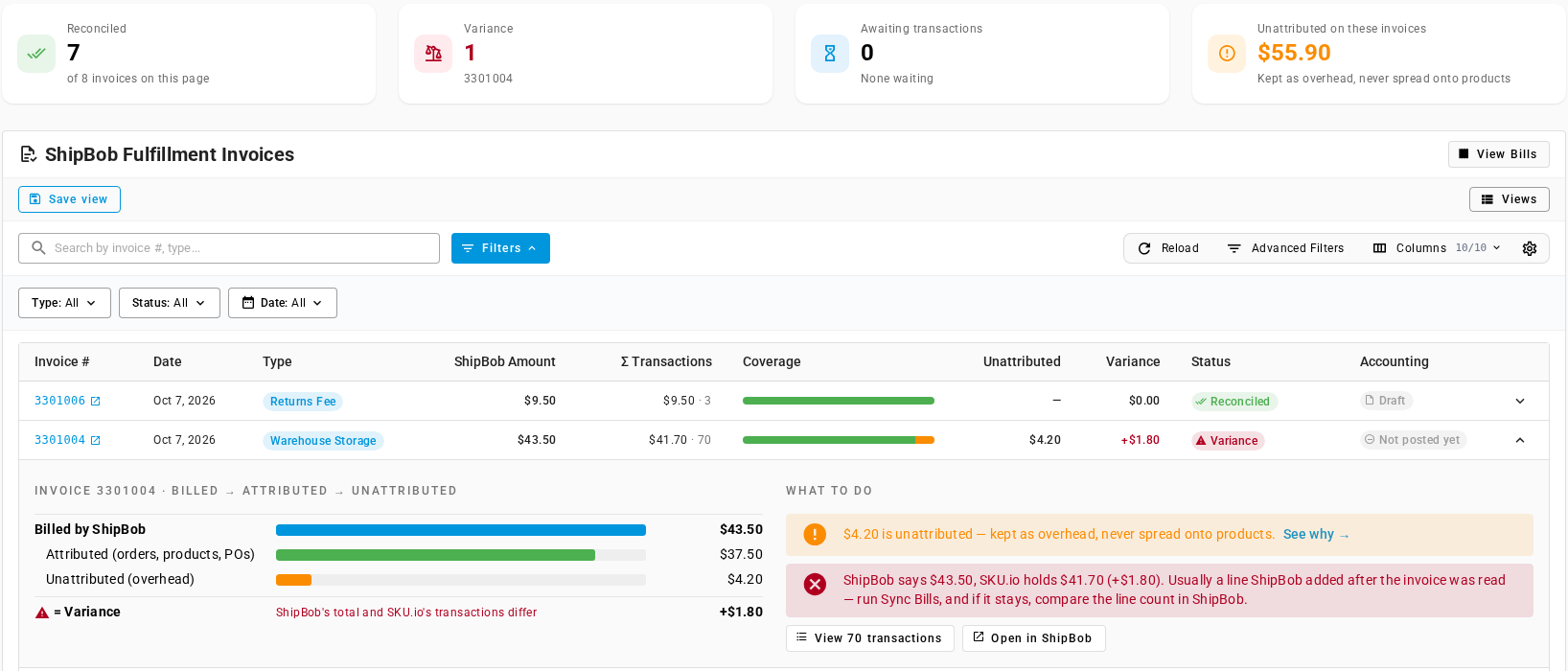
The cards count the invoices on the current page:
| Card | Shows |
|---|---|
| Reconciled | Invoices whose charges add up to ShipBob's amount |
| Variance | Invoices that don't add up, with their invoice numbers |
| Awaiting transactions | Invoices ShipBob hasn't listed every charge for yet |
| Unattributed on these invoices | The overhead on these invoices, kept as overhead and never spread onto products, totaled per currency |
Each row is one ShipBob invoice:
| Column | Shows |
|---|---|
| Invoice # | ShipBob's invoice number. Click it to open the invoice in ShipBob. |
| Date | The invoice date. |
| Type | ShipBob's invoice type, such as Shipping, Additional Fees, Returns Fee, Warehouse Storage, Inbound Fee, Credits, or Payment. |
| ShipBob Amount | What ShipBob invoiced. |
| Σ Transactions | The total of the charges SKU.io holds for the invoice, and how many there are. Voided charges aren't counted. |
| Coverage | A bar split into attributed (green), pending (blue), and unattributed (orange). Point at it to see the amounts. A payment invoice shows Payment · excluded from cost. |
| Unattributed | The overhead on the invoice. |
| Variance | ShipBob Amount minus Σ Transactions. |
| Status | Reconciled, Variance, or Awaiting transactions. |
| Accounting | Where the invoice stands in your books. See Posting to accounting. |
Search by invoice number or type, or filter by Type, Status, and Date.
See where an invoice's money went
Click the arrow at the end of a row to expand it.
The left side follows the money from Billed by ShipBob down through Attributed (orders, products, POs), Pending (shipment not synced), Unattributed (overhead), and Excluded (payments), showing only the parts that aren't zero. The last line, = Variance, reads Every dollar landed somewhere when the invoice adds up, and ShipBob's total and SKU.io's transactions differ when it doesn't.
The right side, What to do, lists the actions for that invoice:
- An unattributed amount, with See why →, which opens the Bills tab filtered to that invoice's unattributed charges.
- A pending amount, with View, for charges still waiting on a shipment sync.
- A variance or missing charges, with the steps below.
- Reconciled — nothing to do. when there's nothing to act on.
View N transactions opens the Bills tab filtered to the invoice. Open in ShipBob opens it in ShipBob.
Clear a variance
A variance means ShipBob's amount and the charges SKU.io holds differ. In the screenshot, storage invoice 3301004 shows ShipBob says $43.50, SKU.io holds $41.70 (+$1.80), followed by the advice to run Sync Bills and compare the line count in ShipBob if the gap stays. ShipBob's invoice carries $1.80 of storage that SKU.io doesn't hold. Usually that's a charge ShipBob added after SKU.io read the invoice.
- On the Bills tab, click Sync Bills, and wait for ShipBob Billing Sync to finish in the job tray. A sync reads each changed invoice's full list of charges again.
- Return to Invoices. If the charge was added late, the invoice now shows Reconciled.
- If the variance stays, click Open in ShipBob and compare ShipBob's list of charges with View N transactions:
- A positive variance (ShipBob's amount is higher) means ShipBob has charges SKU.io hasn't read. If they're older than the last 14 days, backfill from the invoice date.
- A negative variance (SKU.io holds more) usually means ShipBob dropped a charge. Find it and mark it void.
Awaiting transactions isn't a problem to fix. ShipBob hasn't listed every charge on that invoice yet, and the next bill sync reads the list again.
Posting to accounting
With Post ShipBob invoices to accounting on, each ShipBob invoice becomes a supplier bill from ShipBob in your ledger, once it's Reconciled and SKU.io has read its full list of charges. An invoice with a variance isn't posted until it reconciles, so a partial bill never reaches your books. Payment invoices are never posted. Reconcile them against your bank.
The Accounting column shows each invoice's state:
| Shows | Means |
|---|---|
| Off | Post ShipBob invoices to accounting is off for this connection. Point at it to read where to turn it on. |
| Not posted | A payment invoice. Payments are never posted, even with posting on: point at it to read Payments are never posted to accounting — reconcile them against the bank. |
| Not posted yet | Posting is on, but the invoice hasn't posted yet. Point at it to read Not posted yet — SKU.io posts it to accounting once its charges have been attributed. An invoice with a variance stays here until it reconciles, like storage invoice 3301004 in the demo data. |
| Queued | The invoice is waiting to post. |
| Draft | The journal entry exists in the ledger but isn't posted yet. Click it to open the entry. Point at it to see the journal entry and its bill number, such as BILL-415. |
| Posted | The journal entry is posted. Click it to open the entry. |
| Blocked | The last posting attempt failed. Point at it to read why. |
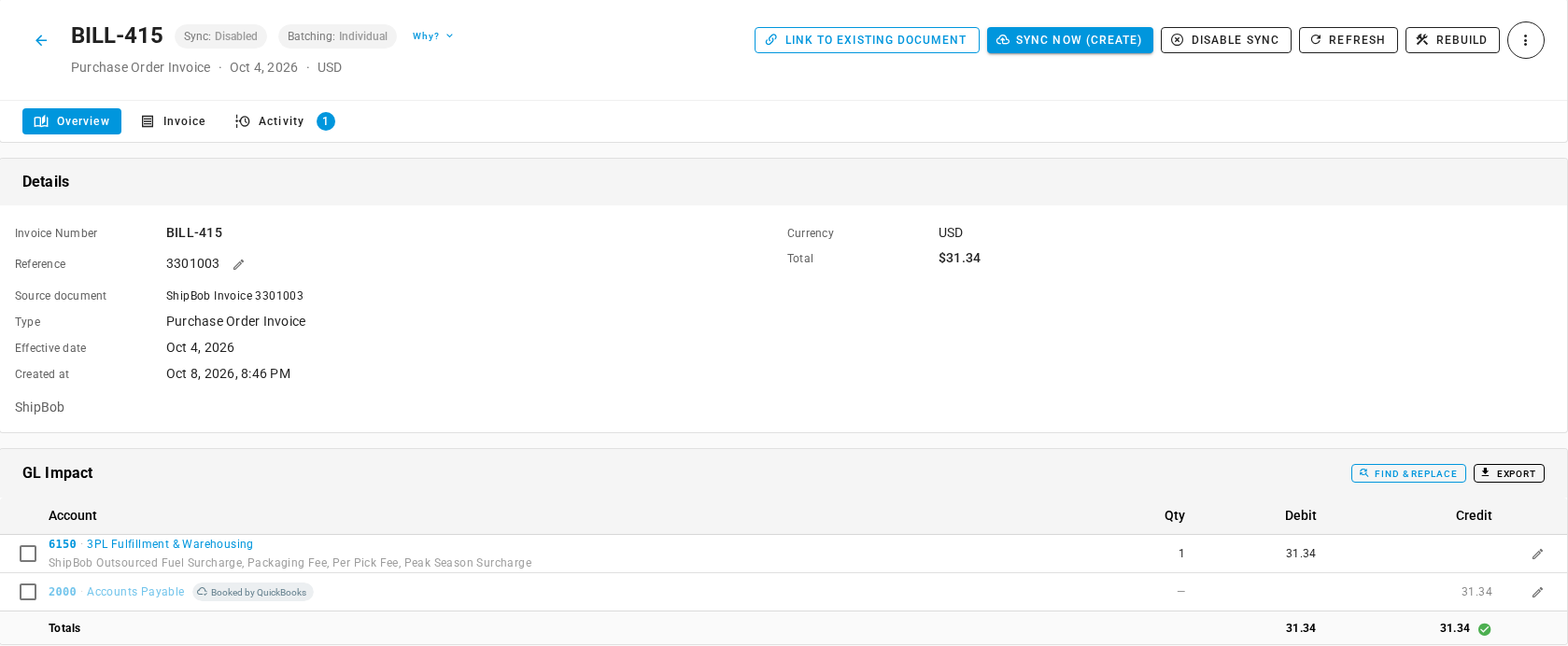
Each entry is built like this:
- Type is Purchase Order Invoice, from the supplier ShipBob, dated the invoice date, in the invoice's currency, with ShipBob's invoice number as its Reference. Source document names the invoice, for example ShipBob Invoice 3301003.
- The charges are grouped by expense account. Each fee posts to the account of its cost line type. Fees whose type has no account, such as storage, receiving, and overhead, post to the Default expense account. Each group's line names the fees in it, for example ShipBob Outsourced Fuel Surcharge, Packaging Fee, Per Pick Fee, Peak Season Surcharge.
- Each expense line is a debit, balanced by a credit to Accounts Payable. Credits net against charges, and an invoice that's a credit overall reverses the sides.
- Tax on ShipBob's charges posts to your sales tax account.
- Voided charges and payments are left out.
If ShipBob later changes an invoice, the entry is rebuilt to match. Use Review the ledger to read entries, and Work the Ledger Outbox to see what's waiting to reach your accounting provider.
Invoices dated in a locked period
An invoice dated in a closed month follows your Locked-period events setting under Accounting → Settings → General:
- Post on first open day, flagged posts the bill on the first open day, flagged with its original date.
- Block until resolved refuses it. The Accounting column shows Blocked, and its tooltip names the locked period. Reopen the month or move the lock date, and the bill posts.
For posting, the lock applies only to the bill's date. Fees still attach to orders and products in a locked month, because that's reporting and creates no accounting entries. The exception is a receiving fee you capitalise onto a purchase order received in a locked month: it changes the stock's cost, so it stays unattributed as Accounting period locked until you reopen the month (see Review ShipBob bills and fix unattributed charges). See What closing does to your books and Reopen a closed month.