Ship TikTok Shipping orders through a 3PL
Some TikTok Shop orders ship on TikTok's own label. In Seller Center this is TikTok Shipping, and on the order's page in SKU.io the Shipping Type reads TIKTOK. You still pick and pack the order, but the parcel must go out on the label TikTok bought, not on one your warehouse buys.
TikTok hides the buyer's name, phone number and street on these orders, because the label is what carries them. So when a warehouse ships through a 3PL, SKU.io keeps the order from going to the 3PL until TikTok's label has reached the warehouse. A parcel never leaves for a 3PL with an address nobody can ship to.
If a 3PL ships your TikTok Shop orders, set your shop to Seller Shipping in Seller Center where you can. TikTok then gives SKU.io the full address, the 3PL ships on its own label, and SKU.io sends the tracking back to TikTok. See Send tracking to TikTok Shop. TikTok Shipping orders work too, but each one waits for TikTok's label.
Before you begin
- Your TikTok Shop is connected. See Connect TikTok Shop.
- The order ships from a warehouse that sends its orders to a 3PL or fulfillment provider, such as ShipHero. Orders you ship yourself are never held: you print TikTok's label in Seller Center as usual. Orders that Fulfillment by TikTok ships aren't affected either.
- Decide how the label reaches your 3PL. For ShipHero, see Send sales channel labels to ShipHero.
How the label gets to the warehouse
- The order arrives and is held. When SKU.io would send the order to the 3PL, it holds the fulfillment order instead. It shows in the Needs attention column of the fulfillment board, with the reason, and a note on the sales order says the order wasn't sent to the warehouse yet.
- SKU.io gets TikTok's label. If the label was already bought, SKU.io downloads it. If it wasn't, either buy it in Seller Center with Arrange shipment, and SKU.io picks it up, or turn on Buy TikTok shipping labels automatically (see Have SKU.io buy TikTok's label). While no label exists, the hold reason and a sales order note say so.
- The label is stored on the sales order. It appears on the sales order in a Sales channel shipping label card. See Download the label.
- The label goes to the warehouse, the way the 3PL's integration is set up to take it: attached to the 3PL's order, or emailed to the warehouse. The order is then released to the 3PL, and a note on the sales order records how the label went.
If the 3PL's integration neither attaches nor emails labels, the label stays on the sales order and the order stays held. Send the label to the warehouse yourself, then submit the fulfillment order.
Download the label
Open the sales order. Above the order's tabs, the Sales channel shipping label card lists TikTok's label, with the TikTok package it belongs to. Click Download label to open the PDF.

The card appears only on orders that have a sales channel label. The label is also kept on the order's fulfillment order.
Hand the label over yourself
Do this when the warehouse's integration doesn't attach or email the label. The hold reason reads "TikTok Shop label ready — download it from the sales order and send it to …, then submit the fulfillment order".
- Open the sales order and click Download label on the Sales channel shipping label card.
- Send the PDF to your warehouse, and tell them to ship on this label rather than buy one.
- Open the fulfillment order and click Submit.
Your submit counts as the hand-off: SKU.io records that you sent the label, adds a note to the sales order, and sends the order to the 3PL. Submitting before the label is stored doesn't release the order. It's refused with the hold reason.
Have SKU.io buy TikTok's label
SKU.io can buy TikTok's label for you, so nobody has to arrange shipment in Seller Center. It's off by default, because buying a label is a charge on your TikTok account and commits the order to TikTok's default shipping service.
- Open your TikTok Shop connection, then Settings, and the Shipping tab.
- Under Shipping Settings, turn on Buy TikTok shipping labels automatically.
- Click Save Settings.
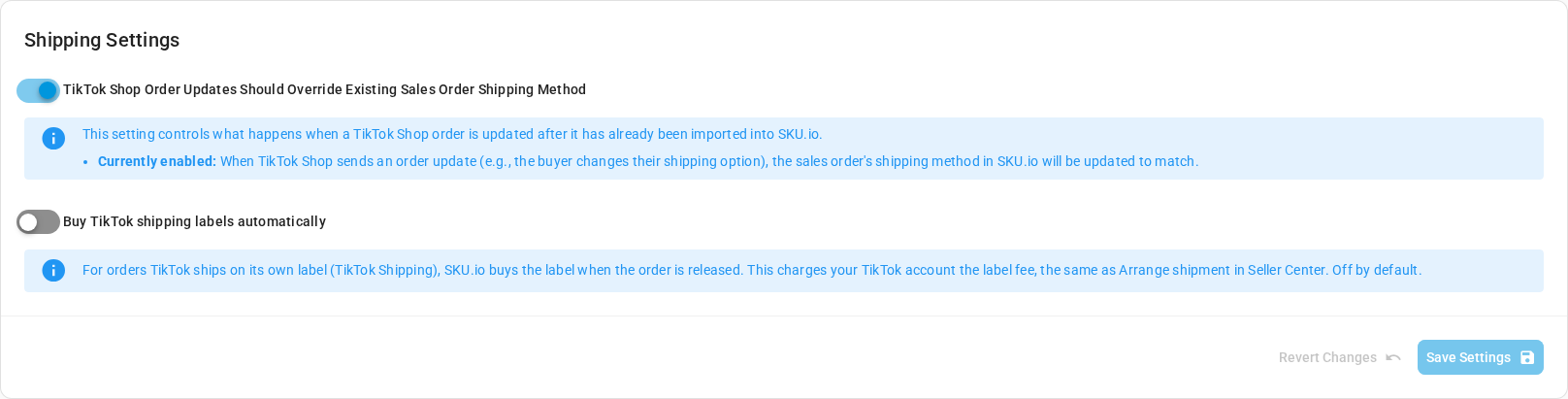
When it's on, SKU.io buys the label when the order is released to the 3PL. Your TikTok account is charged the label fee, the same as Arrange shipment in Seller Center. It sends TikTok the order's weight from your product catalog and, for a single unit of one product, its dimensions. If someone already bought the label in Seller Center, SKU.io uses that one instead of buying a second. A note on the sales order records each label SKU.io buys.
When TikTok puts an order on hold
TikTok puts some new orders on hold for a while, and withholds the buyer's name and street until it releases them. SKU.io imports a held order as Reserved, with only the country and state.
When TikTok releases the hold, SKU.io updates the order on its next sync, webhook or Refresh:
- the shipping address is filled in from TikTok, and
- the order moves from Reserved to Open, so it can be fulfilled.
SKU.io never overwrites an address you corrected on the order yourself. It doesn't change an order that's closed, cancelled or fully fulfilled, and it never replaces an address with a masked one. A seller-shipped order whose address is still blank or masked is held back from the 3PL, with the reason "TikTok has not given SKU a deliverable shipping address for this order (it is blank or masked), so it is held until TikTok releases one."
A TikTok Shipping order keeps its masked address for good. That's expected: the label carries the address.
Troubleshoot
| What you see | What to do |
|---|---|
| The hold reason says no TikTok label has been bought yet | Click Arrange shipment for the order in Seller Center. SKU.io picks up the label. Or turn on Buy TikTok shipping labels automatically. |
| The hold reason says the warehouse has no contact email | Label email is on, but the warehouse has no email address. Add one to the warehouse's address, or download the label and send it yourself. |
| A note starts "Could not get TikTok's shipping label" | TikTok refused the request. The note gives TikTok's reason. Fix it in Seller Center, then submit the fulfillment order again. |
| The order is Reserved and its address has only a country and state | TikTok is still holding the order. It opens by itself once TikTok releases it. |