Send tracking to TikTok Shop
When you or your 3PL ship a seller-shipped TikTok Shop order, SKU.io tells TikTok it has shipped, with the tracking number and the carrier. TikTok needs the carrier as one of its shipping providers, so you map each of your shipping methods to the TikTok provider it stands for.
This is for orders shipped on your own label (Seller Shipping in Seller Center). Orders that TikTok ships, or that ship on TikTok's own label, already carry TikTok's tracking, so SKU.io never sends tracking for them. See Ship TikTok Shipping orders through a 3PL.
Before you begin
- Your TikTok Shop is connected, and Submit tracking to TikTok Shop is on under Settings → Sync. See Manage a connected app.
- The shipping methods your orders ship with exist in SKU.io.
- You need permission to change integrations to save mappings.
Map shipping methods to TikTok carriers
-
Go to Apps & Integrations, open Sales Channels, choose TikTok Shop, and open your connection.
-
Open Settings, then the Shipping tab.
-
Under Shipping Method Mappings, find each SKU.io Shipping Method your shipments use. Rows without a mapping show Unmapped.
-
In TikTok Shop Shipping Provider, pick the TikTok carrier that method ships with, for example USPS for a USPS Ground Advantage method.
-
Click Save Mappings.
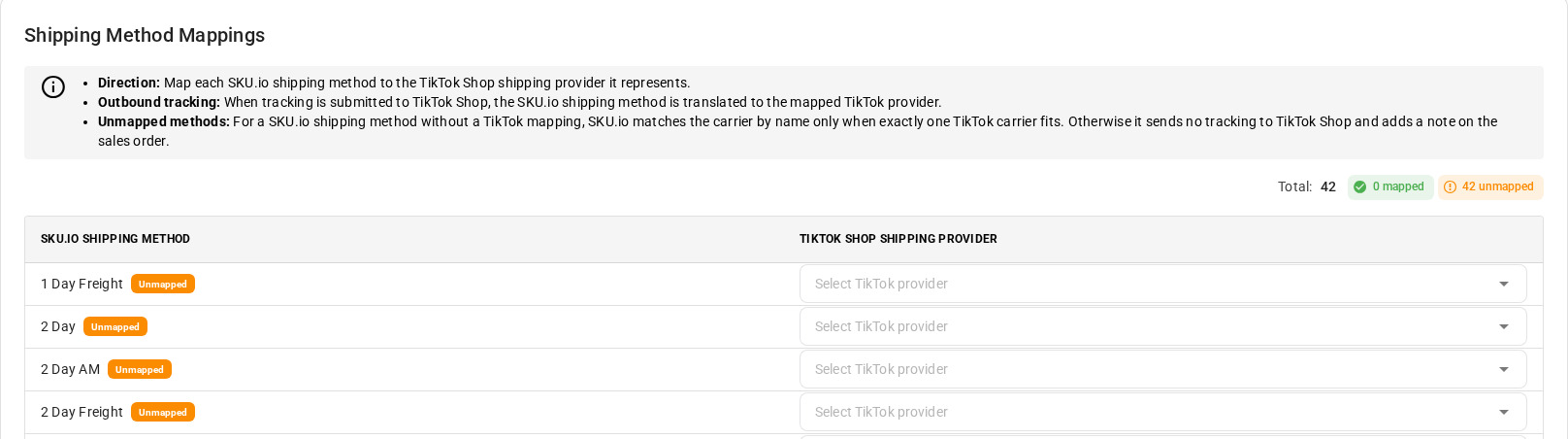
The list of TikTok providers comes from TikTok, for the delivery options your TikTok warehouses offer. The counts above the table show how many methods are mapped and unmapped.
What happens when an order ships
When a shipment is recorded on a TikTok Shop order, whether your 3PL reports it or you fulfill it yourself, SKU.io marks those items shipped on TikTok:
- One shipment is one TikTok package. A partial shipment sends only its own items, and a second shipment becomes a second package.
- Items TikTok already has as shipped are skipped, so nothing is sent twice.
- A note on the sales order records a failure, with what to fix.
SKU.io picks the TikTok carrier in this order:
- Your mapping for the shipment's shipping method, or, when the shipment has none, for the method the order asked for.
- A match by name. With no mapping, SKU.io compares the carrier recorded on the shipment with the providers TikTok offers for that order. It only uses a match when exactly one TikTok provider is that carrier. A plain "DHL" never picks between DHL eCommerce and DHL Express, because TikTok would refuse the tracking number, or accept it against the wrong carrier.
- Otherwise, nothing is sent. SKU.io never guesses a carrier. The sales order gets a note, and the shipment waits under Fulfillments → Pending Sync.
Name matching works for the common carriers, such as USPS, UPS, FedEx, DHL eCommerce, DHL Express, OnTrac, LaserShip, and Amazon Shipping. Map your methods anyway: a mapping is exact, and it's the only way to choose between two TikTok providers for the same carrier.
Fix a shipment TikTok wasn't told about
When no carrier can be found, the sales order gets a note like this:
TikTok Shop tracking was not submitted for fulfillment number: No TikTok Shop shipping provider for fulfillment number (carrier: …; shipping method: …). Map this shipping method to a TikTok shipping provider in TikTok Shop → Settings → Shipping Method Mappings, then submit it again. TikTok offers: …
The note names the carrier and shipping method SKU.io had, and the providers TikTok offers for the order. To fix it:
- Map the shipping method to one of the providers the note lists.
- Open your TikTok Shop connection, then Fulfillments, and the Pending Sync tab.
- Click the Sync to TikTok Shop icon on the shipment's row, or select rows and click Sync Selected. Sync All Now sends every waiting shipment.
If you don't, SKU.io tries again by itself every 30 minutes for shipments from the last three days.
Other notes you may see:
| Note says | What to do |
|---|---|
| The fulfillment has no tracking number | Add the tracking number to the shipment, then sync it from Pending Sync. |
| TikTok Shop rejected the shipment | TikTok's reason follows. A tracking number that doesn't fit the carrier usually means the mapping points at the wrong provider. |