
Product Information Management
Create All the Products, Then Enrich Them
On October 7 I spent 84 minutes on a call with two people from a customer who had been onboarding since July. The first half hour was getting Claude Code to run on a Windows laptop. It installed, then the terminal couldn’t find it, and we ended up in the environment variables adding a folder to the user path by hand. Once it was connected to their SKU.io account, we got to the thing that was actually holding them up, which was the product catalog.
Their storefront had roughly 50,000 products in it. About a thousand of those had been created in SKU.io. The two of them had a shared spreadsheet of about 700 items that sell every week, and the top 100 of those sell pretty much every day. They were working down that list one product at a time, checking the vendor, the vendor part number, the cost, whether it can drop ship, weight and dimensions, and only then creating the product. One of them described the goal like this:
“if the item has, you know, a tag or something that says verified, that means [we] have verified all the details for that item. You can trust what’s there.”
I had no argument with the goal. I had one with doing it before the product existed. I asked how confident he was that the 700 on the sheet were inside the thousand already in SKU.io. “I’m not.”
Meanwhile orders were coming in for products that didn’t exist yet. In SKU.io an order line that isn’t mapped to a product is just a storefront listing we don’t know anything about. It can’t reserve stock, it can’t be costed, and an order with an unmapped line won’t auto-dispatch. It sits there with a note naming the line. Later in the same call he showed me an order where the tax on one line was missing from the total. I said that was strange. Then I said it wasn’t. The product on that line wasn’t linked.
So I interrupted him. This is what I said, as transcribed:
“let’s say you had them all in SKU and then you had a attribute, a custom attribute called verified. So that way it doesn’t hold up the sale, but it is then like a separate process to do data enrichment”
They had two questions tied together: does this product exist, and can I trust what’s on it. The first you can answer for the whole catalog in an afternoon with a bulk create. The second is slow and doesn’t finish, because costs and vendors keep changing. Tie them and the launch waits on the second one.
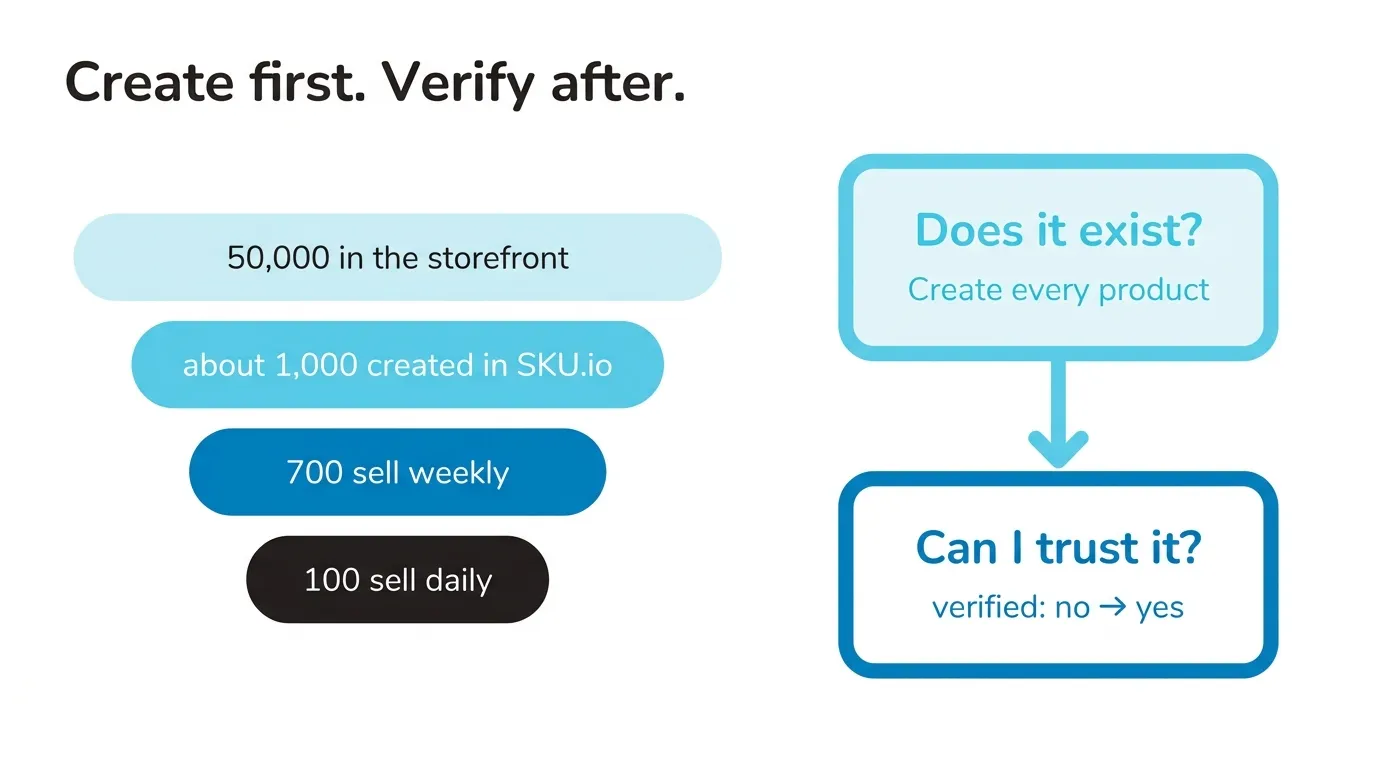
They had already made the field, a custom attribute called verified, yes or no, on the product. SKU.io doesn’t have a verified feature as such. What I was suggesting was only the order, create first and flip it to yes later. The products list can filter on any custom attribute, so “verified is not yes” becomes the work queue. You can sort it by vendor, or hand it to an agent with a source to check against. They have a shared purchasing inbox full of PO emails, and I suggested pointing Claude at that to fill in vendors and costs, and putting the answers in a sheet they approve before anything is written back.
I told them they could get through it “in a matter of, like, minutes.” That was too quick. One of them said what I think a lot of people feel on these calls: “he’s making it seem so simple. And that’s what’s scary about it.” He was right to push. The creating is quick. The checking is still their judgment, item by item, and nothing I showed them changes that.
He didn’t take the whole suggestion either. He wanted “the items that have sold so far.” Part of that was money. Our plans are priced partly on product count, and when he asked where the limit was I said I thought it went from 10,000 to 25,000 or 50,000. I looked it up while they waited. I was wrong, the step after 10,000 is 100,000, and that step cost more a month than he wanted to spend before going live. Earlier I’d filtered the storefront product list to items that appear in orders, which took it from about 50,000 to a little over 3,000. We went with that. Select all, Map to SKU products, Create new SKU Products, and it ran in the background while we talked about email. Every product with an order behind it gets created with whatever the storefront knew about it, and the verified flag says which ones they’ve checked.
I’d still create all 50,000. Doing it piecemeal means “you’re gonna have to come back to it time and time again,” every time an older item sells. If every product exists, “You don’t have to worry about mapping. You just have to worry about enriching at that point.” Every migration guide I’ve read says to clean the catalog before you import it. For product records I think that’s backwards. Cleaning before creating is how a team ends up three months in with a thousand products and orders it can’t ship.
His worry was that creating everything would let orders go out on bad data. It won’t, at least not on its own. Nothing dispatches until you turn on the automation, so orders line up and someone clicks to send them until the data is good enough to stop clicking. He said he was “looking forward to the day where my day is not spent looking at every single order.” The orders he said he was fixing “several times a day” were the ones where the product couldn’t be found yet, not the ones with a wrong cost.
When I left that call they were still working out how to give Claude read access to the shared purchasing inbox, which has no password of its own, so the vendor fill hadn’t started. With a few hundred products on one channel you don’t need any of this, a spreadsheet or inFlow or Zoho Inventory is fine, and if you’re somewhere between a big storefront and a first launch you can book a time and I’ll look at it with you.