Amazon seller feedback — the comments behind your order defect rate
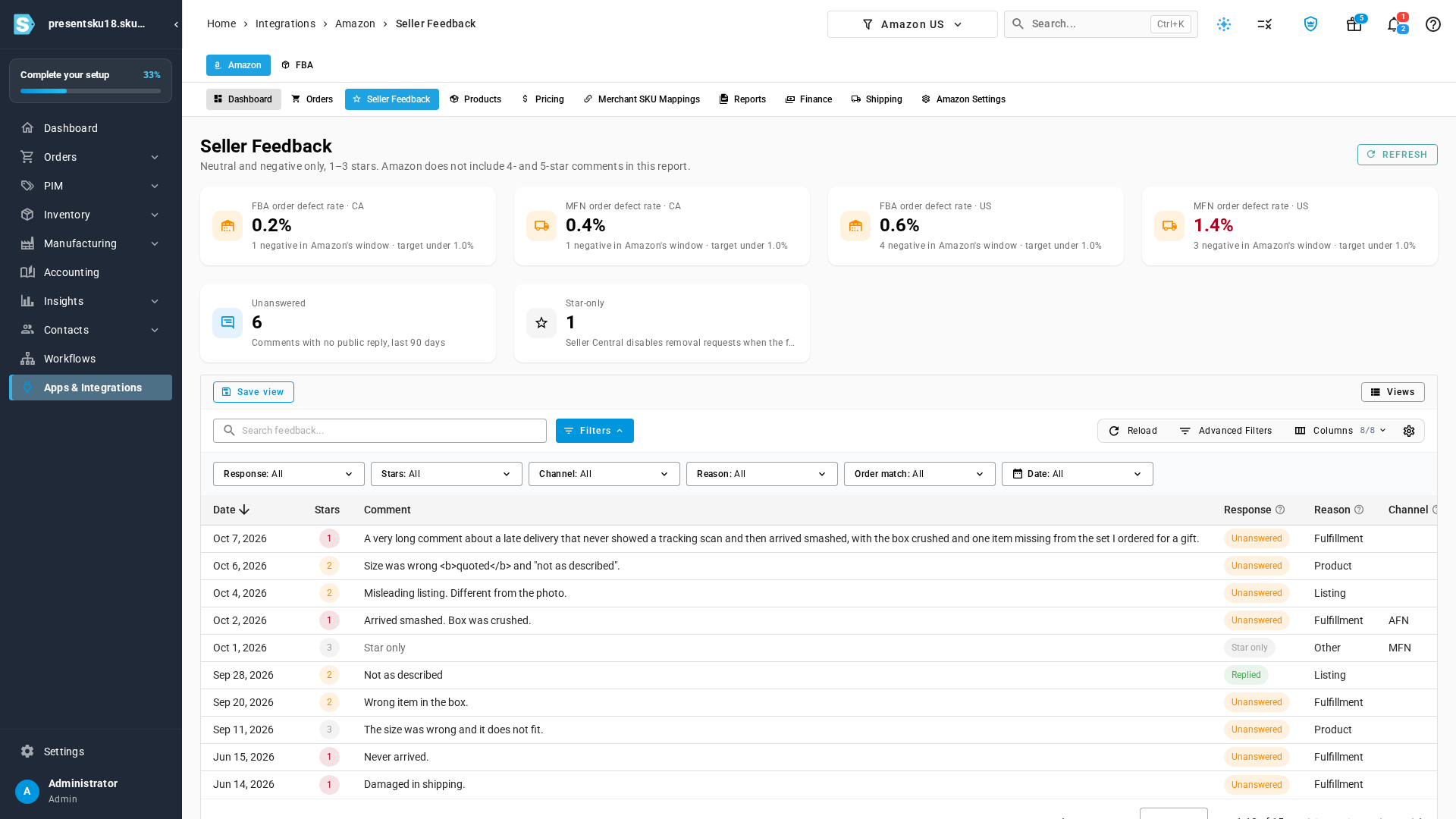
A 1- or 2-star seller comment is one of the things that moves your Amazon order defect rate, and the comment has lived in Seller Central while the order lived in SKU.io. Amazon seller feedback puts them in one place: the rating, the text, whether you have posted a public reply, and the sales order the comment belongs to. Next to the list, SKU.io shows Amazon's FBA and merchant order defect rate for each marketplace, so the comment and the number it affects are on the same screen. The report Amazon sends is neutral and negative only — 1, 2, and 3 stars. Amazon does not include 4- and 5-star comments.
✨ What this means for you:
- One inbox for the neutral and negative comments Amazon includes in this report, with Unanswered and Star-only called out above the list.
- FBA and merchant order defect rates for each marketplace, with Amazon's target (under 1.0%) on the card.
- Open any comment to see the public reply, a short note on what sellers usually do next, a reason you can correct, and an internal note for your team.
- When the Amazon order is already in SKU.io, the row links to that sales order, and the sales order shows the comment.
- The Amazon dashboard counts comments that still need a reply, and alerts fire when a reply is missing or a defect rate is above Amazon's target.
Review the comments Amazon sends, next to your defect rate
Open Seller Feedback on the Amazon channel. The strip across the top is Amazon's own order defect rate, split into FBA and merchant-fulfilled, one card per marketplace. Each card shows the rate, how many negatives Amazon counted in its window, and the target: under 1.0%. A rate over that target is the one to act on.
Two more cards sit under the rates. Unanswered is written comments from the last 90 days with no public reply. Star-only is a rating with no text — Seller Central disables removal requests when the feedback has no text.
The table under that is the comments themselves: date, stars, the comment, whether you have replied, the reason (Listing, Fulfillment, Product, or Other), the channel (AFN or MFN), and the order. A matched order opens the SKU.io sales order. An order SKU.io does not have shows the Amazon order id and a link to Seller Central.
Use Refresh when you want a new download. Filter the list by response, stars, channel, reason, order match, or date.
Open a comment before you reply in Seller Central
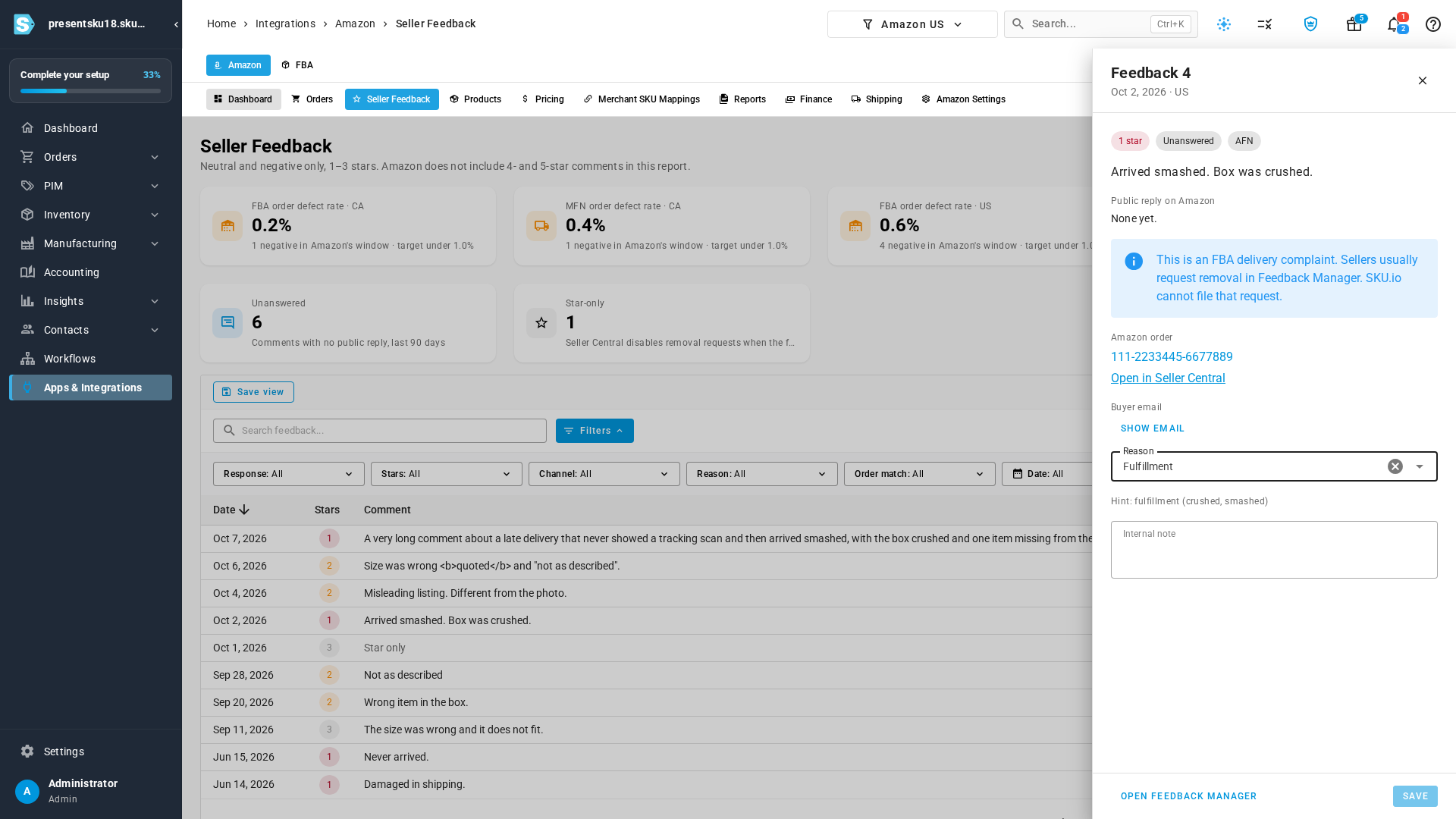
Click a row. The panel shows the comment, the public reply Amazon has on file (or "None yet"), and a short suggestion for that kind of comment. An FBA delivery complaint, for example, tells you that sellers usually request removal in Feedback Manager, and that SKU.io cannot file that request for you.
From the same panel you can open the sales order, open the order in Seller Central, and open Feedback Manager to post the reply or request a removal. The buyer email stays off the list; Show email reveals it on this comment only. The reason is filled in from the comment (a crushed box suggests Fulfillment) and you can change it. An internal note stays in SKU.io — it is not sent to Amazon. Save stores the reason and the note.
The comment shows up on the sales order
When a comment matches a SKU.io sales order, that order carries an Amazon seller feedback card: the stars, the date, the channel, whether there is a public reply, and the comment. View in Seller Feedback opens the same panel. The card appears only on a sales order that has a comment in this report.

A count on the Amazon dashboard
The Amazon channel home has a Seller feedback to review card. The number is how many comments still have no public reply. The line under it reads Within target, or names the side that is over — MFN order defect rate above target when the merchant rate is the one Amazon has flagged. The number turns red in that case. The card opens Seller Feedback.

Alerts when a reply is missing, or a rate is over target
Two alerts follow the same download:
- Amazon seller feedback needs a reply — an Amazon account has written comments from the last 90 days with no public reply. It names the account and the count, and it clears once every one of those comments has a reply or ages out of the 90 days.
- Amazon order defect rate above target — an FBA or merchant rate on that account is above Amazon's target. It names the marketplace and the side, for example the US merchant rate.
Both land in Alerts, under Integrations.
Where to find it
- The inbox: Integrations → Amazon → Seller Feedback. The tab sits directly after Orders. If you have more than one Amazon account, pick it in the account menu at the top of the page.
- A single comment: click the row, or open a sales order that has the Amazon seller feedback card and choose View in Seller Feedback.
- The dashboard count: Integrations → Amazon. The Seller feedback to review card is under the FBA banner.
- The alerts: Alerts, filtered to Integrations.