Dropship vendor shipping labels — your rates, your label, no chasing for tracking
When a vendor ships a dropship order straight to your customer, they usually ship on their own carrier account. You pay their markup, you don't control the carrier, and then you chase them for a tracking number and type it in by hand. Dropship vendor shipping labels fixes that. Switch it on for a supplier, and SKU.io buys a prepaid label on your own Shippo, ShipStation, Starshipit or EasyPost account and gets it to the vendor. The label's tracking flows back into the order by itself, so your customer and sales channel hear "shipped" at the right moment.
✨ What this means for you:
- Your negotiated rates on every dropship parcel. Labels are bought on your own label account, using only the services you allow.
- No more typing in tracking. The label's tracking number flows into the dropship shipment and on to your sales channel.
- "Shipped" means shipped. The order is marked shipped at the first carrier scan, not when the label is printed. ShipStation doesn't send scan updates, so for ShipStation labels it's when the vendor confirms or at the end of the ship date.
- Labels dated for the day they're used. A label for a later ship date is bought that morning, in the supplier's own timezone, so it never goes stale.
- No wasted postage. Unused labels are voided automatically, and so are labels on cancelled orders.
- Vendors never need a login. They request their label from the same link they already use to confirm the PO.
Choose, supplier by supplier, how labels work
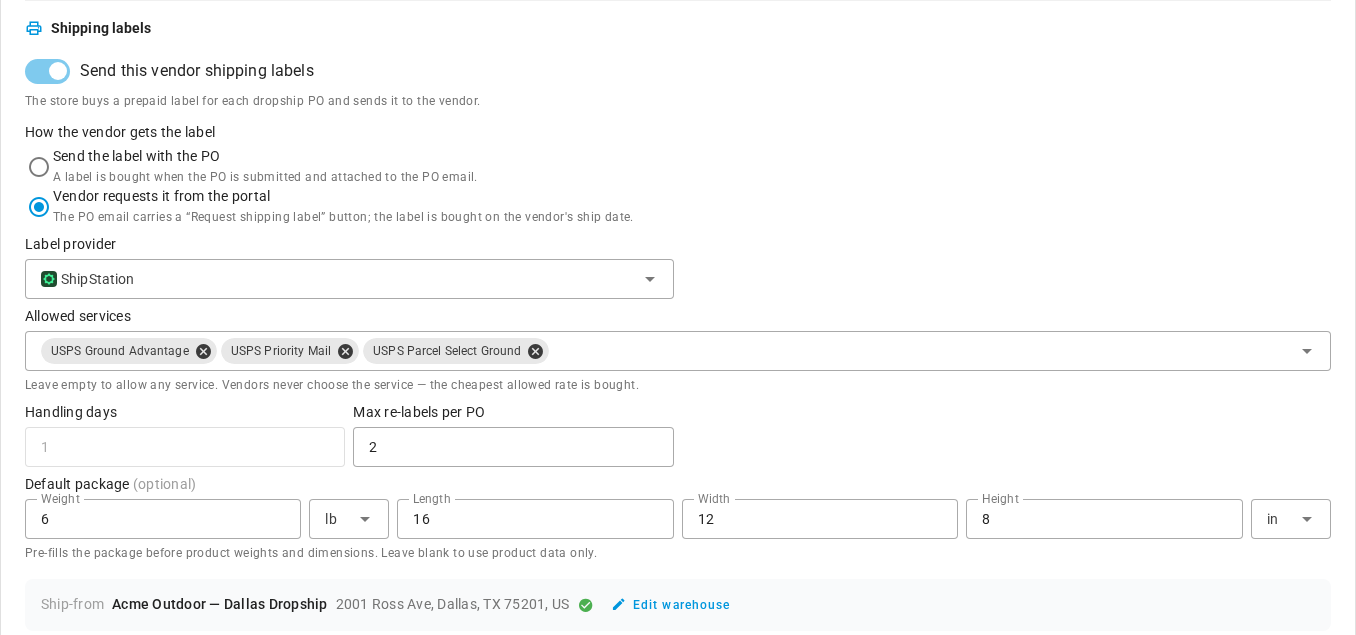
Each supplier has a Shipping labels card in its Dropship settings. Leave Send this vendor shipping labels off and nothing changes: that vendor keeps shipping on its own account and sees no labels at all. Turn it on and choose how the vendor gets the label:
- Send the label with the PO. The label is bought when the PO is submitted and attached to the PO email.
- Vendor requests it from the portal. The PO email carries a Request shipping label button, and the label is bought on the vendor's ship date.
Then pick the Label provider, limit the Allowed services if you like (SKU.io always buys the cheapest allowed rate), and set a Default package size. The ship-from address comes from the supplier's dropship warehouse.
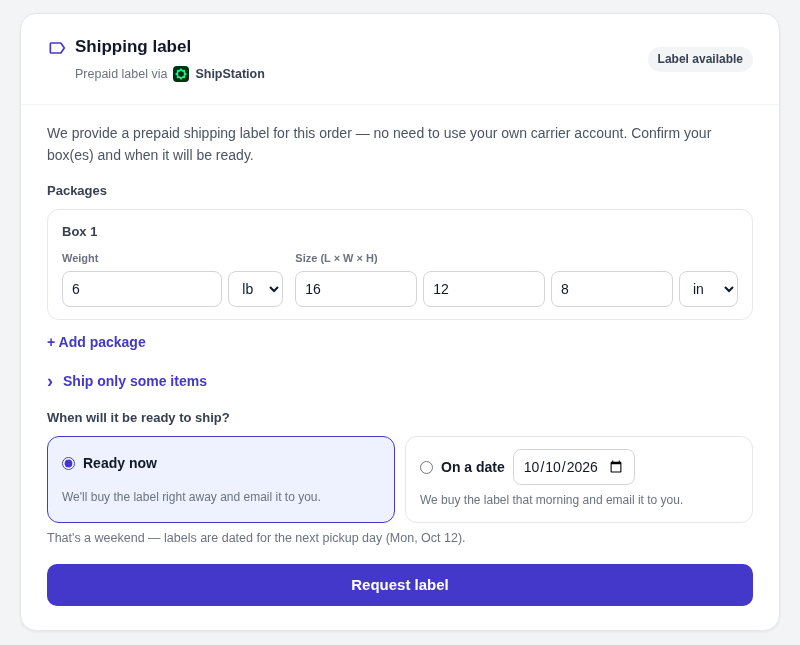
Vendors request a label when the order is ready
From the PO link, the vendor confirms their boxes (pre-filled from your default package or product dimensions), then picks Ready now or On a date. Ready now buys the label straight away and emails it to them. If they choose a date, the label is bought that morning and emailed to them then. They can change the date or say "it's ready now" until then. Shipping only part of the order? Ship only some items lets them label just what's going out now, and request another label for the rest later.
See every label right on the PO
A dropship PO now has a Shipping label card with a badge showing whose account the label is bought on, for example Labels via ShipStation. It shows where the label stands, from requested to scheduled, label ready and shipped. You can see the ship date, service, tracking, cost and packages, plus a timeline of everything that happened. Need to step in? Buy now, Change date, Download, Resend email, Copy portal link and Void are all one click away.

Find stuck labels from the PO list
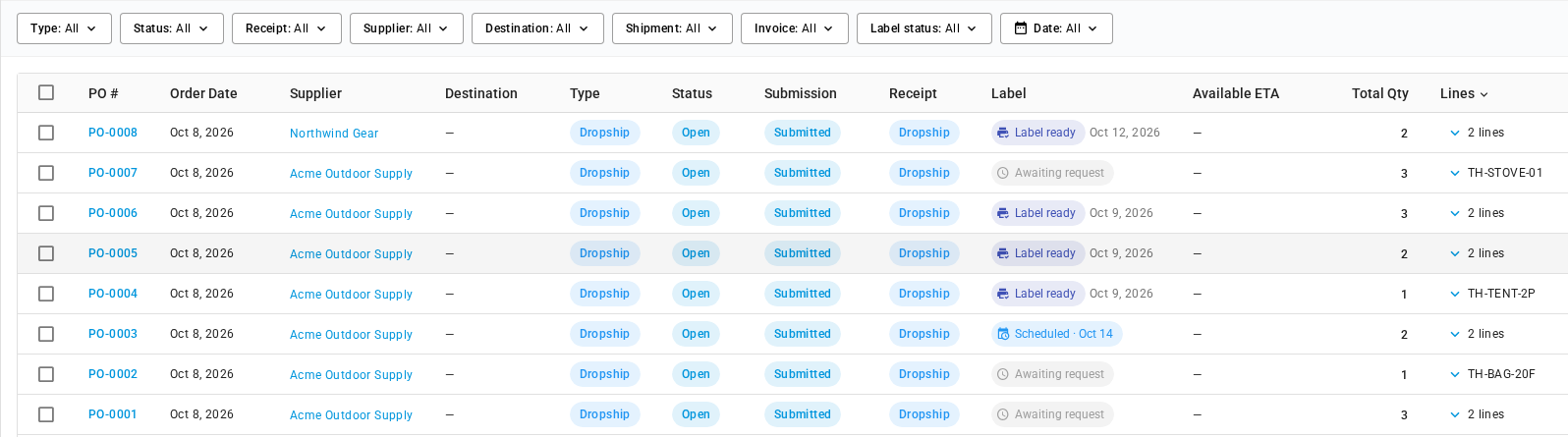
The Purchase Orders list has a new Label column showing each PO's label status and ship date, and a Label status filter. So "awaiting request" or "label ready but not shipped yet" is one filter away. The column is also included when you export the list.
Where to find it
- Turn it on for a supplier: Contacts → Suppliers → (your supplier) → Settings → Dropship → Shipping labels. You'll need Shippo, ShipStation, Starshipit or EasyPost connected under Apps & Integrations first.
- Account-wide defaults (default provider, holding fulfillment until the first carrier scan, return address, vendor reminders): Settings → Purchasing → Dropship Labels.
- Manage a label: open any dropship purchase order under Orders → Purchase Orders and use its Shipping label card.
- Track labels across orders: Orders → Purchase Orders. Add the Label column from Columns and filter by Label status.
Full guides: Send dropship vendors a shipping label · Manage a dropship label on a purchase order · How dropship shipping labels work