How PayPal payments reach SKU.io
When a customer pays a PayPal pay link, the payment usually appears on the sales order straight away. Sometimes it can't: the customer closes the window too early, PayPal holds the money, or something happens on paypal.com instead of in SKU.io. For those cases SKU.io has three backup routes. This page explains what each route covers and how long it takes, so you know when to wait and when to look.
The short version
| Route | When it runs | What it brings in | What it needs |
|---|---|---|---|
| The pay page | The moment the customer completes payment | The payment, recorded on the order | Nothing; this always runs |
| Instant updates (webhook) | Within seconds of PayPal sending an update | Payments, declines, payments that clear, refunds made in PayPal, disputes and reversals | The webhook on your PayPal app |
| SKU.io's 15-minute check | Every 15 minutes | Pay-link payments that didn't arrive, and payments that are still processing | Nothing to set up |
| Nightly reconciliation (the nightly import) | Once a night, or when you click Import now | All your PayPal activity, including anything the other routes missed | Transaction search turned on in your PayPal app |
The routes overlap on purpose. If two routes report the same payment, SKU.io records it once.
The pay page
On the pay page, the customer clicks a PayPal button, signs in to PayPal, and approves the payment. The pay page then completes the charge and shows Payment received. At that moment SKU.io records the payment on the order, with the PayPal Payment payment type and PayPal's fee. The order's amount due drops, and the pay link shows Paid.
This route covers most payments. The other three exist for the cases it can't cover. If the customer approves the payment in PayPal but closes the pay page before it finishes, no instant update completes the charge. SKU.io's 15-minute check does that.
Instant updates (webhook)
When you connect an account with your API keys, SKU.io adds a webhook to your PayPal app. Through it, PayPal sends SKU.io an update every time something happens to a payment. SKU.io acts on it within seconds:
- A completed payment is recorded on the order, if the pay page didn't already record it.
- A payment PayPal is holding (for example, an eCheck) marks the link Pending. SKU.io records the payment once PayPal releases it.
- A declined payment frees the link, so the customer can try again.
- A refund you make on paypal.com is recorded on the order as a refund.
- A dispute opened or closed, or a payment PayPal takes back (a reversal or chargeback) adds an entry to the order's Activity tab. The order's balance doesn't change. You decide what the outcome means for the order. If money went back to the customer, record a refund by hand. Don't use Refund via PayPal: the money has already gone back.
Each update is listed on the account's Webhook Events tab, where you can replay one. See Find a PayPal payment that didn't reach the order.
To check that instant updates are on, open Apps & Integrations → All Integrations, choose PayPal, select the account and look at the Connection Status card on the Account tab. Instant updates (webhook) should say Yes.
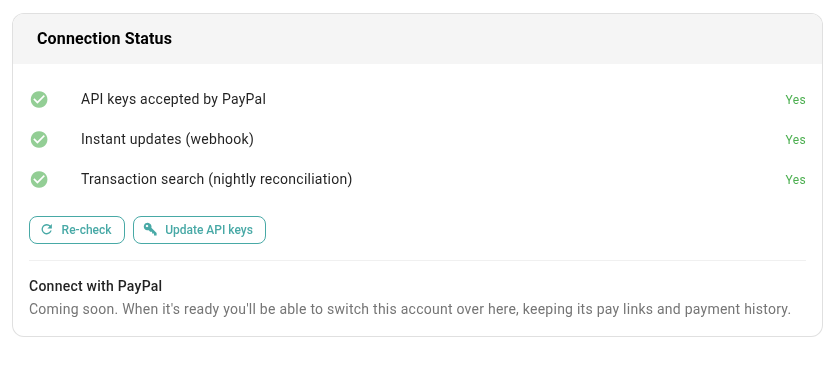
If PayPal refused the webhook, the Account tab shows PayPal isn't sending instant updates yet. Pay-link payments, including ones that clear later, still arrive through the pay page and the 15-minute check. Refunds made in PayPal, disputes and reversals wait for the nightly import. To fix the webhook, see When PayPal won't add the webhook.
SKU.io's 15-minute check
Every 15 minutes, SKU.io looks at pay links where a payment started but was never recorded, and asks PayPal what happened. It runs by itself, and there's nothing to set up or turn on.
It looks at a link when all of these are true:
- The link is Active, and the customer clicked a PayPal button on it in the last 7 days.
- Nothing has happened on the link for at least 10 minutes. A customer who is still on the pay page gets time to finish without SKU.io stepping in.
- The link has no recorded payment. A link whose earlier attempt was declined is still checked, in case the customer tried again.
What happens next depends on what PayPal says:
| PayPal says | What SKU.io does |
|---|---|
| The payment is complete | Records it on the order, the same as if the pay page had |
| The customer approved the payment but the charge was never completed (they closed the window after approving) | Completes the charge, then records the payment |
| The customer hasn't approved yet | Leaves the link alone and checks again next time |
Because of the 10-minute wait and the 15-minute cycle, expect a payment the check recovers 10 to 25 minutes after the customer approved it. If a customer tells you they paid and the order still hasn't updated after 25 minutes, look for the payment.
Payments that are still processing
The check also follows links showing Pending: the customer paid, but PayPal hasn't released the money yet. Every 15 minutes, SKU.io asks PayPal whether the payment has cleared, and records it on the order once it has. If PayPal declines it instead, the link is freed.
The check follows a processing payment for up to 30 days. When it can't follow one any more, the pay link shows a note that you need to check PayPal yourself:
| Note on the pay link | Why |
|---|---|
| Account disconnected — check PayPal | The PayPal account was disconnected, so SKU.io can't ask PayPal any more. |
| API keys need updating — check PayPal | PayPal no longer accepts the account's API keys. Update them, and the check picks the payment up again. |
| Still clearing after 30 days — check PayPal | The payment is still processing after 30 days. |
The note appears on the order's Payments tab and on the account's Pay Links tab.
When the check skips an account
The check skips every link on an account that's disconnected, or whose API keys PayPal no longer accepts, because SKU.io can't ask PayPal about them. The nightly import skips those accounts too. Once you update the API keys, both pick up where they left off.
Nightly reconciliation
Once a night, SKU.io imports your PayPal activity into the account's Transactions tab. You can also start it any time with Import now on that tab. The Last reconciled row on the Account tab shows when it last finished.
The import is the final safety net. While it imports, it also:
- Records missed pay-link payments. A payment that never reached the order is recorded now. Its transaction shows Recovered on the Transactions tab.
- Records refunds made on paypal.com that SKU.io doesn't already have.
- Flags chargebacks. The transaction shows Disputed, and the order's Activity tab gets an entry. The balance doesn't change.
- Lists everything else. Payments that didn't come from an SKU.io pay link, such as a PayPal invoice you sent from paypal.com, show Unmatched. SKU.io doesn't put these on an order for you.
PayPal makes activity available to the import up to about three hours after it happens. So anything from the last three hours before an import arrives with the next one.
The import needs Transaction search turned on in your PayPal app. Check the Transaction search (nightly reconciliation) row on the Connection Status card. If it says No, turn on Transaction search under your PayPal app's features on developer.paypal.com, then click Re-check. Until you do, SKU.io doesn't import anything, so refunds made in PayPal, disputes, and reversals reach SKU.io only through instant updates.
For how matching works and how to review what the import found, see Review PayPal transactions.
SKU.io doesn't alert you about PayPal activity
SKU.io doesn't send notifications or alerts about PayPal activity. Nothing is sent when a customer pays a link, a payment is still processing, a dispute opens, PayPal takes a payment back, or PayPal stops accepting an account's API keys. PayPal isn't one of the alert types you can turn on, either.
Instead, check these places:
| To see | Look at |
|---|---|
| Whether a customer has paid | The order's Payments tab, or the account's Pay Links tab |
| Disputes and reversals | The order's Activity tab, and Disputed on the account's Transactions tab |
| Payments that didn't land on an order | Unmatched and Recovered on the account's Transactions tab |
| Whether the account still works | The status chips at the top of the account page, and its Connection Status card |
PayPal emails you about payments and disputes from its side, so keep those emails turned on in your PayPal account.
Next steps
- Find a PayPal payment that didn't reach the order
- Review PayPal transactions
- Connect PayPal with your API keys
- PayPal reference: every pay-link status and what moves a link from one to the next