Why sales are held
SKU.io never sends Numeral a sale it isn't sure about. When a sale can't go yet, it stays in SKU.io with a reason, and the Numeral dashboard groups those sales so you can clear them. Nothing is lost while a sale waits: once the reason is gone, it goes to Numeral by itself.
Before you begin
- Numeral is connected and sending is on. See Connect Numeral.
Find the sales that are waiting
-
Go to Apps & Integrations → All Integrations, search for Numeral, choose it, and click your Numeral connection. The Dashboard opens.
-
Look under Needs action. Each group is one reason, with how many sales it holds, what they're worth, and the states and channels involved.
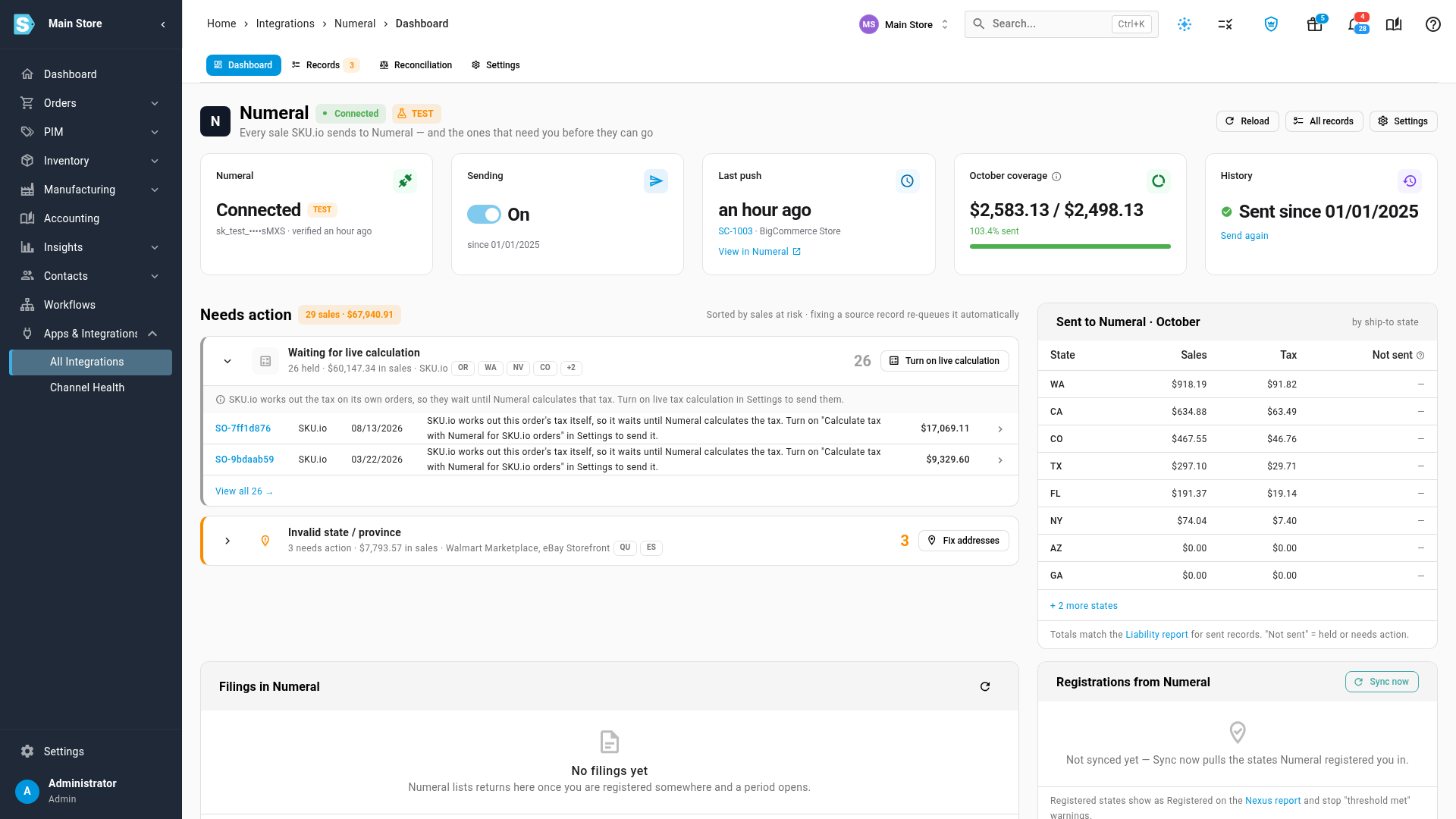
There are two kinds of waiting sale:
- Held (grey): the sale waits for something SKU.io expects to change, such as an order closing. Most clear by themselves.
- Needs action (orange): something about the sale has to be fixed first, usually its address.
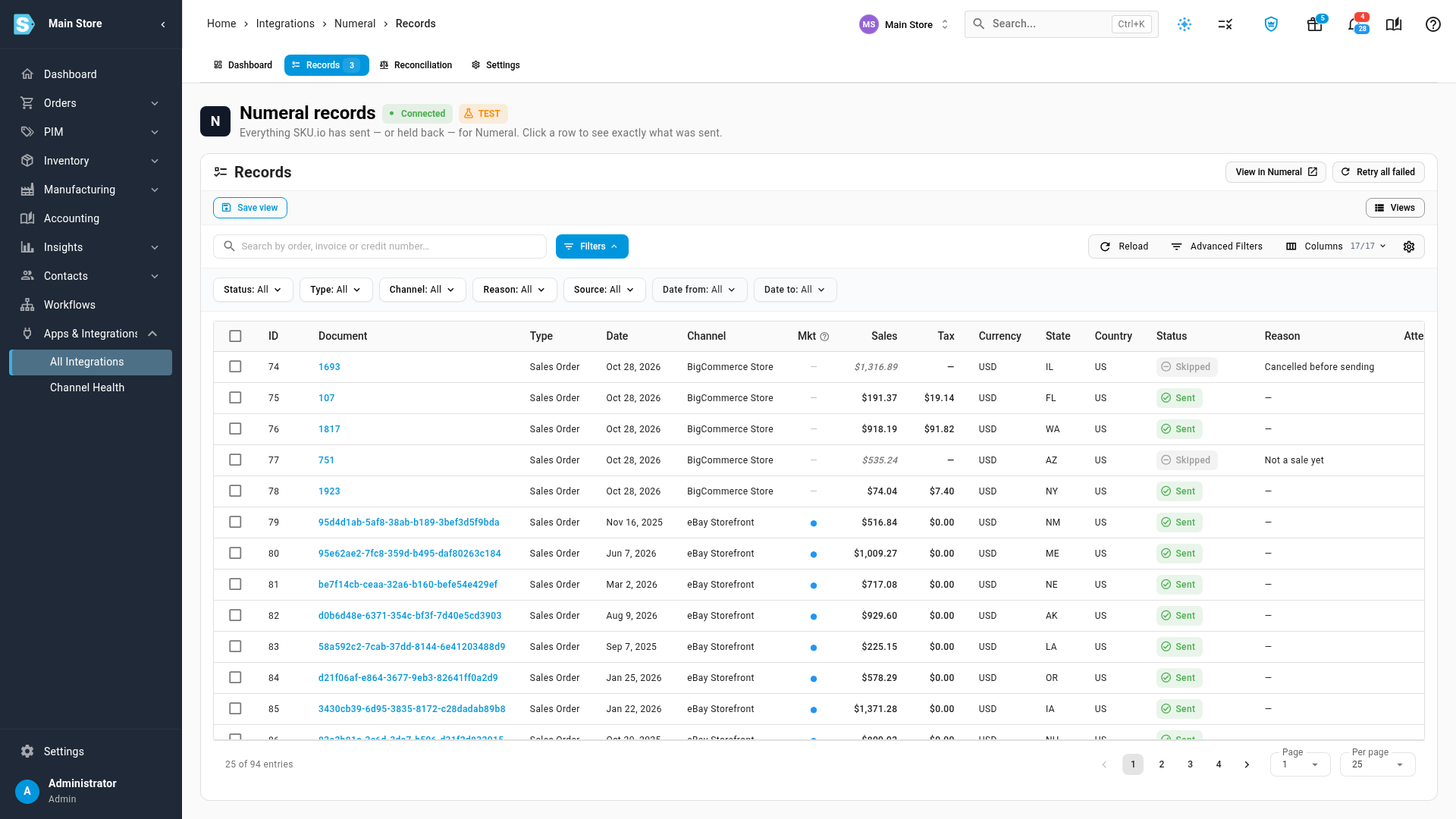
To see every waiting sale in one list, open the Records tab and filter Status or Reason.
Fix a sale that needs action
-
Click the arrow at the left of a group to open it. A hint under the title says how to fix that kind of problem.
-
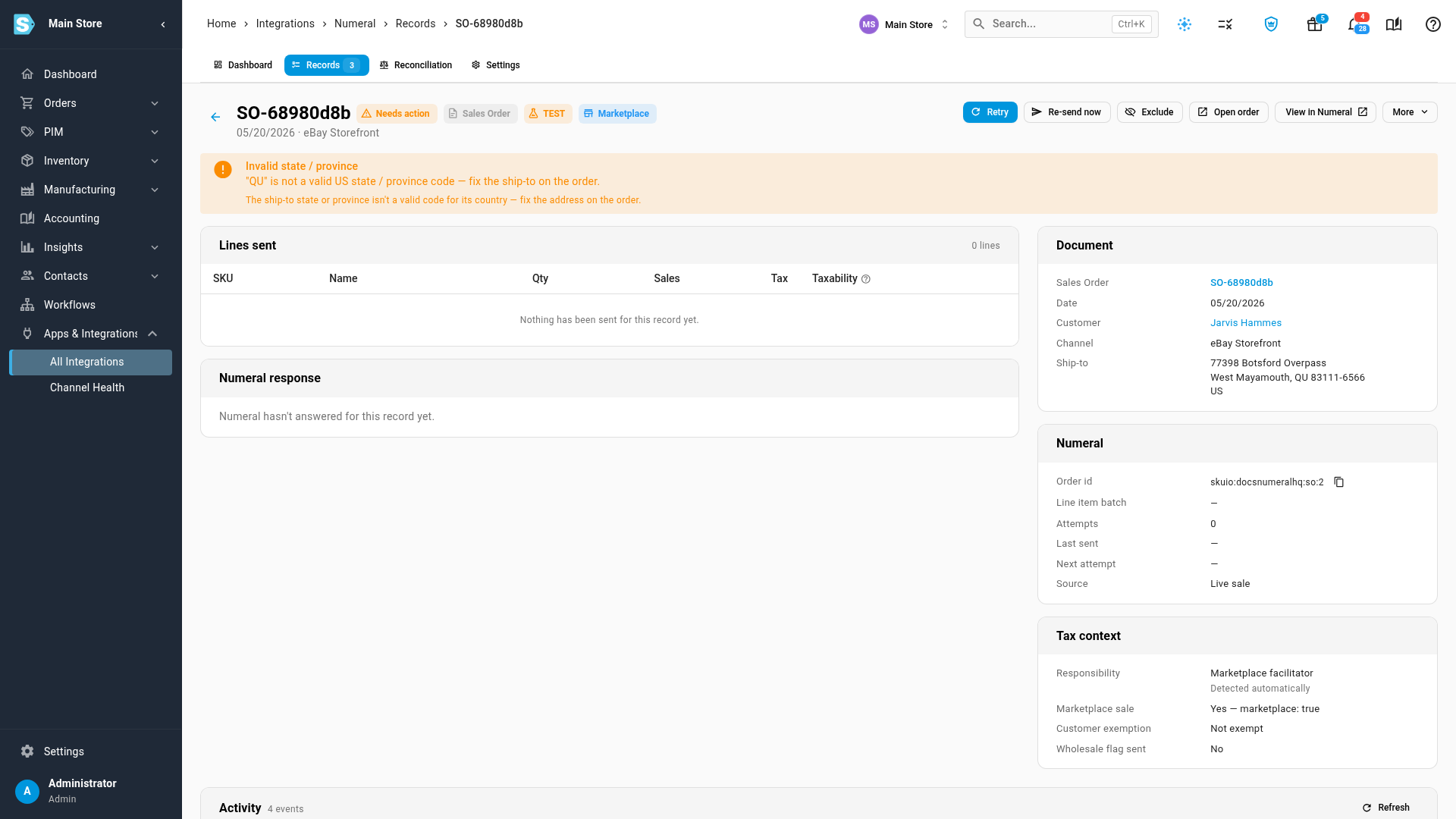
Click a sale to open its record. The banner at the top says exactly what's wrong, and Document shows the ship-to SKU.io has for it.
-
Click Open order, correct the problem (for example, the ship-to state), and save the order.
What you'll see: the record goes back into the queue on its own and is sent within a minute. A group's button does the same for all of its sales at once: Fix addresses opens the affected records, for example.
If Numeral itself rejected a sale, its Numeral response card shows what Numeral said. After you fix it, click Retry.
Release orders held for live calculation
SKU.io works out the tax on orders from your B2B portal and on orders you enter yourself. Numeral needs to calculate that tax before it receives those orders, so until you switch that on they're held as Waiting for live calculation.
-
On the Waiting for live calculation group, click Turn on live calculation. Settings opens at Live tax calculation.
-
Switch on Calculate tax with Numeral for SKU.io orders and confirm.
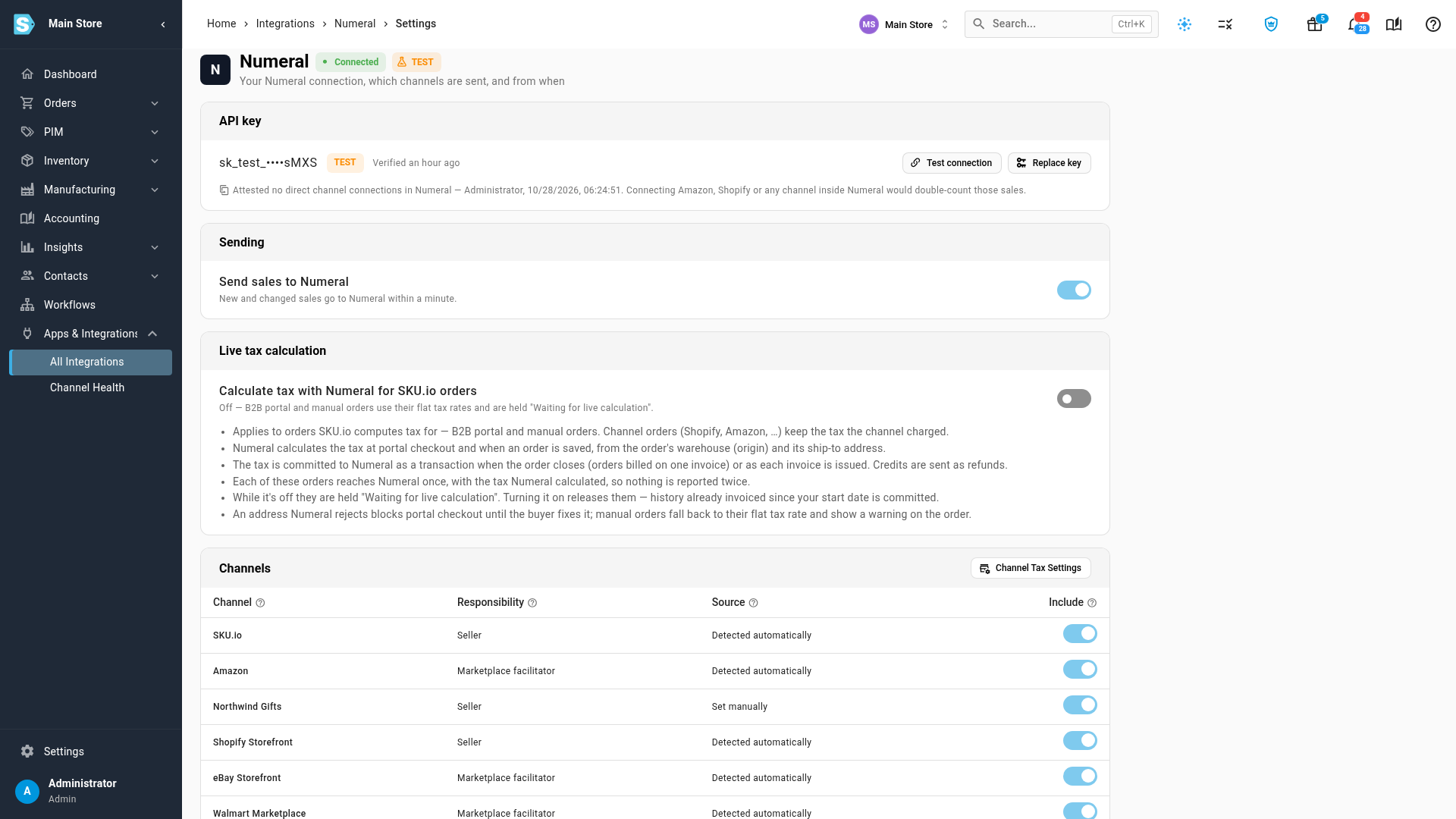
What you'll see: from now on Numeral prices those orders when they're saved and at portal checkout. The held ones are released, and each is sent to Numeral when the order closes or its invoice is issued.
Every reason, and what to do
| Reason | Kind | What it means | What to do |
|---|---|---|---|
| Channel not classified | Held | Nobody has said who collects tax on the channel. SKU.io never guesses. | Answer it on the Numeral Settings tab under Channels. |
| Channel excluded | Held | The channel is set to Don't send. | Change it under Channels if it should be sent. |
| Before start date | Held | The sale is dated before the start date you chose. | Move the start date earlier under What to send. |
| Excluded by a user | Held | Someone excluded this record. | Open the record and include it again. |
| Backfill cancelled | Held | The history send was cancelled before this sale went. | Send history again from the dashboard. |
| Waiting for live calculation | Held | SKU.io works out this order's tax itself. | Turn on live tax calculation (above). |
| Waiting for the order to close | Held | The tax goes to Numeral once the order closes or its invoice is issued. | Nothing; it's sent then. |
| Waiting for the sale to be committed | Held | A refund waits until the sale it refunds reaches Numeral. | Nothing, unless the sale itself is waiting. |
| Invalid state / province | Needs action | The ship-to state isn't a valid code for its country. | Fix the address on the order. |
| Missing state / province | Needs action | US and Canadian sales need a state or province. | Add it to the order's address. |
| Missing postal code | Needs action | US and Canadian sales need a ZIP or postal code. | Add it to the order's address. |
| Missing country | Needs action | The sale has no ship-to or billing country. | Add one to the order. |
| Missing address | Needs action | A credit with no order is placed at the customer's default address, and the customer has none. | Add a default address to the customer. |
| Unknown currency | Needs action | The sale's currency isn't one Numeral accepts. | Check the order's currency. |
| Invoice mixes destinations | Needs action | One invoice combines orders shipped to different places. | Review the invoice so each one has a single ship-to. |
| Address rejected by Numeral | Needs action | Numeral couldn't validate the ship-to. | Fix the address, then recalculate the order's tax. |
| Rejected by Numeral | Needs action | Numeral refused the data. | Open the record; its Numeral response says why. |
| Changed after a refund was sent | Needs action | The sale changed after its refund went to Numeral. | Review it in Numeral. |
| Numeral unavailable | Failed | Numeral didn't answer after eight tries. Nothing is lost. | Click Retry once Numeral is back. |
Some records are Skipped rather than held: a cancelled order that was never sent, a quote that isn't a sale yet, an order sent invoice by invoice instead, or a deposit invoice. They never need to reach Numeral.
Next steps
Video transcript
When a sale can't reach Numeral yet, SKU.io keeps it and tells you why. To see what's waiting, open Apps and Integrations in the menu on the left, then All Integrations. Click the search box, type Numeral, and choose it from the list. Then click the connection under Instances. Its dashboard opens, with your sending status across the top. Needs action lists every sale Numeral hasn't received, grouped by the reason. Each group shows how many sales it holds, and how much they're worth. A grey group is held: it waits for something SKU.io expects to change. An orange group needs you to fix something first. Open a group with the arrow at its left to see its sales and a hint about the fix. Here, the ship-to state isn't a valid code for its country. Click one of the sales to open its record, with everything SKU.io knows about it. The banner at the top says what's wrong, and Document shows the ship-to on the order. Click Open order, correct the address, and save the order. The record goes back in the queue on its own, and the sale is sent within a minute. Now go back to the Dashboard tab, at the top of the page. The grey group, Waiting for live calculation, holds orders whose tax is worked out inside SKU.io. They wait until Numeral calculates that tax, so nothing is sent with the wrong amount. Click Turn on live calculation to open the setting that releases them. Settings opens at Live tax calculation. Switch on Calculate tax with Numeral for SKU.io orders, and Numeral prices those orders from now on. The held ones are released, and sent as each order closes or is invoiced. To see every sale at once, open the Records tab. The Status and Reason columns say where each sale stands, and the filters narrow the list to one reason.