Cancel an order D3 has downloaded
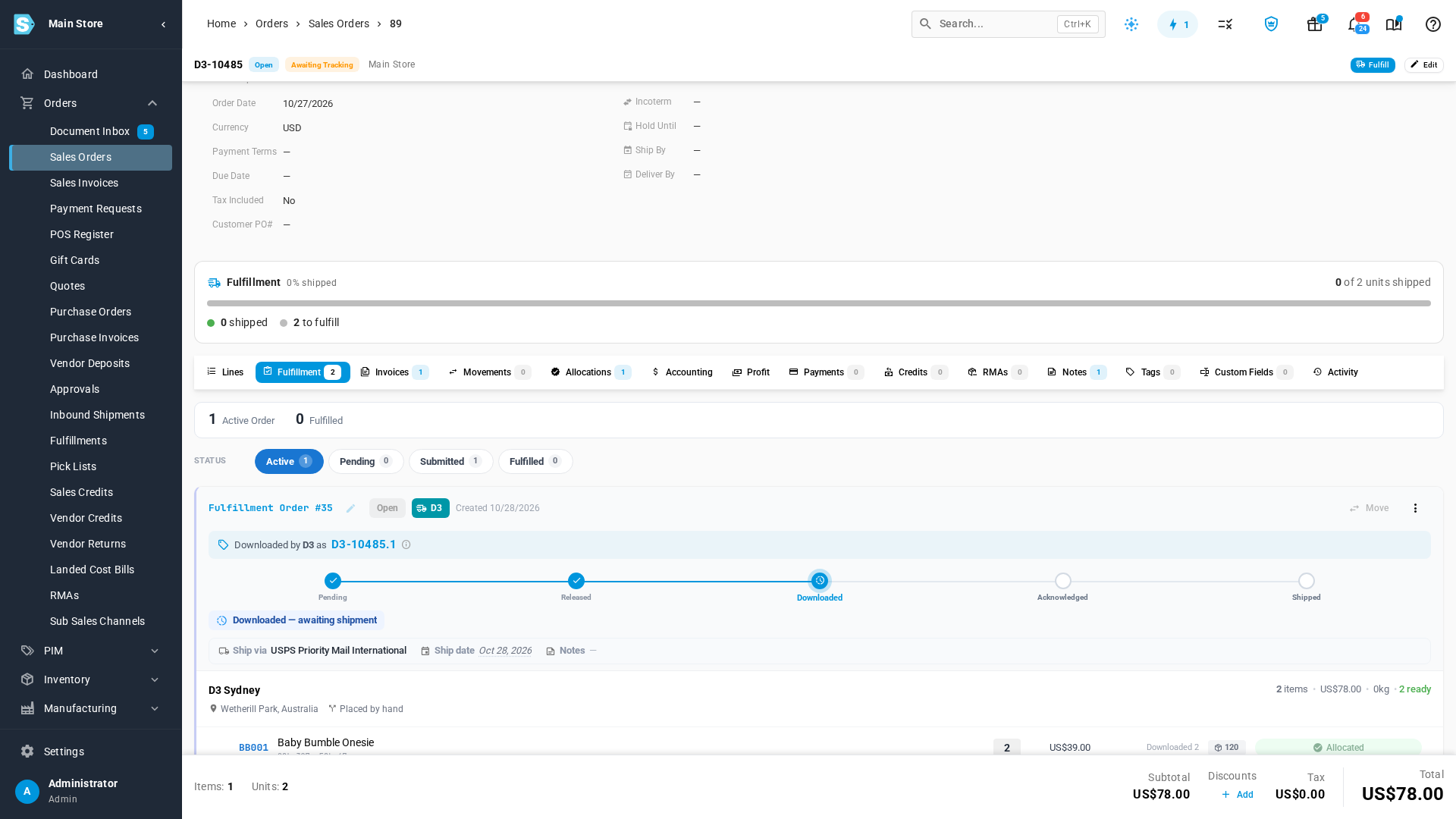
Once D3 has downloaded an order, it keeps its own copy. Cancelling the order in SKU.io releases its inventory, but it doesn't remove the order from D3's system, so D3 still ships it unless you ask D3 to delete it.
Before you begin
-
You need permission to cancel sales orders or fulfillment orders.
-
Check the fulfillment order's status on the sales order's Fulfillment tab. This guide is for Downloaded and Acknowledged orders. A Released order that D3 hasn't downloaded yet just leaves D3's list when you cancel it.
Always cancel in SKU.io first
Cancel in SKU.io before you ask D3 to delete the order. D3 downloads every released order that's still live in SKU.io. If D3 deletes an order while it's still live here, the next check downloads it again, within 30 minutes, and it ships after all.
Steps
Cancel the whole order
Use this when the customer cancelled.
-
Go to Orders → Sales Orders, and open the order.
-
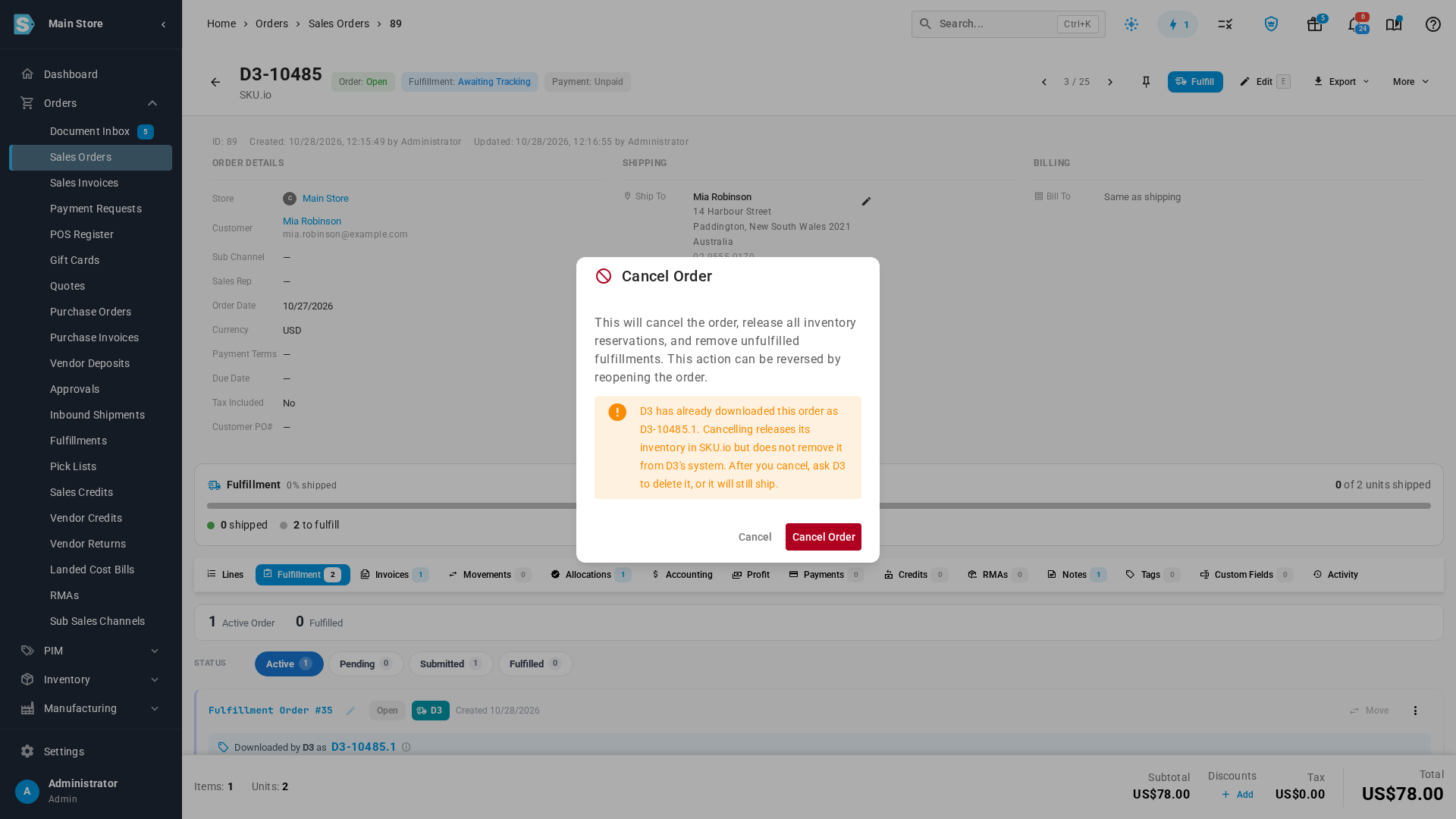
Click More, then Cancel Order.
-
Read the warning. It says D3 has already downloaded the order, under the number D3 knows it by, such as D3-10485.1.
-
Click Cancel Order.
-
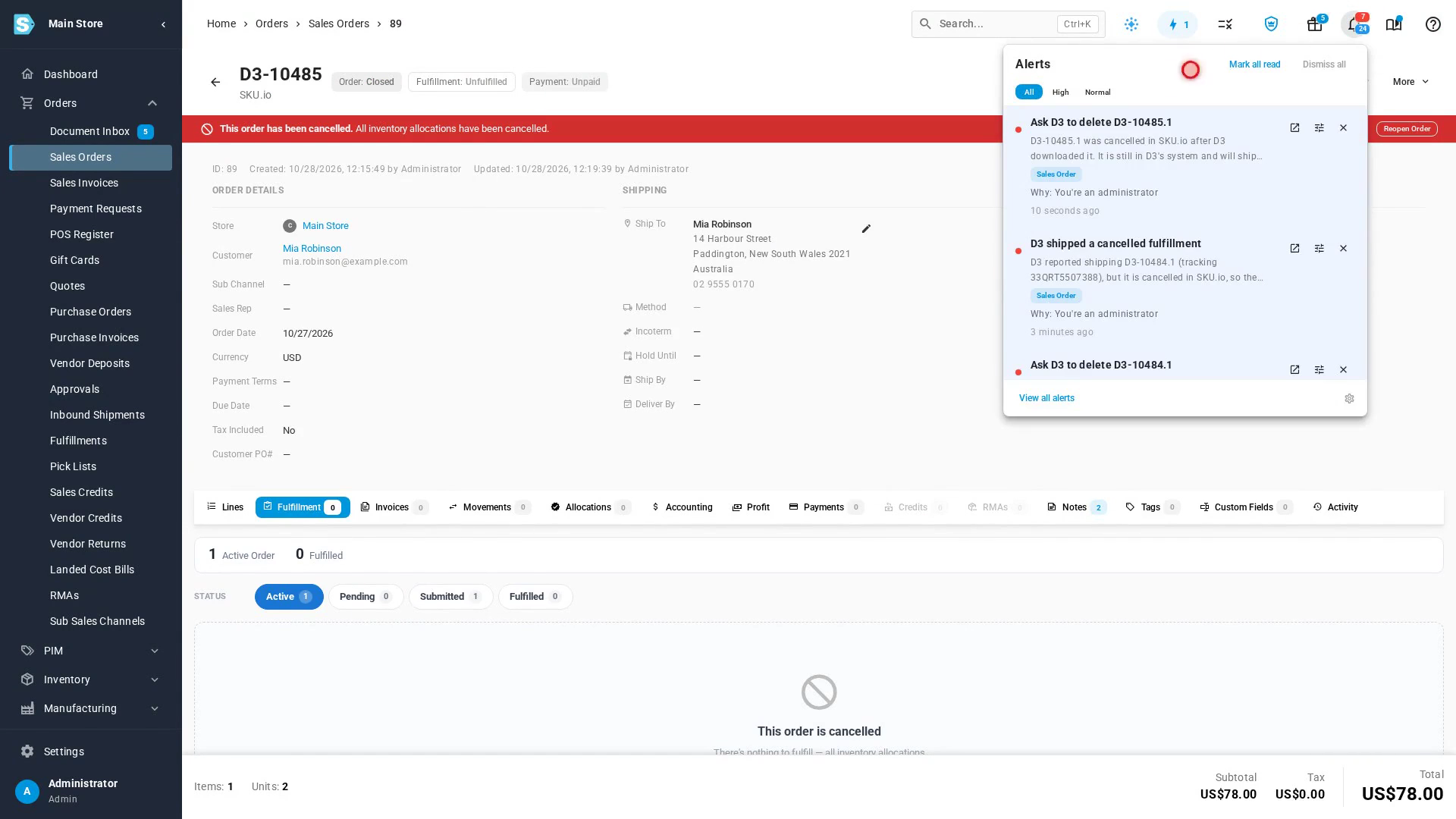
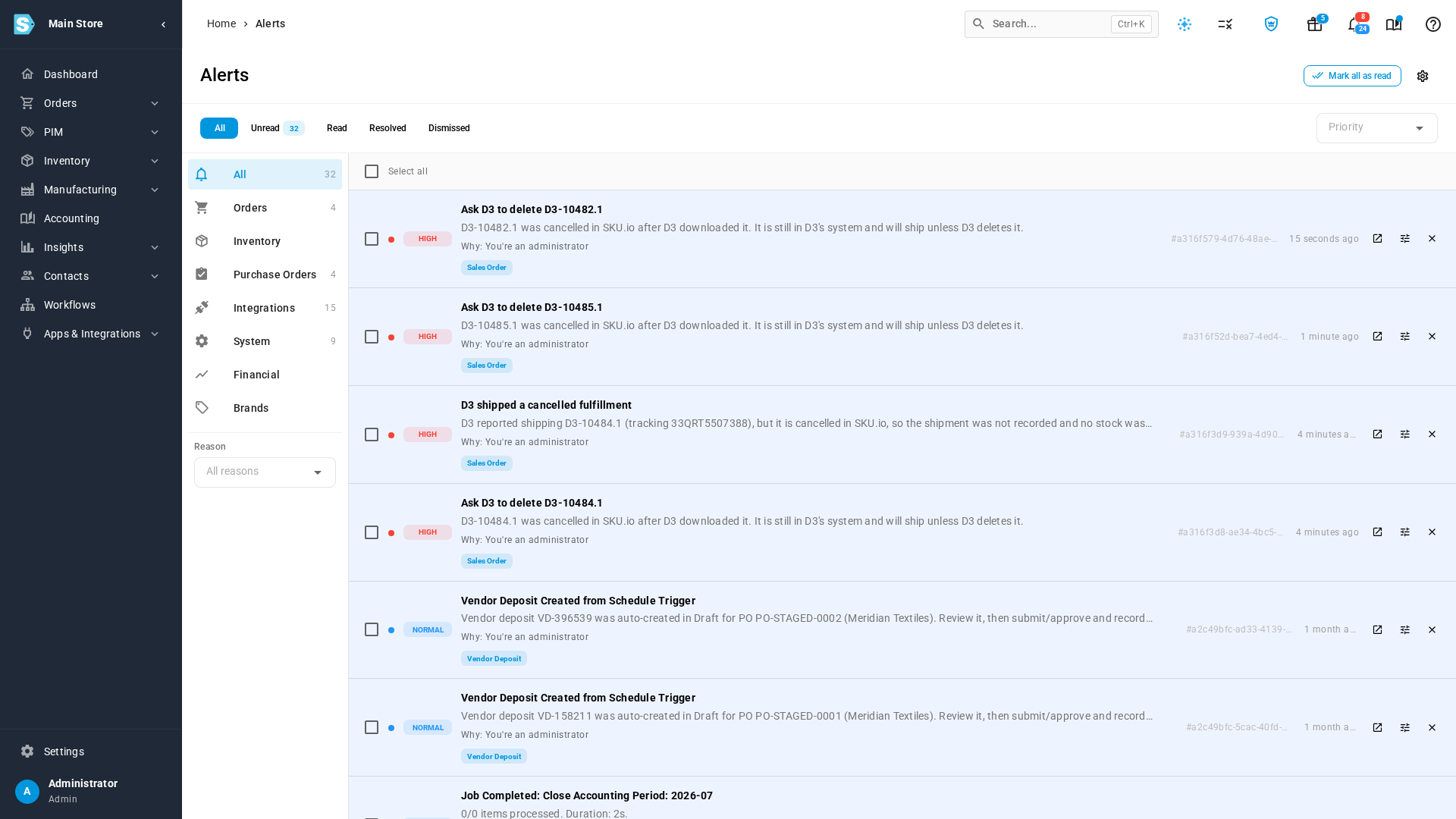
Ask D3 to delete the order, quoting that number. The alerts bell shows Ask D3 to delete with the number, as a reminder.
An order from a connected sales channel, such as Shopify, can't be cancelled here: Cancel Order says it must be cancelled in that channel. Cancel it there. When the cancellation syncs to SKU.io, SKU.io cancels the fulfillment order and raises the alert below, so you know to ask D3 to delete it.
Cancel only the fulfillment
Use this when the order should still ship, but not from D3.
-
Open the sales order, and go to the Fulfillment tab.
-
On the Downloaded fulfillment order, open the menu (⋮), and choose Cancel fulfillment order.
-
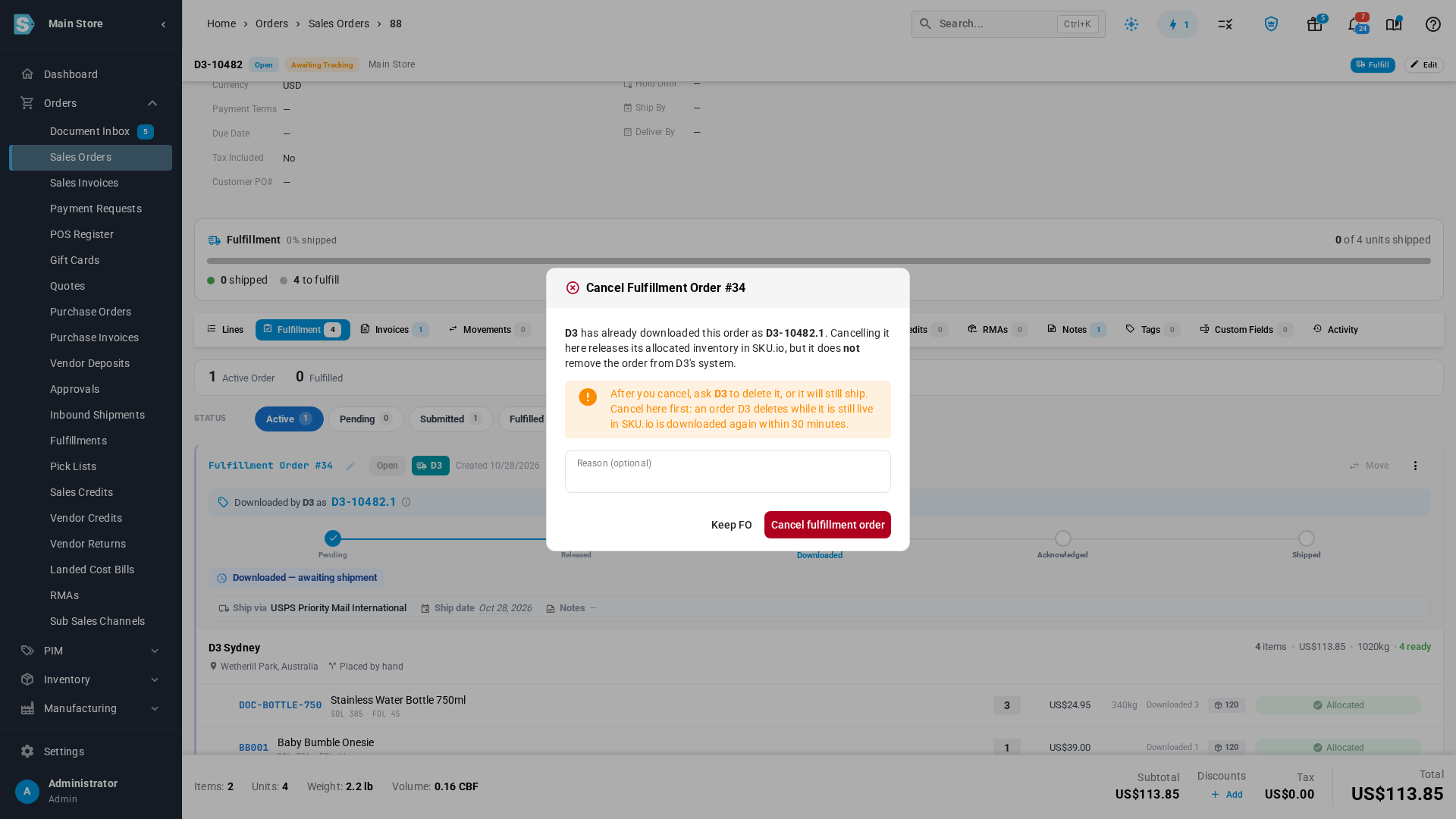
Read the warning. It says D3 has already downloaded the order, and under which number.
-
Optionally, enter a Reason.
-
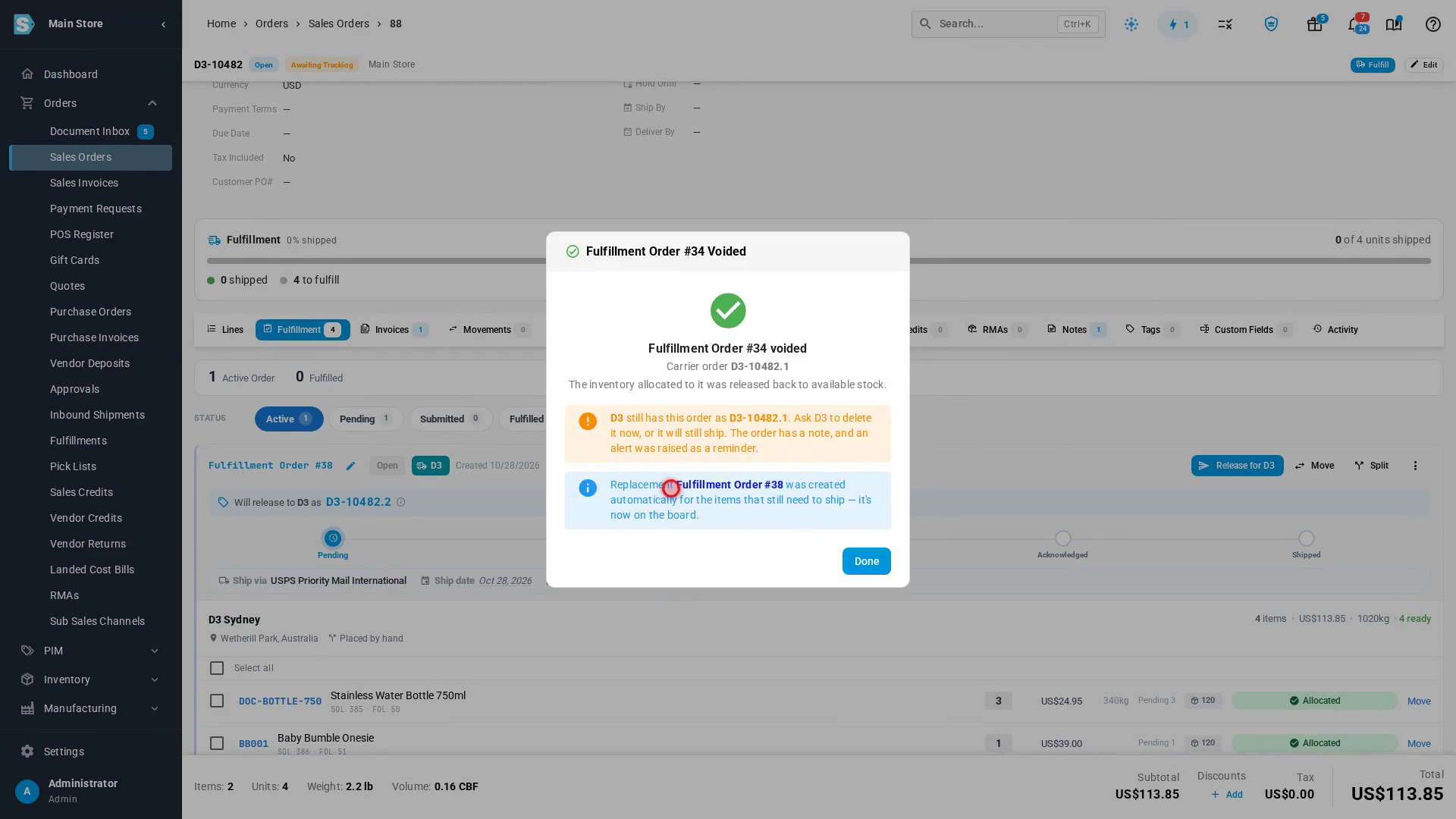
Click Cancel fulfillment order. The confirmation repeats the reminder to ask D3 to delete it, and SKU.io creates a replacement fulfillment order for the items that still need to ship.
-
Click Done, and ask D3 to delete the order, quoting its number.
-
Click Move on the replacement fulfillment order to ship it from another warehouse. If you release it from the D3 warehouse instead, D3 downloads it as a new order.
What SKU.io does for you
Whenever a downloaded D3 order is cancelled, however it happens (by you, by a cancellation from your sales channel, or by a refund), SKU.io:
- raises a Cannot Cancel Fulfillment at Provider alert, titled Ask D3 to delete and the order number, and
- adds a note to the sales order saying D3 still has the order.
Both stay until you act on them, so a cancellation you didn't make yourself isn't missed. Open it from the alerts bell at the top of any page, or click View all alerts.
If D3 ships a cancelled order
If D3 ships the order anyway, SKU.io refuses the shipment. Nothing is recorded and no stock is deducted, because the order is cancelled. SKU.io raises a Shipping Provider Shipped a Cancelled Fulfillment alert, titled D3 shipped a cancelled fulfillment, and notes the sales order with the tracking number D3 reported.
- Contact the customer. They may have received an order they cancelled, or one you refunded.
- Correct the stock in the D3 warehouse for the units that left. See Adjust stock.
- Ask D3 why the order shipped, so its team deletes cancelled orders promptly.
Reading cancellations automatically
D3's system can also read the orders you cancel after it has downloaded them, and cancel them on its side without a phone call or email. Ask D3 whether its system does this yet. Until it does, ask D3 to delete each one yourself.
Next steps
Video transcript
When D3 downloads an order, its own system keeps a copy. Cancelling the order here releases its inventory. But it doesn't remove the order from D3, so D3 would still ship it. Always cancel in SKU.io first, then ask D3 to delete the order. Open the sales order. Then go to its Fulfillment tab, and find the D3 card. This fulfillment order reads Downloaded. D3 knows the order by the number shown here. When the customer cancels, cancel the whole order. Scroll back to the top of the order. Then click More. Pick Cancel Order from the menu. SKU.io first checks whether D3 already has a copy of this order, which takes a moment. The warning says D3 has already downloaded this order, and names its number. Read it, then click Cancel Order. The order is now cancelled, and its inventory is released. SKU.io raises an alert, and adds a note to the order. Open the alerts bell to see it. Ask D3 to delete the order, and quote the number in the alert. Sometimes the order should still ship, just not from D3. Then cancel only its fulfillment. Go back to Sales Orders, and open an order that D3 has downloaded. The order opens on its Lines tab. Go to its Fulfillment tab, and find the card marked D3. Now cancel only this fulfillment. Open the menu on that card. Choose Cancel fulfillment order. A dialog opens to confirm the cancel. It shows the same warning about D3. Click Cancel fulfillment order. The confirmation reminds you to ask D3 to delete it. SKU.io creates a replacement fulfillment order for the items still to ship. Move it to another warehouse before you release it. If D3 ships a cancelled order anyway, the shipment is refused. Nothing is recorded, and no stock is deducted. Instead, this alert tells you D3 shipped a cancelled fulfillment. Contact the customer, and correct the stock for the units that left.