Review FBA customer returns
When a customer returns an order Amazon fulfilled, the parcel goes back to an Amazon fulfillment center, not to you. Amazon inspects the unit, decides what to do with it, and lists it in its FBA customer returns report. SKU.io imports that report into FBA → Customer Returns, so you can see what's coming back, why, and in what condition, and keep track of which returns your team has checked.
What a return changes in SKU.io
- Your FBA stock follows Amazon's inventory ledger, not this report. A unit Amazon puts back into stock reaches your FBA quantity as a customer return on the ledger. See How FBA inventory is tracked.
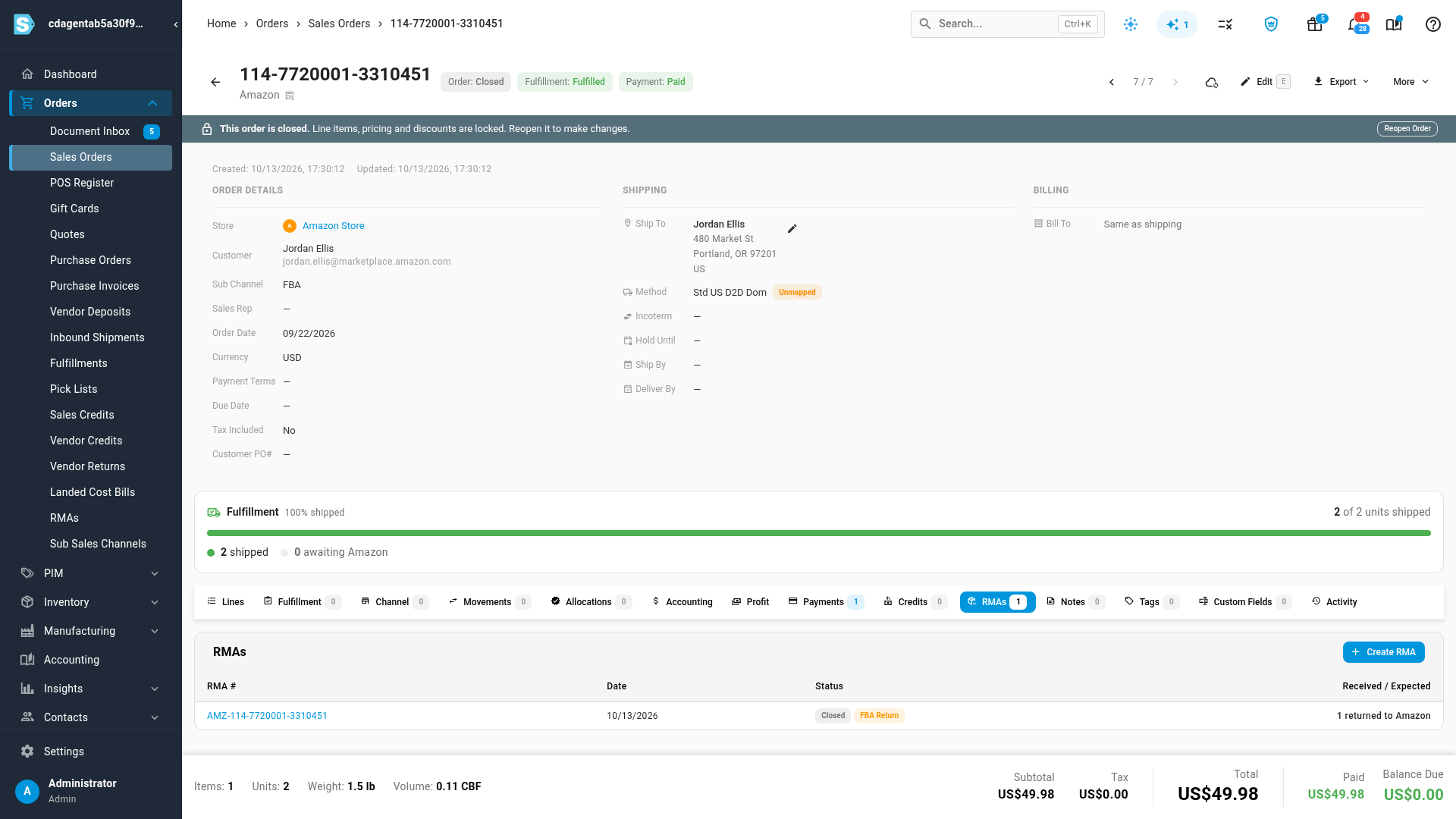
- The sales order gets a record of the return. For each order with a return that Amazon put back into stock (status Returned to Inventory or Repackaged Successfully), SKU.io records a closed RMA numbered AMZ- followed by the order ID, with one line per returned item and the reason Amazon gave. The RMA documents the return and feeds the order's profit and your return reports. It adds no stock to your own warehouses, because the unit is at Amazon.
- Returns Amazon didn't restock (disposed of, donated or reimbursed) get no RMA. If Amazon owes you for a damaged or unreturned unit, see Recover money Amazon owes you.
Before you begin
- FBA is on for your Amazon connection. See Turn on FBA inventory tracking.
- You need permission to change integrations to mark returns reviewed.
Open Customer Returns
- Go to Apps & Integrations, open your Amazon channel, and click FBA at the top of the page.
- Open Customer Returns.
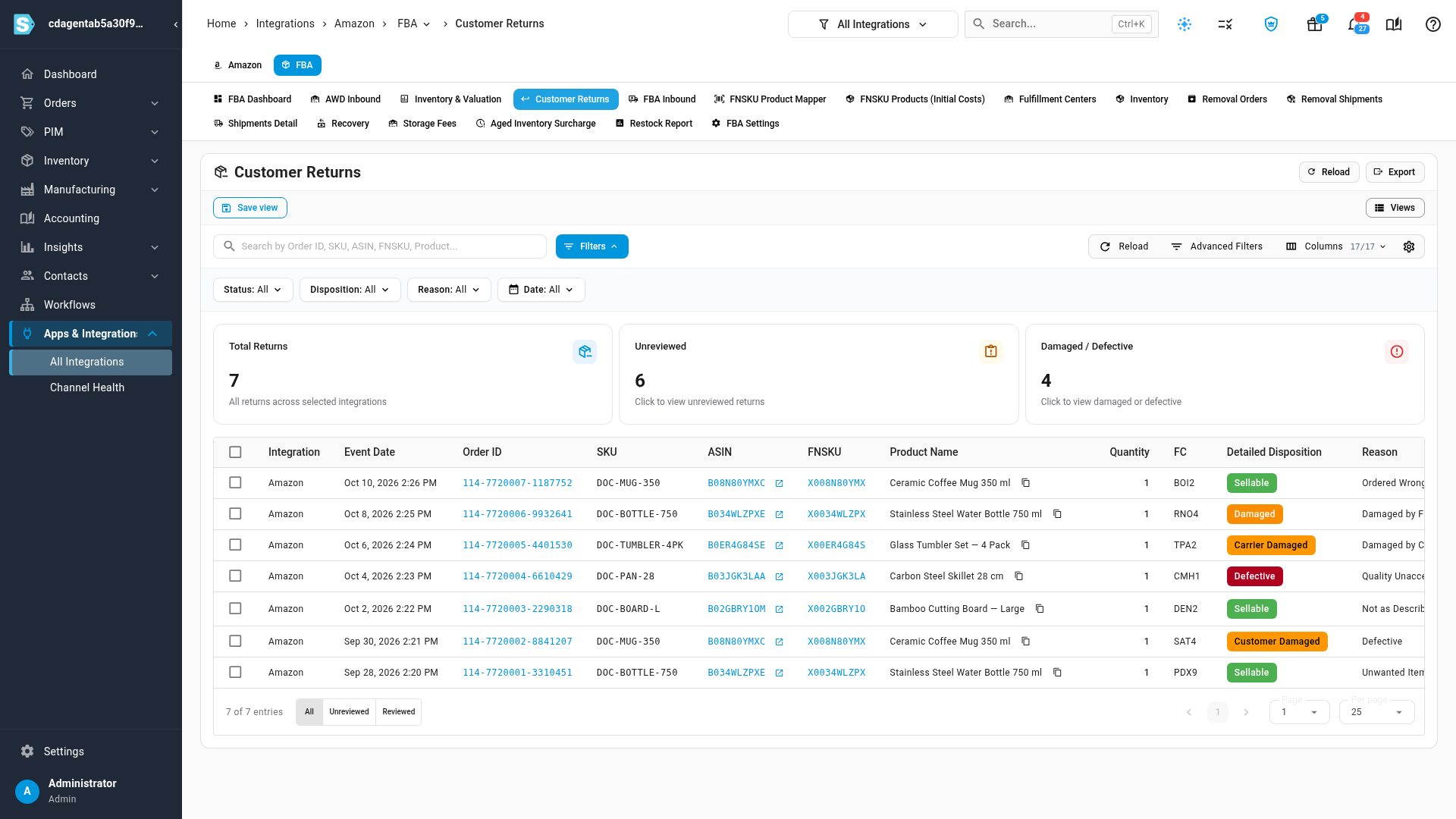
The cards count Total Returns, the Unreviewed ones and the Damaged / Defective ones. Click Unreviewed or Damaged / Defective to filter the list to those returns.
Read a return
Each row is one returned item:
| Column | What it tells you |
|---|---|
| Event Date | When Amazon processed the return. |
| Order ID | The Amazon order. When SKU.io has the order, it's a link to the sales order; hover it to see the sales order number and status. |
| SKU, ASIN, FNSKU, Product Name | The item that came back. FNSKU opens the matching FBA product. |
| Quantity | Units returned. |
| FC | The fulfillment center that received the return. |
| Detailed Disposition | The condition Amazon recorded: Sellable, Defective, Damaged, Customer Damaged or Carrier Damaged. |
| Reason | The reason the customer gave, such as Unwanted Item, Defective or Not as Described. |
| Status | What Amazon did with the unit: Returned to Inventory, Repackaged Successfully, Reimbursed, Immediate Disposal or Immediate Donation. |
| License Plate | Amazon's tracking code for the returned unit. |
| Customer Comments | Anything the customer wrote. |
| Reviewed | Who marked the return reviewed, and when. |
To narrow the list, use the Status, Disposition, Reason and Date filters, or search by order ID, SKU, ASIN, FNSKU or product name. Click Export to download the list.
Mark returns reviewed
Reviewing is your team's own checklist. It changes nothing at Amazon and nothing in your stock or accounts.
- At the bottom of the table, choose Unreviewed to list the returns nobody has checked.
- Tick the returns you've checked.
- Click Mark Reviewed. The update runs in the background; follow it in the job tray. The returns then show Reviewed with your name and the time.
To put a return back on the list, tick it under Reviewed or All, and click Mark Unreviewed.
Find a return's RMA on the sales order
- Click the return's Order ID. The sales order opens.
- Open its RMAs tab. A restocked return shows as AMZ- followed by the order ID, with the status Closed and FBA Return.
Next steps
- How FBA inventory is tracked: how a return reaches your FBA stock through Amazon's ledger.
- Recover money Amazon owes you: claim reimbursement for returns Amazon damaged or didn't restock.
- Look up what Amazon shipped: the outbound side of the same orders.
Video transcript
When a customer sends back an order Amazon fulfilled, Amazon handles the return and reports it to SKU.io. To review those returns, click FBA at the top of the channel's pages. Then open the Customer Returns tab, which lists every reported return. The cards count every return, the ones nobody has reviewed yet, and the damaged or defective ones. Each row is one returned item, with its Order ID, the product, and its Detailed Disposition. Sellable units can be sold again. Damaged and defective ones can't. Use the Status, Disposition and Reason filters to narrow the list. To work through the returns nobody has looked at, choose Unreviewed at the bottom of the table. When you've checked a return, select its row, and then click Mark Reviewed, above the table. The update runs in the background, and when it's done, the return leaves the Unreviewed list. To put one back, find it in the Reviewed list, and undo it the same way. Choose All again, and click the Order ID of a return that went back into stock. It opens the sales order. On its RMAs tab, SKU.io has recorded the return as a closed RMA. Amazon already has the unit, so the RMA adds no stock to your own warehouses.