
Free purchase order template
A purchase order template built for ecommerce
One page, ready to send to a supplier. Your SKU next to theirs, freight and duties on their own lines, and a column for what actually arrived. Download it or fill it in right here.
- Free, no email, no sign-up
- Opens in Excel, Google Sheets and Numbers
- The math is built in
Fill it in here, or download it
Purchase order template, with the reasons for each part
Type over the underlined parts and print it or save it as a PDF. Or download the Excel file, which has the same layout and formulas plus room for more lines.
Swipe the sheet sideways to see all of it.
-
Your SKU and theirs, on one line
The supplier's invoice and cartons come back with their code. Both codes on the PO turn receiving into a lookup instead of a guess.
-
Ship to the dock, not the office
If you use a 3PL, put its receiving address and dock hours here. A pallet at the wrong door costs a redelivery fee and a week.
-
Terms the invoice will be checked against
Payment terms, currency and Incoterms decide what you owe and when. Agree them on the PO, not after the invoice lands.
-
An expected date you can chase
Without a date on the PO, "late" is an opinion. With one, it is a list.
-
Freight on the PO, so landed cost is real
Unit cost is what the supplier charges, not what the item costs you. Freight and duties get their own lines so the margin is right from day one.
-
What actually arrived
Write the counted quantity here before anything is put away. Short shipments are cheap to fix only before the invoice is paid.
Run this in SKU.io
Raise the PO from the reorder suggestion instead
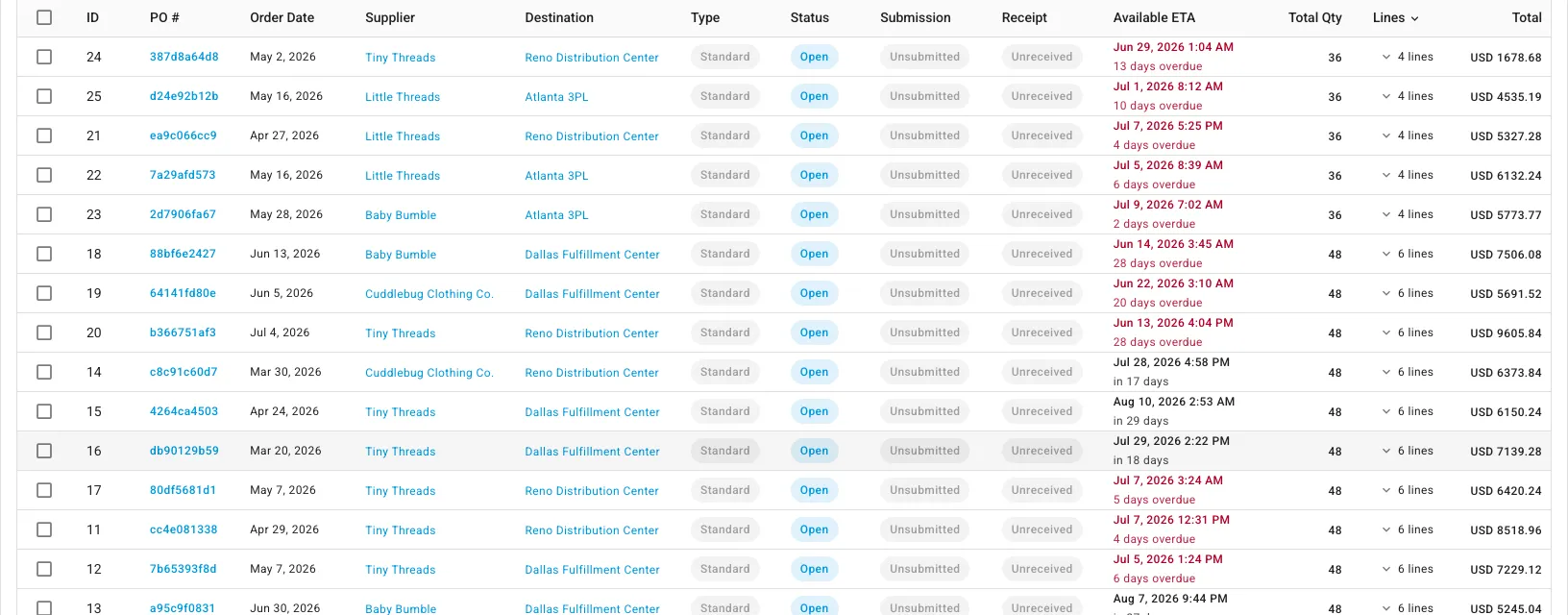
In SKU.io a purchase order starts from the replenishment worklist. Suggested quantities per SKU become POs in bulk, they print from a template you can edit, and the delivery is received against each line.
| In the spreadsheet | In SKU.io |
|---|---|
| Work out what to order in another tab | Suggested quantities per SKU, from the forecast |
| Copy the lines into this PO | Create from Forecast builds the POs |
| Keep a list of which POs are still open | Every PO with its receipt status and ETA |
| Type the received quantity by hand | Receive against each PO line |
Why I put two SKU columns on every PO
In my own store I buy one product from three different suppliers, and each of them has its own code for it. As I put it on a call last year:
"I have three different suppliers for a single internal SKU, and they each have their own internal SKUs themselves."
The suppliers wanted their SKU on the PO, not ours, and that is fair: they do not know your codes and you should not have to learn theirs. Putting both on the same line is what lets whoever opens the cartons match them to the product you actually sell.
Numbering, approval and when to stop using a spreadsheet
Number POs in sequence and never reuse one. If more than one person can place orders, decide who approves above what amount and write it down, even if the answer is "anything over $5,000 needs a second name".
A spreadsheet PO works fine for a handful of suppliers. It stops working when you are retyping each PO into your accounting app, keeping a separate list of which POs are still open, and working out reorder quantities in yet another tab. The reorder point sheet is the step before software, and purchasing in SKU.io is the step after it.
Questions people ask
What should a purchase order include?
A PO number you never reuse, the date, the supplier, where the goods should be delivered, payment terms, currency, an expected delivery date, and one line per item with quantity, unit cost and line total. For a store, add your own SKU next to the supplier SKU so the invoice and the cartons can be matched back to your catalog.
Can I fill in the purchase order online?
Yes. Type over the underlined parts of the sheet on this page, add your logo if you want, and use Print or save as PDF. Nothing you type is sent anywhere; it stays in your browser.
Does the template calculate totals?
Yes, on this page and in the Excel file. Line totals, total units, the subtotal and the grand total are formulas. Freight and duties have their own lines so the landed cost of the order is visible on the PO itself.
Can I use it in Google Sheets?
Yes. Download the .xlsx file, then in Google Sheets use File, then Import, and upload it. The formulas and layout carry over. It also opens in Excel and Apple Numbers.
Is the template free?
Yes. There is no email form and no sign-up. Use it for your own business and change it however you like.
Bring your PO spreadsheet to a call
Bring the sheet and a supplier invoice. We will walk through how the same order, receipt and bill look in SKU.io, and what you would stop retyping.
Book a DemoFounder-led demo · 2-day onboarding · no onboarding fees