Use Walmart repricer strategies and pricing programs
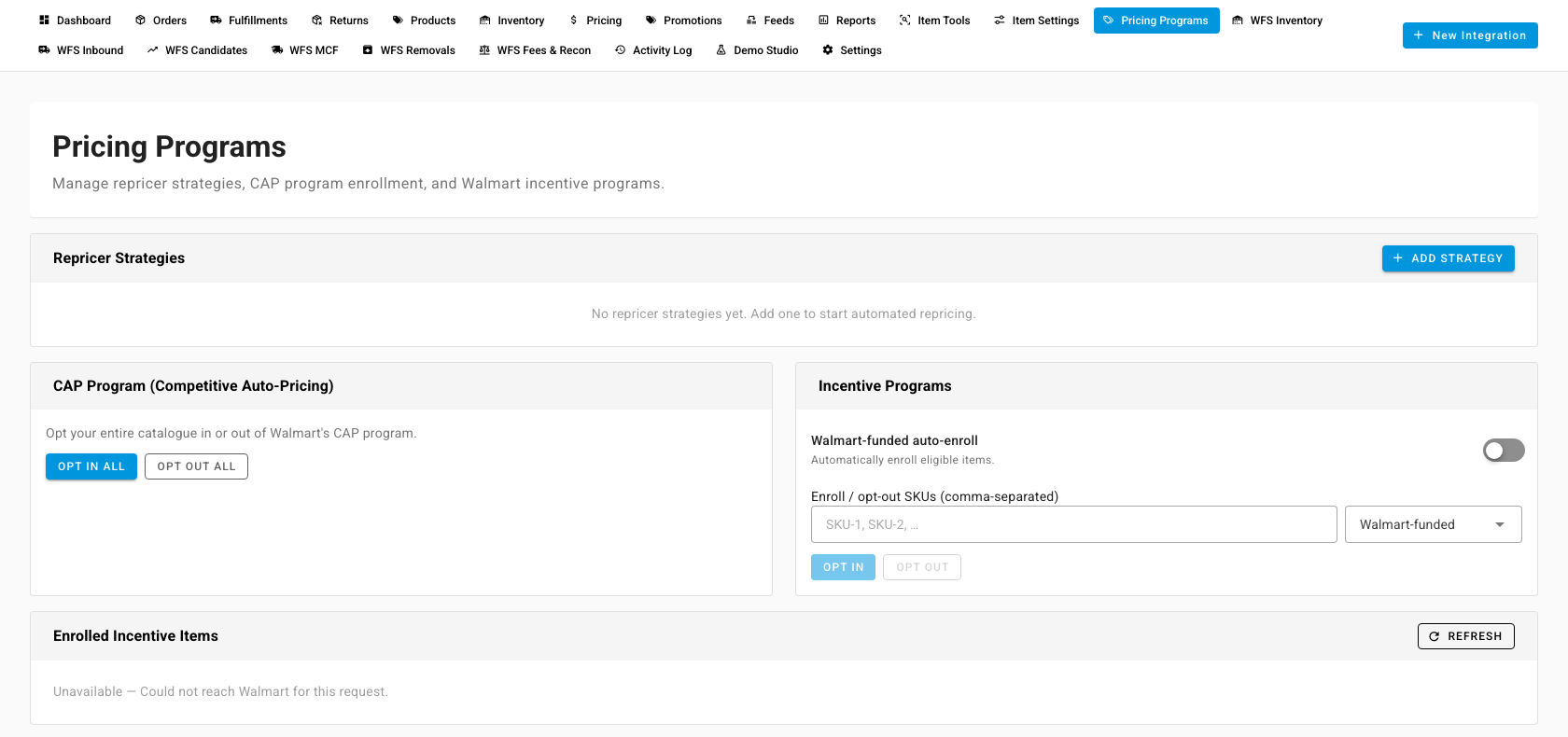
Walmart can reprice your items for you against competing offers. SKU.io lets you manage that from the Pricing Programs tab of your Walmart connection: create repricer strategies, assign items to them, and opt in or out of Walmart's CAP (Competitive Auto-Pricing) and incentive programs. The repricing itself runs on Walmart. SKU.io sends your choices to Walmart and reads back what's set there.
Repricing is available for Walmart only. For every channel, including Walmart, the prices SKU.io sends are set on the channel's Pricing Sync tab. See Sync prices with your sales channels.
Before you begin
- Your Walmart Marketplace account is connected, and its connection is working. Every action on this tab is sent straight to Walmart, so it fails if SKU.io can't reach Walmart.
- You know the SKUs you want to assign. They're the item SKUs on Walmart.
Open Pricing Programs
- Go to Apps & Integrations, open Walmart, and pick your connection from the selector at the top.
- Open the Pricing Programs tab.
Create a repricer strategy
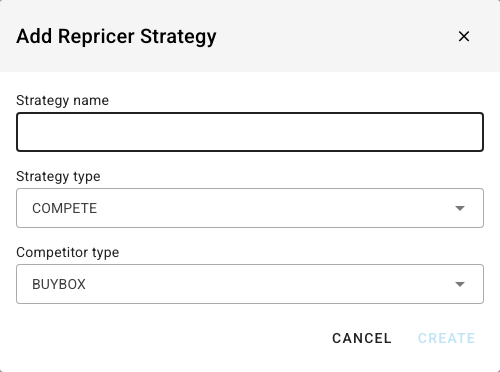
- In Repricer Strategies, click Add Strategy.
- Enter a Strategy name.
- Choose a Strategy type: COMPETE, MATCH_BUYBOX, or MARGIN. These are Walmart's own repricer strategy types, and Walmart applies the rules behind each one.
- Choose a Competitor type, the offers the strategy prices against: BUYBOX, LOWEST_PRICE, or ALL.
- Click Create.
The strategy appears in the table with its Name, Type and the Strategy ID Walmart gave it.
Assign items to a strategy
- In the strategy's row, click the Assign items icon.
- Enter the SKUs, separated by commas.
- Click Assign. To take items off the strategy, enter their SKUs and click Unassign instead.
To change a strategy's name or type, use the Edit icon. Delete removes the strategy, and Walmart unassigns every item that was on it.
Opt in or out of the CAP program
Walmart's CAP Program (Competitive Auto-Pricing) lets Walmart lower your prices to stay competitive. The card works on your whole catalogue at once:
- Opt In All enrolls every item.
- Opt Out All takes every item out.
Manage incentive programs
- Turn on Walmart-funded auto-enroll to have Walmart enroll your eligible items automatically.
- To enroll or remove specific items, enter their SKUs under Enroll / opt-out SKUs (comma-separated), choose the program, then click Opt In or Opt Out.
- Enrolled Incentive Items lists what's enrolled now, with each item's Program and Status. Click Refresh to read it again from Walmart. If Walmart can't be reached, the card says Unavailable instead of showing an empty list.
A repricer strategy or CAP changes the price on Walmart itself. If SKU.io is also sending prices to Walmart (Master of Price set to SKU.io on the Pricing Sync tab), both are setting the same price. Decide which one should own the price before you turn both on.
Next steps
- Sync prices with your sales channels — choose who owns the price, and set guardrails.
- Walmart — the rest of the Walmart chapter.