Connect more than one store or account
Every sales channel in SKU.io can be connected more than once. Each connection is an instance: two Shopify stores, an Amazon account per region, or a second eBay seller account. Each instance has its own name, store, settings, and sync controls, and its orders arrive as their own sales channel.
Before you begin
- You need permission to connect integrations.
- Decide which SKU.io store each instance sells through. Two instances can share a store or use different ones.
- Plan a name for each instance that tells them apart, such as Amazon US and Amazon UK. The name is how the instance appears on orders, filters, and reports.
Add another instance
-
Go to Apps & Integrations and open Sales Channels.
-
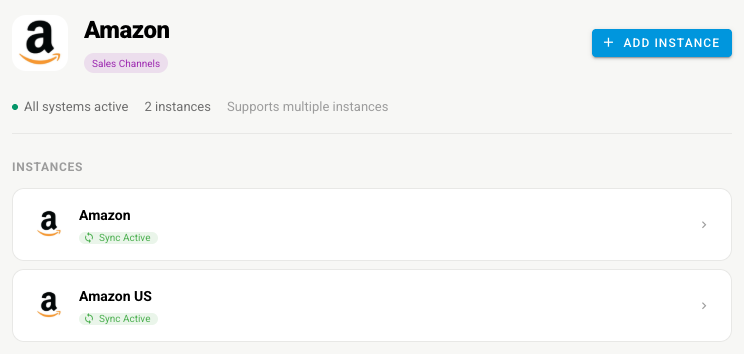
Choose the channel. The panel shows how many instances you have, and Supports multiple instances when the app allows more than one.
-
Click Add Instance. The channel's new-integration page opens, the same one you used for the first connection.
-
Give the instance its own Integration Name and pick its Store, then connect it the way that channel connects. For the steps, see the channel's own connect page, such as Connect eBay or Connect a Shopify store.
What you'll see: the new instance joins the list under Instances, with its own sync status.
Work with one instance at a time
-
Click an instance in the list to open its Dashboard and tabs.
-
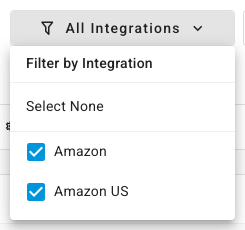
On a channel's pages, use Filter by Integration in the top bar to choose which instances you're looking at. Clear an instance's check box to hide its orders and products, or click Select None to start over.
What each instance keeps to itself
Changing one instance never changes another. Each one has its own:
| Setting | Where |
|---|---|
| Name, store, and start date | The instance's Settings → General and Orders tabs |
| Sync schedule and What syncs switches | Settings → Sync. See Manage a connected app |
| Stock warehouses, master of stock, and master of price | Settings → Inventory Sync and Pricing Sync |
| Accounts its sales and costs post to | A row of its own under Channel Accounting |
| How unpaid orders import | A row of its own under Unpaid Orders |
| Sub sales channels | Created per instance. See Set up sub sales channels |
Apps you can connect only once
Every sales channel supports multiple instances. Some other apps don't: before you connect one, its panel reads Single instance only, and once it's connected there's no Add Instance button. Accounting apps (QuickBooks Online and Xero) and several shipping providers work this way.
Next steps
- Manage a connected app — pause or narrow what one instance syncs.
- Use different accounts for each sales channel — keep each instance's revenue on its own account.
- Integrations reference — which capabilities each channel can sync.