Sync Click & Collect orders with Shopify
A Shopify customer can choose Click & Collect for some items and shipping for the rest, all in one order. SKU.io splits that order into a shipped part and a pickup part, each with its own fulfillment order, so the shipped items go out while the pickup items wait at the store. The Shipping tab of your Shopify settings decides which pickup method the collected items get, and what SKU.io tells Shopify as the pickup moves along.
Before you begin
- Connect your Shopify store.
- At least one shipping method is marked as pickup. Go to Settings → General → Shipping Methods, and tick This is a pickup shipping method on the method your stores use.
- Your Shopify pickup options are mapped to that method, or you set a Fallback Pickup Method below. See Map Shopify shipping methods.
Set the pickup options
- Go to Apps & Integrations, open your Shopify connection, then Settings and the Shipping tab.
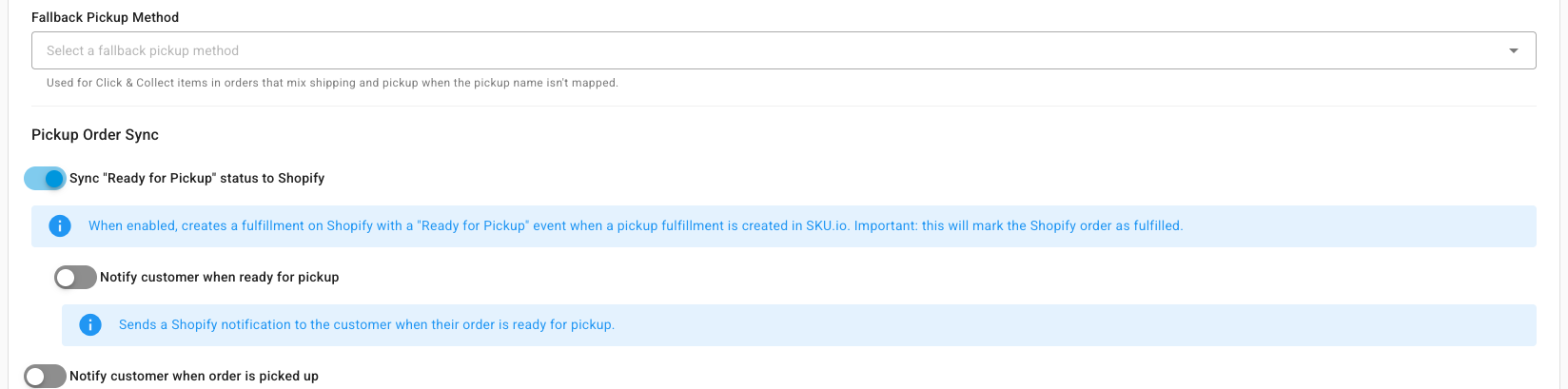
- Under Fallback Pickup Method, pick the pickup method SKU.io uses for Click & Collect items whose Shopify pickup name isn't mapped. Only methods marked as pickup are offered.
- Under Pickup Order Sync, choose what goes back to Shopify:
- Sync "Ready for Pickup" status to Shopify (on by default) creates a fulfillment on Shopify with a "Ready for Pickup" event when a pickup fulfillment is created in SKU.io. This marks the Shopify order as fulfilled.
- Notify customer when ready for pickup has Shopify email the customer at that point. It shows while the switch above is on.
- Notify customer when order is picked up has Shopify email the customer once the order is collected.
- Click Save Settings.
How a mixed order is split
When an order mixes shipping and Click & Collect:
- The order gets the shipping method of its shipped items, through your mappings, rules, and fallback shipping method. It never gets a pickup method.
- Each Click & Collect item gets the pickup method mapped to its Shopify pickup option. When that isn't a pickup method, it gets the Fallback Pickup Method.
- SKU.io creates one fulfillment order for the shipped items and one for the pickup items. The shipped items go out as usual.
- The pickup part waits until every pickup item can be fulfilled, then goes out together.
The order shows a Ship + Pickup chip, and each pickup line shows a Click & Collect icon. The order reads Awaiting Pickup only once nothing is left to ship.
When the customer collects, mark the pickup as picked up. SKU.io sends the "picked up" fulfillment to Shopify.
When SKU.io can't split an order
SKU.io keeps the order as one kind and leaves a note on it when:
| Note on the order | What to do |
|---|---|
| "no pickup shipping method configured" | Set a Fallback Pickup Method, or map the Shopify pickup option to a pickup method. |
| "Line … is split between shipping and pickup at checkout — fulfil manually" | One line was partly shipped and partly collected at checkout. Split it by hand. The order is tagged mixed-delivery-split-line. |
| "the shipped items have no mapped shipping method and the order keeps a pickup method" | Set a Fallback Shipping Method, or map the Shopify shipping option. |