Hold Shopify fulfillment until ship day
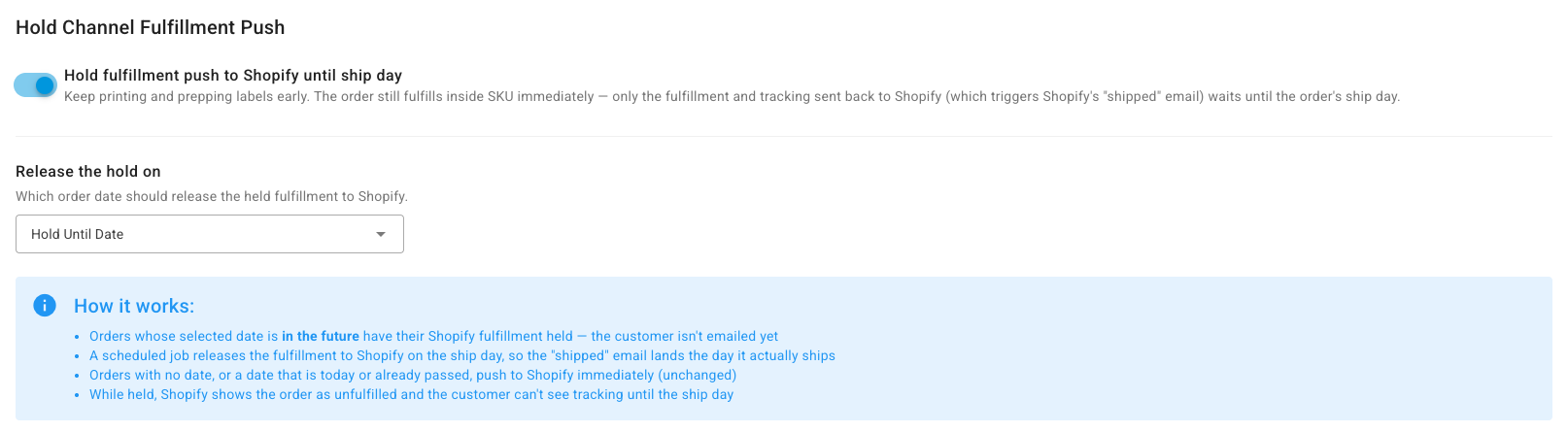
If you print labels and pack orders days before they leave, Shopify normally emails the customer "your order has shipped" as soon as you fulfill. Hold Channel Fulfillment Push keeps the order fulfilled inside SKU.io straight away, but waits until the order's ship day to send the fulfillment and tracking to Shopify.
Before you begin
- Connect your Shopify store.
- Your orders carry the date that should release them: a Ship By Date, set up under Delivery & Ship Dates, or a Hold Until Date, read from the order metafield you set under Hold & Ship-By Date Control. Both sections are on the same Orders tab.
- You need permission to change integration settings.
Turn on the hold
- Go to Apps & Integrations, open your Shopify connection, then Settings and the Orders tab.
- Under Hold Channel Fulfillment Push, turn on Hold fulfillment push to Shopify until ship day.
- In Release the hold on, choose which order date releases it: Hold Until Date (the default) or Ship By Date.
- Click Save Changes.
What happens to each order
| The order's chosen date is… | What SKU.io does |
|---|---|
| In the future | Fulfills the order in SKU.io as usual, but holds the fulfillment and tracking back from Shopify. Shopify shows the order as unfulfilled, and the customer can't see tracking yet. |
| Today or in the past | Sends the fulfillment to Shopify straight away, as it does with the hold off |
| Missing | Sends the fulfillment to Shopify straight away |
A held fulfillment is released on the ship day: SKU.io checks every 10 minutes and sends it once the date is today, in your account's timezone. Shopify then sends its "shipped" email on the day the order leaves. There's no time-of-day setting.
The hold only changes what goes to Shopify. Stock, shipments, and tracking in SKU.io update as soon as you fulfill.
Next steps
Last verified:
Was this helpful?