Subscribe to webhooks
A webhook is SKU.io telling your system something happened, instead of your system asking over and over. You give us an event and an HTTPS URL; when that event fires, we POST a signed JSON payload to it. This guide creates a subscription, verifies the signature, and sends a test delivery to prove the endpoint works.
Before you begin
- You need somewhere to receive the POST — an HTTPS URL on a host that
resolves publicly. A
http://address, alocalhostaddress, or anything on a private network is refused at creation. - One subscription is one event to one URL. To receive three events, create three subscriptions; to fan one event out to two systems, create two.
- The signing secret is shown once, when the subscription is created. Have your secret store open.
- Doing this over the API instead needs a token carrying
webhooks:manage. See the API scopes reference. - The screenshots below come from a demonstration account with sample subscriptions and a seeded delivery history. Your own events, URLs, and timings will differ.
Steps
1. Open the webhooks page
Go to Settings → Developer → Webhooks.
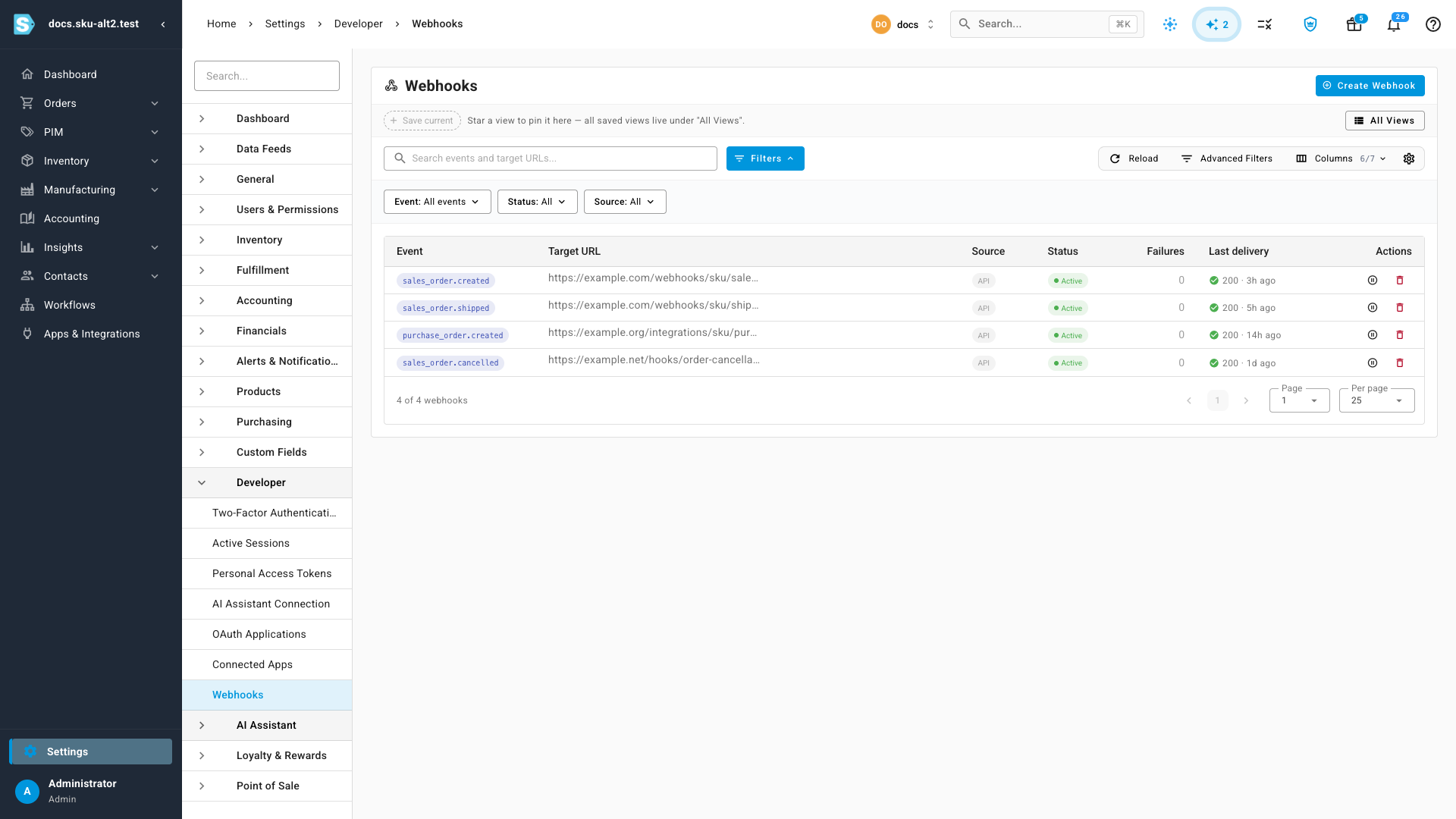
Every subscription on the account is listed here, whether you created it yourself or an app created it on your behalf during an OAuth authorization — the Source column tells you which.
2. Start a new subscription
Click Create Webhook.
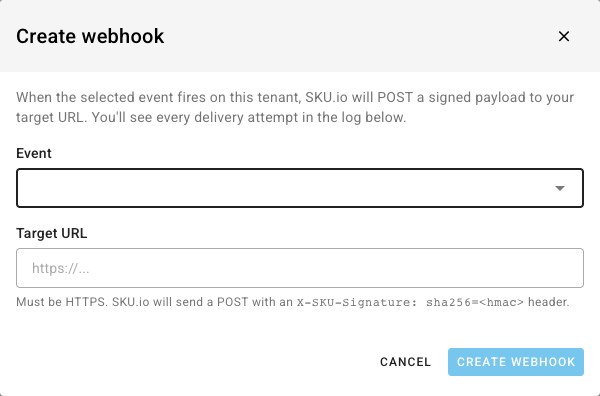
The dialog states the deal up front: when the selected event fires on this tenant, SKU.io POSTs a signed payload to your target URL, and every attempt lands in the delivery log.
3. Pick an event
Open Event and choose from the catalog. Events are grouped by the part of the product they come from.
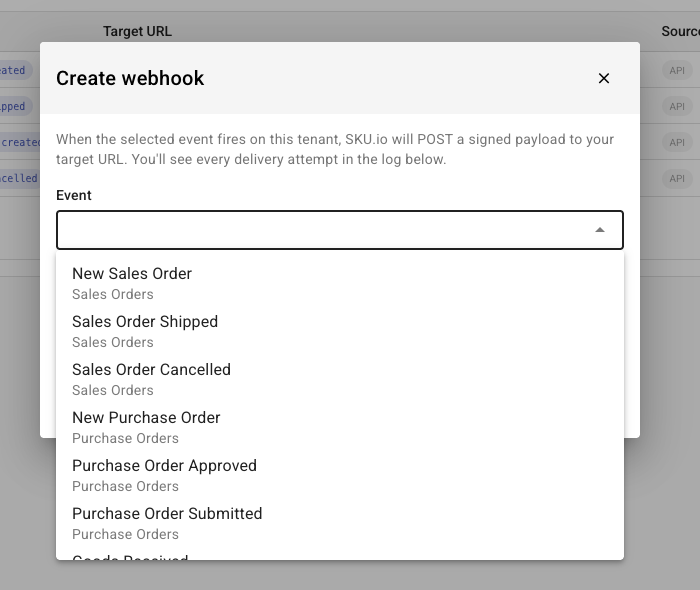
There are 11 events in five groups:
| Group | Event | Fires when | Read scope |
|---|---|---|---|
| Sales Orders | sales_order.created | A new sales order is created, on any channel or manually | orders:read |
sales_order.shipped | A sales order is fully shipped | orders:read | |
sales_order.cancelled | A sales order is cancelled | orders:read | |
| Purchase Orders | purchase_order.created | A new purchase order is created | purchase-orders:read |
purchase_order.submitted | A purchase order is sent to the supplier | purchase-orders:read | |
purchase_order.approved | A purchase order is approved | purchase-orders:read | |
purchase_order.received | Goods are received against a purchase order | purchase-orders:read | |
| Inventory | inventory.adjusted | Stock is adjusted, transferred, or recounted | inventory:read |
| Products | product.created | A new product is created | products:read |
| Customers | customer.created | A new customer is created | customers:read |
Once you pick one, a scope chip appears next to it — that's the read scope a
token must carry to receive this event's payload. Creating the subscription in
the browser doesn't require the scope, but a token creating it over the API
does: asking for sales_order.created with a token that can't read orders is
refused.
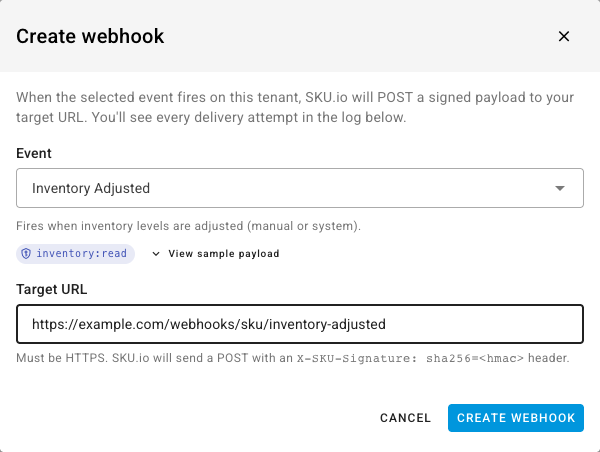
4. Check the sample payload
Click View sample payload to see the exact shape your endpoint will receive, built from a real record on your own account.
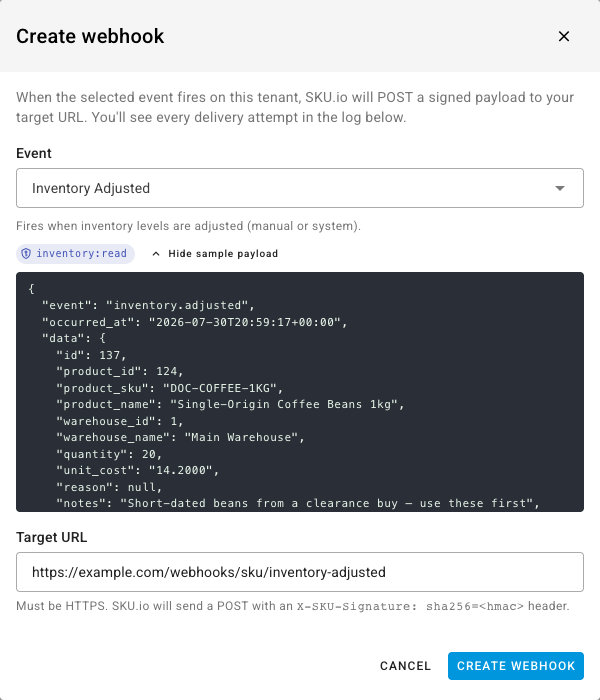
Build your handler against this rather than against a guess. If your account has no matching records yet, the dialog says so — the subscription still works, there is nothing to preview yet.
Every payload uses the same envelope:
{
  "event": "inventory.adjusted",
  "delivery_id": "9f1c4a6e-2f4d-4b21-9a8e-6c0a1d3e5f70",
  "occurred_at": "2026-07-31T14:02:11+00:00",
  "data": { }
}
data carries the record itself and changes per event. The three fields around
it never do. The preview shows event, occurred_at, and data;
delivery_id is minted per delivery, so it only appears on a real one.
5. Enter your target URL
Type the endpoint into Target URL.
SKU.io checks it before saving, and again on every delivery, so a URL that stops being safe stops receiving:
| Rule | Refusal |
|---|---|
| Must be a valid URL | Target URL is not a valid URL. |
| Must use HTTPS | Target URL must use HTTPS. |
| Must include a host | Target URL must include a host. |
| The host must resolve | Target URL host cannot be resolved: {host}. |
| It must not resolve to a private or reserved address | Target URL must not resolve to a private or reserved IP. |
The last one rules out localhost, 127.0.0.1, 10.x, 192.168.x, link-local
addresses, and anything else inside your own network. It's re-checked at send
time as well, so a public hostname that later points somewhere private is
refused then too.
Testing from a laptop? Use a tunnelling service that gives you a public HTTPS hostname, and point the subscription at that.
6. Create it and copy the signing secret
Click Create webhook. The secret appears once.
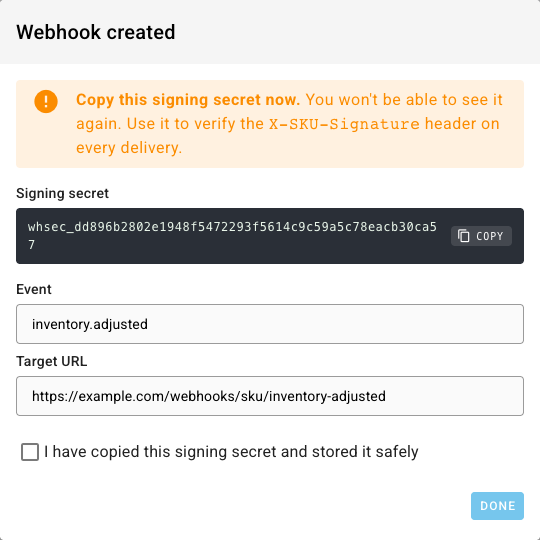
Copy it into your secret store now — there's no way to reveal it again. Tick I have copied this signing secret and stored it safely to close the dialog.
A signing secret can't be re-shown or replaced in place. If you lose one, delete the subscription and create it again — you'll get a fresh secret, and the delivery history of the old one goes with it.
7. Send a test delivery
Open the new subscription from the list. Until a real event fires, the delivery log is empty.
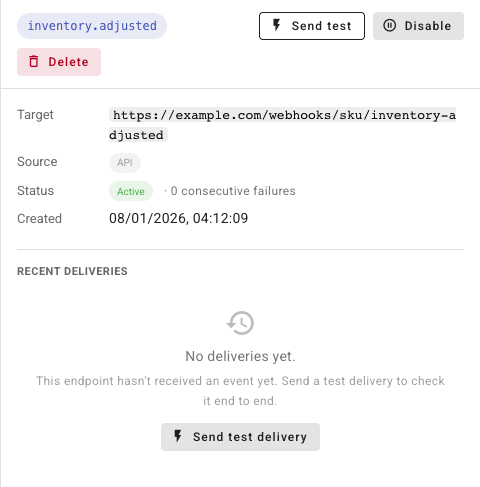
Click Send test delivery. SKU.io sends it immediately — signed with your real secret, to your real URL, with the real headers — and shows you the result in the log without waiting for a queue.
A test payload is marked so your handler can tell it apart:
{
  "event": "inventory.adjusted",
  "delivery_id": "c8f0a2b4-7d31-4c8e-b6a9-2e5f7180d4c3",
  "occurred_at": "2026-07-31T14:06:44+00:00",
  "data": {
    "_test": true,
    "message": "This is a test delivery from SKU.io."
  }
}
A failed test still records a row with the status code and the error, which is what you want — it's the fastest way to find a firewall rule or a bad path.
What SKU.io sends
Every delivery is a POST with a JSON body and these headers:
| Header | Value |
|---|---|
Content-Type | application/json |
X-SKU-Signature | sha256= followed by the HMAC of the body |
X-SKU-Event | The event name, for example inventory.adjusted |
X-SKU-Delivery-Id | A UUID unique to this delivery |
User-Agent | SKU.io-Webhook/1.0 |
Verify the signature
Treat any request without a valid signature as hostile. Your URL is reachable by anyone; the signature is what proves the payload came from SKU.io.
The signature is an HMAC-SHA256 of the raw request body, keyed with your signing secret. Compute it over the bytes you received — not over a re-encoded version of the parsed JSON, which will not match.
$body = file_get_contents('php://input');
$expected = 'sha256='.hash_hmac('sha256', $body, $signingSecret);

if (! hash_equals($expected, $_SERVER['HTTP_X_SKU_SIGNATURE'] ?? '')) {
    http_response_code(401);
    exit;
}
const crypto = require("crypto");

const expected =
  "sha256=" +
  crypto.createHmac("sha256", signingSecret).update(rawBody).digest("hex");

const ok = crypto.timingSafeEqual(
  Buffer.from(expected),
  Buffer.from(req.headers["x-sku-signature"] ?? "")
);
Compare in constant time — hash_equals, timingSafeEqual, or your language's
equivalent — rather than with ==.
What your endpoint should do
| Do | Why |
|---|---|
| Respond 2xx within 15 seconds | Anything slower is treated as a failure and retried. Acknowledge first, process afterwards. |
| Verify the signature before trusting the body | The URL is public; the signature isn't. |
Deduplicate on delivery_id | A retry re-sends the same delivery_id. Handlers must be idempotent. |
| Return 410 Gone to unsubscribe | It's the one status that makes SKU.io stop immediately and disable the subscription — no retries, no waiting for the failure count. Use it when the endpoint is permanently retired. |
Anything else non-2xx is a failure: SKU.io retries up to three times, waiting 30 seconds and then 5 minutes. After 25 consecutive failures the subscription is disabled automatically and the account owner is emailed. Every attempt — success or failure — is written to the delivery log.
For reading that log, diagnosing failures, and re-enabling a disabled subscription, see Monitor webhook deliveries.
The webhooks guide on developer.sku.io covers the same contract from the receiving end, alongside the rest of the API reference.
Duplicates are blocked
The same event pointed at the same URL twice is refused, with a link to the subscription that already exists. If that one is disabled, the dialog says so and offers to open it — enable it rather than creating a second subscription alongside it.
This is deliberate: two live subscriptions on the same event and URL means double the deliveries, and the duplicate is almost always an accident.
Next steps
- Monitor webhook deliveries — read the log, retry, disable, and delete.
- API scopes reference —
webhooks:manageand the read scope each event needs. - Create a personal access token — a credential for managing subscriptions over the API.