Developer settings overview
Everything that can reach your SKU.io account from outside the browser is managed in one place. Developer settings is where you mint API credentials, see which third-party apps you've let in, check where you're signed in, and send events out to other systems.
This page is the map. Each section below says what a thing is for, when to choose it over the alternatives, and links to the guide that walks through it.
Before you begin
- Everything under Your API access is personal. The tokens, sessions and connected apps you see are yours; other users have their own and can't see yours.
- OAuth Applications is restricted — it's for building an integration other people will connect to, and most accounts won't see it.
- The screenshots come from a demonstration account.
Where to find it
Go to Settings → Developer.
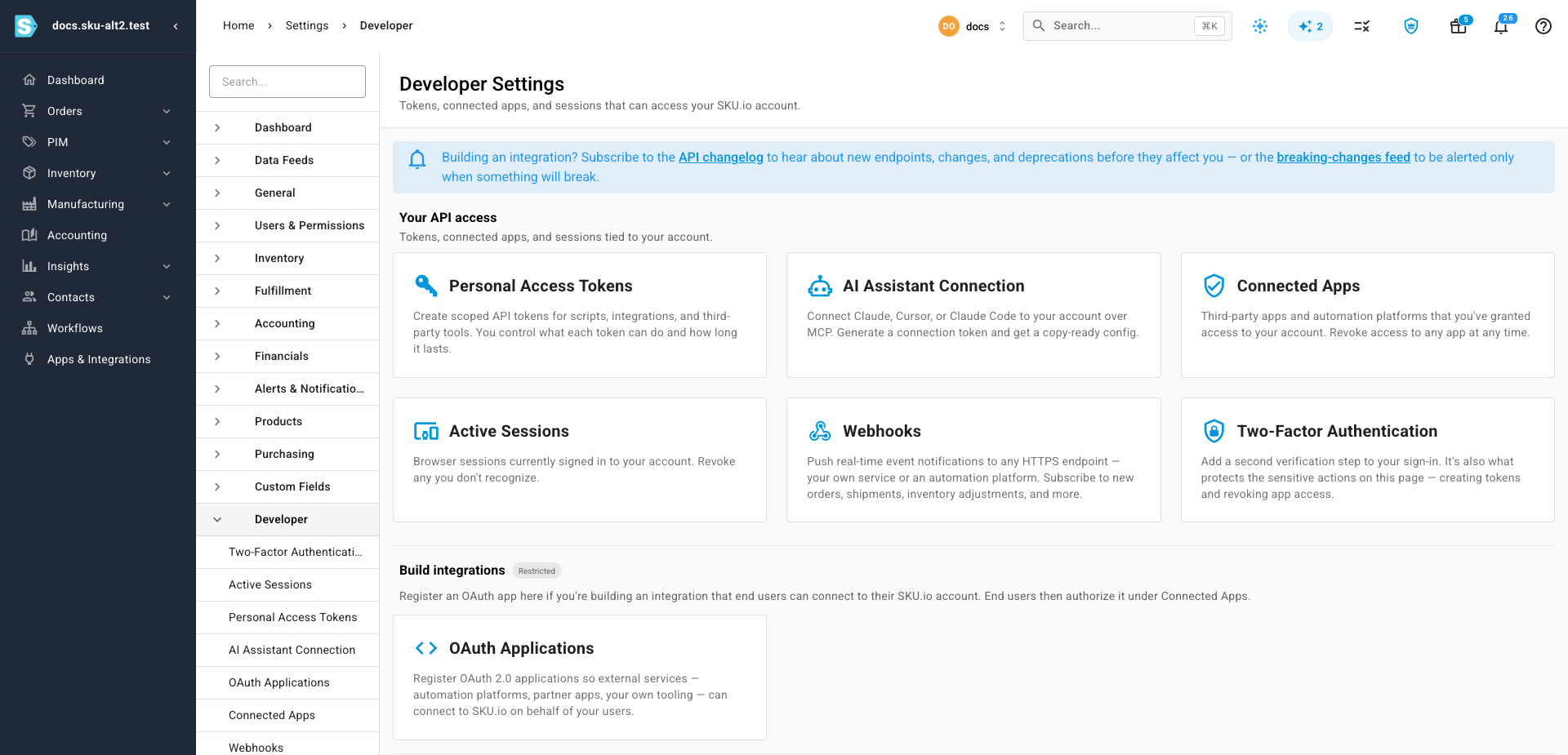
What's on the page
| Card | What it's for |
|---|---|
| Personal Access Tokens | Long-lived API credentials for your own scripts, jobs and tools |
| AI Assistant Connection | A single token that lets an AI client read your account over MCP |
| Connected Apps | Third-party apps you've authorised, and the button that takes it back |
| Active Sessions | Every browser currently signed in as you |
| Webhooks | Outbound notifications when something happens in SKU.io |
| Two-Factor Authentication | A second step at sign-in — and the gate on the sensitive actions above |
Build integrations appears only for accounts that can register OAuth applications. It holds one card, OAuth Applications, for the case where you're the one building software that other SKU.io users will connect.
Which one do you want?
The six cards solve different problems, and picking the wrong one usually shows up as work you didn't need to do.
| If you want to… | Use |
|---|---|
| Run a script, report or job against your own account | A personal access token |
| Let Claude, Cursor or Claude Code query your account | The AI assistant connection |
| Be told when an order ships, without polling for it | A webhook subscription |
| Ship an integration that other SKU.io accounts install | An OAuth application |
| Check what an app you connected can actually see | Connected apps |
| Make sure nobody else is signed in as you | Active sessions |
Two distinctions are worth getting right the first time.
A personal access token is not an OAuth application. A token authenticates you to your own account — one account, one user, no consent screen. An OAuth application is software other people authorise against their accounts. If you're writing a nightly export for your own data, you want a token; building something you'll hand to customers means an OAuth application.
A webhook is not a token. Tokens let something in; webhooks push something out. A subscription needs no credential of yours at all — SKU.io calls your URL and signs the request so you can prove it came from us.
Stay notified of changes
The banner at the top of the page links to two feeds worth subscribing to before you build anything that has to keep working:
- API changelog — new endpoints, changes and deprecations.
- Breaking-changes feed — an RSS feed that carries only the changes that will break something.
Where the API itself is documented
These guides cover the SKU.io interface — the pages where you create a token, choose its permissions, add a webhook, or revoke an app.
The API's own behaviour on the wire lives on developer.sku.io, a separate reference site:
| Question | Where it's answered |
|---|---|
| Which endpoints exist, and what do they return? | API reference |
| How do I make my first call? | Quickstart |
| How do I send the token on a request? | Authentication |
| How do paging, filtering and sorting work? | Pagination and API conventions |
| What does this error code mean? | Errors |
| How many requests can I make? | Rate limits |
| How do I verify a webhook signature? | Webhooks |
The short version: get the credential here, use it there.
What this area doesn't do
There's no export and no bulk import anywhere in Developer settings. API usage logs, webhook subscriptions, delivery logs, tokens, sessions and connected apps can't be downloaded as CSV or Excel, and nothing can be uploaded in bulk. If you need a record of something that ages out — usage logs and webhook deliveries are both kept for 30 days — copy what you need from the screen while it's still there.
Nor is any of it managed through the API. Creating, editing and revoking credentials is deliberately restricted to a signed-in browser session, so a leaked token can't be used to mint more.
Next steps
- Create a personal access token — the usual first stop.
- API scopes reference — what each permission actually grants.
- Set up two-factor authentication — recommended before you start minting credentials.