Add a landed cost after receiving
Freight, customs, and 3PL project invoices usually arrive after the goods do. You don't need to plan for them up front: add the landed cost to the purchase order whenever the invoice lands — even if the order is already received and closed — and SKU.io re-prices the stock immediately. The FIFO layers created at receipt, the product's average cost, and the realized COGS on anything already sold all update on their own, and every change is written to a dated revaluation ledger you can audit.
This guide adds a late freight bill to a closed, fully received order, then shows exactly where the cost impact appears — the part that's easy to miss, because the FIFO Layers list absorbs the new cost into its Avg Cost column without flagging that anything changed.
Adding a landed cost doesn't require reopening the order (a cost edit on a PO line does — see Correct a cost on a received purchase order). And nothing here needs Recalculate or Rebuild — the revaluation happens the moment you save the invoice.
Before you begin
| Requirement | Why it's needed |
|---|---|
| Update purchase orders permission | The Landed Cost button on the PO is gated on it. |
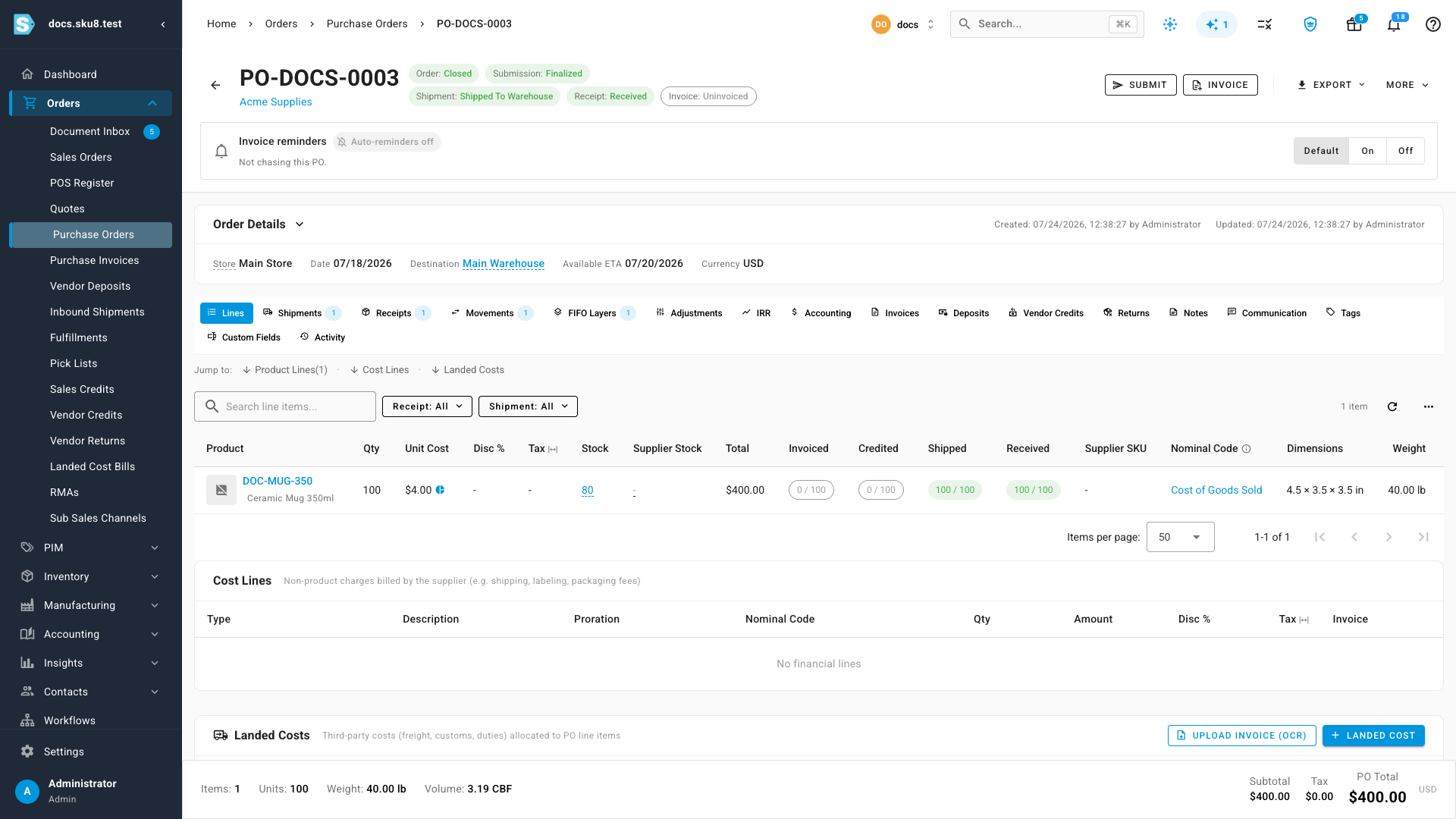
| A received purchase order | The examples use PO-DOCS-0003 — 100 × Ceramic Mug 350ml received at $4.00, order Closed, receipt Received. |
| A service-type supplier to bill from | Landed cost bills can only be billed by service providers (freight forwarders, customs brokers, 3PLs). The examples use Swift Freight Co. — you can create one inline from the invoice editor. |
Add the landed cost
-
Go to Orders → Purchase Orders and open the received order. Its status chips read Order: Closed and Receipt: Received — that's fine; leave it closed.
-
Open the Lines tab and use the Jump to: row to scroll to Landed Costs, then click Landed Cost. The Add Landed Cost Invoice editor opens with the PO named in the header.
-
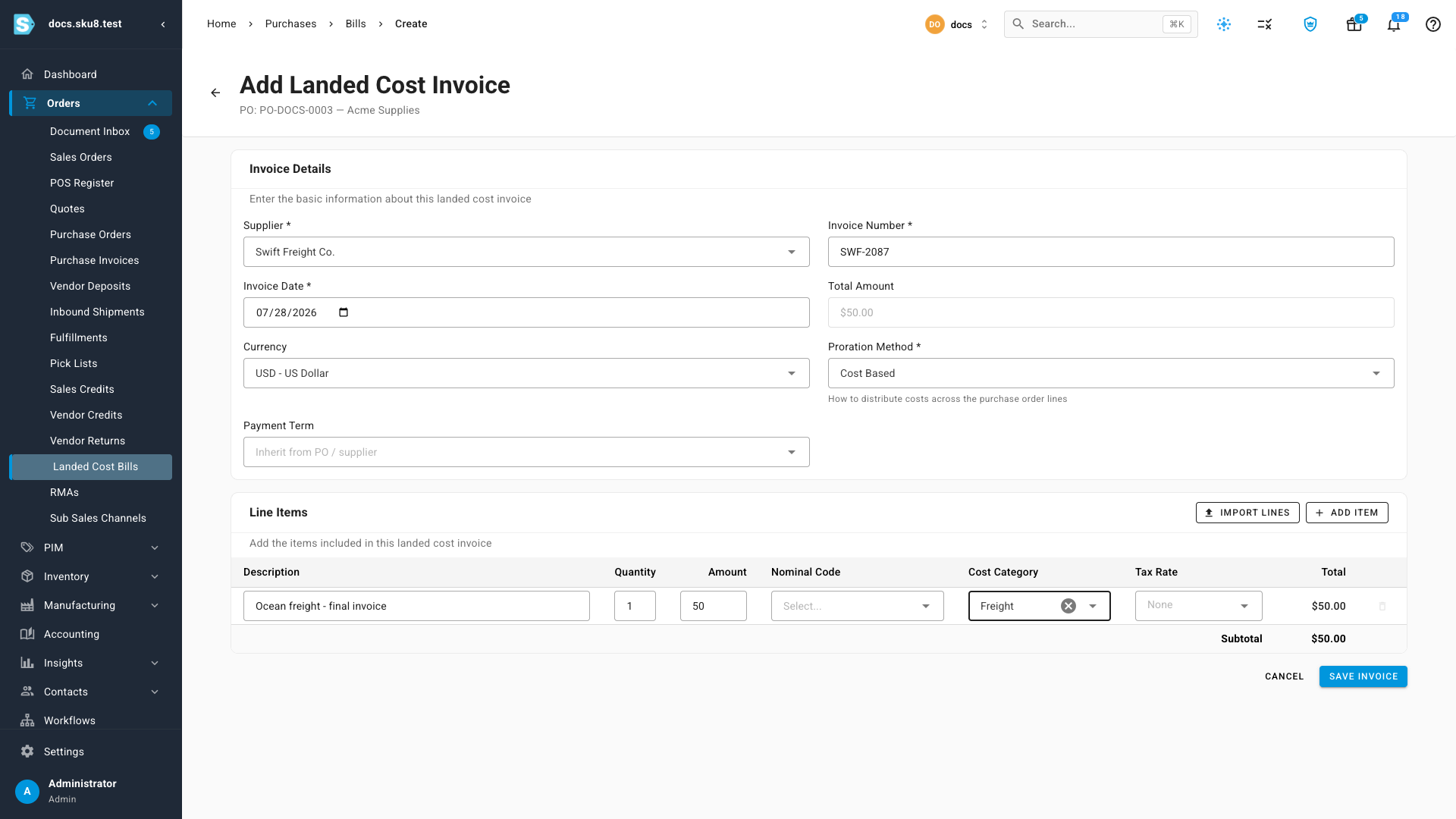
Set the Supplier to the company that billed you — search for Swift Freight Co., or type a new name and pick New: … to create the carrier inline.
-
Enter the Invoice Number (for example, SWF-2087) and check the Invoice Date.
-
Under Line Items, describe the charge — "Ocean freight - final invoice" — and enter the Amount ($50.00).
-
In the Cost Category column, pick Freight (or create a category that fits, like "Rework" for a 3PL project). This is what makes the charge report under its own name in cost breakdowns instead of a generic "Other" bucket.
-
Leave the Proration Method on Cost Based (with a single product line, the whole amount lands on it either way), and click Save Invoice.
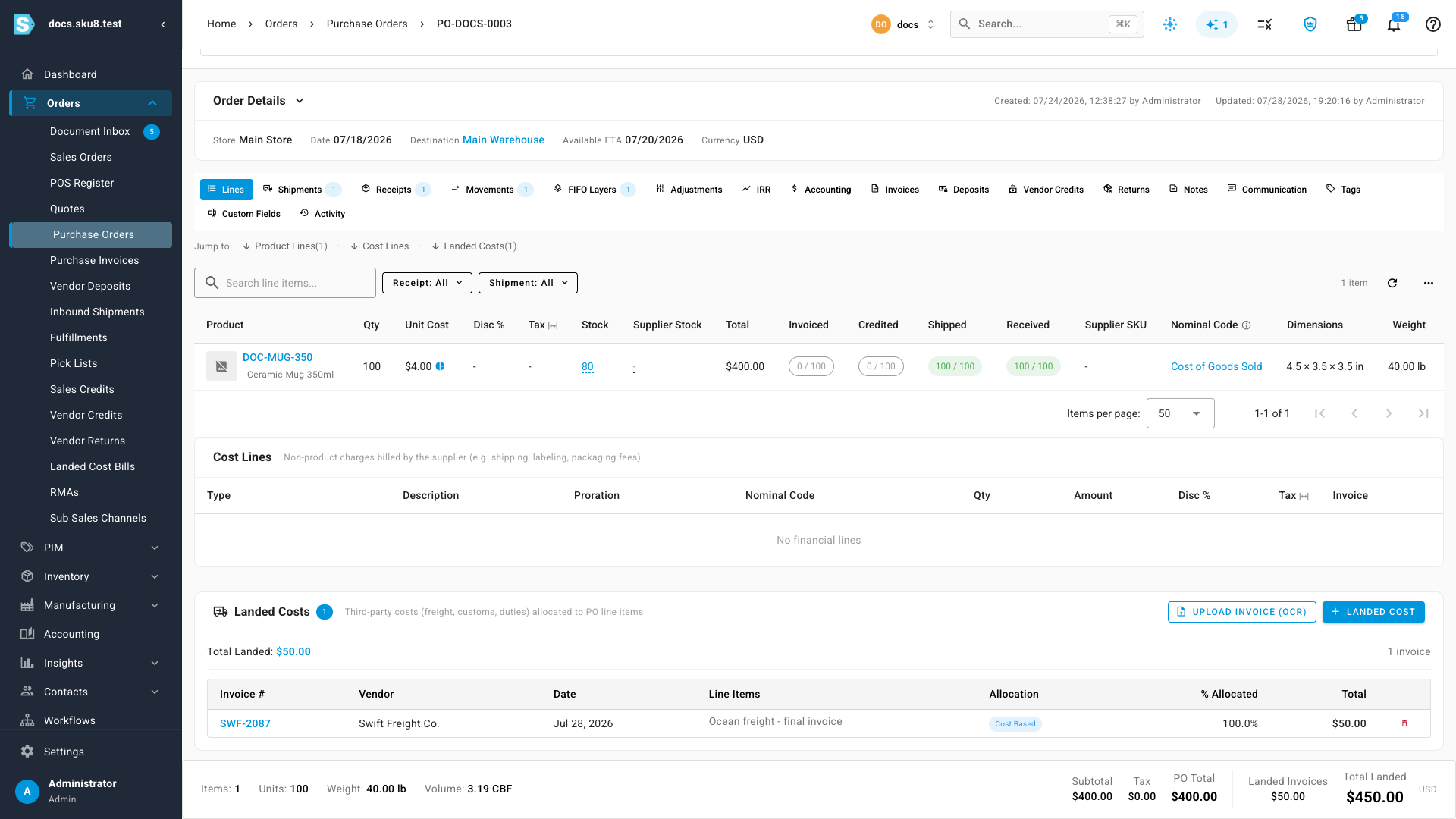
What you'll see: you're returned to the purchase order. The bill appears in the Landed Costs table and Total Landed shows $50.00 — and the inventory impact has already happened. For the full editor reference — proration methods, manual splits, OCR upload — see Add landed costs to a purchase order.
Where the cost impact appears
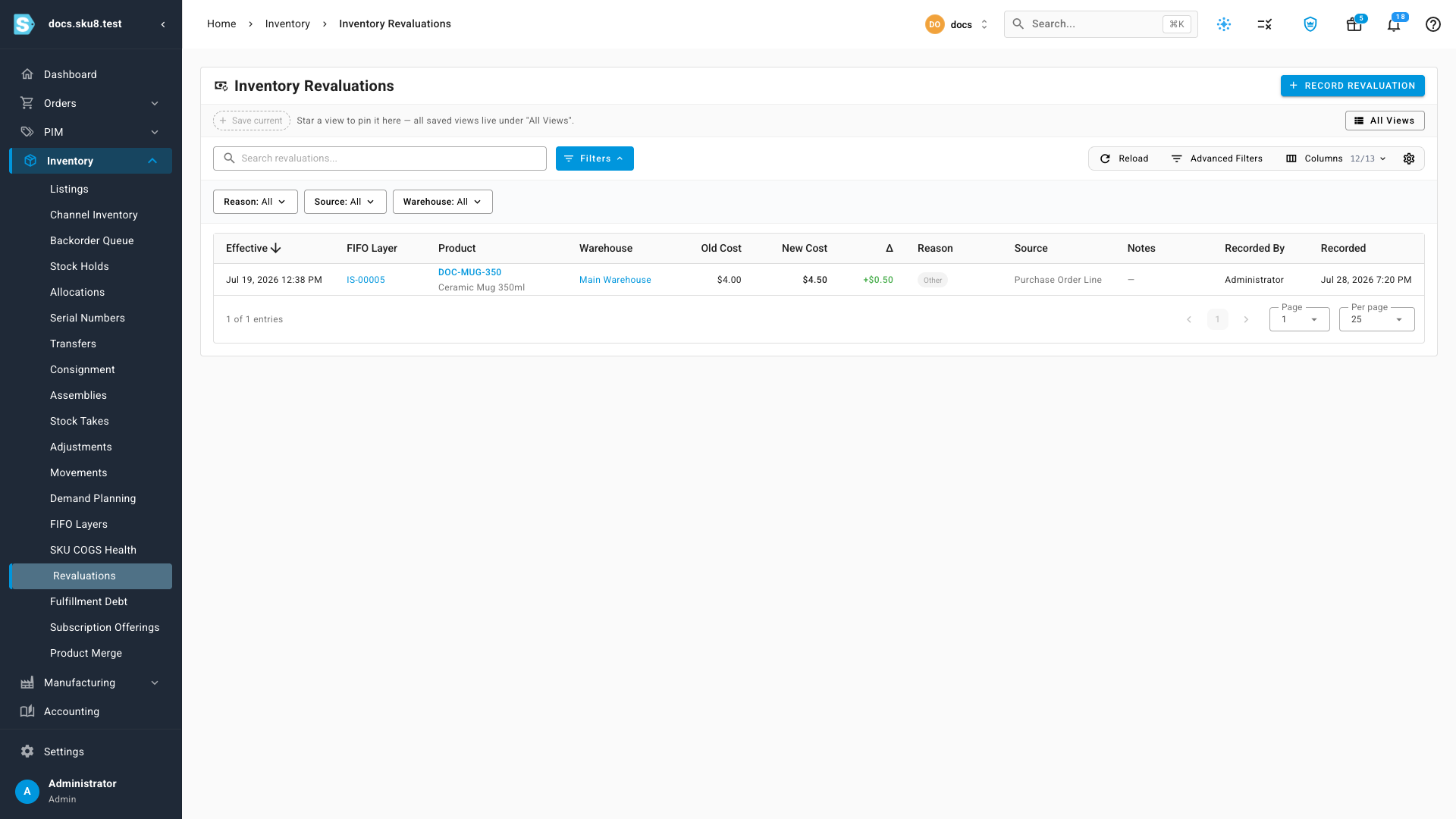
The $50 spread across the 100 received mugs is a +$0.50 per-unit uplift: the receipt's FIFO layer moves from $4.00 to $4.50. Here's where to see it:
Inventory → Revaluations — the audit trail
Open Inventory → Revaluations. Applying the landed cost posted one dated row per affected layer, with Old Cost ($4.00), New Cost ($4.50), and the change (+$0.50) side by side, and Source: Purchase Order Line. This is the first place to look whenever you want to confirm a landed cost applied — the record is created the moment you save the invoice.
The FIFO layer — cost breakdown by category
Click the layer's ID (from the Revaluations row or the FIFO Layers list) to open its detail page:
-
COGS (per unit) reads $4.50 — the current, landed-cost-inclusive figure.
-
The Cost Breakdown card splits it by category: Base Product $4.00 (88.9%) and Freight $0.50 (11.1%) — your invoice, reporting under the category you chose in step 6.

-
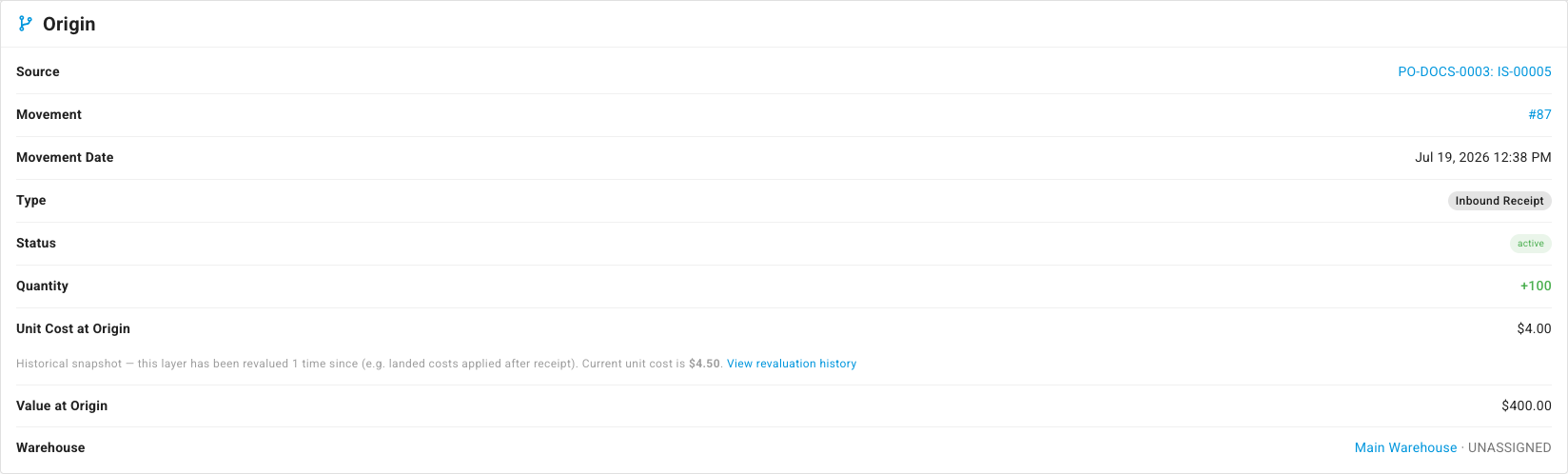
Unit Cost at Origin still reads $4.00. That's intentional: the origin is a historical snapshot of the receipt, and revaluations never rewrite history. The page says so right below the figure — "Historical snapshot — this layer has been revalued 1 time since" — with a View revaluation history link that opens the Revaluations page filtered to this layer.
The list's Avg Cost and Total Cost columns show the current values — $4.50 and $450.00 already include the freight. There's no separate "landed cost" column there, so a freshly applied cost just looks like a slightly higher number. Use the Revaluations page for the before/after, or open the layer for the breakdown.
The product — average cost, stock value, and sold units
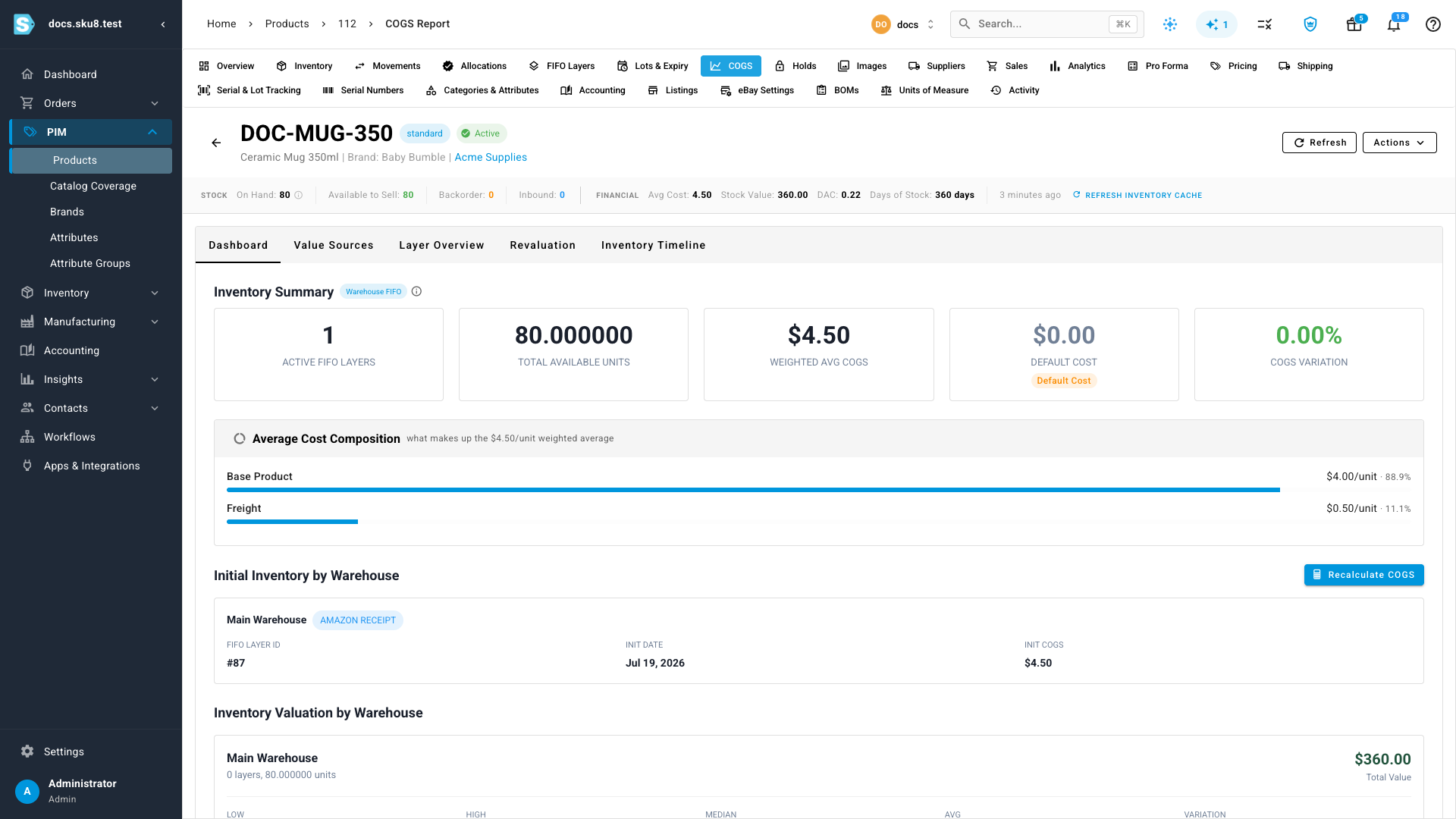
Open the product's COGS report (Products → open the product → COGS). Avg Cost shows $4.50 and Stock Value reflects it (80 on hand × $4.50 = $360.00). The Average Cost Composition chart on the Dashboard tab shows the same Base Product + Freight split, and the Revaluation tab lists the dated history per layer.
The 20 mugs that had already shipped were re-costed too: the sale's realized COGS moved from $80.00 to $90.00 (20 × $4.50), so your margin reports match the true landed cost — no manual correction needed.
How the cost spreads (worth knowing)
- The allocation becomes a flat per-unit uplift — allocated amount ÷ the line's ordered quantity — applied to every unit received against that line, including receipts at other warehouses.
- Units not yet received don't carry cost yet; their share applies automatically if they arrive later.
- Editing or deleting the invoice re-spreads automatically — open it from the Landed Costs table, adjust, and save.
Next steps
- Add landed costs to a purchase order — the full editor reference: proration methods, manual splits, OCR upload.
- Correct a cost on a received purchase order — fixing the supplier's price after receipt.
- Correcting COGS: revalue vs rebuild vs recalculate — when to reach for each tool.
- FIFO layers & how COGS is realized — the model behind these numbers.
Video transcript
A freight invoice often lands after the goods do. Here's a purchase order for ceramic mugs — a hundred units, already received, and the order is closed. You can add the late freight bill exactly as it is.
On the Lines tab, jump down to Landed Costs, and click Landed Cost.
Choose the freight company as the supplier, and enter the invoice number. Describe the charge, and enter the amount — fifty dollars. Then pick a cost category, so the charge reports under its own name instead of falling into Other.
Save the invoice. That's the whole job — the bill is linked to the order, and the cost has already been applied to your inventory. No reopening the order, and no recalculation step.
To see the impact, open Inventory, then Revaluations. Every affected layer gets a dated record — the mugs moved from four dollars to four fifty a unit, and the source names the purchase order line.
Click through to the layer itself. The cost breakdown now shows freight as its own line — fifty cents a unit on top of the four dollar base. The unit cost at origin stays at four dollars, because origin is a historical snapshot — the page flags the revaluation and links straight to its history.
On the product's COGS report, the average cost and stock value are already up to date — and the twenty mugs that had shipped were re-costed too, so your margins stay honest. A late cost, captured in under a minute.