Monitor webhook deliveries
Once a webhook is live, the question stops being "does it work?" and becomes "what happened to that one delivery?". Every attempt SKU.io makes — successful or not — is recorded with its status code, how long it took, which attempt it was, and the exact payload sent. This guide reads that log and acts on it.
Before you begin
- The delivery log is per subscription. Open the subscription to see it.
- Reading it over the API needs a token carrying
webhooks:readorwebhooks:manage; pausing, resuming, and deleting needwebhooks:manage. - The screenshots below come from a demonstration account with a seeded delivery history — sample subscriptions, sample endpoints, and sample responses. Your own events, URLs, and timings will differ.
- To create a subscription in the first place, see Subscribe to webhooks.
Steps
1. Scan the list
Go to Settings → Developer → Webhooks. Three columns tell you the health of every subscription at a glance.
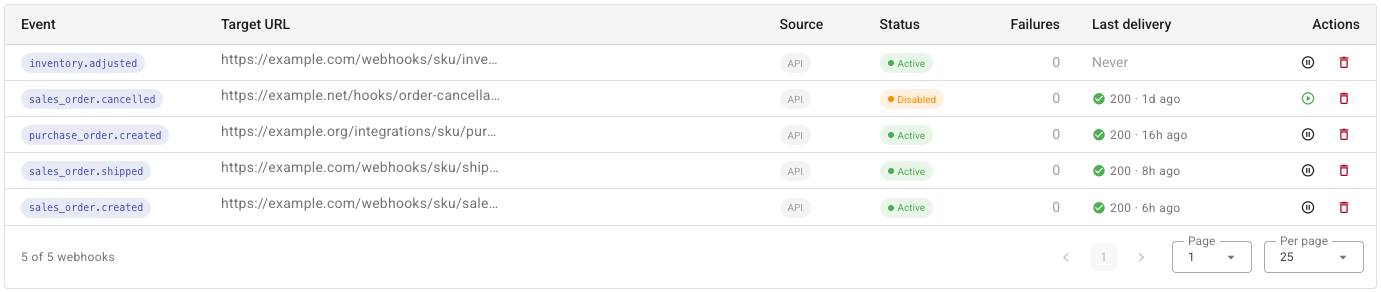
| Column | What it means |
|---|---|
| Status | Active is receiving deliveries. Disabled is not — hover it to see why. |
| Failures | Consecutive failures. It resets to zero the moment one delivery succeeds, so a non-zero number means the endpoint is failing now. |
| Last delivery | The status code of the most recent attempt and how long ago it was. Never means nothing has been sent yet. |
Use the Status filter to pull up only the disabled ones, and Source to separate the subscriptions you created from those a connected app created.
2. Open the delivery log
Click a subscription to open its drawer. The log sits under Recent deliveries, newest first.
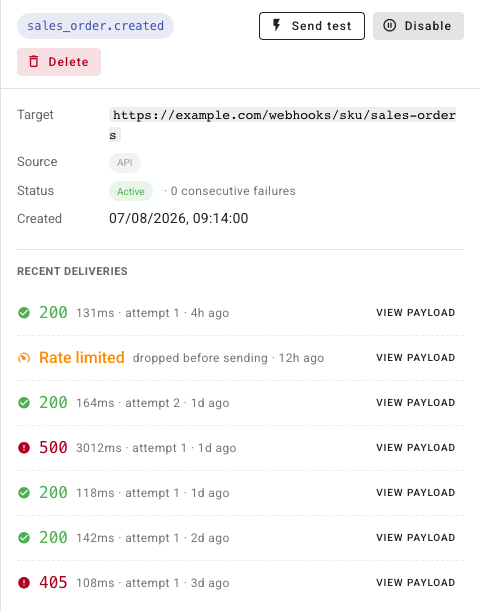
Each row is one attempt, not one event. A retried event appears once per attempt, with the attempt number climbing — that's how you tell "my endpoint was briefly down" from "seven separate events failed".
The detail line reads duration · attempt N · how long ago.
3. Read the outcome
The coloured label on the left is what happened:
| Label | Meaning |
|---|---|
A green status code, for example 200 | Your endpoint accepted the delivery |
A red status code, for example 500 or 405 | Your endpoint answered, but not with a success status. It will be retried |
| No response | Your endpoint couldn't be reached at all — DNS, TLS, connection refused, or slower than the 15-second timeout. It will be retried |
| Rate limited | The delivery went over your account's per-minute webhook ceiling and was dropped before sending. Your endpoint was never called, and this one is not retried |
Rate limited is the row people misread most often. It carries no status code and no timing, because nothing was sent — it isn't a failure of your endpoint, and it doesn't count toward the failure total. The ceiling is per account, defaulting to 600 deliveries a minute, and it exists so one busy account can't starve everyone else's deliveries.
4. Inspect the payload
Click View payload on any row to see exactly what was sent.
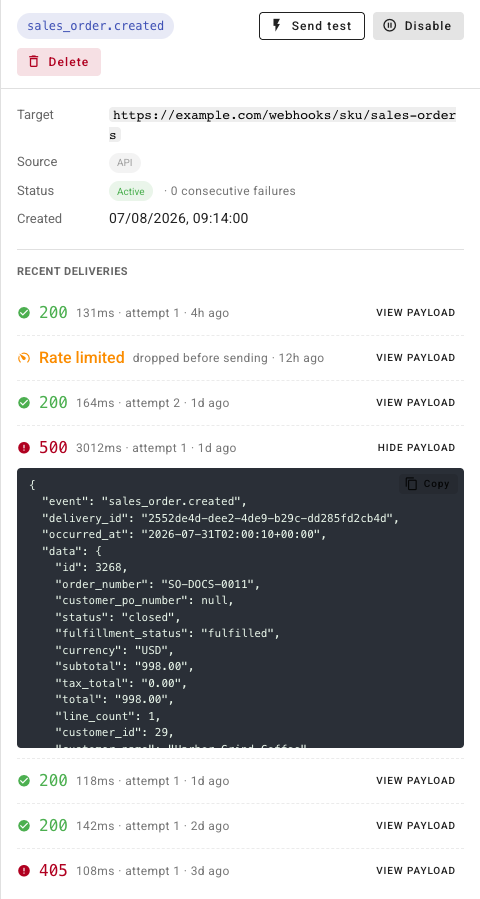
This is the body your endpoint received, byte for byte — including
delivery_id, which is the value your handler should be deduplicating on.
Copy puts it on your clipboard so you can replay it against your receiver
locally and reproduce the failure without waiting for the event to happen again.
5. Prove a fix
After changing your endpoint, click Send test in the drawer header rather than waiting for the next real event. It goes out immediately, signed with the real secret, and its result lands in the log like any other delivery.
Retries and automatic disabling
A failed delivery is retried twice, so three attempts in all:
| Attempt | When |
|---|---|
| 1 | Immediately |
| 2 | 30 seconds later |
| 3 | 5 minutes later |
After that the event is given up on. It is not re-queued, and there is no manual replay — the payload stays in the log so you can re-send it yourself.
Two things switch a subscription off without you asking:
- 25 consecutive failures. The subscription is disabled and the owner is emailed. Because the counter resets on any success, reaching 25 means the endpoint has been continuously broken, not occasionally flaky.
- A
410 Goneresponse. This is the deliberate "stop sending" signal. Deactivation is immediate, with no further retries — return it when an endpoint is permanently retired.
Hover a Disabled chip to see which applied:
| Reason shown | What happened |
|---|---|
| The receiver returned 410 Gone — that endpoint is no longer accepting deliveries. | Your endpoint asked to be unsubscribed |
| Disabled automatically after too many consecutive failed deliveries. | 25 consecutive failures |
| The connected app this subscription was created under no longer has access. | The OAuth authorization behind it was revoked |
| Disabled manually. | Someone paused it here |
Pause and resume
Disable stops deliveries without destroying anything: the signing secret, the delivery history, and the subscription itself all survive. Use it while you deploy a change to your receiver, or to silence a noisy endpoint during an incident.
Enable turns it back on, re-checks that the target URL is still safe to call, and resets the failure count to zero — so a subscription disabled at 25 failures gets a clean 25 attempts, not one.
One reason can't be undone from here: a subscription disabled because its connected app's authorization was revoked. Re-enabling it would resurrect a delivery the app is no longer permitted to receive, so the Enable button stays greyed out and the tooltip points you at reconnecting the app instead.
Delete a subscription
Delete removes the subscription and its delivery history for good.
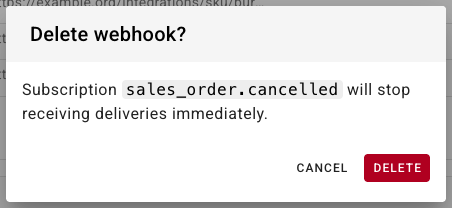
Deliveries stop immediately, and the signing secret is gone with it — recreating the same event and URL later issues a new secret, so your receiver needs updating. If you only want to stop deliveries temporarily, disable it instead.
Deleting a subscription that a connected app created is called out in the dialog. It breaks that integration from SKU.io's side while the app still believes it's subscribed; disconnecting the app is the clean way to turn its webhooks off. See Review connected apps.
Troubleshooting
| What you see | Likely cause |
|---|---|
| Never under Last delivery | Nothing has fired yet. Send a test delivery to confirm the endpoint works before assuming the event is broken |
| Repeated No response | The host isn't reachable from the internet, TLS is failing, or your handler takes longer than 15 seconds. Acknowledge with a 2xx first and process afterwards |
Repeated 401 or 403 | Your signature check is rejecting genuine deliveries. Verify the HMAC over the raw body, not a re-encoded copy of the parsed JSON |
404 or 405 | Right host, wrong path or method. Deliveries are always POST |
| The same event handled twice | Attempt 2 or 3 of a delivery your endpoint actually accepted but answered slowly. Deduplicate on delivery_id |
| Frequent Rate limited rows | The account is producing more deliveries a minute than the ceiling allows. Reduce the number of subscriptions on very high-volume events |
Next steps
- Subscribe to webhooks — create a subscription and verify its signature.
- Review connected apps — apps that create webhooks on your behalf.
- API scopes reference —
webhooks:readversuswebhooks:manage.