API scopes reference
A scope is one permission on an API credential. Every personal access token and every OAuth authorization carries a list of them, and SKU.io checks that list on each request. This page is the complete catalog: what exists, what each entry opens, and what a refusal looks like so you can tell "the token is wrong" from "the token isn't allowed to do that".
Before you begin
- Scopes apply to API credentials only. When you use SKU.io in the browser you're signed in with a session, and sessions aren't scope-checked — they use your normal permissions.
- Scopes narrow, they never widen. A token acts as the person who created
it. If your role can't delete products, neither can a token you issue that
carries
products:write. - You pick scopes when you create a token, and you can change them afterwards.
How scopes are named
Every scope is resource:action:
orders:read
purchase-orders:write
webhooks:manage
The resource is the area of the product. The action is what the token may do
there — read to look, write to change, and (for webhooks only) manage.
The catalog
There are 15 groups and 30 scopes. Read and write are always separate
entries, so a reporting job can take orders:read without ever being able to
cancel an order.
| Group | Scope | Grants |
|---|---|---|
| Sales Orders | orders:read | View sales orders and order lines |
orders:write | Create, update, and cancel sales orders | |
| Products | products:read | View products, SKUs, and variants |
products:write | Create and update products | |
| Inventory | inventory:read | View stock levels, allocations, and reorder points |
inventory:write | Adjust inventory, transfer stock, and reconcile counts | |
| Customers | customers:read | View customers |
customers:write | Create and update customers | |
| Suppliers | suppliers:read | View suppliers |
suppliers:write | Create and update suppliers | |
| Purchase Orders | purchase-orders:read | View purchase orders |
purchase-orders:write | Create, update, and approve purchase orders | |
| Warehouses | warehouses:read | View warehouses and locations |
warehouses:write | Manage warehouses, locations, put-away, and location transfers | |
| Reports | reports:read | View reports and analytics |
reports:write | Run report queries, exports, and scheduled reports | |
| Webhooks | webhooks:read | View webhook subscriptions, their delivery history, and the event catalog |
webhooks:manage | Create, enable, disable, and delete webhook subscriptions | |
| Returns & RMAs | returns:read | View RMAs, return receipts, and dispositions |
returns:write | Create and process RMAs and return receipts | |
| Accounting | accounting:read | View transactions, bills, vendor credits, and financial settings |
accounting:write | Create and update transactions, payments, and financial settings | |
| Settings & Organization | settings:read | View stores, tags, alerts, and organization settings |
settings:write | Update stores, tags, alerts, and organization settings | |
| Manufacturing | manufacturing:read | View BOMs, manufacturing orders, and MRP plans |
manufacturing:write | Create and update BOMs, manufacturing orders, and MRP runs | |
| Subscriptions | subscriptions:read | View subscription offerings |
subscriptions:write | Create, update, and delete subscription offerings | |
| Integrations | integrations:read | View connected integration instances and their settings |
integrations:write | Create, update, and manage integration instances |
The same catalog is available to your own code at GET /api/developer/scopes,
which is what the token checklist, the OAuth consent screen, and the OAuth
Applications page all read. Fetch it rather than hard-coding this table if you
build tooling around scopes.
What each group reaches
Scope groups follow the product, not the URL. One group usually covers a whole family of endpoints:
| Group | Covers, among others |
|---|---|
| Sales Orders | Orders and order lines, fulfillment orders, shipments, channel refund requests, artwork and decoration |
| Products | Products, SKUs and variants, attributes, brands, categories, listings, content sync |
| Inventory | Stock levels and allocations, inventory adjustments, assemblies, FIFO layers, COGS revaluation |
| Customers | Customers and contacts, receivables, customer statements |
| Suppliers | Suppliers, payables, supplier statements, invoice reminders |
| Purchase Orders | Purchase orders, bills, cost entries, consignment, amortization schedules |
| Warehouses | Warehouses and locations, pick lists, LPNs, put-away, warehouse transfers |
| Reports | Report builder, custom reports, financial reports, analytics |
| Webhooks | Subscriptions, their delivery history, and the event catalog |
| Returns & RMAs | RMAs, return receipts, dispositions |
| Accounting | Transactions, payments, bills, vendor credits, financial settings |
| Settings & Organization | Stores, tags, alerts, currencies, incoterms, order import rules, onboarding |
| Manufacturing | BOMs, manufacturing orders, MRP runs |
| Subscriptions | Subscription offerings |
| Integrations | Integration instances and their settings |
For most endpoints the method decides the action: a GET needs :read, and a
POST, PUT, PATCH, or DELETE needs :write.
Choosing scopes
Scopes are picked from the checklist in the Create Access Token and Edit Token dialogs.
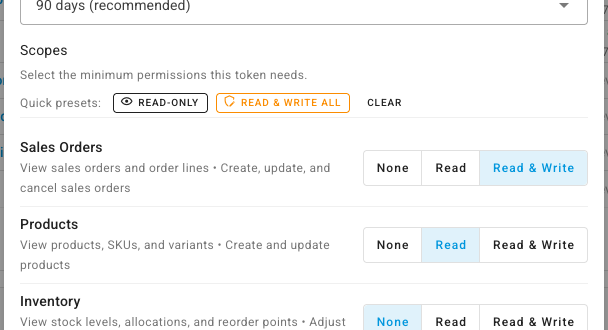
Each group is one row with a ladder: None → Read → Read & Write.
Moving a group to Read & Write grants both of its scopes; moving it back to
Read drops the write one. Webhooks reads None → Read →
Read & Manage instead, because that group's second action is manage.
Two quick presets sit above the list:
| Preset | What it does |
|---|---|
| Read-only | Sets every group to Read — 15 scopes, no ability to change anything |
| Read & write all | Sets every group to its top rung. Grants everything the token's owner can do, so use it only for a credential you fully control |
| Clear | Appears once something is selected, and returns every group to None |
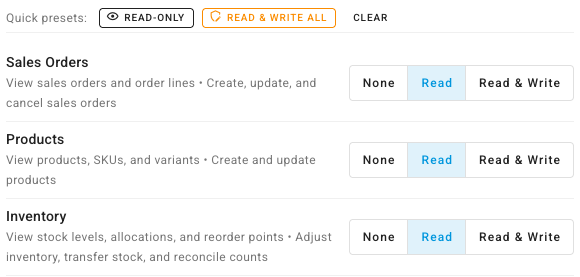
Underneath the list, a running summary shows exactly what you're about to grant:
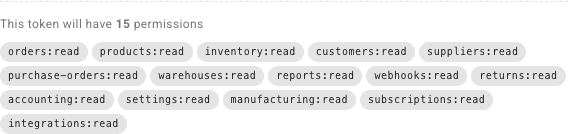
Check that count before you create the token. It's the quickest way to catch a preset you clicked and forgot about.
Endpoints that need two scopes
A handful of endpoints join two areas of the product, and a token needs both scopes to call them — one of the two is not enough.
| Both scopes needed | Endpoints |
|---|---|
customers + orders | Customer receivables, AR summary, AR communications, statement (view, preview, export, send), and payment requests |
purchase-orders + suppliers | Supplier payables, AP summary, supplier statement (view, export), invoice reminders, and invoice requests |
purchase-orders + reports | Rebuilding purchase order return metrics |
The read or write half is chosen per request in the usual way, so
GET /api/customers/{id}/receivables needs customers:read and
orders:read, while POST /api/customers/{id}/request-payment needs
customers:write and orders:write.
Webhooks work slightly differently
Webhooks use read and manage rather than read and write, and the
read-only endpoints accept either scope:
| Endpoint | Scope |
|---|---|
| List subscriptions, view one, view its deliveries | webhooks:read or webhooks:manage |
| List the event catalog, fetch a sample payload | webhooks:read or webhooks:manage |
| Create, delete, enable, disable, or send a test delivery | webhooks:manage |
A token that can create and delete subscriptions can already list them, so
webhooks:manage on its own is enough for the whole surface. You don't need to
add webhooks:read alongside it.
AI assistant access is separate
Connecting an AI assistant over the Model Context Protocol uses its own ability,
mcp:access, which is deliberately absent from the checklist. An MCP token is
minted only through the AI assistant connection flow, and it can't be mixed with
the REST scopes above — a token is either an MCP connection or a REST
credential, never both. See
Connect an AI assistant.
What a refused request looks like
403 — the token is missing a scope
{
  "message": "Token is missing the required scope: orders:write",
  "error": "insufficient_scope",
  "required_scope": "orders:write"
}
error is the one-word diagnosis — insufficient_scope means the fix lives on
the token. required_scope is the machine-readable copy: add that scope to the
token and retry. Where an endpoint accepts either of two scopes, the message
lists both and required_scope names the narrower one.
The same refusal also arrives as a standard authentication challenge, so you can recognize it from the headers alone:
www-authenticate: Bearer error="insufficient_scope", scope="orders:write"
403 — the endpoint isn't open to tokens at all
{
  "message": "This endpoint is not available to API tokens."
}
Nothing you add to the token changes this answer. Endpoints are closed to API credentials unless they've been opened deliberately, and the account-management endpoints — creating tokens, listing sessions, revoking connected apps, connecting an AI assistant — are closed on purpose. A token can never mint or manage another credential; those actions need a signed-in session.
401 — the credential itself didn't work
A 401 carries a code so you don't have to guess which of the failure modes it
was:
code | Meaning |
|---|---|
ERR_UNAUTHENTICATED | No credential was sent at all |
ERR_TOKEN_EXPIRED | A genuine token, past its expiry. The response includes expired_at |
ERR_TOKEN_REVOKED | The token no longer exists — revoked, or never issued |
ERR_TOKEN_INVALID | Right shape, wrong secret |
ERR_TOKEN_MALFORMED | Not a shape SKU.io issues — usually a truncated paste, a doubled Bearer prefix, or an unsubstituted placeholder |
Treat 401 as "re-authenticate" and 403 as "this credential is valid but not allowed to do that".
A token can also be refused for reasons that have nothing to do with scopes: an IP allowlist that doesn't include the caller, or a per-token rate limit. Those are covered in Manage your personal access tokens.
For the full error catalogue — every status code the API returns, the body shape that comes with it, and how to send the credential in the first place — see Errors and Authentication on developer.sku.io.
Scopes don't override permissions
A scope opens a door; your role decides whether you may walk through it. Both checks run, and the stricter one wins.
Account-wide settings are the clearest example. Writing a setting needs the
token to carry settings:write and the token's owner to hold the
settings.update permission. Granting the scope to a user who lacks the
permission changes nothing — the request is still refused.
That refusal is a 403 too, but it's a different one, and it says so:
{
  "message": "Your user account is missing the required permission: settings.update. This is a role permission, not a token scope — the token itself is valid.",
  "error": "insufficient_permission",
  "required_permissions": ["settings.update"]
}
insufficient_permission is the signal that no amount of scope editing helps:
required_permissions names what the owner's role is missing, and it
carries no www-authenticate header, because the credential was never in
question. Fix it by having an administrator add those permissions to the owner's
role, or by re-issuing the token from an account that already holds them.
This is why granting Read & write all to a token is bounded by who created it: the token can do everything its owner can do, and nothing more.
The scope picker flags this before you ever make a call — see Fix a 403 from your API token.
Changing a token's scopes
Scopes aren't frozen at creation. Edit the token to add or remove them without re-issuing the secret, so integrations keep working while their permissions change.
Adding a write or manage scope to an existing token asks you to re-enter
your password first, the same as creating one — and to pass two-factor
verification if you have it switched on. Removing scopes asks for neither.
Next steps
- Fix a 403 from your API token — tell a missing scope apart from a missing permission.
- Create a personal access token — pick scopes and capture the value.
- Manage your personal access tokens — edit scopes, watch usage, and revoke.
- Subscribe to webhooks — where
webhooks:manageis used.