How purchases reach your books
Buying stock touches your books three times: when you pay a deposit, when the goods arrive, and when the supplier's bill is recorded. These rarely happen in the same order or the same month. SKU.io keeps the money in balance-sheet accounts between those events, so nothing hits your P&L until the stock is sold. This page explains which accounts hold it, and how each one empties out.
The three events
| When you… | SKU.io posts | So the balance sits in… |
|---|---|---|
| Pay a vendor deposit | Debit Prepaid Vendor Deposits, credit Accounts Payable | an asset, not an expense |
| Receive stock on a purchase order | Debit Inventory Control, credit the purchase clearing account | a liability: goods received, not yet billed |
| Record the supplier's bill | Debit the purchase clearing account, credit Accounts Payable | Accounts Payable, until you pay it |
| Apply the deposit to the bill | Debit Accounts Payable, credit Prepaid Vendor Deposits | nowhere: the deposit is used up |
When the receipt and the bill agree, the clearing account nets to zero for that order, and the deposit account empties when the deposit is applied. Whatever is left in either account is real: goods you've received but haven't been billed for, bills for goods that haven't arrived, or deposits not yet used.
Vendor deposits stay on the balance sheet
A deposit is a prepayment, so SKU.io never posts it to an expense account. It sits in Prepaid Vendor Deposits, an asset, until one of these clears it:
| What happens to the deposit | Entry |
|---|---|
| Applied to the supplier's bill | Debit Accounts Payable, credit Prepaid Vendor Deposits. A foreign-currency deposit adds a realized FX gain or loss line. |
| Refunded by the supplier | Debit Accounts Payable, credit Prepaid Vendor Deposits |
| Written off because it can't be recovered | Debit Deposit Forfeiture Expense, credit Prepaid Vendor Deposits |
| Ownership of the goods transfers to you before receipt | Debit the purchase clearing account, credit Prepaid Vendor Deposits |
With Auto-apply deposits to new bills on, which is the default, under Settings → Purchasing → Payment Approvals, open deposits on a purchase order are applied to its bills, oldest first, as the bills are recorded. For how to record and apply deposits, see Manage vendor deposits and Apply a vendor deposit to a bill.
SKU.io only records deposit entries once Prepaid Vendor Deposits is mapped under Accounting → Settings → Nominal Code Mappings. Until then, deposits don't reach your books at all. Map Deposit Forfeiture Expense too if you ever write deposits off.

In Xero a paid deposit becomes a prepayment, which matches your bank feed, and applying it allocates the prepayment to the bill. In QuickBooks Online it becomes an expense coded to the deposit account, and applying it shows as a credit against the bill in Pay Bills.
Received but not yet billed
Between receipt and bill, the value of the stock waits in a purchase clearing account. By default that's one account, 2100 Accrued Purchases, which carries both sides of the timing gap:
- goods you've received but not yet been billed for, often called goods received not invoiced (GRNI), and
- bills you've recorded for goods that haven't arrived yet.
If you'd rather see the two sides separately, map both rows under Accounting → Settings → Nominal Code Mappings:

- Prepaid Purchases: the asset for purchases billed but not yet delivered. It's mapped to 2100 Accrued Purchases by default.
- Goods Received Not Invoiced: the liability for goods delivered but not yet billed. Leave it empty to keep both sides netted in one account.
When the bill arrives, SKU.io clears the received-not-billed part first. If the bill is for more than you've received, the rest becomes a prepaid balance until the remaining goods arrive.
A product can post to its own clearing account. Set Accrued Purchases on the product's Accounting tab. See Set product accounting.
See what's in the clearing account
Go to Accounting → Reports → GINR Balance. The report shows the clearing balance as of a date you choose, broken down by purchase order.
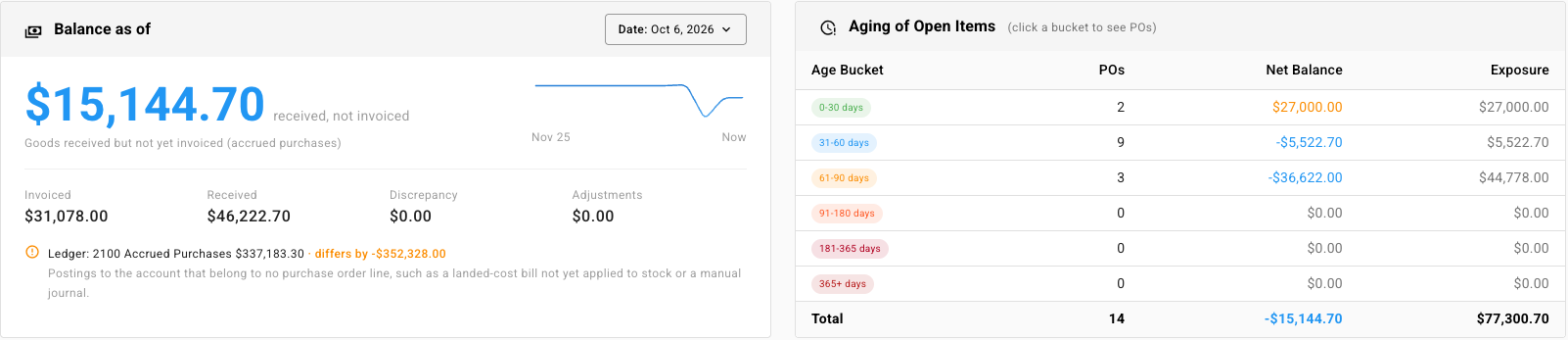
- Balance as of shows the headline figure with its Invoiced, Received, Discrepancy and Adjustments totals. Under it, SKU.io compares the figure with the ledger balance of the clearing account and explains any difference, such as postings that belong to no purchase order line.
- Aging of Open Items groups open orders by how long they've been open. Click a bucket to see its orders.
- Open Items lists every open purchase order with Invoiced, Received, Discrepancy, Adjustments and Balance. A positive balance means you've been billed ahead of delivery. A negative balance means you've received goods you haven't been billed for. Monthly Detail shows the same movement month by month.
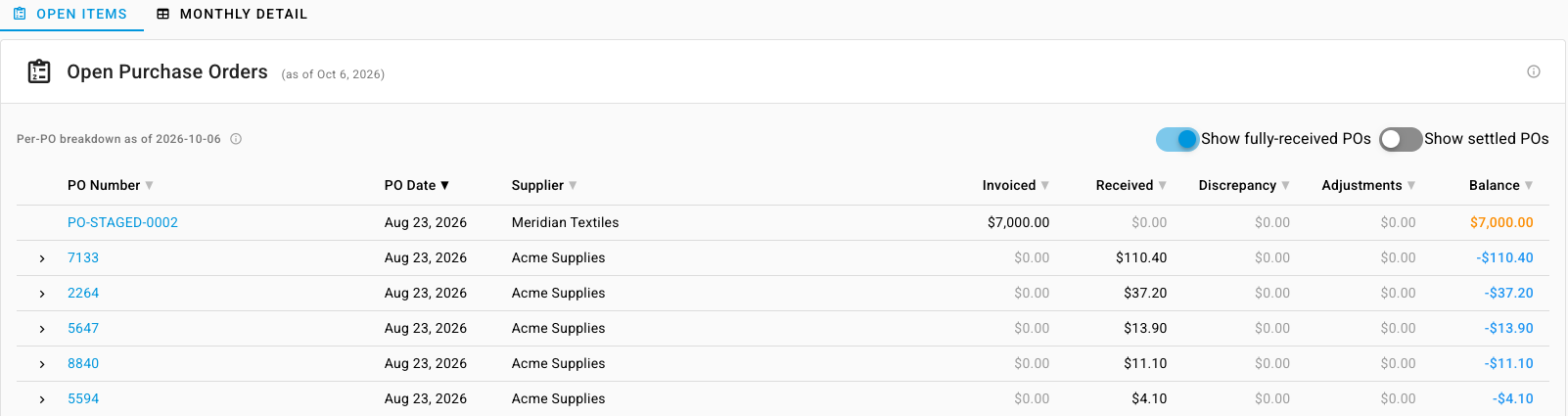
An order that stays open for months usually means a missing or mismatched bill. Record the bill, or correct the receipt, and the order drops off the report.
Related
- How automatic accounting works: the model behind every entry.
- Chart of accounts reference: the default accounts.
- What syncs to your accounting provider: how deposits and bills arrive in Xero and QuickBooks.
- Committed spend billing: post committed spend when a purchase order is submitted.