Manage vendor deposits
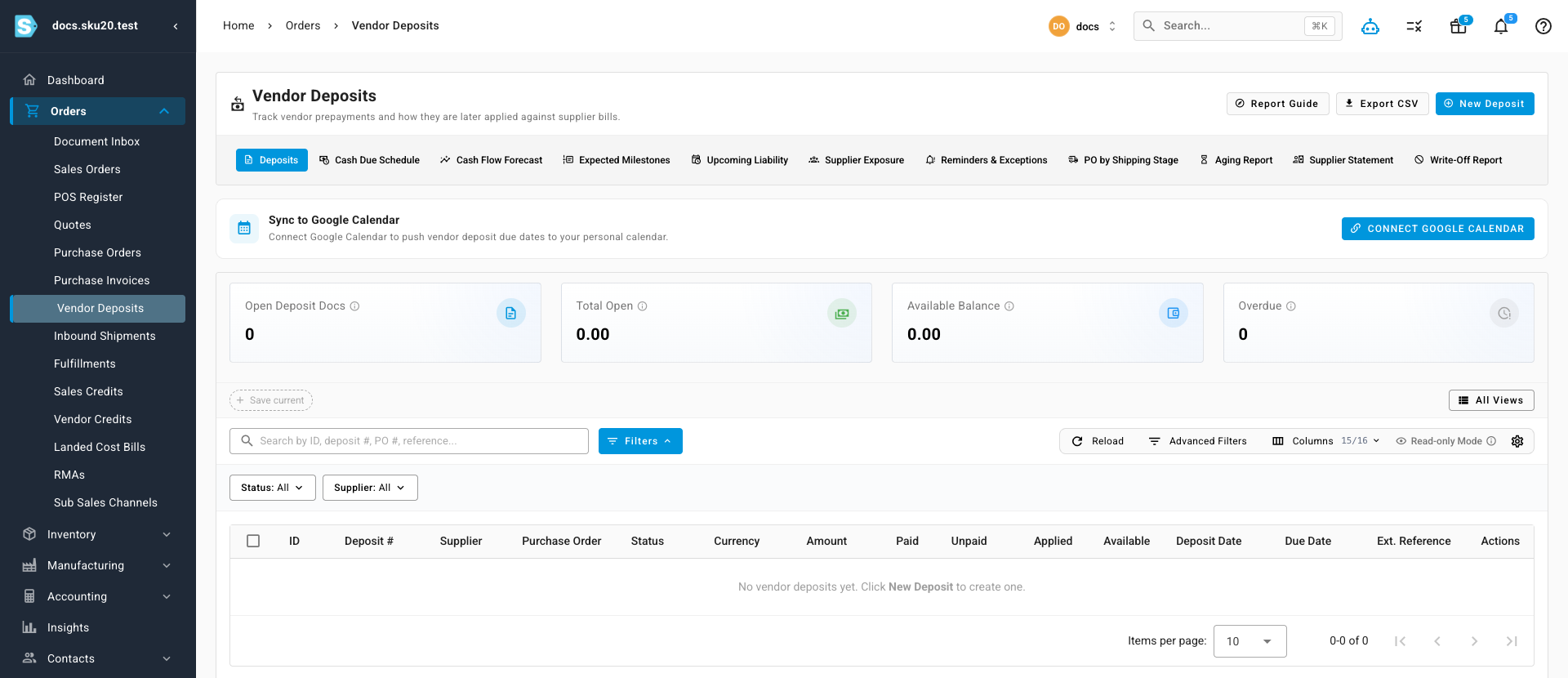
A vendor deposit is money paid to a supplier before the goods — a proforma-invoice prepayment, a production milestone, a container deposit. Many suppliers, especially overseas manufacturers, ask for one: "30% on order, 70% before we ship." They often request it on a proforma invoice — a preliminary bill sent before the real invoice. Orders → Vendor Deposits tracks every prepayment and how it's later applied against what the supplier invoices you.
A deposit is cash you commit to the supplier ahead of delivery. A vendor credit is money the supplier owes back to you — for returns, over-bills, or refunds.
Create a deposit
- Click New Deposit (also available from the supplier's Payables → Deposits tab).
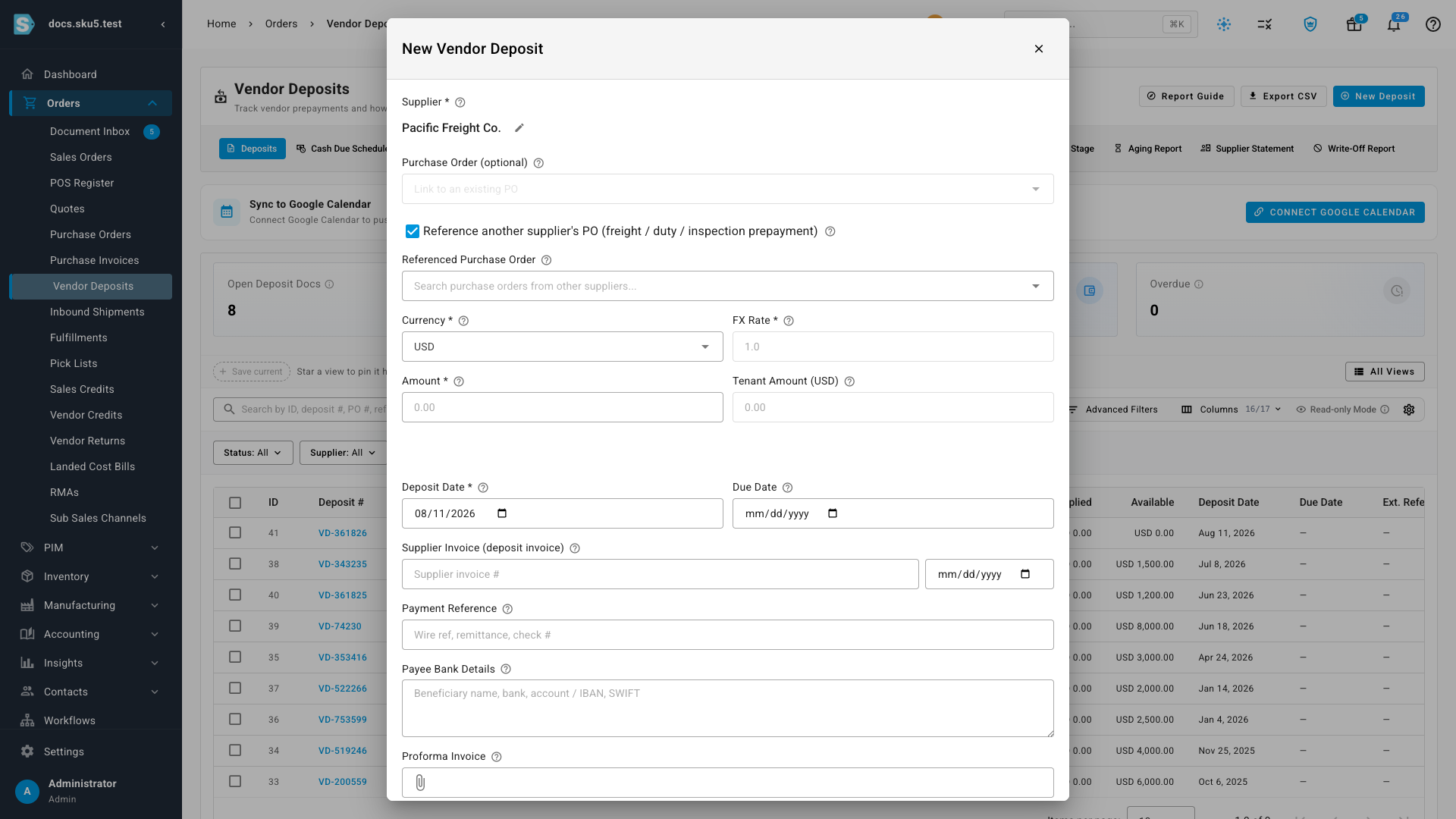
- Pick the Supplier and optionally link the Purchase Order; set the Currency, FX Rate, and Amount, plus the Deposit Date, Due Date, and the supplier's Reference (PI #). The supplier picker shows each supplier's type — Product Supplier or Service Provider — so forwarders and brokers are easy to spot.
- Paying a freight forwarder, customs broker, or inspection agency for goods on another supplier's order? Turn on Reference another supplier's PO instead of linking a purchase order, and search for the order the prepayment belongs to. See Third-party deposits below.
- Attach the Proforma Invoice so the payer sees what they're paying, and add the Payee Bank Details.
- Save as Draft, or Save & Request Payment to push it into the payment-approval flow. With no payment approver configured, submitting auto-approves — the dialog warns you. If your account has a vendor deposit approval policy turned on, the policy routes the request instead, and the drawer tells you who it goes to, or that you can approve this amount yourself.
Changing a draft deposit's Currency later recalculates its home-currency amount, and its tax, at the new currency's rate. The form names the rate it used, for example Home-currency amount and tax recalculated at 1 EUR = 1.0821 USD.
A supplier can also auto-apply its available deposits when landed costs are created.
Start from a purchase order
Every purchase order has a Deposits tab, with a badge counting its deposits. To record a prepayment the supplier asks for outside the payment schedule — a proforma invoice out of the blue, say — start there:
- Go to Orders → Purchase Orders, open the order, and select the Deposits tab.
- Click Record PI / Add Deposit. You can also click Record Proforma Invoice / Request Payment from the order's More menu (⋮); it opens the same drawer.
- The Supplier, purchase order, total, and currency are filled in from the order, with the deposit capacity the order has left.
- Enter the deposit value. Switch between Amount and Deposit % of PO to enter it either way.
- Attach the supplier's proforma invoice if you have one, then click Save as Draft.
The new deposit appears in the tab's Vendor Deposit Documents table in Draft, and follows its approval workflow before it can be paid and applied.
When the purchase order needs approval first
If your account has a purchase order approval policy turned on, you can't add a deposit to a PO that's still a draft, waiting for approval, or waiting for re-approval. In the order's More menu, Record Proforma Invoice / Request Payment is greyed out and says why, for example "PO-0064 must be approved before a deposit can be requested." A deposit you start from the Deposits tab or from Orders → Vendor Deposits is refused when you save it, with a message that the order needs approval first. Approve the PO, or wait for its approval, then add the deposit.
Deposits that the order's payment terms draft on their own are the exception: they can appear on a draft PO, but they still go through approval before you can pay them.
Deposits under an approval policy
With a vendor deposit approval policy on, a deposit must be fully approved before you can record a payment against it. Until then, recording a payment is refused with a message that the deposit "is awaiting approval — the payment can be recorded once it is approved."
If the policy needs more than one step, Approve & Mark Paid records only your step: you see "Approved your step — waiting on Step 2. No payment was recorded." Record the payment after the last step approves it. See Request and approve a vendor deposit payment.
Deposits are capped at the order total
Deposits linked to a purchase order can't add up to more than the order's total. Once they cover it, Create Deposit and Record PI / Add Deposit are disabled, and their tooltip explains that linked deposits already cover the purchase order total. Cancelled, void, refunded, and written-off amounts free that capacity back up.
Payment-term milestones
The Deposits tab on a purchase order shows two tables. Keep them apart:
| Table | What it holds | A financial record? |
|---|---|---|
| Expected Deposit Milestones | Planning rows worked out from the order's payment terms. Each has a trigger, a basis date, a due date, and an amount — a percentage of the order total or a fixed amount. | No — a milestone forecasts a deposit you'll owe. |
| Vendor Deposit Documents | The actual deposits, each with its status, Amount, Paid, Applied, and Available balance. Click a deposit number to open it. | Yes — this is the prepayment you pay and track. |
The basis date is the date a milestone counts from, such as the approval date; the due date is worked out from it ("10 days after approval"). Applied is how much of a paid deposit is already used against the supplier's bills — see Apply a vendor deposit to a bill.
A worked schedule
Say PO-DOCS-0001 totals $10,000, and Acme Supplies' terms are 30% on approval, 70% on first shipment. The order shows two milestones:
| Milestone | Trigger | % of order | Amount | Status before the trigger |
|---|---|---|---|---|
| Deposit 1 | PO Approved | 30% | $3,000 | Expected |
| Deposit 2 | PO First Shipment | 70% | $7,000 | Expected |
- You approve the order (or, with a purchase order approval policy on, its approvers do). Deposit 1 turns Ready to create. You create it and pay Acme $3,000. Deposit 2 stays Expected.
- Acme records the first shipment. Deposit 2 turns Ready to create. You create it and pay the remaining $7,000.
- Total prepaid: $10,000 — the full order value, committed as the terms describe.
When Acme's invoice for the goods arrives, you apply these deposits against it so you don't pay twice for the same goods.
A milestone can be a percentage of the order total or a fixed amount. A percentage recalculates when the order total changes; a fixed amount doesn't.
Milestone statuses
Hover a milestone's status chip for the full explanation.
| Status | Meaning |
|---|---|
| Expected | The payment terms call for this deposit later, but its trigger hasn't happened yet. |
| Ready to create | The trigger has happened. Create the deposit next. |
| Created | A deposit is linked to this milestone. |
| Out of sync | A linked deposit exists, but the payment terms no longer match it exactly. Review it. |
What triggers a milestone
A milestone's Trigger names the order event that makes it ready. It fires once, when the order first crosses that point:
| Trigger | Fires when the order… |
|---|---|
| PO Approved | is approved (moves from Draft to Open), whether you approve it or, under an approval policy, its approval request is approved. |
| PO First Shipment | records its first shipment. |
| PO Fully Shipped | becomes fully shipped. |
| PO First Receipt | records its first receipt. |
| PO Fully Received | becomes fully received. |
| Manual / Logistics Tracking Date | is triggered by hand, or by a logistics tracking date. |
When an order's payment terms or date change, SKU.io reworks its draft deposits to match. For the status changes behind these triggers, see How purchase order status works.
A later basis date pushes due dates out. When an edit to the order's dates would affect its milestones, SKU.io warns you before you save and previews the impact — read it before you confirm.
Create a deposit from a ready milestone
You need the Update purchase orders permission — without it, Create Deposit doesn't appear.
- On the order's Deposits tab, find a milestone marked Ready to create.
- Click Create Deposit on that row.
SKU.io creates a Draft deposit filled in from the milestone's amount and due date, and links the two. The milestone turns Created, and the deposit appears in the Vendor Deposit Documents table. A milestone that already has a deposit, or isn't ready yet, can't create another — you see a message explaining why.
Third-party deposits: freight, duty, and inspection prepayments
Not every prepayment on an order goes to the order's own supplier. On a DDP shipment, for example, you often pay the freight forwarder directly against their proforma invoice. That money belongs to the purchase order, but the forwarder is a different supplier.
Record it as a deposit to the service provider — the forwarder, customs broker, or inspection agency — and reference the purchase order it belongs to. It appears on the order's Deposits tab in its own Third-Party Deposits card, so the order's cash picture includes prepaid freight and duty, without touching anything that belongs to the goods supplier:
- The milestones don't change. Third-party deposits never appear in, or alter, the payment-term schedule.
- The order's deposit capacity doesn't change. A freight prepayment doesn't use up the goods supplier's cap — it can even exceed the order total.
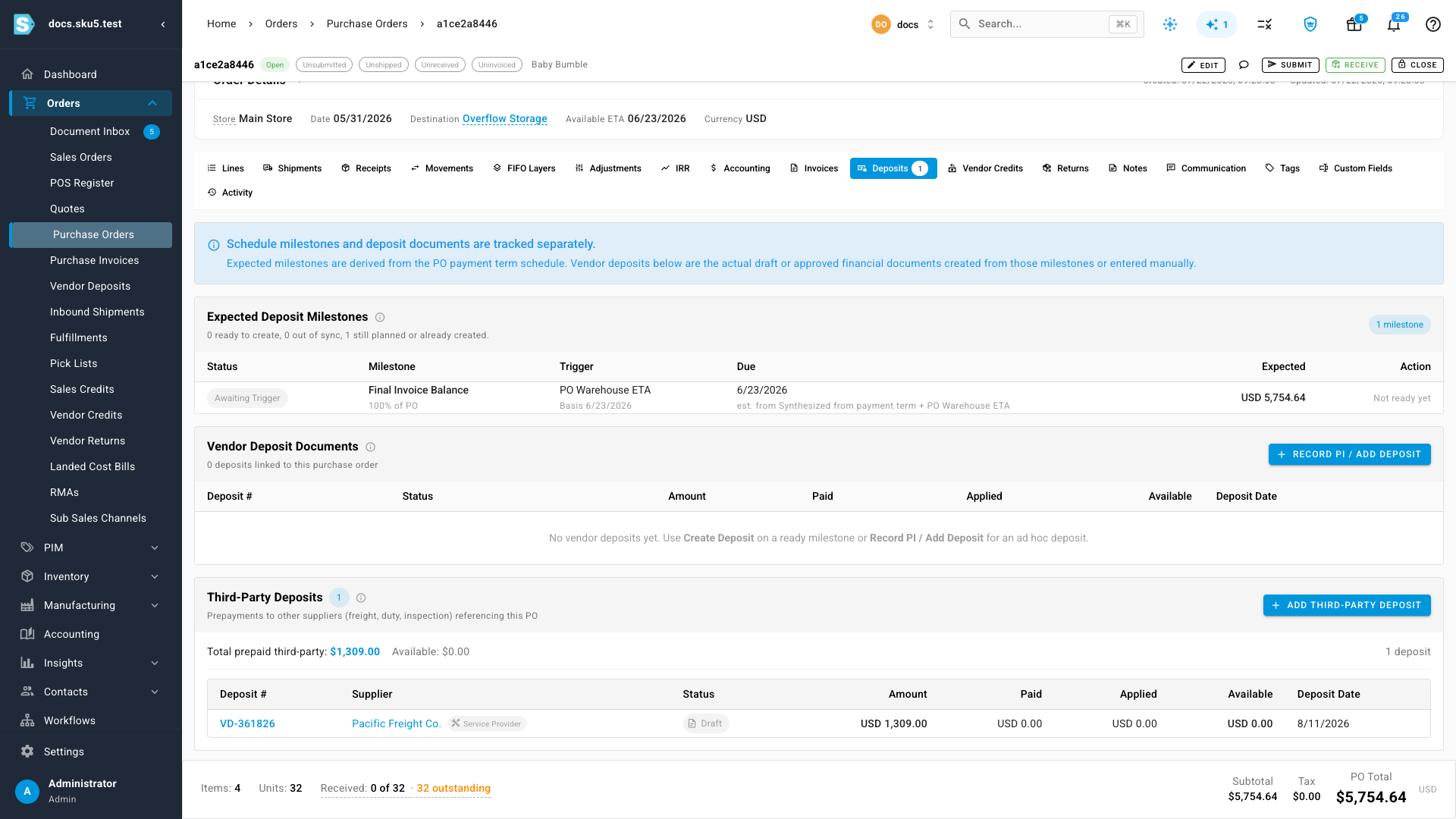
To add one from the order, click Add Third-Party Deposit on the card (or in the Deposits tab header when the card is empty). The deposit drawer opens with the reference to the order already set — pick the service provider, enter the amount, and save. From Orders → Vendor Deposits, turn on Reference another supplier's PO in the drawer instead.
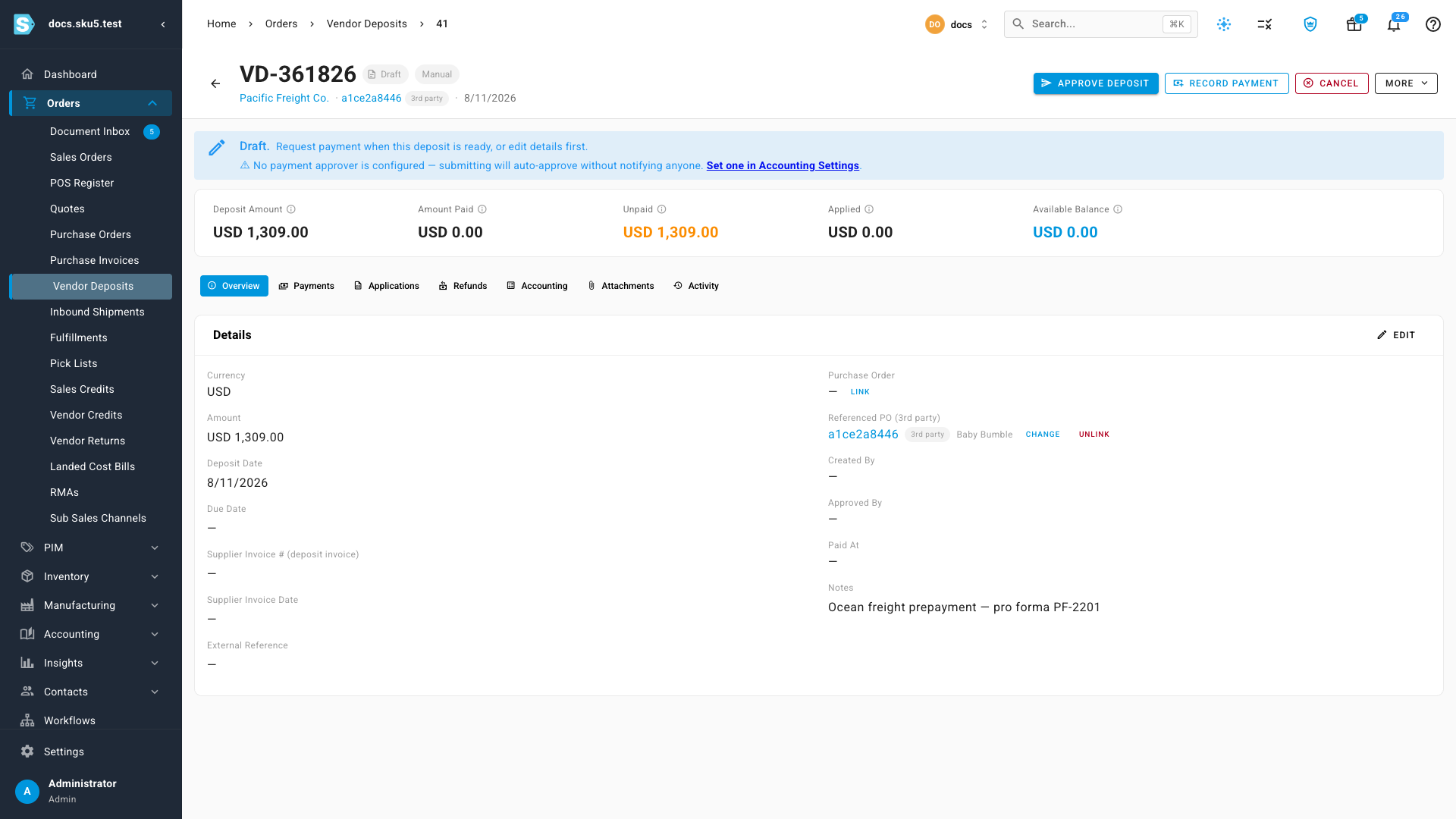
A deposit has either its own supplier's purchase order link, which drives milestones, or a third-party reference — never both. Wherever the deposit appears, the referenced order carries a 3rd party badge:
When the service provider's invoice arrives, apply the deposit to it as usual.
Deposit statuses
| Status | Meaning |
|---|---|
| Draft | Created, not yet submitted for approval. |
| Pending Approval | Submitted and waiting for sign-off. |
| Approved | Signed off and ready to pay. |
| Partially Paid | Some of the amount is paid. |
| Paid | The full amount is paid to the supplier. |
| Partially Applied | Some of the paid deposit is used against the supplier's bills; a balance is still available. |
| Fully Applied | The whole deposit is used against bills. |
| Refunded | The supplier returned the money. |
| Written Off | Cleared from the books as unrecoverable. |
| Void / Cancelled | Voided or cancelled before completing. |
An approved deposit that's overdue and still unpaid shows a warning icon on the purchase orders list, so you can spot prepayments that need attention without opening each order.
The deposit views
The module is more than a list — its tabs slice the same prepayments by question:
| Tab | Answers |
|---|---|
| Deposits | Every deposit with its status, amount, applied, and available balance. |
| Cash Due Schedule | What deposit payments are due, when. |
| Cash Flow Forecast | The forward view of deposit cash going out. |
| Expected Milestones | Production/payment milestones tied to deposits. |
| Upcoming Liability | What you'll owe as milestones land. |
| Supplier Exposure | How much cash each supplier is holding. |
| Reminders & Exceptions | Deposits needing attention. |
| PO by Shipping Stage | Deposits mapped to where their POs are physically. |
| Aging Report / Supplier Statement / Write-Off Report | Reconciliation and cleanup views. |
Tiles track Open Deposit Docs, Total Open, Available Balance, and Overdue, and Connect Google Calendar pushes deposit due dates to your calendar.
Deposits keep their own accounting records, separate from the purchase order's entry for received stock, and your accounting integration (such as Xero or QuickBooks) mirrors them. For how the order itself posts when stock arrives, see How a PO becomes inventory.
Next steps
- Apply a vendor deposit to a bill — net a paid deposit against the supplier's bill.
- Request and approve a vendor deposit payment — when a deposit approval policy is on.
- Track a supplier's payables — deposits in the supplier's net position.
- Invoicing and the 3-way match — how the final bill is reconciled.
- How purchase order status works — the order events behind milestone triggers.
Video transcript
Vendor deposits track money paid before the goods — every prepayment, and how it's later applied. The tabs slice them by cash flow, milestones, and supplier exposure. A deposit carries the currency, amount, dates, and the supplier's proforma invoice — save it as a draft, or request payment straight away.