Clear old purchase accruals before you close
Between a purchase order's receipt and its supplier bill, its value waits in your purchase clearing account. It should empty once the order is both received and billed. An order still sitting there months later is usually a bill nobody recorded, a receipt that was never booked, or goods that are never coming. Either way your balance sheet carries an amount that isn't real any more.
The close checklist's No old purchase accruals still open check finds these orders for you, and its arrow opens exactly them. For how the clearing account works, see how purchases reach your books.
Before you begin
- An inventory start date must be set. Without one there's nothing to age, and the row stands aside.
- Settling an order means editing it, so you need permission to edit purchase orders, and to receive stock or record bills for the fix you choose.
Steps
-
Go to Accounting → Close and click the tile of the month you're closing on the Year board. Its drawer opens on the right, with the Close checklist.
-
Find No old purchase accruals still open, in the Sync & reconciliation group. A green tick means no purchase order has been open longer than your limit, 90 days by default. An amber row names how many are, splits their value into invoiced not received and received not invoiced, and names the oldest.
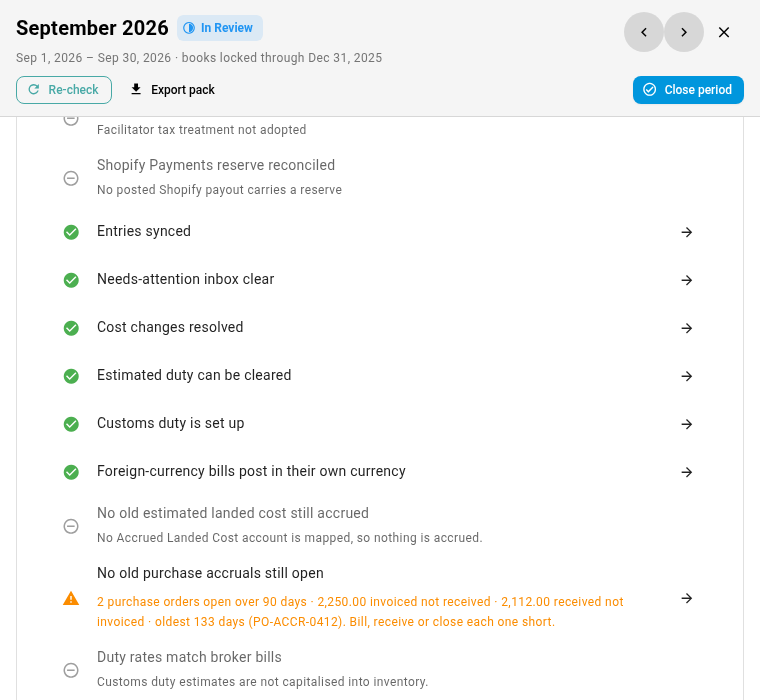
The check runs in the background. If the row reads checked in the background — starts with the close, or press Re-check, click Re-check in the drawer's header and wait for it to finish.
-
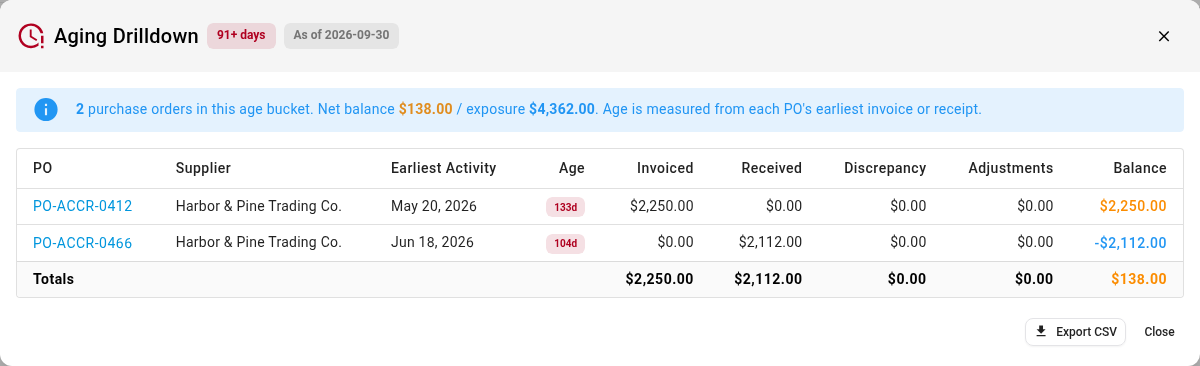
Click the arrow at the end of the row. Accounting → Reports → GINR Balance opens, dated to the month end, with the Aging Drilldown already open on the purchase orders older than your limit. Each row shows the supplier, the Earliest Activity (the first bill or receipt, which is where the age counts from), the Age, what was Invoiced and Received, and the Balance:
- A positive balance was invoiced and not received.
- A negative balance was received and not invoiced.
-
Click a purchase order to open it, and settle it the way that matches what happened:
What happened What to do The goods were received, and the supplier's bill never got recorded Click Invoice and record the bill. See invoicing and 3-way match. The goods were received, and the bill was entered in your accounting software, or will never come Mark the lines Billed outside SKU from the lines menu. See mark lines billed outside SKU. The order was invoiced, and the goods arrived but the receipt was missed Click Receive and record the receipt. See receive stock against a PO. The order was invoiced, and the goods will never arrive Click Reconcile shortfall. Choose Create vendor credit when the supplier is crediting you, or Close with receiving discrepancy when no credit is coming. 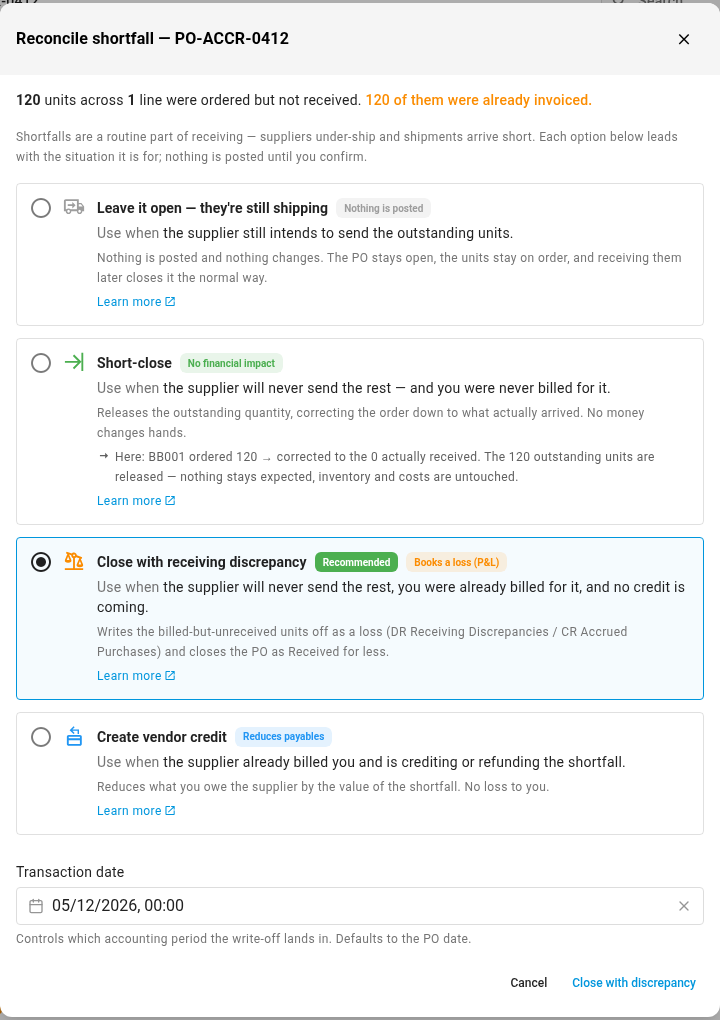
Don't choose Short-close for goods you were already invoiced for. It releases the quantity still on order but posts nothing, so the invoiced amount stays in the clearing account and the order stays on this list.
-
Repeat for each purchase order in the drill-down.
-
Go back to Accounting → Close, open the month and click Re-check. When nothing is left past your limit, the row turns green.
The row is a warning, so you can close over it once you acknowledge it. An old accrual isn't always wrong, since a bill can still be on its way. Acknowledge it only when you know why it's still open.
When the row asks you to map an account
If Goods Received Not Invoiced has no account in Accounting → Settings → Nominal Code Mappings, goods received and not yet billed share one account with goods billed and not yet received, and the two net against each other. Your balance sheet then understates both. While any goods received and not billed are open at the month end, the row says so, whatever their age:
No Goods Received Not Invoiced account is mapped, so the 2,112.00 of goods received but not yet billed at month end (of any age) is netted against goods billed but not received in Purchase Clearing. Map one in Nominal Code Mappings so each shows on the balance sheet.
Mapping alone never warns: with nothing received and unbilled at the month end, the row passes. When the mapping is the only thing the row reports, its arrow opens Nominal Code Mappings. When the row also lists old purchase orders, the arrow keeps opening those, and a Map a Goods Received Not Invoiced account link under the row opens the mappings. Map a liability account to Goods Received Not Invoiced, then click Re-check. See how purchases reach your books.
Change the age limit
The limit is Purchase accruals are old after in Accounting → Settings → Close, under Reconciliation policy. It's 90 days by default. Enter a whole number of days, from 0 to 3,650, and click Save. 0 turns the whole check off, the mapping warning included, and the row stands aside.
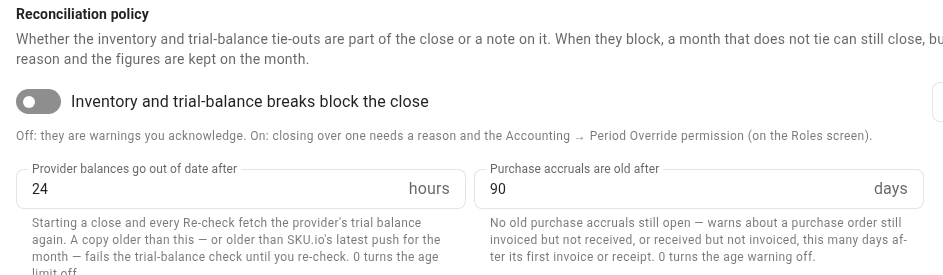
A new limit applies the next time the checks run. Click Re-check on a month in review to see it.
What the row leaves out
- Orders you released entirely. When every line of a purchase order was settled without a bill before the month end, so each line shows a Billed outside SKU or Not billable chip, it carries no accrual and isn't listed. An order with any line still open stays on the list.
- Orders younger than the limit. An order received two weeks before the month end and not billed yet is normal timing, not a problem.
For the row's exact wording and when it stands aside, see the close checks.
Next steps
- Fix a failing check: the loop for every other row on the checklist.
- How purchases reach your books: the accounts a purchase passes through.
- Close, reopen and short-close: when to close a purchase order instead.
- Close a month: sign the month off.
Video transcript
Before you close a month, check for purchase orders that never cleared. Open Accounting from the main menu, on the left. In the sections list, find Period End, and click Close. A Year board of your months appears. Click the tile for the month you are closing. Its drawer opens on the right, with the checklist inside.
Scroll down the checklist to the row called No old purchase accruals still open. It's a warning, so it never stops the close, but it asks you to look. Here, two purchase orders have been open for more than ninety days. One was invoiced, but nothing has been received. The other arrived, and no bill was ever recorded. The row also names the oldest order, open for a hundred and thirty-three days.
Click the arrow at the end of the row, and the balance report for purchase clearing opens. It's dated to the month end, and the aging drill-down already lists the old orders. Age counts from each one's first invoice or receipt. A positive balance means goods were invoiced and never arrived. A negative one is the reverse, so record the supplier's bill.
Click a purchase order number, and the order opens in full. Its header shows where it stands. This one was invoiced in May, and nothing has been received since. If the goods arrived and the receipt was missed, click Receive. If they will never arrive, click Reconcile shortfall. It lists each way to settle what's missing. When the supplier is crediting you, choose a vendor credit. If nothing is coming back, write the loss off with a receiving discrepancy.
You can change the age limit yourself, in the settings for Accounting, on the Close page. Purchase accruals are old after is the field you want, under Reconciliation policy. It's ninety days by default. Set it to zero, and the age warning turns off.