How freight estimates work
This page is about the freight you pay to bring goods in from a supplier. To quote and book outbound LTL or truckload loads, see How freight works.
A freight estimate is SKU.io's figure for what the freight on a purchase order or inbound shipment will cost, before the forwarder's bill arrives. It shows on the order and the shipment while the goods are on their way. When the goods are received, the estimate is fixed, and, if you choose Post, it goes into the stock's cost straight away. Each freight bill that comes in later clears part of the estimate. Only the difference between the estimate and the bills changes your stock cost.
Where an estimate comes from
SKU.io looks for an estimate in this order:
- An accepted quote. A quote from your forwarder that you've accepted on the order or shipment wins over any rate. See Add a freight quote.
- A freight rate. Otherwise, SKU.io uses the best matching dated rate from Settings → Purchasing → Freight Rates. A rate can be scoped to a product, a supplier, a transport mode, an origin country or a destination country. The most specific rate that matches wins. See Set up freight rates.
- No estimate. If there's no accepted quote and no matching rate, the order or shipment says No estimate. It never shows a freight estimate of $0.00, so a missing figure can't pass for a free shipment.
An Override you type on a purchase order or shipment sits on top of either source. And once a freight bill has been entered, it's the actual freight: the estimate only covers what the bills haven't yet.
Your books only ever use an accepted quote or a dated rate. A rate SKU.io learns from your past bills is a proposal until you click Use rate, which turns it into a dated rate. See Use learned freight rates.
One estimate per shipment, shared over its lines
Freight is priced per container, pallet or parcel, not per product. So SKU.io estimates a shipment as one load, then shares the total over the shipment's product lines. A purchase order's estimate is its unshipped part, plus what its shipments give each of its lines.
The total is shared by the Allocate by method of your freight cost category: by weight, by volume or by quantity. With any other method, or none, it's shared by cost. Each line gets whole cents, and the last line takes any rounding.
Only product lines get freight. Non-product lines, service fees and the outputs of outsourced manufacturing are left out, the same as for duty.
The three stages
The estimate follows the goods. At each stage, the rate in force on that stage's pricing day is used.
| Stage | Shown on screen as | Priced on | What happens |
|---|---|---|---|
| Purchase order | PO stage | The expected delivery date, else today | A live estimate. It updates when the order changes. |
| Inbound shipment | Shipment stage | The expected arrival date, else today | A live estimate for the shipment as one load. |
| Receipt | Receipt stage | The receipt date | The estimate is frozen. If you chose Post, it goes into stock cost. |
You see the stage and the rate date at the top of the Est. freight popover on a purchase order line.
If the rate in force on the receipt date is different from the one on the order, the receipt uses the receipt date's rate. The line gets the Rate changed at receipt flag: The rate on the receipt date was used, not the one on the order.
Once units are received, their estimate can't change. The popover tells you: These units were received, so their estimate is frozen. Enter the freight bill instead.
Partial, over and ad-hoc receipts
- A partial receipt takes its share of the line's estimate, in proportion to the units received. The receipt that completes the shipment takes whatever is left, so a shipment's receipts add up to its estimate to the cent.
- An over-receipt takes the estimate per unit for the extra units.
- An under-receipt that closes the line takes no more.
- Receiving a purchase order with no shipment uses the order's estimate. Each receipt takes its share.
What happens in your books
When freight estimates are set to Post, the Freight tab of Settings → Purchasing → Landed Cost Estimates shows a worked example with your own account names. In the example, $15,000.00 of freight is estimated. Two bills come in, $9,200.00 and $5,000.00, and the second is marked final.
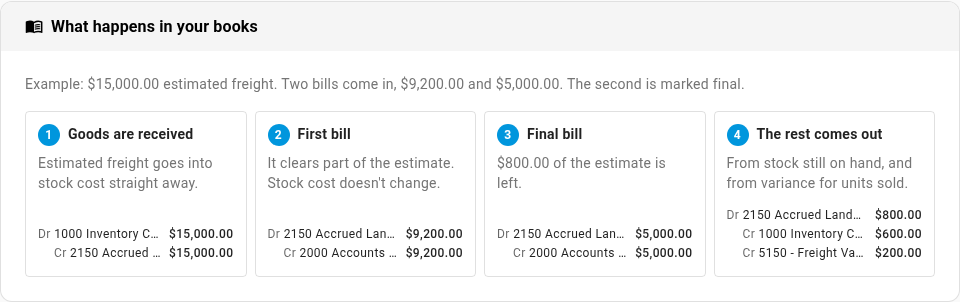
- Goods are received. The $15,000.00 estimate goes into stock cost. Inventory is debited, and Accrued Landed Cost is credited: freight you owe but haven't been billed for.
- First bill. The $9,200.00 bill debits Accrued Landed Cost instead of stock. It clears part of the estimate. Stock cost doesn't change.
- Final bill. The $5,000.00 bill clears the same way. Because it's marked Final freight bill, SKU.io knows no more freight is coming, and $800.00 of the estimate is left.
- The rest comes out. The $800.00 is taken back. Units still on hand give back their share from inventory ($600.00). Units already sold give back theirs through Freight Variance ($200.00).
After step 4, Accrued Landed Cost is back to $0.00 for those goods.
Every case, one entry each
| What happens | What it books |
|---|---|
| Goods are received | Inventory up by the estimate, Accrued Landed Cost up by the same amount |
| A bill that stays within the open estimate | Clears Accrued Landed Cost. Stock cost doesn't change. |
| A bill that takes the total past the estimate | Clears what's left of the estimate, and the excess goes to stock still on hand and to units already sold |
| A final bill with part of the estimate left | The rest comes out of stock on hand and, for units sold, out of Freight Variance |
| A credit note from the forwarder | Works like a bill for a negative amount |
| A bill after the estimate was closed | Posts as an ordinary landed cost bill. The estimate isn't reopened. |
Wherever a difference touches units already sold, it goes to your Freight Variance account. If you haven't mapped one, it goes to cost of goods sold. Units still on hand always take their share in their cost.
Only freight categories clear an estimate
A bill line clears freight estimates only when its cost category has Counts as inbound freight turned on. Lines in any other category, and lines with no category, leave the estimate alone. So a $75.00 handling fee from your forwarder doesn't clear a $15,000.00 ocean freight estimate. You choose your freight categories in Turn on freight estimates. The same page lets you review older bill lines that read like freight but have no category.
A bill that arrives before the goods
Forwarders often bill before the goods arrive. What happens at receipt depends on where the estimate came from:
- From an accepted quote: only the part of the quote that the bills haven't covered goes into stock cost at receipt.
- From a rate: if any freight bill already reaches the goods, no estimate is posted at receipt. The bill is the actual.
The rule that always holds
For every receipt line, the open estimate is the estimate minus the freight billed against it, and never less than zero. Once the estimate is closed, it's zero.
Your Accrued Landed Cost account always holds exactly the open estimates, to the cent. That stays true after any bill, edit, credit, close or undo. It's what lets you tie the account to the freight reconciliation report at month end.
When no bill comes
Some estimates never get a bill: the freight was in the supplier's price, or the forwarder never invoiced. You have two ways to clear them:
- Close estimate on the shipment's Freight card clears what's left now.
- When no bill arrives, at the bottom of Landed Cost Estimates, releases what's still open a set number of days after the purchase order's last receipt. It starts at 120 days. See Release an estimate when no bill is coming.
Show only: look before you post
In Show only, SKU.io works out every estimate and shows it on orders and shipments, and receipts still freeze one. But nothing is posted to your ledger. The Freight tab then tells you what a month's receipts would have added to stock and to cost of goods sold, so you can check the figures for one close before you choose Post. See Turn on freight estimates.