Turn on freight estimates
Freight estimates have three modes: Off, Show only and Post. In Show only, SKU.io shows a freight estimate on every purchase order and inbound shipment but posts nothing. In Post, the estimate also goes into stock cost when goods are received, and each freight bill books only the difference. This guide sets the mode, the accounts, the thresholds and the cost categories that count as freight.
New accounts start in Show only. Accounts that existed before freight estimates arrived start Off, so nothing changes until you choose.
Before you begin
- In your chart of accounts, have an accrued landed cost account (a current liability). Ideally, also have a freight variance account (a cost account) for the difference on units already sold.
- Have at least one cost category for your freight bills, with Capitalise into stock turned on.
- You need access to Settings to change these settings.
- For estimates to have something to price with, add freight rates or accept a freight quote.
Steps
- Go to Settings → Purchasing → Landed Cost Estimates.
- Click the Freight tab.
- Under Freight categories, turn on the switch for each category your freight bills use. Each switch saves as soon as you turn it.
- Under Accounts, choose your Accrued Landed Cost account.
- Optionally, choose your Freight Variance account.
- Under Freight estimates, choose Show only or Post.
- Check the three Thresholds, and change them if you need to.
- Click Save changes, at the top of the page.
The mode applies to goods received from now on. Goods already received keep what they did.
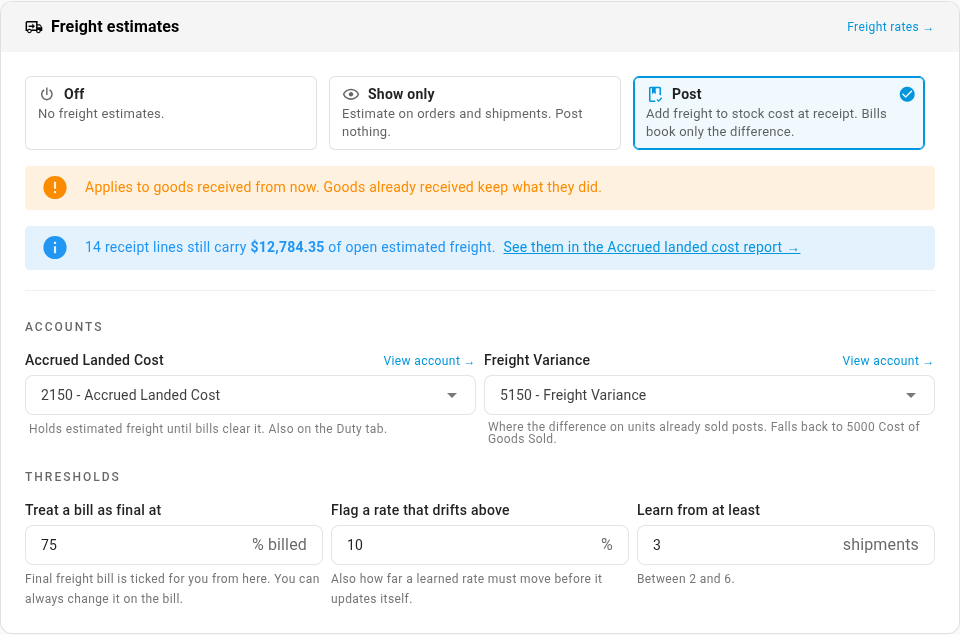
Choose a mode
| Mode | On screen | What it does |
|---|---|---|
| Off | No freight estimates. | Nothing is estimated on orders or shipments. Estimates already in stock cost still clear when their bills come in, and still release. |
| Show only | Estimate on orders and shipments. Post nothing. | Estimates show on purchase orders and shipments, and receipts freeze one, but nothing goes to your ledger. |
| Post | Add freight to stock cost at receipt. Bills book only the difference. | At receipt, the estimate goes into stock cost and is held in Accrued Landed Cost until the bills clear it. |
When you choose Off, the tab says: No freight is estimated. Estimates already in stock cost still clear and release. When you choose Post, it warns: Applies to goods received from now. Goods already received keep what they did.
In Show only, each Freight card on an order or shipment carries a Show only chip. Hovering over it says Estimates are shown and nothing is posted. Change it in Landed cost estimates. An estimate in Show only isn't booked, so it doesn't count as accounted for when you find missing freight.
See what Show only would have posted
While the mode is saved as Show only, the Freight tab adds a note about last month, for example: In October 2026 this would have added $12,400.00 to stock and $1,850.00 to cost of goods sold. 38 receipt lines. Nothing was posted. If nothing with a freight estimate was received, it says No goods with a freight estimate were received in October 2026. Click See by shipment → to open the freight reconciliation report and check each shipment.
Use this to check one month's figures with your accountant before you choose Post.
Why Post isn't available yet
Post needs two things. Until both are in place, the tab lists what's missing under the mode cards, and Post can't be chosen:
- To post: Turn on Counts as inbound freight for at least one cost category first.
- To post: Map an Accrued Landed Cost account first.
The account check follows what you've chosen on the page, even before you save. So choosing an account clears that line straight away.
If the mode is already Post and the Accrued Landed Cost account is removed, the page shows an error: Freight estimates are set to post but no Accrued Landed Cost account is mapped, so estimated freight is not being capitalised. Map an Accrued Landed Cost account to start capitalising it.
Accounts
| Field | What it does |
|---|---|
| Accrued Landed Cost | Holds estimated freight until bills clear it. Also on the Duty tab. It's the same account the Duty tab uses for estimated duty when no separate duty account is set. |
| Freight Variance | Where the difference on units already sold posts. If you leave it empty, that difference goes to your cost of goods sold account. The hint names the account it falls back to. |
View account → beside a field opens that account in the ledger.
You can't change the Accrued Landed Cost account while goods received under Post still have open estimates. Saving refuses the change with a message like You cannot change the Accrued Landed Cost account while 14 receipt lines still carry 12,784.35 of estimated freight accrued at receipt that no bill has cleared yet. Clear or bill them first, or turn capitalisation off (earlier receipts keep their accrual). Changing it would leave the receipt's credit in one account and the bill's debit in another.
Open estimated freight
When goods received earlier still carry freight that no bill has cleared, the tab tells you how much: 14 receipt lines still carry $12,784.35 of open estimated freight. Click See them in the Accrued landed cost report → to see each line.
Thresholds
| Field | Starts at | What it does |
|---|---|---|
| Treat a bill as final at | 75 % billed | When the freight billed reaches this share of the estimate, the bill editor ticks Final freight bill for you. You can always change it on the bill. Allowed: 1 to 100. |
| Flag a rate that drifts above | 10 % | A rate whose bills keep landing further than this from its estimates is flagged as drifting. It's also how far a learned rate must move before it updates itself. Allowed: 1 to 100. |
| Learn from at least | 3 shipments | How many shipments SKU.io needs before it proposes a learned rate. Allowed: 2 to 6. |
A value outside the range shows a message under the field, such as Shipments to learn from: enter a whole number between 2 and 6., and Save changes stays unavailable until you fix it. Hovering over the button repeats the message.
Choose your freight categories
The Freight categories card says which cost categories hold your actual freight: Bills in these categories count as actual freight. A bill line in one of these categories clears freight estimates and teaches your freight rates. A bill line in any other category, or with no category, doesn't. So a handling fee doesn't clear an ocean freight estimate.
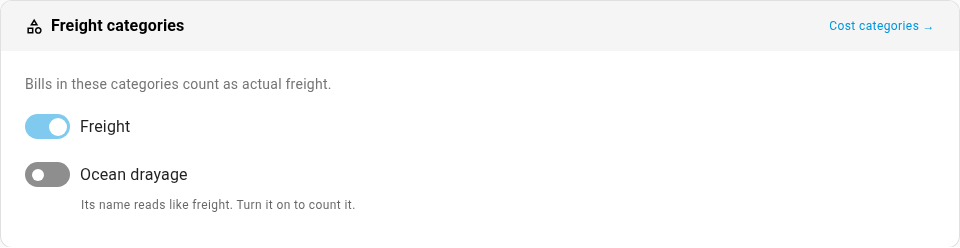
The card lists the categories that already count, and suggests others. A suggestion says Its name reads like freight. Turn it on to count it., or names the alias that matched. Nothing is turned on for you. If no category counts yet, the card says No category counts as inbound freight yet.
Turning a switch saves it right away, and a message confirms the change. Cost categories → opens the full list, where the same switch is called Counts as inbound freight in each category's dialog. Categories that count show a Freight chip beside their name.
Categories that can't count as freight
Some categories are refused, with the reason under the switch:
| Category | Message |
|---|---|
| Base Product or Vendor Credit | Base Product is not a freight cost. |
| A system category | A system category cannot count as inbound freight. |
| Your customs duty category | Your customs duty category cannot also count as inbound freight. |
| A category with Capitalise into stock off | Turn on Capitalise into stock first. Inbound freight is part of what stock costs. |
The reverse is also blocked: you can't turn off Capitalise into stock on a category that counts as inbound freight. Turn off Counts as inbound freight first.
Turning a category off
You can't stop a category counting as freight while its bill lines are clearing open estimates. The message tells you how many: "Ocean drayage" clears freight estimates on 3 receipt lines ($1,200.00). Close those estimates first. Estimates that its bills have already used up in full are closed when you turn it off, so those bills stay as they are.
If a category can't be changed for another reason, the card says Couldn't change the category. If the card can't load, click Retry.
Review bill lines that read like freight
Older bills may have freight lines with no category. Those lines don't clear estimates. When SKU.io finds some, the card shows a warning, such as 8 bill lines read like freight but have no category. If some are in a locked period, it adds 2 are in a locked period and can't change.
- Click Review 6 lines on the warning. The dialog Freight lines without a category opens.
- Choose a category under Freight category.
- Tick the lines to change, or tick the box in the header to select every line on the page. Your selection is kept when you move between pages.
- For a line that's the last freight bill for its goods, turn on Final freight bill.
- Check the total under the table, for example This clears $2,400.00 of estimates.
- Click Set category on 6 lines.
The table shows each line's Bill, Supplier, Invoice, Date, Description, Amount and Freight estimate: what that line would clear, or No open estimate. Lines in a locked period are marked Locked period: categories can't change, and can't be selected. When every line has a category, the dialog says Every bill line that reads like freight has a category.
Lines about duty, customs, brokerage, insurance, handling, demurrage, detention, storage or outbound shipping are never suggested as freight.
Next steps
- How freight estimates work
- Set up freight rates
- Read freight on orders and shipments
- Find missing freight
Video transcript
SKU.io can estimate the freight on your orders and shipments, before the forwarder's bill arrives. To set it up, go to Settings, at the bottom of the sidebar. In the settings menu, open the Purchasing group. Then choose Landed Cost Estimates from that group, and wait for it to load. Then click the Freight tab, at the top of the page. It holds the settings for freight estimates. First, choose which cost categories hold your freight bills. Scroll down to the Freight categories card. Bills in these categories count as actual freight, and clear the estimates. Turn on the switch for each category your freight bills use. A suggestion means its name reads like freight, but nothing is turned on for you. Back at the top, the Accounts section holds two accounts. Accrued Landed Cost holds the estimated freight until bills arrive to clear it. Freight Variance takes the difference on units already sold. If you leave it empty, that difference goes to cost of goods sold. Now choose a mode. Show only puts estimates on orders and shipments, without posting anything. Post also adds freight to stock cost when goods are received. Choose Post, to turn that on for your account. The warning says it applies only to goods received from now. Under Thresholds, Treat a bill as final at ticks Final freight bill for you. That happens once that much of the estimate is billed. Flag a rate that drifts above marks rates whose bills keep missing. Learn from at least sets how many shipments a learned rate needs. Click Save changes, at the top of the page. A message confirms the settings are saved. Below, What happens in your books shows a worked example with your own accounts. Goods are received, and the estimate goes into stock cost. Then each freight bill that arrives clears part of the estimate. After the final bill, the rest comes out of stock. For units already sold, that part comes out of the variance account instead.