Freight statuses and sources
This page lists everything you can see on screen about inbound freight estimates: on the Freight card of a purchase order or inbound shipment, in the Est. freight popover on a purchase order line, on the freight rates list, in the Freight missing view and in the freight reconciliation report. For how estimates work, see How freight estimates work.
Estimate statuses
The chip at the top right of a Freight card says where the freight stands.
| Status | What it means |
|---|---|
| Estimated | The estimate comes from a freight rate, and no bill has reached it yet. |
| Quoted | The estimate comes from an accepted quote, and no bill has reached it yet. |
| Partial | Some lines have no estimate, usually because a product has no weight or dimensions. The figure covers only the lines that do. |
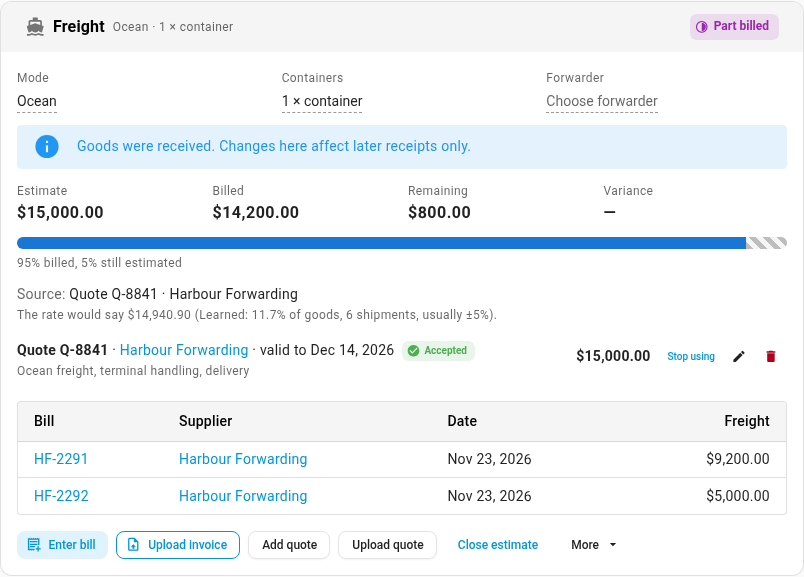
| Part billed | Freight bills have cleared part of the estimate, and part is still estimated. |
| Billed | The freight is billed. |
| Closed | The estimate was closed, by a final freight bill or by Close estimate, and nothing is left. |
| Seller pays | The incoterm says the supplier pays the main freight, so nothing is estimated for you. |
| None expected | Someone marked the order or shipment No freight expected. |
| No estimate | There's no accepted quote and no matching rate. SKU.io shows this instead of $0.00. |
| No exchange rate | The rate or quote is in another currency, and there's no exchange rate for the pricing day. |
When freight estimates are set to Show only, a Show only chip appears beside the status. Hovering over it says Estimates are shown and nothing is posted. Change it in Landed cost estimates.
When freight estimates are Off, the card says Freight estimates are off, with a Turn on freight estimates button for people who can change settings.
The figures on the Freight card
| Figure | What it shows | Captions you may see |
|---|---|---|
| Estimate | The estimate for the order or shipment | No estimate |
| Billed | Freight billed so far, net of credit notes | Credited more than billed, when credit notes exceed the bills |
| Remaining | The open estimate: what the bills haven't cleared yet | Closed, after the estimate is closed |
| Variance | Bills minus the estimate | Over the estimate, Under the estimate or As estimated. …, which was not booked is added when the estimate wasn't posted to stock cost. |
The bar under the figures splits the estimate into its parts, and the text beside it names them, for example 95% billed, 5% still estimated. Other parts you may see are $600.00 over the estimate, $800.00 closed (what a close or final bill took back) and $300.00 not booked (a part that never went into stock cost).
Messages on the Freight card
| Message | What it means and what to do |
|---|---|
| Partial estimate. 2 of 5 lines have product data missing, so they aren't in the figure. | A rate per kg or per CBM needs a weight or dimensions. Click Add weight to or Add dimensions to beside a product to fix it. |
| Add the number of containers to use the rate per container. | The matching rate is per container. Enter Containers on the card. |
| Some lines have no matching rate. | Add a rate that covers those lines, or accept a quote. |
| 3 lines are priced by the forwarder's flat rate for the whole shipment, because no rate of their supplier covers them. | On a shipment with goods from several suppliers, these lines share the forwarder's flat rate. |
| The rate is in EUR and there is no exchange rate for the date. | Add the exchange rate under Currencies, linked from the message. |
| Goods were received. Changes here affect later receipts only. | Received units keep the estimate they were received with. |
| Seller pays main carriage. Nothing is estimated. | The incoterm makes the supplier pay. Click We pay some legs if you still pay part of the freight. |
| No freight expected. | Shown with the reason chosen. Click Expect freight to undo it. |
| No accepted quote and no rate matches … | Click Add quote, Add rate or No freight expected. |
| View only. You need permission to edit purchase orders to add a quote. | You can see the freight but not change it. |
The card's buttons are unavailable when the work can't happen, and hovering over one says why: This shipment is cancelled, This order is cancelled, so bills can't be added, or Add items to this order before entering a bill.
Estimate flags
Flags are small chips on a line, in the Est. freight popover and on the card. Hover over a flag to read its help.
| Flag | Help text |
|---|---|
| No weight | This product has no weight, so a rate per kg can't be used. |
| No dimensions | This product has no dimensions, so a rate per CBM can't be used. |
| No container count | Add the number of containers to use a rate per container. |
| Zero value | The goods cost nothing, so a percent of goods is 0. Rates on any other basis still work. |
| Expired | The quote ends before the goods leave. The quote stays accepted. |
| Next rate used | A better matching rate needs data this product doesn't have, so the next one was used. |
| Two rates match | Two rates match equally well. The one that starts latest was used. |
| Forwarder's rate | No rate of this line's supplier covers it, so it shares the forwarder's flat rate for the whole shipment. |
| One flat rate | A rate per shipment or container is charged once and shared over the lines. |
| Minimum applied | The rate's minimum charge was used. |
| FX: current rate | There is no exchange rate for the date, so the current one was used. |
| No incoterm, buyer assumed | The order has no incoterm, so we assume you pay the freight. |
| Supplier's incoterm | The order has no incoterm, so the supplier's default was used. |
| Override carried forward | Set by hand on an earlier stage and kept. |
| From shipments | Units already on shipments use those shipments' freight. |
| Rate changed at receipt | The rate on the receipt date was used, not the one on the order. |
When product data is missing
A rate per kg is skipped for a line whose product has no weight, and a rate per CBM for a line with no dimensions. SKU.io moves on to the next matching rate and flags Next rate used. If no other rate matches, the line has no estimate, it's flagged No weight or No dimensions, and the card shows Partial.
When a shipment has goods from several suppliers
Each line uses a rate of its own supplier. A rate per shipment or per container is charged only once, from the first of these that exists:
- the forwarder's flat rate, flagged Forwarder's rate;
- a flat rate with no supplier;
- the flat rate of the supplier with the most goods value on the shipment.
The lines that share it are flagged One flat rate.
Currencies
A rate or quote in another currency is converted to your currency on the pricing day. The Freight card shows your currency, and the popover shows the original amount and the Exchange rate. If there's no exchange rate for that day, the current one is used and flagged FX: current rate. If there's no exchange rate for that currency at all, the status is No exchange rate and there's no estimate.
Lines and documents with no freight
Only product lines get freight. Non-product lines, service fees and the outputs of outsourced manufacturing get none. When a purchase order or shipment is cancelled, its live estimates are removed. Estimates already frozen at receipt stay.
Stages
The Est. freight popover shows which stage priced the line: PO stage, Shipment stage or Receipt stage, with the rate date. Once units are received, their estimate is frozen: These units were received, so their estimate is frozen. Enter the freight bill instead. When the whole order is received, the card says Everything was received, so the estimates are frozen. Enter the freight bill instead.
Sources
Where an estimate comes from
The card shows the source under the figures, as Source: followed by its label. When lines use different sources, it adds and 2 more.
| Source | Example label |
|---|---|
| Quote | Quote Q-8841 · Harbour Forwarding |
| Rate | The rate, for example Learned: 11.7% of goods, 6 shipments, usually ±5%. Click it to open the rate. |
| Override | An amount typed by hand on the order or shipment |
| Booked freight | A booked freight shipment used as a quote, for example Booked freight Estes Express · Freight shipment FRT-QA-1 |
When a quote is the source, the card also says what the rate would have given, for example The rate would say $14,940.90 (Learned: 11.7% of goods, 6 shipments, usually ±5%).
The freight reconciliation report filters by Quote, Rate or Override, and its Source column shows Rate, Learned rate or Several.
Where a rate comes from
| Rate source | What it means |
|---|---|
| Manual | Added by hand on the freight rates page |
| Learned | Proposed from your own freight bills, and accepted with Use rate |
| Imported | Brought in from a spreadsheet |
Rate statuses
| Status | What it means |
|---|---|
| Active | In force today |
| Scheduled | Starts on a future date |
| Expired | Its end date has passed |
| Archived | The rate was archived. Choose Archived above the list to see it. |
Accuracy and confidence
The Accuracy chip on a rate shows how its estimates compare with the bills.
| Chip | What it means |
|---|---|
| Good ±4.7% | Bills on closed shipments land within this much of the estimates |
| On target | Bills match the estimates |
| 14% low or 14% high | The rate is drifting: bills keep landing this far above (the rate is low) or below (the rate is high) its estimates. The limit is Flag a rate that drifts above in Turn on freight estimates. |
| Good, Fair or Weak | For a learned rate with too few closed shipments to judge, how well it fitted the bills it was learned from, often with its usual range |
| Not tested yet | No shipment at this rate has had its final freight bill yet |
Freight coverage
The Freight missing view on Inbound Shipments puts each received shipment in one bucket, in the month of its first receipt. Hover over a chip to read its help. See Find missing freight.
| Bucket | Help text |
|---|---|
| Billed | A freight bill reaches this shipment. |
| Estimated | A freight estimate is in stock cost. |
| None expected | Someone said no freight bill is coming. |
| Seller pays | The incoterm says the seller pays the freight. |
| Freight missing | Freight is expected, but there is no bill, no booked estimate and no reason. |
| Not usually freighted | This supplier's earlier shipments don't tell us to expect a freight bill. Not counted in the score. |
No freight expected reasons
When you mark an order or shipment No freight expected, you choose a reason. The Freight card describes them like this:
| Reason | Description on the card |
|---|---|
| Included in supplier price | The supplier's price already has the freight in it. |
| Seller pays | The supplier pays the carrier. |
| Own truck | You collect the goods yourself. |
| Other | Say why in the note. |
The dialog in the Freight missing view words two of these differently. Included in supplier price reads The goods price already covers delivery., and Own truck reads You collected.
Reconciliation statuses
Each row in the freight reconciliation report has a status. See Reconcile freight estimates.
| Status | What it means |
|---|---|
| Awaiting bill | An estimate is in stock cost and no freight bill has reached it |
| Partially billed | Bills have cleared part of the estimate |
| Closed | The estimate is closed |
| Billed, no estimate | A freight bill came in for goods that had no estimate |
The Final column shows Final for a bill marked Final freight bill.
Permissions
You manage these on Settings → Users & Permissions → Roles.
| To… | You need |
|---|---|
| see freight rates | the Inbound Freight Rates → List permission (freight_rates.index) |
| add, change or delete freight rates | the Inbound Freight Rates → Create, Edit or Delete permission (freight_rates.create, freight_rates.update, freight_rates.delete) |
| see the Freight card on an order or shipment | Purchase Orders → View |
| add quotes, override an estimate or mark no freight expected | Purchase Orders → Edit |
| close an estimate, or undo a close | Landed Cost Accruals → Release (no more landed cost expected) |
| apply a landed cost account repair | Accounting → Manage Settings |
| link a booked freight shipment as a quote | Freight → View freight |
Roles that already had a duty rates permission got the matching freight rates permission when freight estimates arrived. The Finance — Financials role can list freight rates.
People without accounting access see freight amounts, but not the What this does to your books preview on a bill. Supplier portal and 3PL users see no freight at all.