Release an estimate when no bill is coming
When you capitalise estimated duty or estimated freight, SKU.io adds the estimate to the stock's cost the day goods arrive, and holds the same amount in an accrued account until the bill clears it. Sometimes no bill ever comes: the supplier paid the duty under its own terms, or the freight was already in the supplier's price. Left alone, that estimate stays in the accrued account and keeps your stock cost too high.
No more landed cost expected clears it. This guide covers finding those estimates, releasing them, undoing a release, and letting SKU.io release them for you.
Before you begin
- Estimates are only accrued once Capitalise estimated customs duty (or a freight Estimate source) is on, with an accrued account chosen. See Capitalise estimated duty and reconcile the broker bill.
- To release or undo, you need the Landed Cost Accruals → Release (no more landed cost expected) permission. The Admin and Full Access roles, the Finance — Financials preset, and any role that can resolve cost changes have it. Without it, the buttons are greyed out, and hovering over one says which permission is missing.
- To open the report, you need access to the ledger's reports.
Find estimates that are still waiting
Three places show estimates that are still waiting for a bill.
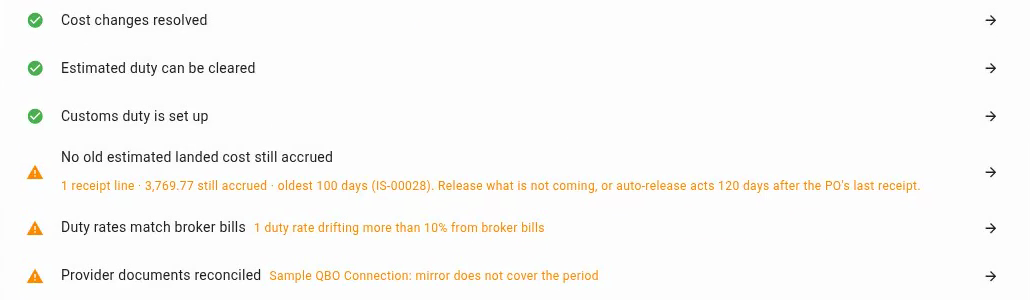
Month-end close. Go to Accounting → Close and choose the month. The No old estimated landed cost still accrued check warns when a receipt line still has an estimate older than your aging limit, 90 days unless you change it. Its row says how many lines, how much, and the oldest shipment. The arrow at the end of the row opens the Accrued landed cost report with only those lines showing. The check is a warning: an old estimate isn't wrong, so it doesn't stop you closing the month.
The shipment or purchase order. On an inbound shipment's Landed Costs tab, and on a purchase order's Lines tab, the Estimated landed cost accrual card lists each receipt line that had an estimate added to stock cost. On a purchase order, the lines are grouped by receipt.
The Accrued landed cost report. It lists every receipt line across your account. See Check every accrual in the Accrued landed cost report.
Read the accrual card
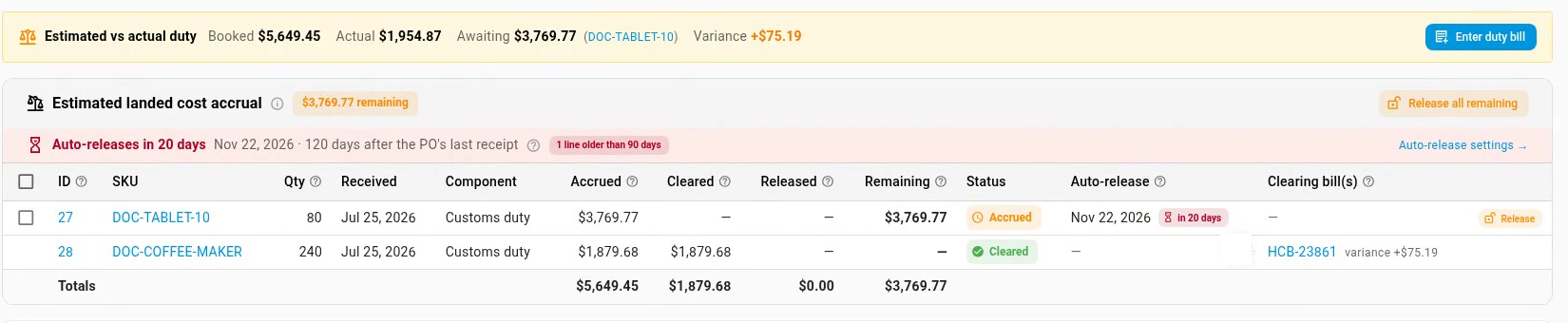
Each row is one receipt line and one part of the estimate, Customs duty or Freight & landed cost.
| Column | What it shows |
|---|---|
| Accrued | The estimate added to stock cost at receipt, and held in the accrued account. |
| Cleared | How much of it a landed-cost bill has cleared. |
| Released | How much was released because no bill was coming. |
| Remaining | What's still on the books, waiting for a bill. |
| Status | Accrued, Cleared, Released, or Released · billed later. Under a released line: who released it (Auto for auto-release) and the date. |
| Auto-release | The date this line is released automatically, with a countdown. Red once the line is older than your aging limit. Manual only when a release of it was undone, and After full receipt while the purchase order isn't fully received. |
| Clearing bill(s) | The bill that cleared the line, with its variance from the estimate. |
The chip next to the card's title shows how much remains. The bar under the title counts down to the next auto-release, and a red chip flags lines older than your aging limit. Auto-release settings → opens the settings.
Release an estimate
Release an estimate only when you know no bill is coming. For example, the supplier paid the duty under its own terms, or the freight was already in the supplier's price.
-
Open the inbound shipment and go to its Landed Costs tab. Or open the purchase order's Lines tab.
-
On the Estimated landed cost accrual card, click Release on the line. To release several lines, tick them, then click No more landed cost expected (2) at the top of the card. To release everything still waiting on the shipment or order, click Release all remaining.
-
Check the No more landed cost expected? dialog. It shows the amount, and under Journal it books, the entry it posts:
Account Debit Credit Accrued Customs Duty (or Accrued Landed Cost for freight) the remaining estimate Inventory the share for units still on hand Customs Duty Variance (duty) or Cost of Goods Sold (freight) the share for units already sold For duty, the sold units' share goes to Cost of Goods Sold when you haven't chosen a customs duty variance account.
-
Optionally, type a Note, for example why no bill is coming.
-
Click Release $3,769.77. The button shows the amount.
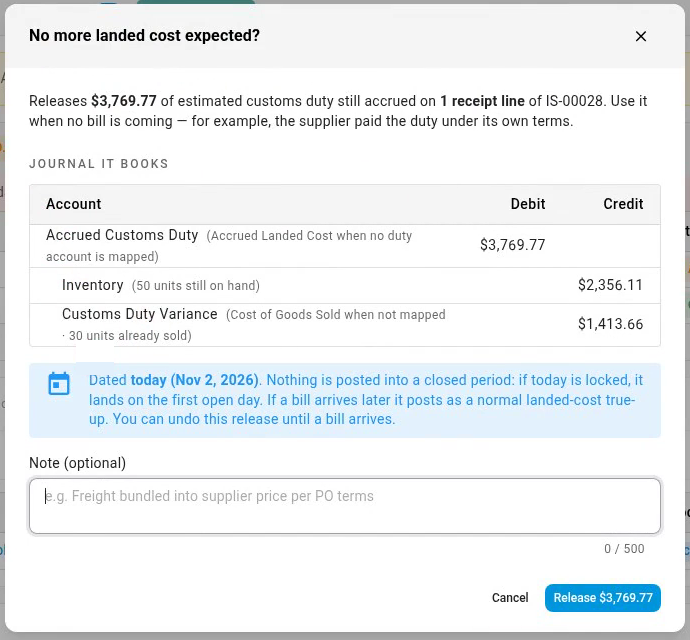
The release is dated today. It never lands in a closed period: if today is locked, it's dated the first open day. A message confirms the amount and the date, and the line's status changes to Released, with your name and the date under it. When nothing is left on the shipment, the card says Nothing remaining.
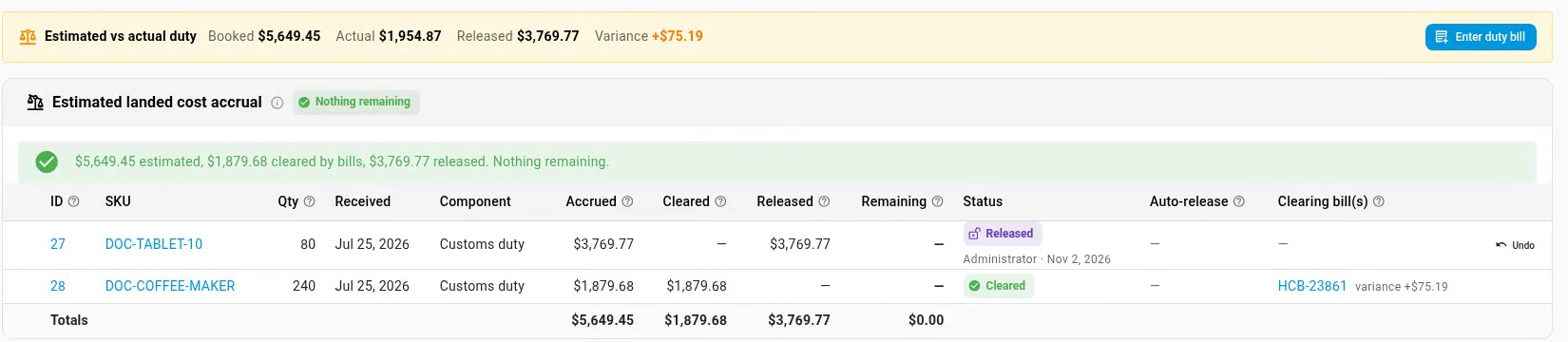
This releases the estimate the same way a bill for $0 would clear it. The accrued account for that receipt is back at $0.00, and the goods carry no estimated cost.
You can also release lines from the Accrued landed cost report: click Release on a row, or tick rows and click Release selected above the table.
Undo a release
You can undo a release until a bill arrives for that line.
- On the line, click Undo.
- In the Undo the release? dialog, click Undo release.
The estimate goes back on the books, dated today: Inventory is debited for units on hand, and Customs Duty Variance (duty) or Cost of Goods Sold (freight) for units already sold, against the accrued account. The next bill clears it as usual.
After an undo, auto-release leaves that line alone. Its Auto-release column says Manual only, so if no bill comes, release it yourself.
Undo is greyed out, and hovering over it says why, when:
- a bill arrived after the release. It already posted as a normal bill, so there's nothing to undo.
- the release is dated in a closed accounting period.
If a bill arrives after a release
Enter it as usual. Because the estimate was released, the bill has nothing to clear: it posts as a normal landed-cost bill and adds its cost to the goods, the way a bill did before estimates were turned on. The accrued account isn't touched. The line's status becomes Released · billed later, and the Clearing bill(s) column shows billed after release with the amount.
Let SKU.io release them for you
Go to Settings → Purchasing → Landed Cost Estimates. At the bottom, the When no bill arrives card controls auto-release.
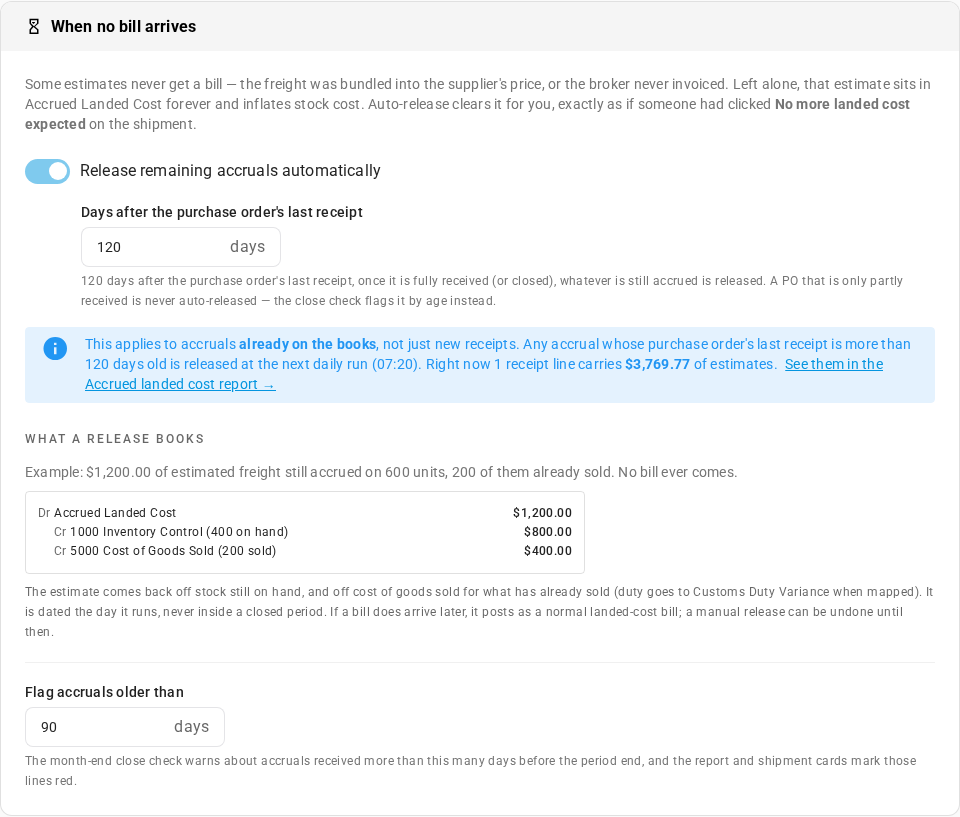
| Setting | What it does |
|---|---|
| Release remaining accruals automatically | On by default. Releases whatever is still waiting, a number of days after the purchase order's last receipt: 120 unless you change it. |
| Days after the purchase order's last receipt | How long to wait. |
| Flag accruals older than | The aging limit, 90 days unless you change it. The month-end close check warns about lines older than this, and the report and the accrual card mark them red. |
Auto-release runs once a day, at 07:20, and books exactly what No more landed cost expected would. Some details:
- It only acts once the purchase order is fully received, or closed. A partly received order is never auto-released: the close check flags its old lines instead.
- It applies to estimates already on your books, not just new receipts. When you switch it on, the card says how many lines and how much it covers.
- A line whose release was undone is left alone.
- An automatic release shows Auto under its status, and is logged on the purchase order's activity.
Switch it off to keep estimates until a bill clears them or someone releases them. Click Save changes at the top of the page.
Check every accrual in the Accrued landed cost report
Go to Accounting → Reports → Accrued landed cost. It's also the arrow on the month-end close check.
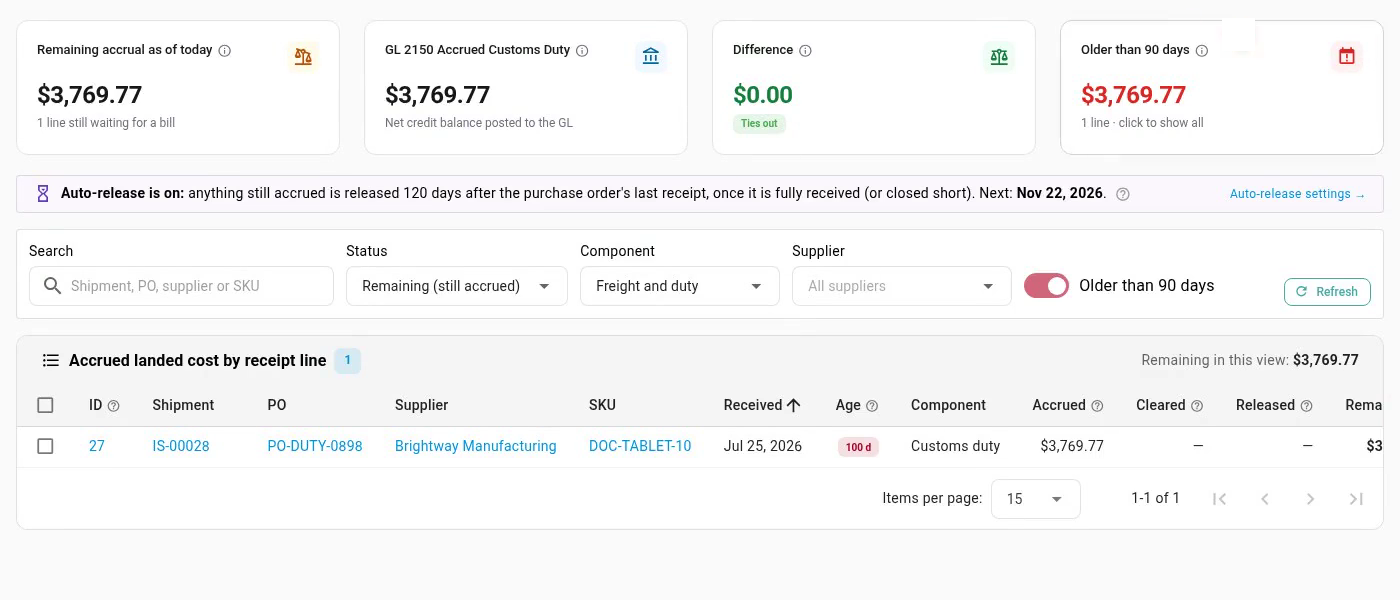
The cards at the top:
| Card | What it shows |
|---|---|
| Remaining accrual as of today | The estimates still waiting for a bill, and how many lines. |
| GL 2150 Accrued Customs Duty | The balance of your accrued account in the ledger. It names your own account. When freight and duty use different accounts, it adds them up. |
| Difference | The two compared. When they match, they tie. Posting pending means some documents are still being posted to the ledger. Reload in a minute. |
| Older than 90 days | Lines older than your aging limit. Click the card to show only those. |
A message above the filters explains a difference that isn't settled: documents still waiting to post, a receipt with no ledger entry yet, or a real mismatch.
Filter the table with:
- Search: a shipment, purchase order, supplier, or SKU.
- Status: Remaining (still accrued) by default. Also Cleared by a bill, Released, and Released · billed later.
- Component: freight, duty, or both.
- Supplier.
- Older than 90 days: only lines past your aging limit.
Each row links to its shipment, purchase order, supplier, and product. Release on a row releases it, and Undo undoes a release, with the same dialogs as on the shipment.
Next steps
- Capitalise estimated duty and reconcile the broker bill: turn estimates on and clear them with the broker's bill.
- Record landed cost bills: enter the freight and duty bills that clear estimates.
- Close checks reference: every check on the month-end close checklist.
- Duties & Tariffs: every guide in this chapter.
Video transcript
Estimates that never get a bill show up at month end, so go to Accounting, in the sidebar. When goods arrive, their estimated duty or freight goes into stock cost, and waits in an accrued account for its bill. Sometimes no bill is coming. Under Period end, in the list of Accounting sections, open Close. Then choose the month you are closing, from the list of periods on the left. This check warns when an estimate is older than your aging limit, which is ninety days by default. Here, one receipt line still carries an estimate after a hundred days. Its arrow opens the Accrued landed cost report. The report lists every receipt line still waiting for a bill. Older than ninety days is already on, so only the old ones show. The cards compare what is still accrued with your accrued customs duty account in the ledger. You can also filter by status, by freight or duty, or by supplier. To open the shipment, click its number in the Shipment column. It opens on the Overview tab, so switch to its Landed Costs tab, at the end of the tab bar. The Estimated landed cost accrual card shows each line of the receipt. For each line, you see what was accrued, what a bill has cleared, what was released, and what remains. This line is cleared by the broker's bill, and shows its variance. This one is still accrued. The bar above the table counts down to auto-release, and flags lines older than ninety days. When no bill is coming for a line, click Release at the end of its row. The dialog shows the journal it books. The accrued customs duty account is cleared. The share for units still on hand comes off inventory, and the share for units already sold goes to customs duty variance. It is dated today, and never lands in a closed period. Add a note if you like, so others know why no bill is coming. Then click Release, at the bottom of the dialog. The line now says Released, with who released it and when. Nothing remains on this shipment. If a bill does arrive later, it posts as a normal landed cost bill. Until a bill arrives, you can undo a release. Click Undo, at the end of the released line. A dialog explains what it puts back, so click Undo release to confirm. The estimate goes back on the books, and the line is accrued again. From then on, auto-release leaves the line alone, so it says Manual only. To release everything still waiting on a shipment at once, click Release all remaining. The same dialog opens, with the journal it books, so click Release to confirm. Auto-release is set in Settings, at the bottom of the sidebar. Open the Purchasing group, then choose Landed Cost Estimates, near the bottom of the list. When the page opens, scroll down to the last card on it, When no bill arrives. It releases whatever is still waiting, a hundred and twenty days after the purchase order's last receipt. Estimates already on your books are included. And Flag accruals older than sets the aging limit, for the close check and the report.