Add co-products and by-products to a recipe
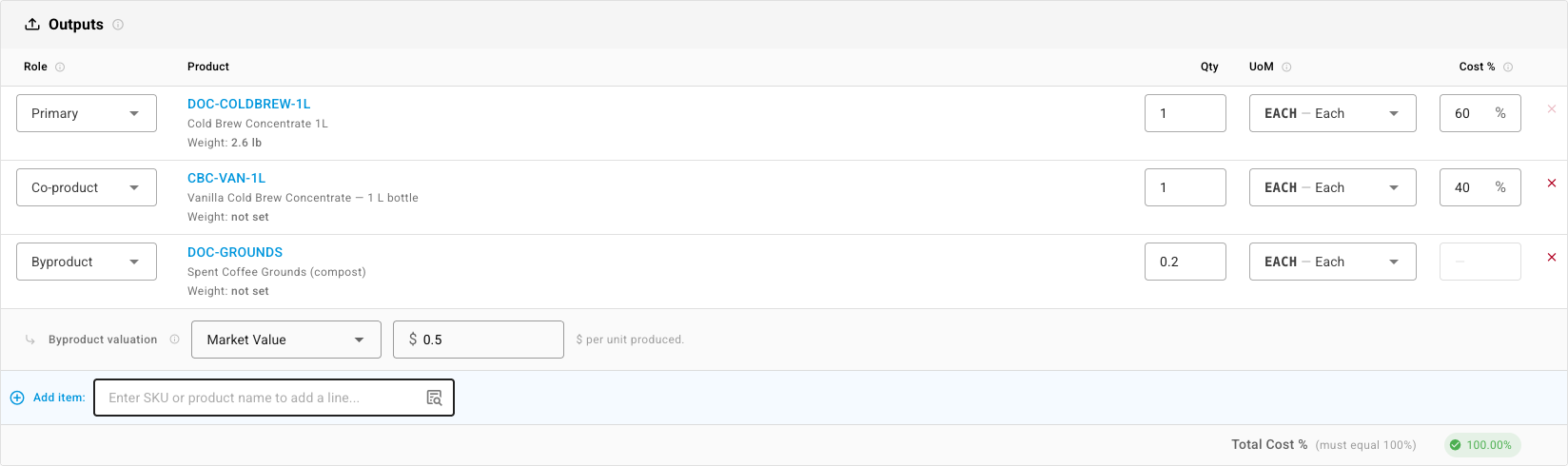
Some runs make more than one thing. A cold-brew steep fills plain and vanilla bottles from the same batch and leaves spent grounds behind. A cutting job yields the part you wanted plus offcuts you can sell. A recipe's Outputs tab lists everything a run produces, and each output gets a share of the run's cost, so nothing is valued at zero by accident.
Output roles
Every output row has a Role:
| Role | Use it for | How it's valued |
|---|---|---|
| Primary | The main product the recipe makes. Every recipe has one. | Shares the cost pool. |
| Co-product | A second product you set out to make. | Shares the cost pool with the primary. |
| Byproduct | Something with resale value that the run happens to produce. | Gets a fixed value of its own, taken off the top of the cost. |
| Scrap | Waste you want counted but not valued. | Valued at zero. |
Before you begin
- Each output must already exist as a product.
- If you plan to split cost By Weight or By Volume, every primary and co-product needs a weight or dimensions on its Shipping tab.
Add the outputs
- Go to Manufacturing → Recipes / BOMs and open the recipe. If it's active and already used by a manufacturing order, your edits save as a new version.
- Select the Outputs tab. The finished product is already there as Primary.
- In Add item, type a SKU or name and pick the product. New rows start as Co-product.
- Set the row's Qty: how many of this output one run produces for each unit of the primary.
- To make a row a by-product or scrap, change its Role.
- Click Save.
Choose how the cost is split
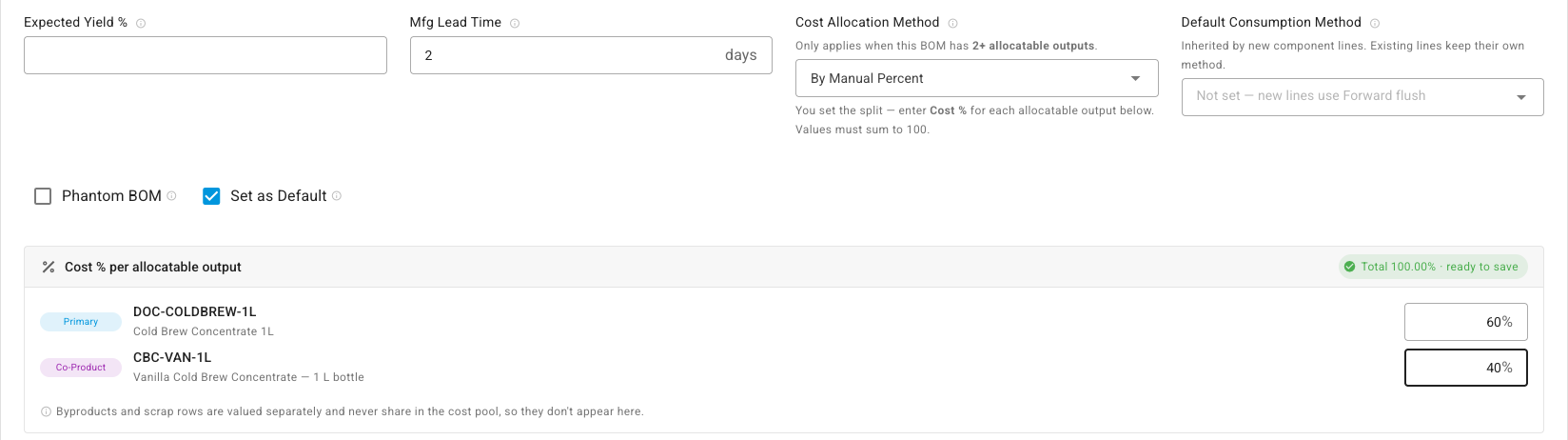
The method only matters once a recipe has two or more Primary or Co-product rows. With one, that output takes the whole cost.
-
Select the Details tab.
-
Pick a Cost Allocation Method:
Method Splits the cost by By Weight Quantity × each product's weight By Volume Quantity × each product's length × width × height By Default Cost Quantity × each product's Default Cost By Average Cost Quantity × each product's average cost in the destination warehouse, falling back to Default Cost By Manual Percent A Cost % you type for each output -
For By Manual Percent, enter each output's share under Cost % per allocatable output. The shares must add up to 100; the total turns green and reads ready to save when they do.
-
Click Save.
If a method needs data that's missing on every output, such as weight for By Weight, the recipe warns you and won't save until you fill it in or pick another method.
Give a by-product its value
When you set a row to Byproduct, a Byproduct valuation line appears under it:
| Valuation | What you enter | Value given to the by-product |
|---|---|---|
| Zero | Nothing | Always $0 |
| Market Value | A price per unit | That price × the units produced |
| % of Input Cost | A percentage | That share of the run's component cost |
| Fixed Cost | A flat amount | That amount each time production is recorded |
A by-product's value is taken off the top first. Whatever is left is the pool that the primary and co-products split.
What happens when you build
When you record production on a manufacturing order, the Outputs section lists every output with its Role, the Expected quantity and an Actual Produced quantity you can change. Lot-tracked outputs each need a Batch #, and an Expiry Date when they're tracked first-expired-first-out.
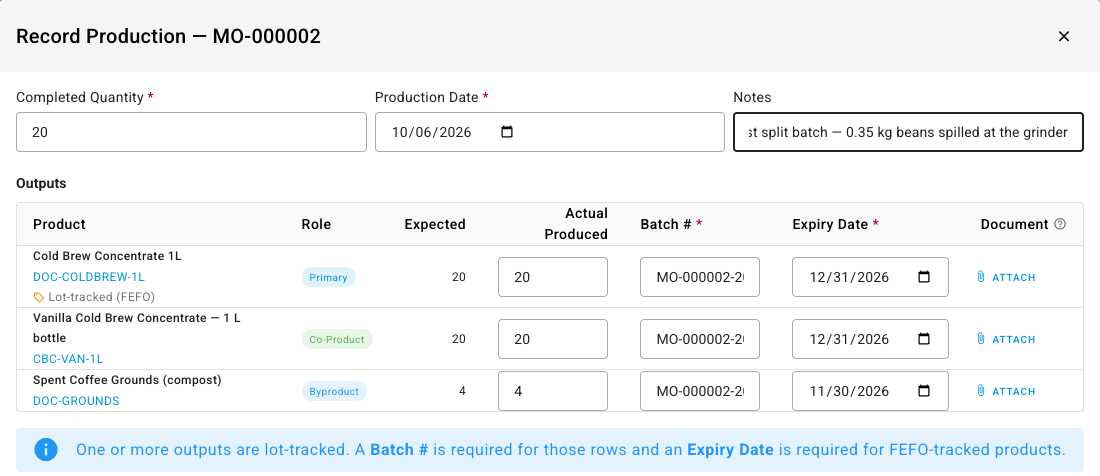
Each output gets its own stock and its own cost. On the order, the Additional Outputs tab shows each co-product and by-product with its Expected Qty, Actual Produced and Allocated Cost.

To see the split itself, click the information icon next to Total Cost at the bottom of the order. Cost Allocation shows the total input cost, the by-product value taken off it, the pool left to split, and each output's share, allocated cost and unit cost.
How each kind of cost is shared:
- Component cost is split by the recipe's Cost Allocation Method, after by-products take their value.
- Labor and overhead from the order's operations are spread across the primary and co-products by the number of units each produced.
Next steps
- Create a recipe (bill of materials): the components and settings every recipe starts with.
- Record scrap on a manufacturing order: material lost in the run, as opposed to a scrap output.
- Compare planned and actual production: expected against actual for every output.