Assemble and disassemble in Simple Mode
Simple Mode is a one-screen build for when you don't need to plan, confirm and start a full manufacturing order. You pick the product, the quantity and the warehouse, check the preview, and submit. The components come off the shelf and the finished stock goes on in the same moment, costed from what was consumed.
It runs in reverse too. Disassemble takes finished stock apart and puts the components back into inventory, carrying the finished item's cost back onto them.
Either way, SKU.io keeps a completed manufacturing order marked Simple Mode as the permanent record of what happened.
Before you begin
- The product needs either kit components or an active default recipe. Only those products appear in the picker.
- To assemble, the components need stock in the warehouse you choose. To disassemble, the finished product needs stock there.
Assemble
-
Go to Manufacturing → Simple Mode.
-
Under Action, leave Assemble selected.
-
In Kit / Manufactured Product, type at least two characters and pick the product.
-
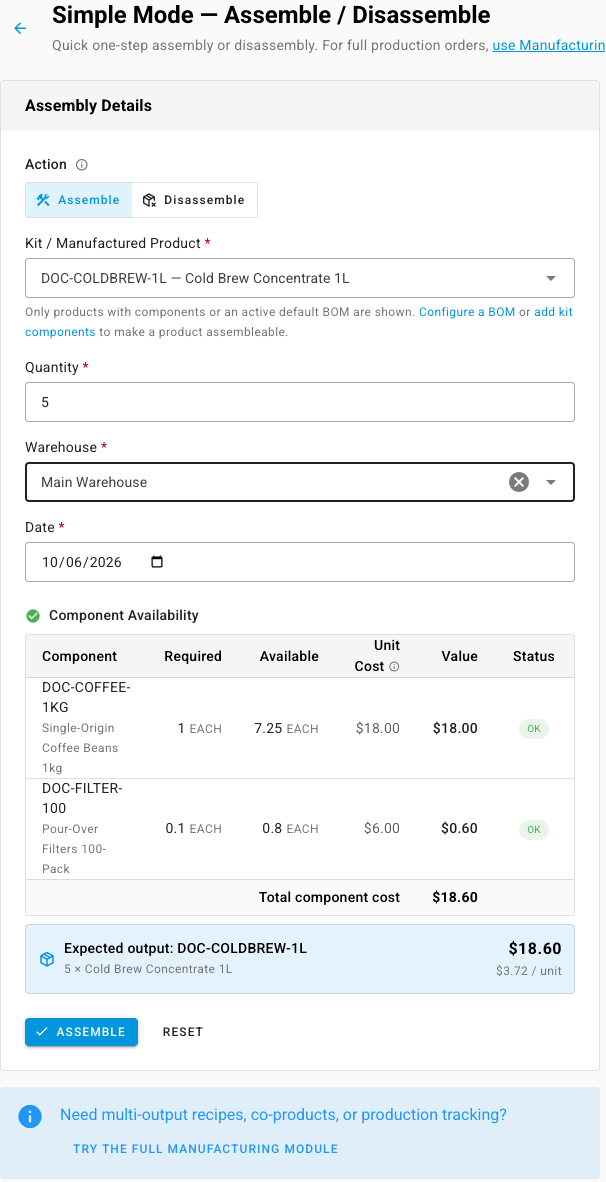
Enter the Quantity to build. Decimals are allowed.
-
Pick the Warehouse the components come from and the finished stock goes into.
-
Check the Date. It defaults to today.
-
Review Component Availability. Each component shows what's Required, what's Available in that warehouse, an estimated Unit Cost and Value, and a status of OK or Short. The blue panel underneath shows the Expected output and its estimated cost per unit.
-
Click Assemble.
A green banner confirms Assembly completed successfully. Click View Manufacturing Order to open the record.

A yellow warning appears when the warehouse doesn't hold enough of a component: Submitting may fail. Move or receive the stock first, or build fewer.
What assembling records
Simple Mode follows the product's recipe in full. Components are drawn from stock in cost order, and the recipe's expected scrap is included. The recipe's operation costs are added at their expected time. Any co-products and by-products on the recipe are produced alongside the main product and valued the same way a manufacturing order values them. See Add co-products and by-products to a recipe.
The preview's unit cost is an estimate from the average cost of the stock in that warehouse. The exact cost is set when the build is recorded. Open the manufacturing order to see the final figures.
Disassemble
-
Go to Manufacturing → Simple Mode.
-
Under Action, select Disassemble.
-
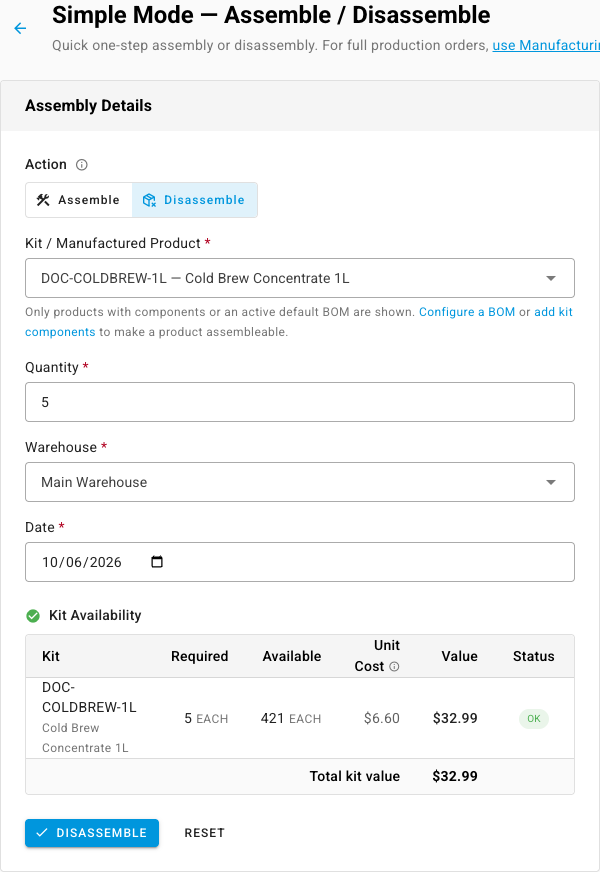
Pick the product, the Quantity to take apart, the Warehouse and the Date.
-
Review Kit Availability. It shows how many units are Required, how many are Available, and the Total kit value you're breaking down.
-
Click Disassemble.
The banner reads Disassembly completed successfully.
How the cost flows back
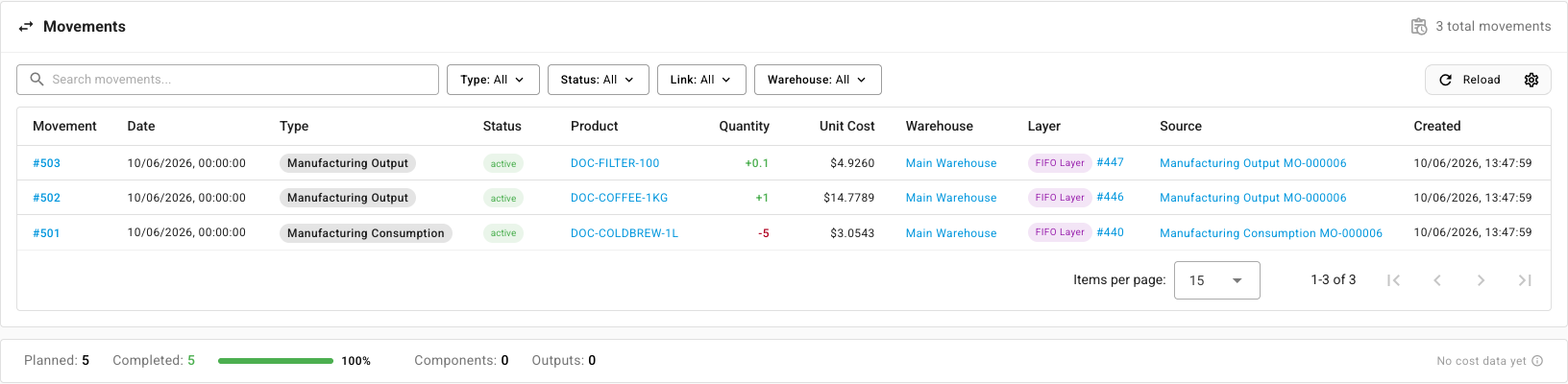
Disassembling consumes the finished stock and creates new stock for each component. The finished item's total cost is split across the components in proportion to each component's cost, so every cent comes back into inventory. No scrap is recorded.
You can see this on the manufacturing order's Movements tab: one consumption line for the finished product and one output line per component, each with its share of the cost.
Simple Mode or a manufacturing order?
| Use Simple Mode when | Use a manufacturing order when |
|---|---|
| The build happens straight away, in one step | You plan the build ahead, schedule it, or assign it |
| You don't need to track time or operators | You time each operation on the shop floor |
| What you consume is what the recipe says | You record actual consumption and scrap that differs from the recipe |
| You need to take finished stock apart again | You build in several partial runs |
Inventory → Assemblies offers the same one-step build for kits with a guided, three-step form. See Assemble a kit.
Next steps
- Build with a manufacturing order: the full lifecycle, for builds you plan and track.
- Create a recipe (bill of materials): define what a product is made of so it appears in Simple Mode.
- Serials in manufacturing: how Simple Mode treats serialized components and kits.