Compare planned and actual production
A manufacturing order keeps the plan and the result side by side. When you confirm an order, SKU.io snapshots what the recipe expects for the planned quantity. Each time you record production, it records what actually happened against that plan. The two sit next to each other on every tab. This page shows where to look for each comparison.
Quantity
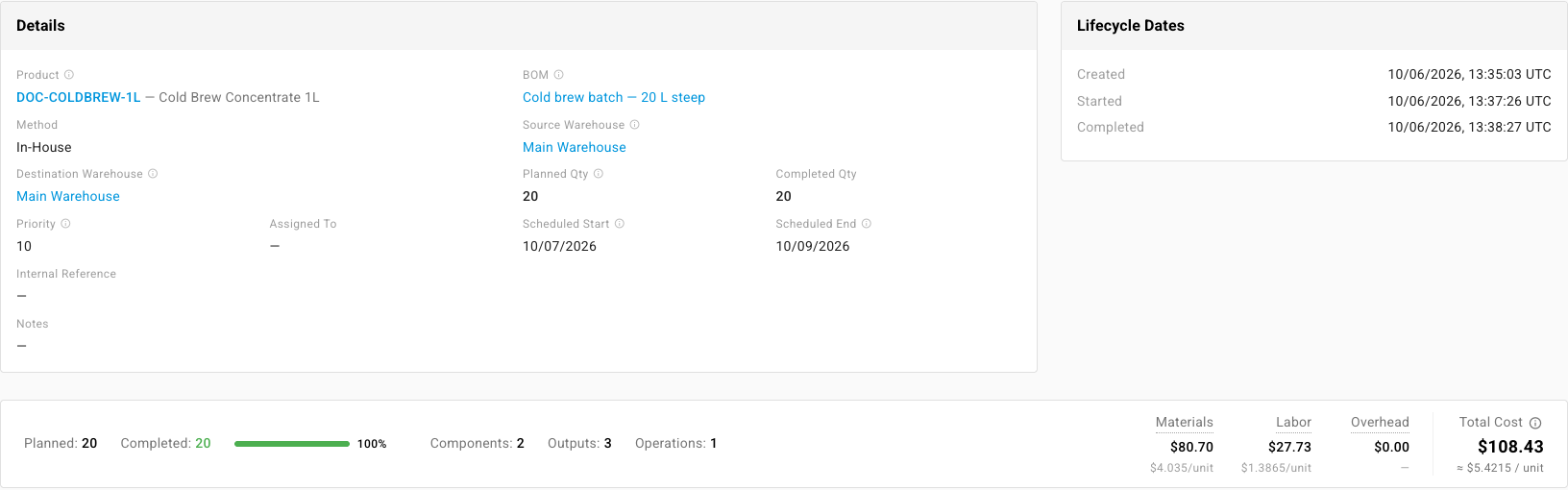
The Overview tab shows Planned Qty next to Completed Qty, and the bar at the bottom of the order repeats Planned, Completed and Remaining with a progress bar.
If you produce more than planned, an amber Over-yield chip appears next to Completed Qty showing the extra units and percentage. The extra is real production: it goes into stock and into the cost.
Dates
Scheduled Start and Scheduled End on the Overview tab are the plan. The Lifecycle Dates card beside it records what happened: when the order was Created, Started and Completed.
Components and scrap
The Components tab compares each component's Expected Qty, what the recipe calls for including expected scrap, with Actual Consumed. Expected Scrap sits beside Actual Scrap and its Scrap Reason.

To record scrap, see Record scrap on a manufacturing order.
Outputs
For recipes with co-products or by-products, the Additional Outputs tab compares each output's Expected Qty with Actual Produced, and shows the cost allocated to it.
Time
The Operations tab compares each step's Expected Duration (min) with Actual (min), and shows the Actual Cost of the time recorded. See Record operations and labor time.
Cost
Before any production is recorded, the bar at the bottom of the order shows an estimate, labeled Estimated — from BOM on a draft or Estimated — no production recorded once confirmed. It projects Materials from the components' default costs and Labor from the operations' expected times, with an Est. Total and a cost per unit.

Once you record production, the same bar switches to actual figures: Materials drawn from stock in cost order, Labor and Overhead from the time recorded, the Total Cost, and the cost per unit. The estimate isn't kept once actual costs exist, so note it before you record if you want to compare.
Each production run
Every time you click Record Production, SKU.io saves a production iteration: one run with its own date, quantities, movements and cost. Partial runs build up an order run by run.
The Production Activity tab lists them, with the Iteration #, Production Date, who Recorded By, the Output Qty, the Total Input Cost and Total Allocated Cost, the stock Output Layer created, and the number of Movements.
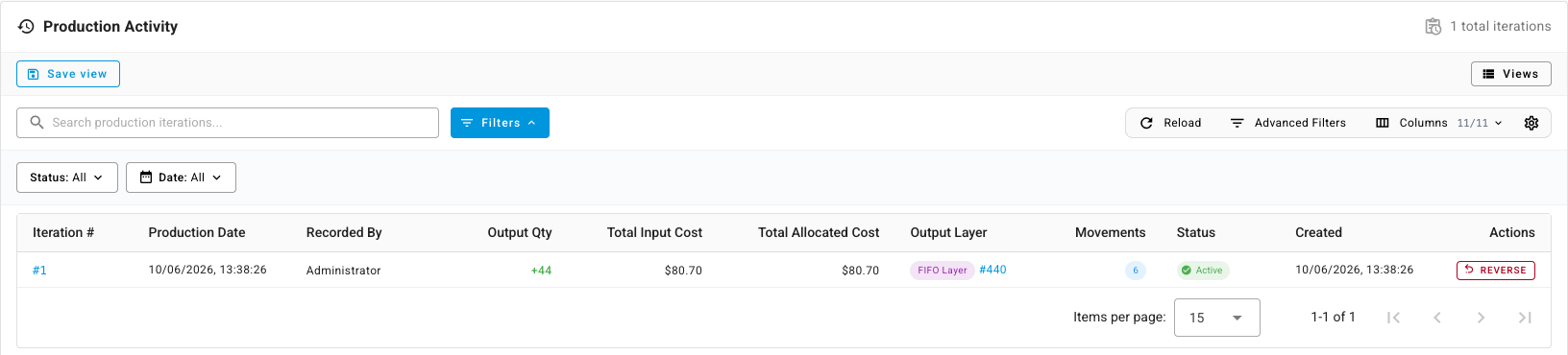
Click an iteration number to open it. Click Reverse to undo a run that was recorded in error. Reversing puts the components back and takes the output out of stock; a reversed iteration stays in the list marked Reversed.
Next steps
- Build with a manufacturing order: confirm, start and record production.
- Monitor production from the Manufacturing overview: every order's status at a glance.
- Manufacturing order status reference: what each status does to inventory.