Record scrap on a manufacturing order
Material gets lost in production: spills, trim, a bad batch, the first units off a machine. SKU.io lets you plan for that loss on the recipe and record what really happened on each run. Scrapped material comes out of stock like anything else consumed, and its cost goes into the finished goods instead of disappearing.
Before you begin
- The manufacturing order is In Progress. Scrap is recorded in the Record Production dialog.
Plan for loss on the recipe
On the recipe's Components tab, each line has a Scrap %: how much of that component you expect to lose on a typical build. When you confirm a manufacturing order, each component's Expected Qty includes it. A recipe asking for 0.2 kg of coffee per unit with 5% scrap expects 4.2 kg for a 20-unit order, not 4.
Expected scrap reserves extra stock up front, so the run isn't short when the loss happens. See Create a recipe (bill of materials).
Record what was lost
- Open the manufacturing order and click Record Production.
- Scroll to Component Consumption. Each component shows the Expected quantity, with Actual Consumed and Actual Scrap filled in from the recipe.
- Change Actual Consumed to what went into good product.
- Change Actual Scrap to what was lost.
- Pick a Scrap Reason: Setup Error, Material Defect, Equipment Issue, Human Error, Yield Loss or Other.
- Optionally explain what happened in Notes at the top of the dialog.
- Finish the rest of the dialog and click Record Production.
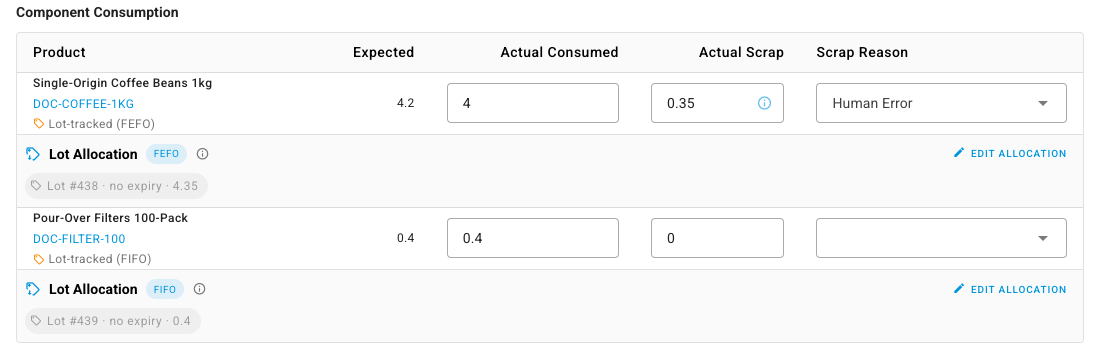
For lot-tracked components, the Lot Allocation under the line draws the consumed and scrapped quantities together from your lots, in expiry or receipt order. Click Edit allocation to choose lots yourself.
Where scrap shows up
On the order. The Components tab shows Expected Scrap and Actual Scrap side by side for every component, with the Scrap Reason you picked.

In inventory. Scrap leaves stock as its own movement, separate from the material consumed into the product, so the order's Movements tab shows the loss on its own line.
In cost. The scrapped material is drawn from stock in cost order like everything else, and its cost is included in the run's materials. The finished goods carry it. Recording 0.35 kg of scrap at $18 per kg adds $6.30 to the cost of the batch, so the higher waste shows up as a higher unit cost.
For serialized components, the scrapped serial numbers change to Scrapped rather than Consumed. See Serials in manufacturing.
Scrap outputs are different
A recipe's Outputs tab can also list a Scrap row: a product the run creates, such as offcuts you keep in stock, valued at zero. That records waste as something produced. Scrap on Component Consumption records material lost. Use whichever matches what you want in inventory. See Add co-products and by-products to a recipe.
Next steps
- Compare planned and actual production: expected against actual consumption, scrap, output and time.
- Build with a manufacturing order: the rest of the Record Production dialog.