Account for marketplace facilitator tax
In every US state with a sales tax, marketplaces such as Amazon, Walmart, eBay, Etsy, Temu, TikTok Shop and Faire collect sales tax from the buyer and pay it to the state for you. That tax is never your revenue and never something you owe. It passes through your books on its way to the state, and it should leave them at zero.
By default, SKU.io posts the tax on a marketplace order the same way as tax you collect yourself: to your Sales Tax account. Your Sales Tax liability then keeps growing with tax you'll never pay. The clearing treatment fixes that. Each marketplace order posts its tax to a separate Marketplace Facilitator Tax account twice, once as collected by the marketplace and once as paid by it, so that account always nets to zero. You can then repair the months that already posted to Sales Tax, and the month-end close checks that it stays right.
How the clearing treatment posts an order
Take an Amazon order for $40.00 with $3.20 of sales tax that Amazon collects and pays:
| Account | Before (Sales Tax) | With the clearing treatment |
|---|---|---|
| Accounts Receivable | debit $43.20 | debit $40.00, what Amazon pays you |
| Sales | credit $40.00 | credit $40.00 |
| Sales Tax | credit $3.20 | nothing |
| Marketplace Facilitator Tax | nothing | credit $3.20 "Tax collected by Amazon" and debit $3.20 "Tax remitted by Amazon" |
Your revenue is the same either way. What changes is that Sales Tax no longer holds tax you don't owe, and the receivable matches what the marketplace actually pays. Refunds post the same pair with the signs reversed. Tax you collect yourself, for example on Shopify orders, still posts to Sales Tax.
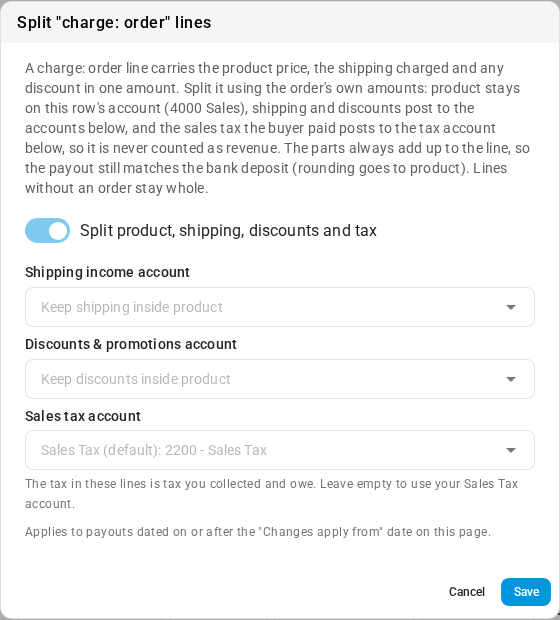
On Shopify and eBay payouts, a split sale line posts the tax the buyer paid to the split's Sales tax account, your Sales Tax account unless you choose another liability, so it's never counted as revenue. See Account for Shopify and eBay payouts.
The treatment applies by order date: orders created from the moment you adopt it post the new way. Orders created before that keep the entries they already have. Nothing already posted is edited, so the earlier months are fixed with a separate repair.
Before you begin
- Accounting entry generation must be on (Accounting → Settings → General).
- You need the Manage accounting settings permission to adopt the treatment or run a repair. Without it, the buttons are greyed out and say why.
- Map a Sales Tax account under Accounting → Settings → Nominal Code Mappings. The clearing account has to be a different account.
- Connect at least one marketplace that collects and pays US sales tax. On an account with only your own channels, such as Shopify, the card reads Not needed.
Steps
- Review settlement tax codes that need review and apply their suggestions. This also sets up the clearing account.
- Adopt the clearing treatment on the Marketplace facilitator tax card.
- Read the impact report to see what already reached Sales Tax.
- Repair the months that posted to Sales Tax.
- Check it at month end.
Find the Marketplace facilitator tax card
Go to Accounting and, in the section list on the left, click Settings (under Setup). General opens. Scroll down to the Marketplace facilitator tax card.
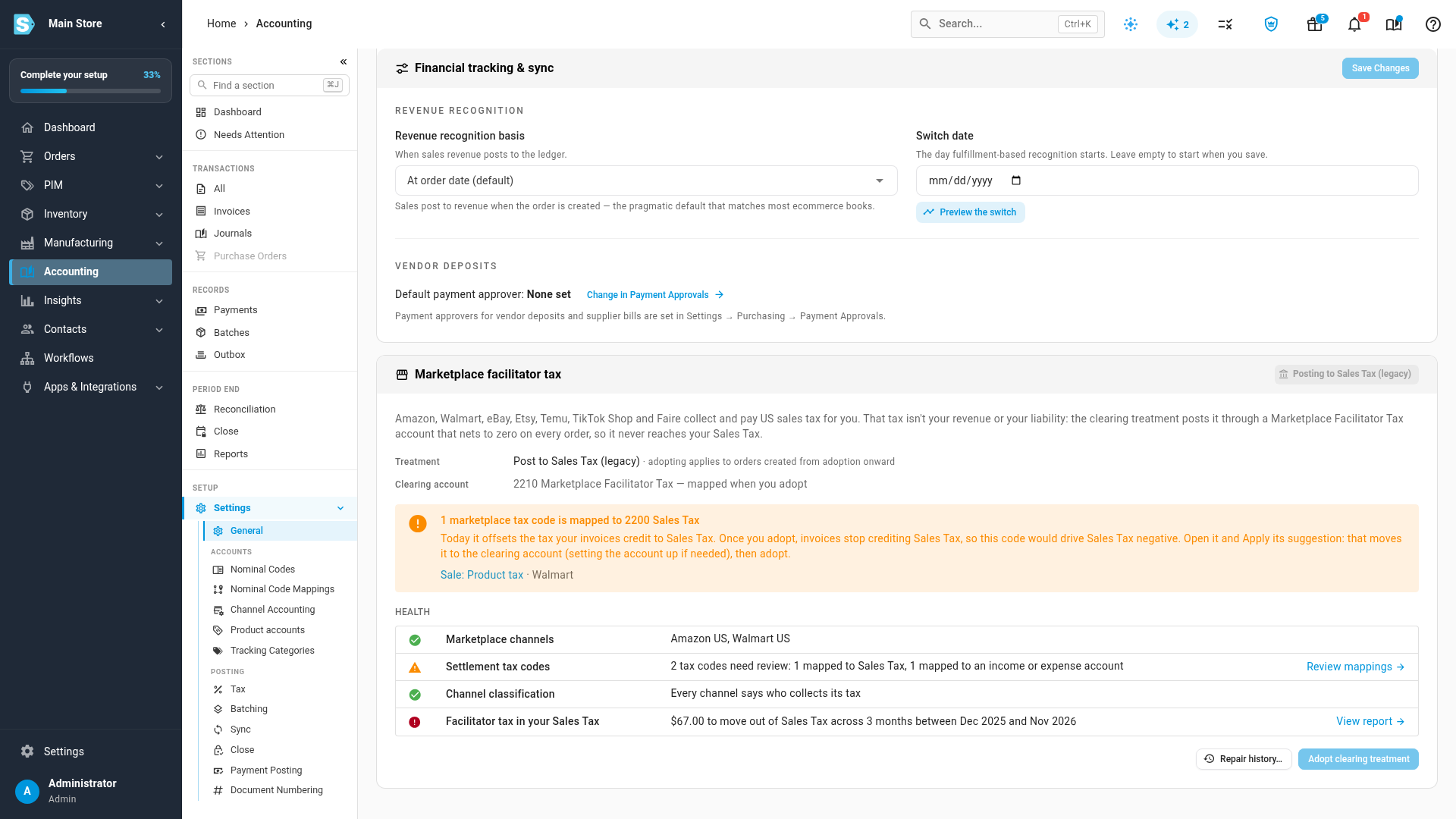
The chip in the card's title says which treatment is in force: Posting to Sales Tax (legacy) until you adopt, then Clearing account since the date you adopted. Health has four rows, the same four things the month-end close checks:
| Row | What it checks |
|---|---|
| Marketplace channels | Which of your channels collect and pay tax for you. |
| Settlement tax codes | Whether any tax line in a settlement or payout is mapped where tax doesn't belong. Review mappings opens those codes. |
| Channel classification | Whether every channel says who collects its tax. A channel that doesn't is treated as yours to collect. Classify opens the Sales Tax Liability report, where you set it. |
| Facilitator tax in your Sales Tax | How much marketplace tax already sits in your Sales Tax account, and in how many months. View report opens the impact report. |
Clearing account shows the account the treatment will use. Before you have one, it names the account SKU.io will set up, for example 2210 Marketplace Facilitator Tax — mapped when you adopt.
Adopt clearing treatment stays unavailable while a marketplace tax code in a settlement is mapped to your Sales Tax account. The card lists those codes in a warning above Health, and says what to do: open the code and Apply its suggestion, then adopt. The next section does exactly that.
Review settlement tax codes that need review
Settlements and payouts carry their own tax lines, such as Walmart's Sale: Product tax and Sale: Product tax withheld. Each pair washes out: the marketplace collects the tax and withholds it again. They belong in the clearing account too. SKU.io flags a tax code with Needs review when it's mapped:
- to an income or expense account, so the tax would post as revenue or fees, or
- to your Sales Tax account, for tax the marketplace collects and pays. That offsets the tax your invoices put in Sales Tax today, but once you adopt the clearing treatment, invoices stop crediting Sales Tax and these codes would drive it negative.
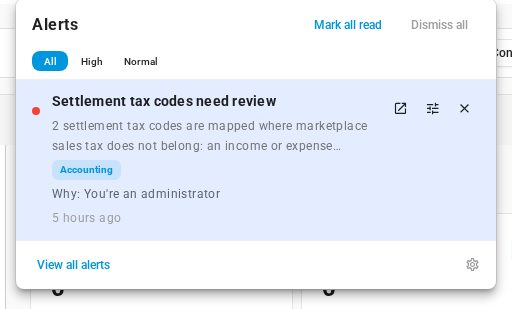
When codes are flagged, you get an alert, Settlement tax codes need review. Codes that are still unmapped aren't flagged: adopting maps them for you.
-
Click the bell in the top bar, then click the alert Settlement tax codes need review. You can also click the code in the card's warning, or Review mappings in Health.
-
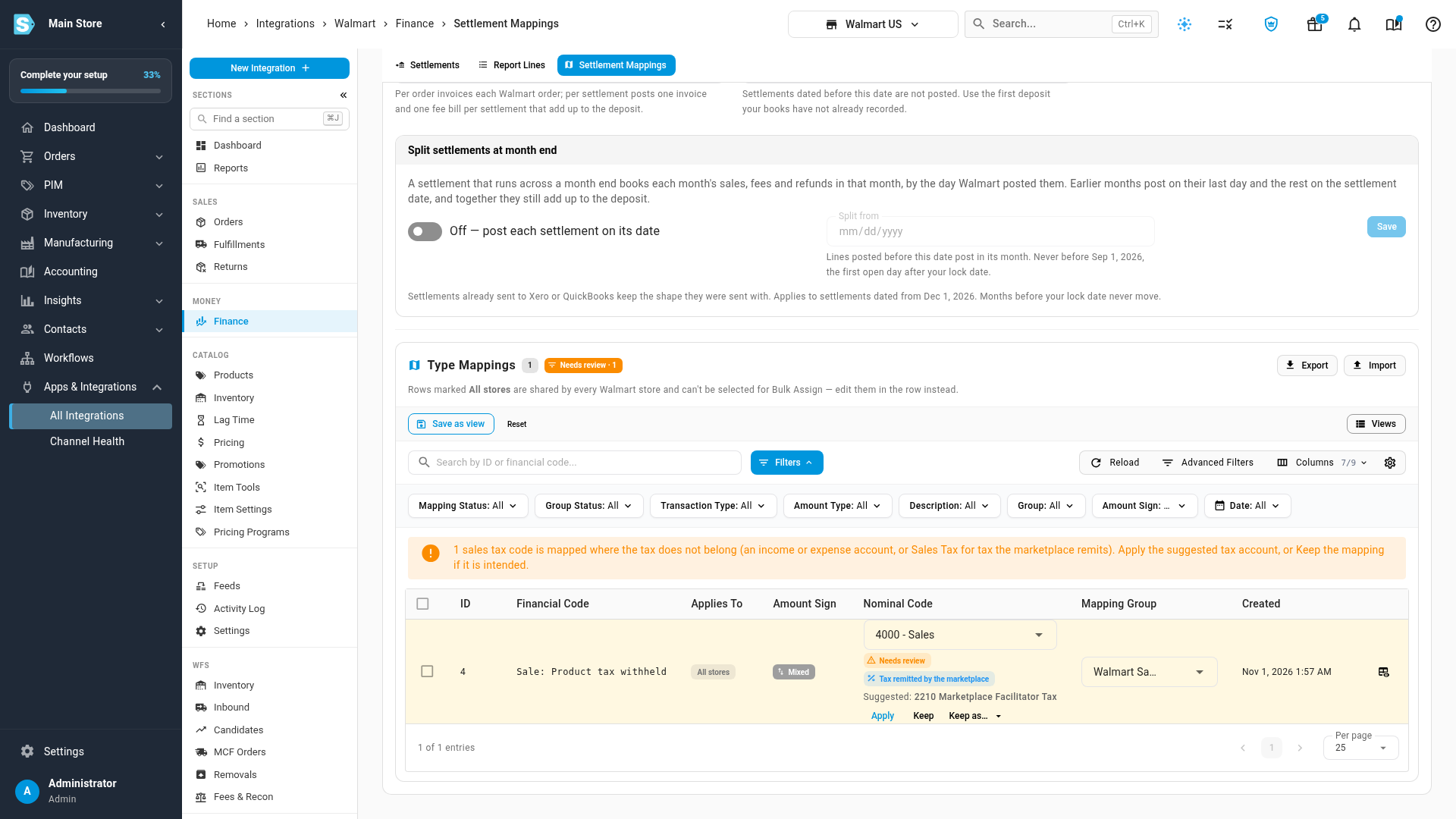
The channel's settlement mappings open at Type Mappings, filtered to the codes that need review.
-
Under each flagged code, read what SKU.io thinks it is, such as Tax collected by the marketplace, and the suggested account. Then choose one:
- Apply maps the code to the suggested account. Use this unless you know the current mapping is right. When the suggestion is your clearing account and you don't have one yet, Apply sets it up first: it maps 2210 Marketplace Facilitator Tax, adding the account to your chart if it isn't there, and to Xero or QuickBooks when one is connected. The treatment itself still starts only when you adopt it.
- Keep leaves the account as it is and stops flagging the code.
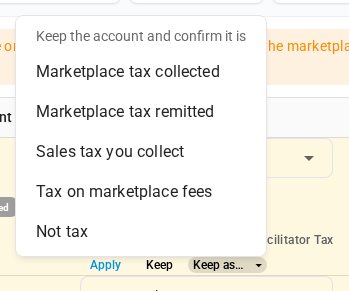
- Keep as… also leaves the account, and records what the code is: Marketplace tax collected, Marketplace tax remitted, Sales tax you collect, Tax on marketplace fees or Not tax. A class you confirm is never changed automatically. Confirm opens the same choice on a code that isn't flagged but whose class is only a guess.
-
When the last code is done, the table reads No tax codes left to review and the alert resolves itself. Back on the card, Clearing account now shows the account, and the warning is gone.
A new mapping applies to settlements dated from the Changes apply from date at the top of the page. Settlements that already posted keep their accounts. See Change payout mappings from a date.
Amazon tax from marketplaces where you remit it
Amazon collects and pays US sales tax for you, but on some marketplaces, such as amazon.ca and amazon.com.mx, you collect and remit the tax yourself. You don't need a second mapping for that. Map Amazon's buyer tax codes, such as Order: ItemPrice - Tax, to the Marketplace Facilitator Tax account. Those rows carry a Non-US tax → Sales Tax chip: tax from a marketplace where you remit it posts to Sales Tax automatically, net of anything Amazon withheld, while US tax stays in the clearing account, where it nets against Amazon's withheld line.

Tax that Walmart charges on its own fees, Sale: Other tax (Fees), normally stays with your marketplace fees expense, so it isn't flagged there.
Adopt the clearing treatment
-
Go back to Accounting, click Settings, and scroll to the Marketplace facilitator tax card. The warning is gone, Clearing account shows the account you set up, and Settlement tax codes reads Every tax-like settlement code is mapped or acknowledged.
-
Click Adopt clearing treatment.
-
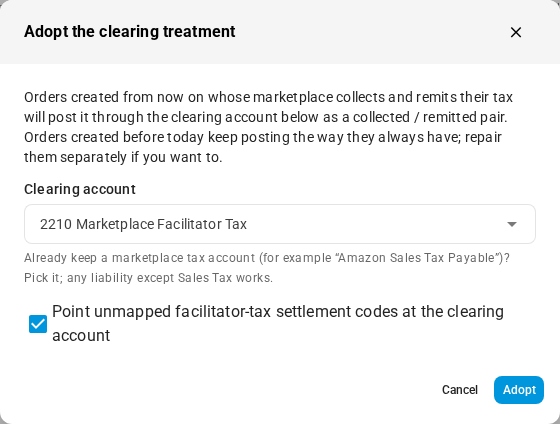
In Adopt the clearing treatment, check the Clearing account. If you already keep an account for this, such as "Amazon Sales Tax Payable", you can choose it instead: any liability account except Sales Tax works. Your Sales Tax account is listed but can't be chosen, and nor can an account that already has another role.
-
Leave Point unmapped facilitator-tax settlement codes at the clearing account ticked, so settlement tax codes that have no account yet go to the clearing account.
-
Click Adopt.
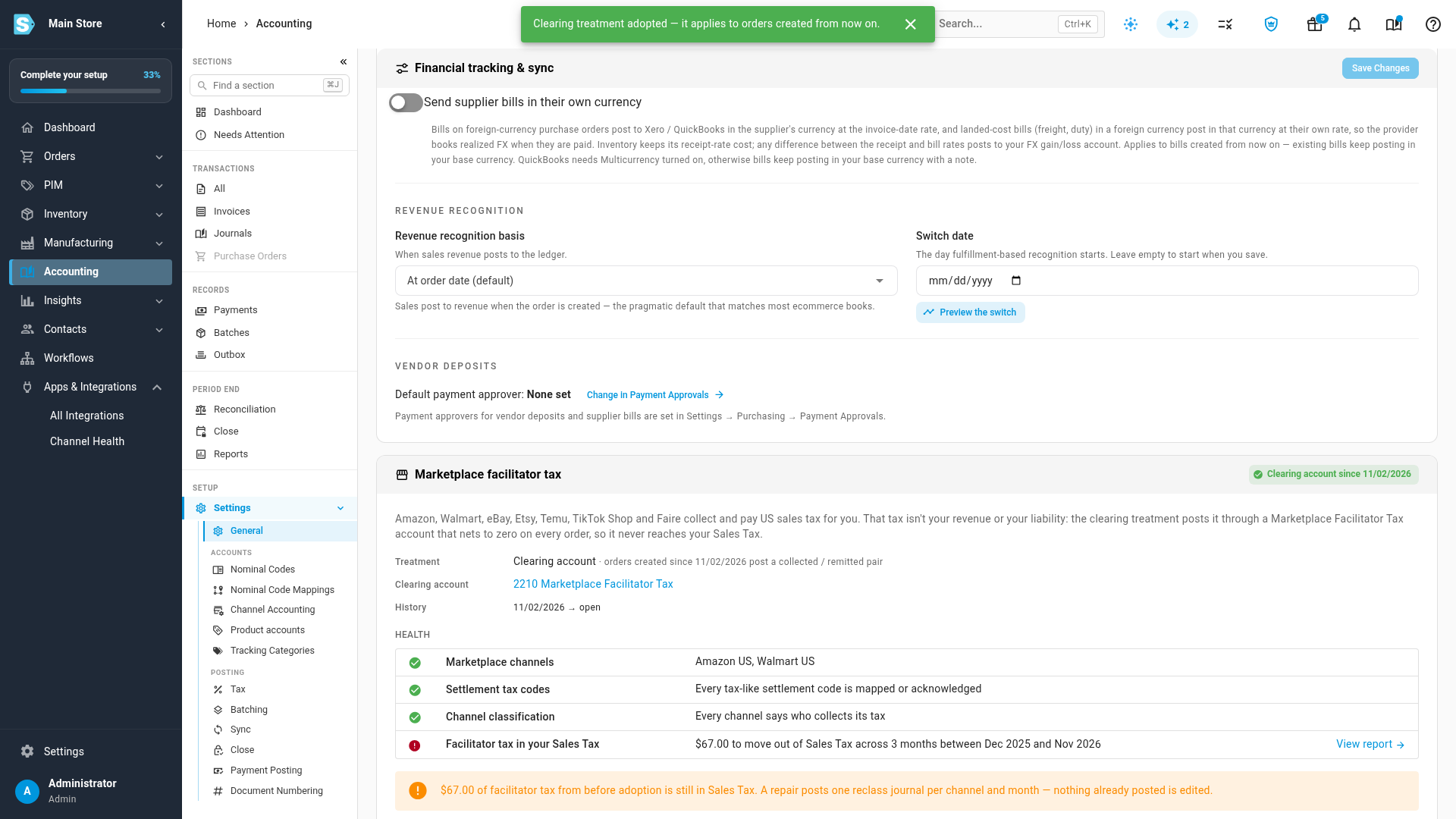
The chip changes to Clearing account since the date you adopted, and History lists the period it has been in force. From then on, every order created on a marketplace that collects its tax posts a collected and remitted pair to the clearing account.
To go back, click Revert. Orders created after that post their tax to Sales Tax again; orders created while the treatment was in force keep it, and nothing already posted changes. Adopting again opens a new period in History.
Read the impact report
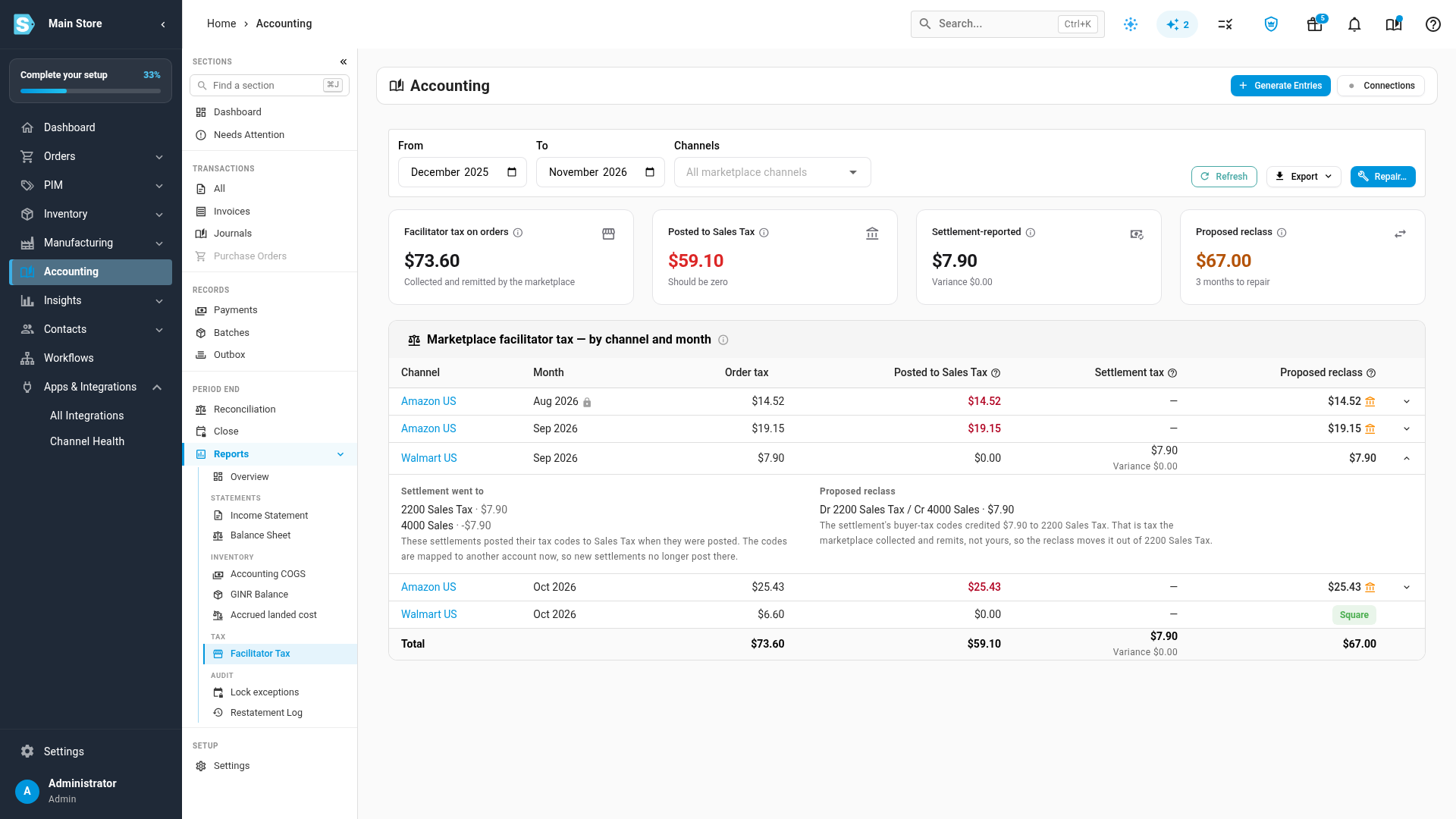
The impact report shows, per channel and month, how much marketplace tax reached your Sales Tax account and what a repair would post. It changes nothing until you run a repair.
- On the card, in Health, click View report on the Facilitator tax in your Sales Tax row. It opens the Facilitator Tax report, which you can also reach from Accounting → Reports, under Tax.
- Set From and To (up to 36 months) and, if you like, pick Channels. It starts on the last 12 months and every marketplace channel.
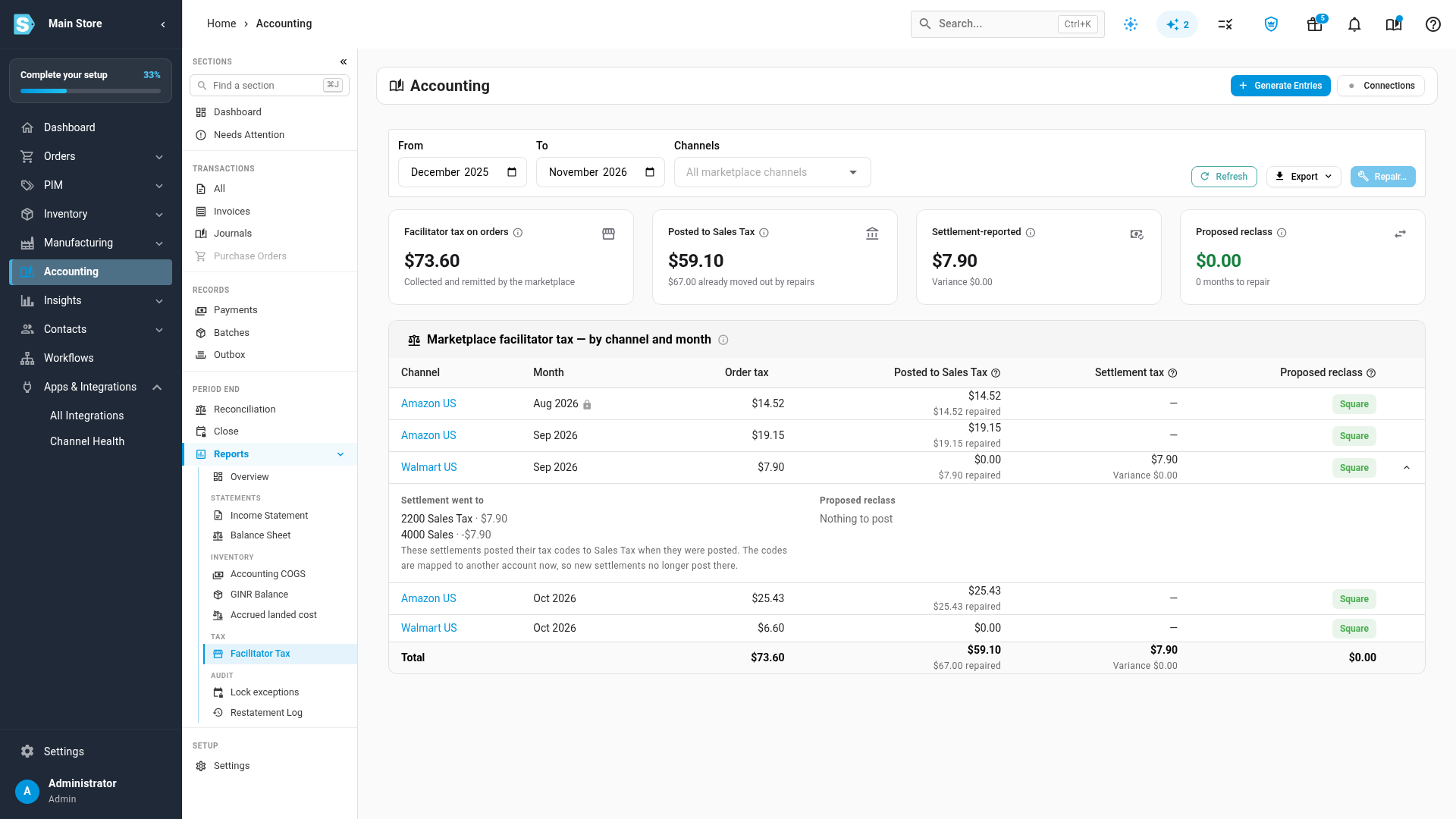
The four figures at the top:
| Figure | What it means |
|---|---|
| Facilitator tax on orders | Tax on orders whose marketplace collects and pays it, less refunds. |
| Posted to Sales Tax | How much of it the orders' documents left in your Sales Tax account. It should be zero. |
| Settlement-reported | Tax the settlements report as withheld by the marketplace, with the Variance against the order side. Small differences from rounding and timing are normal. |
| Proposed reclass | What a repair would post, after anything already repaired, and in how many months. |
Each row is one channel and month. A lock beside the month means the month is locked. Click the arrow at the end of a row to see Settlement went to, the accounts the settlement's tax codes posted to, and Proposed reclass, the balanced journal lines a repair would post. If those codes posted to Sales Tax but are mapped elsewhere now, the row says so: new settlements no longer post there. A row that reads Square has nothing to repair.
A channel you account for per payout, such as Walmart here, posts no invoice for its orders: its settlements carry the sale. Its Posted to Sales Tax reads $0.00, and anything in Sales Tax got there through the settlement's tax codes, as Settlement went to shows. The expanded row says how much the settlement's buyer-tax codes credited to Sales Tax, and that the reclass moves it out. The repair moves it back to where the matching withheld code went. Once a month is repaired, its row reads Nothing to post and that note no longer shows.
Export downloads the report as CSV or Excel.
Repair the months that posted to Sales Tax
A repair posts one balanced reclass journal per channel and month, moving the marketplace tax out of Sales Tax. Each journal goes to Xero or QuickBooks as a manual journal with no tax. Nothing already posted is edited, and running the repair again posts only what's still owed. Repair… becomes available once you've adopted the clearing treatment, so new orders stop adding to Sales Tax while you repair.
-
On the impact report, check From, To and Channels. The repair covers exactly what the report shows.
-
Click Repair….
-
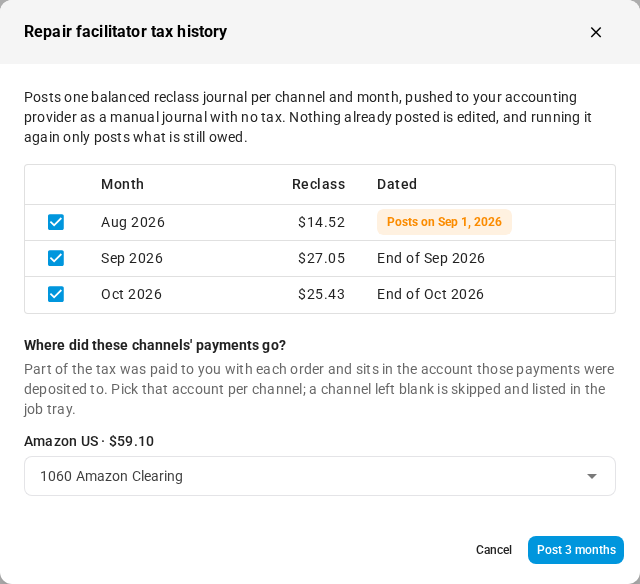
In Repair facilitator tax history, tick the months to post. Dated says when each journal posts: at the end of its month, or, for a locked month, on the first open day after the lock (see below).
-
Under Where did these channels' payments go?, choose the account each channel's payments were deposited to, such as a clearing or bank account. This is where part of the tax sits today: the marketplace paid it to you with each order. Only channels with tax like that are listed; a channel whose settlements account for all of its tax, like Walmart here, isn't. A channel you leave blank is skipped and listed in the job tray.
-
Click Post with the number of months.
The repair runs in the background; follow it in the job tray. When it finishes, the report refreshes, Posted to Sales Tax shows what the repairs moved out, and Repair history… on the card lists each journal.
Which account the tax comes back from
The reclass takes the tax out of Sales Tax and puts it back where the other side of it went:
| Where the tax went | The repair posts |
|---|---|
| A settlement tax code mapped to an income account, such as Sales | debit Sales Tax, credit that income account |
| A settlement tax code mapped to an expense account, such as fees | debit Sales Tax, credit that expense |
| No settlement code at all: the marketplace paid it to you with the order | debit Sales Tax, credit the deposit account you chose |
| A settlement code already mapped to Sales Tax | nothing; it already nets there |
A repair never posts to Accounts Receivable or Accounts Payable.
Locked months
A locked month is never edited. Its reclass is dated on the first open day after the lock, keeps the month it belongs to as its original date, and reads "Reclass of facilitator tax for month, posted after lock". In Repair history it carries an after lock chip. If your locked-period setting under Accounting → Settings → General is Block until resolved, locked months are listed but not posted.
Tax left in Sales Tax on purpose
Some tax isn't moved:
- Unpaid invoices. Tax on an invoice that hasn't been paid is in Accounts Receivable, not in a deposit account. Credit the invoice for the tax, or run the repair again once it's paid.
- Credits with no refund paid out. Refunded tax on a credit note that no refund was paid on stays in Sales Tax. Run the repair again once the refund is paid.
The dialog and the expanded row say how much is left for each reason.
Check it at month end
The month-end close (Accounting → Close) has a Marketplace facilitator tax check under Sync & reconciliation. It passes when, for the month:
- the Marketplace Facilitator Tax account nets to zero for each channel, within $1.00;
- no line in Sales Tax came from a marketplace order created after you adopted;
- no settlement tax code needs review; and
- every sales channel says who collects its tax.
When it fails, the row says why, for example "Clearing off by 12.40 on Walmart US; 2 tax codes mapped to income or expense", and its arrow opens the impact report for that month. It's a warning you acknowledge to close, unless you turn on Block the close when marketplace facilitator tax doesn't tie out in the close settings (Accounting → Settings → Close). The $1.00 allowance is the Marketplace facilitator tax tolerance on the same screen. Before you adopt, the check reads Not applicable, with the reason Facilitator tax treatment not adopted.
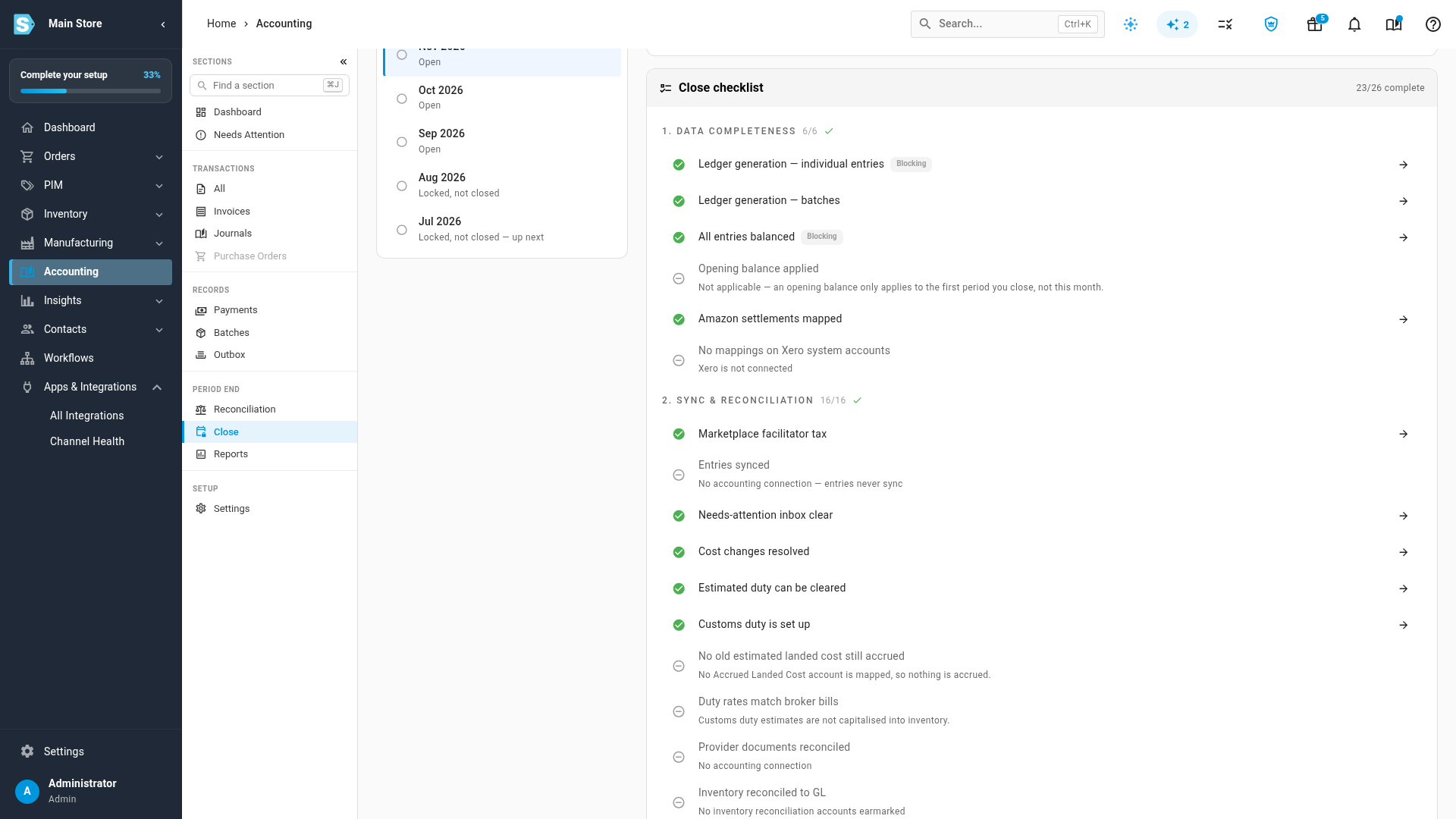
See The close checks for every row on the checklist.
Next steps
- Map Amazon settlements to your accounts
- Account for Walmart settlements
- Account for Shopify and eBay payouts
- Read the Sales Tax Liability report
- Close a month
Video transcript
Many online marketplaces collect sales tax from your buyers. They pay that tax to the state on your behalf. So it's neither your revenue nor your debt. To set this up, open Accounting from the sidebar. In the Accounting sections, click Settings. General opens first. Scroll down to the Marketplace facilitator tax card. Before you adopt anything, the chip reads Posting to Sales Tax. Health lists what needs attention, like settlement tax codes to review. The last row shows the tax that already reached your Sales Tax account. Notice that Adopt clearing treatment is greyed out. One marketplace tax code is still mapped to your Sales Tax account. The warning says to apply its suggestion first, and then adopt the treatment. Codes mapped to the wrong account also raise an alert. Click the bell icon, near the right end of the top bar. Then click the alert itself, Settlement tax codes need review. The alert opens that channel's settlement mappings, right at the codes that need review. Each flagged code shows its kind of tax, and a suggested account. Keep, or Keep as, leaves the current mapping in place. Most of the time, the suggestion is right, so click Apply. If you have no clearing account yet, this step also creates the Marketplace Facilitator Tax account. Apply the suggestion on the withheld tax code as well. Once the list is empty, every tax code is in the right place. Now return to Accounting in the sidebar. Then click Settings in its section list. Scroll down to the Marketplace facilitator tax card once more. Its clearing account is now set up, and nothing blocks adoption. Click Adopt clearing treatment, at the bottom of the card. Check the clearing account it will use. Keep the box ticked, so unmapped codes follow the same clearing account. When everything looks right, click Adopt to start the treatment. The chip now shows the date the clearing treatment started. New marketplace orders post their tax to the clearing account, as collected and then remitted. Those two lines cancel out, so Sales Tax stays clean. Orders from before today keep their entries. You fix those older months with a repair. In the Health list, click View report to see the impact report. The impact report breaks the tax down by channel and month. Posted to Sales Tax is what reached your liability. Proposed reclass is what a repair would move back out. Expand a row with the arrow at its end, to see the detail. It shows where the settlement went, and the journal lines a repair posts. Click Repair, and tick the months to post. A locked month is never edited. Its journal posts on the first open day after the lock. Next, pick the account where the channel's payments were deposited. Only channels whose orders paid you part of the tax appear in this list. Check the months and the account once more. When everything looks right, click the Post button. The repair runs in the background, in the job tray. When it finishes, the report refreshes. It shows how much the repairs moved out of Sales Tax. Nothing that was already posted is changed. Every month, your close checklist checks all of this again. In the section list, click Close, under Period end. Pick the month to close from the list of periods. Its checklist loads beside the list. Under Sync and reconciliation, find Marketplace facilitator tax. It passes when the clearing account nets to zero, and nothing needs review.