Set up shipping methods
A shipping method is a service you ship with, such as USPS Priority Mail or FedEx Ground. Your list of methods is the common language the rest of SKU.io speaks: each sales channel maps its own shipping options to your methods, sales orders and customers carry them, and fulfillment providers route orders on them.
Before you begin
- You need permission to manage shipping methods.
- Know each method's carrier and typical delivery time.
Add a shipping method
-
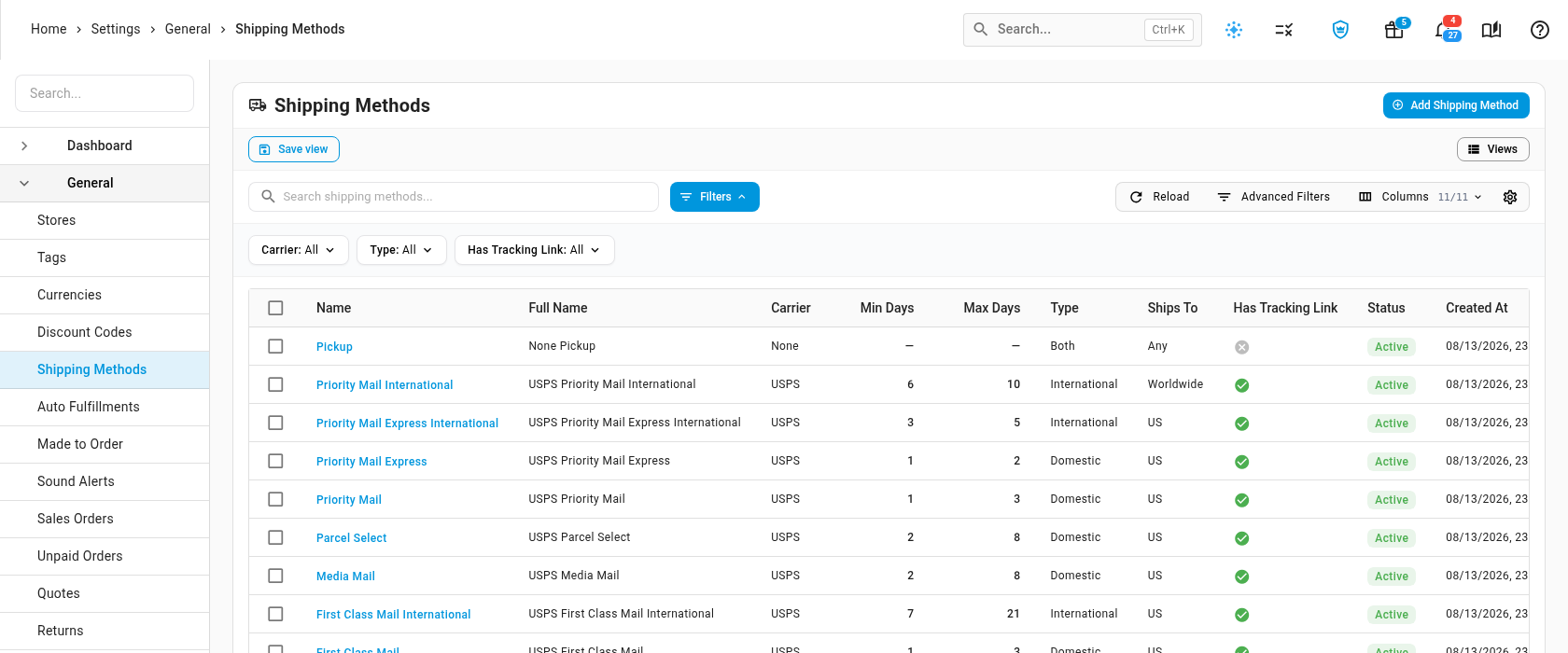
Go to Settings → General → Shipping Methods. The list shows each method's Carrier, delivery days, Type, Ships To countries and whether it has a tracking link. Use the Carrier, Type and Has Tracking Link filters to narrow it.
-
Click Add Shipping Method.
-
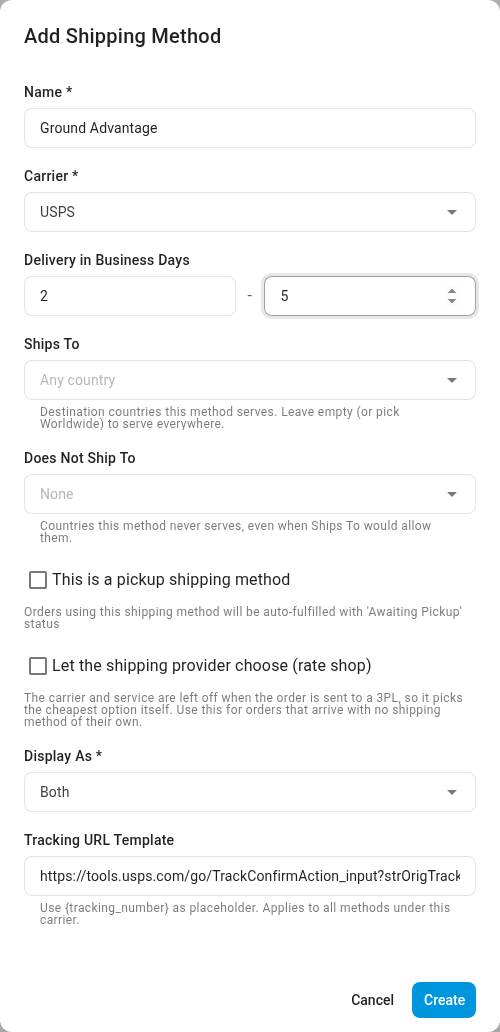
Enter a Name, for example Ground Advantage.
-
Pick the Carrier. If it isn't listed, type its name and select Create to add it.
-
Under Delivery in Business Days, enter the minimum and maximum number of business days delivery takes.
-
Fill in the rest as you need:
Field What it does Ships To The destination countries the method serves. Leave it empty, or pick Worldwide, for everywhere. Does Not Ship To Countries the method never serves, even when Ships To would allow them. This is a pickup shipping method For collection and click-and-collect methods. Orders that use the method are fulfilled with the status Awaiting Pickup. Let the shipping provider choose (rate shop) Leaves the carrier and service off when the order is sent to a 3PL, so the 3PL picks the cheapest option. Use it for orders that arrive with no shipping method of their own. Display As Labels the method Domestic, International or Both. It appears as the Type column on the list, and customer imports use it to match a customer's default domestic and international methods. Tracking URL Template A link with {tracking_number}where the tracking number goes, for examplehttps://carrier.com/track?id={tracking_number}. It belongs to the carrier, so it applies to every method of that carrier, and picking a carrier that already has one fills it in.Ships To and Does Not Ship To describe the method. SKU.io doesn't stop an order from shipping with a method outside its countries, but a sales channel's shipping rules warn you when a rule would send orders to a country the method doesn't serve.
-
Click Create.
To change a method later, click the pencil at the end of its row. To retire one, archive it: it disappears from the shipping method pickers, and orders that used it keep it. You can't delete a method that sales orders, sales order lines or customers use, or that is a Default Shipping Method under Settings → General → Sales Orders.
How shipping methods are used
- Sales channels map to them. A channel order arrives with the channel's own shipping option, such as Standard Shipping on Shopify. You map each of those to one of your methods in the channel's settings, for example Map Shopify shipping methods.
- Fulfillment providers route on them. A 3PL needs to know which of its services each of your methods means. See Map ShipBob shipping methods, Map VeraCore shipping methods or Route Trackstar shipping methods.
- Orders and customers default to them. New sales orders start with the Default Shipping Method (Domestic) or (International) from Settings → General → Sales Orders, and each customer can have its own defaults.
Only auto fulfill mapped shipping methods
When a channel order's shipping option isn't mapped to one of your methods, the order arrives with no shipping method. Settings → General → Auto Fulfillments decides what happens next.

- Go to Settings → General → Auto Fulfillments.
- Tick Only Auto Fulfill for Mapped Shipping Methods.
- Click Save Changes.
With it on, an order that has no shipping method is not sent to fulfillment automatically. Instead:
- a note on the order says it wasn't dispatched because it has no shipping method;
- the order is flagged as failing fulfillment validation;
- your admins get an alert.
Map the channel's shipping option to one of your methods, or set a shipping method on the order, and it can go out. To send such orders anyway, dispatch them by hand from Orders → Sales Orders and turn on the Shipping Method Mapped override in the Dispatch Fulfillments dialog.
With it off (the default), these orders fulfill automatically like any other.
Next steps
- Set up fulfillment dispatch: the other checks an order passes before it's sent out.
- Map Shopify shipping methods
- Track shipments
Video transcript
Shipping methods are the services you ship with, like USPS Priority Mail or FedEx Ground. Sales channels map their own options to these methods, and fulfillment providers route orders by them too. To manage them, open Settings, at the very bottom of the left sidebar. Click the General card at the top of the page to expand its list. Shipping Methods is the fifth entry, so choose it, and your methods appear. Click Add Shipping Method at the top right, and a blank form appears. Give the method a name, like Ground Advantage, then click the Carrier box and pick its carrier from the list. If a carrier is missing, type its name to create a new carrier. Enter the delivery time, in business days, as a minimum and a maximum. Ships To and Does Not Ship To describe the countries the method serves. Check the pickup option for a collection method, and orders that use it are fulfilled as awaiting pickup. Display As labels the method domestic, international or both. The tracking URL template builds tracking links for every method of this carrier. When everything looks right, click Create, and the new method joins the list. One more setting sits next to this page, under Auto Fulfillments in the settings list on the left. When it's on, a channel order whose shipping method isn't mapped to one of yours is held back from automatic fulfillment. The order gets a note, and admins are alerted, so you can map the method and dispatch the order.