Use SKU.io on your phone
SKU.io runs in your phone's browser — no app store, no separate login. It's built for the jobs you do away from a desk: checking stock on the warehouse floor, approving a purchase order from the road, answering "where's that order" in front of a customer.
It's not a shrunk-down copy of the whole product. Some screens are designed for a phone, some work fine, and a few are left for a larger screen. This page says which is which, so you don't go looking for something that isn't there.
Install it to your home screen
Open SKU.io in your phone's browser, then use your browser's Add to Home Screen option. It then opens like any other app — full screen, its own icon, no address bar.
You stay signed in between sessions, so day to day it behaves the way an app does. There's no separate download and nothing to update.
What's built for a phone
These are laid out for a narrow screen and are the ones worth using on the move:
- Dashboard — your headline numbers, stacked for a phone.
- Order and shipment lookup — find an order and see where it is.
- Stock checks — look up a product and see what's on hand, by warehouse.
- Approvals — approve or reject a purchase order or transfer.
- Global search — the fastest way in; search from the top bar.
- The job tray and notifications — see what's running and what needs attention.
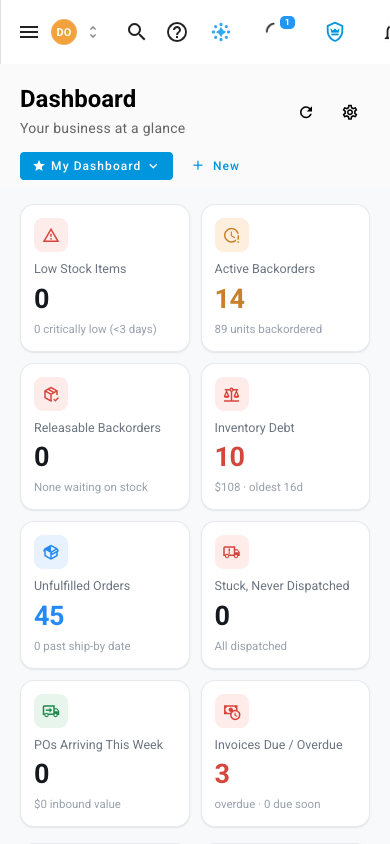
Tap the menu icon at the top left to move around. The navigation slides in over the page rather than squeezing it.
Warehouse screens work too
The screens you'd actually hold a phone for are included:
- Stock takes — count on the floor with the phone in your hand.
- Put away — see what's waiting and where it should go.
- Pick lists — work a pick list without a terminal.
- Pallets and containers — look up what's on one.
If your phone's camera or an attached scanner can read a barcode, you can scan into the fields that accept one rather than typing.
What stays on the desktop
Some work needs the room, and a cramped version of it would be worse than none:
- Bulk management of large tables — editing many rows at once
- Demand planning and forecasting grids
- Rebuilding costs, and the month-end reconciliation screens
- Settings and channel field mapping
These still open on a phone, but they're laid out for a desktop. Save them for one.